1
English
UNIT FEATURES
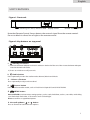
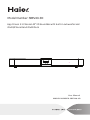
Figure 1. Front unit
D ock ing for iPod, iPhone , iPad
display screen
remote control sensor
Note that Remote Control Sensor detects the controls signal from the remote control.
Do not to block its direct line of sight to the remote control.
Figure 2. Key buttons on top panel
4
5
6
3
1
2
1.
Standby/on button
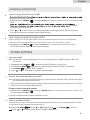
1.) Connect the Power Adaptor to the DC socket on the back of the unit. Then insert the Power Adaptor
into the desired wall outlet.
2.) Press to switch on or off your unit.
2.
Audio button
Press repeatedly to view the audio modes: Normal, Movie and Music.
3. - Volume + Buttons
Press repeatedly to adjust volume level.
4.
Source button
Press to shift to another mode, such as iPod/Line-in/Optical/Coaxial/AUX/ FM/AM.
5.
MENU button
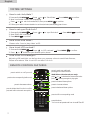
Press and hold to activate menu setting options, such as seek, clock/date, set bass, set treble, audio delay,
sync iPod clock, iPod video, LCD contrast and LCD backlight.
Press to confirm an appointed option.
6. the scroll up/down
or
button
Press to forward or backward view options.
4