1
User Manual
eclipse EXPLORER
CONTENTS
CONTENTS...........................................................................................2
PRECAUTIONS...................................................................................6
Preface...........................................................................................................................................6
Copyright.............................................................................................................................6
Trademarks........................................................................................................................6
About this manual..........................................................................................................6
Symbols used in this manual...................................................................................6
WARNING......................................................................................................................................7
SAFETY PRECAUTIONS........................................................................................................9
Video camera notes......................................................................................................9
Memory card notes........................................................................................................9
LCD screen notes........................................................................................................ 10
Please read the following important information
carefully before using this product................................................................... 10
WATER & DUST PROOF PRECAUTIONS................................................................... 11
Water & Dust Proof.................................................................................................... 11
Precautions Before Using....................................................................................... 11
Precautions When Using......................................................................................... 11
Maintenance Precautions After Using............................................................. 12
GETTING STARTED......................................................................13
Accessories ............................................................................................................................ 13
Each Component Name..................................................................................................... 14
Charge and Insert SD Card.............................................................................................. 15
Charging............................................................................................................................ 15
Insert SD/SDHC Card................................................................................................. 16
Turning On/Off........................................................................................................................ 17
Setting Language and Date/Time............................................................................... 18
Set Display Language............................................................................................... 19
Set Date and Time...................................................................................................... 20
BASIC OPERATION.......................................................................21
Recording Movies.................................................................................................................. 21
Zoom Function.............................................................................................................. 21
White Balance............................................................................................................... 22
Shooting........................................................................................................................... 22
LCD Screen Display in Different Modes.................................................................... 23
Shooting Screen........................................................................................................... 23
Video Recording........................................................................................................... 24
Playback........................................................................................................................... 25
DISP..................................................................................................................................... 26
PLAYBACK........................................................................................27
Preview Photos and Videos............................................................................................ 27
Video................................................................................................................................... 27
Zoom in Photos............................................................................................................ 29
Screen Display in the Playback Mode.............................................................. 30
Delete Photos and Videos...................................................................................... 31
MENU SETUP...................................................................................32
Photo Setup............................................................................................................................. 32
Quality................................................................................................................................ 33
Exposure Metering...................................................................................................... 33
HDR..................................................................................................................................... 34
Continuous Shot.......................................................................................................... 34
Date Imprint.................................................................................................................... 35
Movie Setup.............................................................................................................................. 36
Movie Resolution.......................................................................................................... 37
Exposure Metering Modes...................................................................................... 37
HDR..................................................................................................................................... 38
General Setup......................................................................................................................... 39
Beep Setup..................................................................................................................... 40
LCD Brightness............................................................................................................. 40
World Time...................................................................................................................... 41
Power Saver................................................................................................................... 41
firmware Version.......................................................................................................... 42
Format Memory............................................................................................................. 42
Reset.................................................................................................................................. 43
Copy to Card................................................................................................................... 43
Playback Setup....................................................................................................................... 44
Delete................................................................................................................................. 45
Slide Show....................................................................................................................... 47
Red Eye Removal......................................................................................................... 48
CONNECTION...................................................................................49
Connecting to TV Output with HDMI.......................................................................... 49
Connecting to a PC via USB............................................................................................ 50
APPENDICES....................................................................................52
Specifications: eclipse EXPLORER............................................................................... 52
Error Messages...................................................................................................................... 55
Troubleshooting..................................................................................................................... 57
Customer Care........................................................................................................................ 58
PRECAUTIONS
Preface
Thank you for purchasing this AgfaPhoto digital video camera. Please read
this manual carefully and keep it in a safe place for future reference.
Copyright
Copyright 2011 RedDot Imaging All rights reserved.
No part of this publication may be reproduced, transmitted, transcribed,
stored in a retrieval system, or translated into any language or computer
language, in any form, by any means, without the prior written permission of
RedDot Imaging.
Trademarks
All trademarks mentioned in this manual are used for identification purposes
only and are properties of their respective owners.
About this manual
This manual provides you with instructions on how to use your AgfaPhoto
digital video camera. Every effort has been made to ensure that the contents
of this manual are accurate, however RedDot Imaging reserves the right to
make changes without notice.
Symbols used in this manual
Throughout this manual, the following symbols are used to help you locate
information quickly and easily:
Indicates important information.
Indicates precautions to be taken while operating the video camera.
WARNING
Do not expose the video camera battery pack or other accessories to rain or
humidity to to reduce the risk of fire hazard or electric shock fire hazard or
electric shock.
For customers in the U.S.A.
Tested To Comply With FCC Standards
FOR HOME OR OFFICE USE
FCC Statement
This device complies with part 15 of the FCC Rules. Operation is subject to
the following two conditions:
(1) This device may not cause harmful interference, and
(2) This device must accept any interference received, including interference
that may cause undesired operation.
For customers in Europe
"CE" mark indicates that this product complies with the European
requirements for safety, health, environment and customer protection.
"CE" marked video cameras are intended for sales in Europe.
This symbol [crossed-out wheeled bin WEEE Annex IV] indicates
separate collection of waste electrical and electronic equipment in
the European countries. Please do not throw the equipment into the
trash. Please electronically recycle responsibly.
Declaration of Conformity
Model Name: eclipse EXPLORER
Trade Name:
AgfaPhoto
Responsible Party: RedDot Imaging
Address:RedDot Imaging, 2275 NW 84thAve, Doral, FL 33122.
Customer Care Hotline:
Service & Repair Hotline (USA):
1-855-243-2937 (from a landline only)
Service & Repair (UK):
+44 1908 488676
Online Service / International contact:
[email protected]
For repair and service in all other countries, please refer to the warranty
pamphlet for additional information.
SAFETY PRECAUTIONS
Video camera notes:
Do not store or use the video camera in the following types of locations:
• In direct sunlight for a long period of time or high temperature (beyond
40ºC);
• In environments with high magnetic fields;
• In very humid and dusty places;
Doing so may shorten the life of the digital video camera or allow foreign
materials to enter which could damage the internal components.
If the video camera will not be used for a long period of time, we suggest you
download photos and remove the memory card.
If the video camera is taken from a relatively cool environment (lower
than 40ºC/104F), and placed in a warmer or more humid atmosphere,
condensation may occur within the appliance. We suggest you wait for it to
warm to room temperature before turning on the video camera.
General Imaging is not responsible for any loss of data.
Memory card notes:
When using a new memory card, or a memory card has been initialized by
a PC, you might have to format the card if the camera is not reading it.
However, please back up any data on the card as the formatting will delete
all data on the card.
To edit image data, copy the image data to PC first.
Do not change or delete the folder names or file names in the memory card
from your PC, as this may make it unusable and/or unreadable.
Only remove and insert a memory card when the camera is off as data loss
and/or corruption may occur otherwise.
Do not turn the camera off when the firmware is being updated or there may
be data or picture loss and/or corruption.
The memory card can be inserted only one way into the camera.
LCD screen notes:
Due to current LCD manufacturing technology, you may see a few light or dark
pixels on your LCD. This is normal.
These light or dark pixels will not affect the quality of the photo or video
image.
If the LCD screen is damaged, take particular care with the liquid crystal in
the screen. If any of the following situations arise, take the recommended
immediate action indicated below:
• If liquid crystal comes in contact with your skin, wash thoroughly with
soap and running water.
• If liquid crystal gets into your eye, flush the affected eye with clean water
for at least 15 minutes and then seek medical assistance.
• If liquid crystal is swallowed, flush your mouth thoroughly with water and
try to induce vomiting. Then seek medical assistance immediately.
Please read the following important information carefully
before using the product:
• Do not disassemble or attempt to service the video camera yourself.
• Do not drop or knock the video camera. Improper handling may damage
the product as it will void the warranty.
• Turn off the video camera before inserting or removing the memory card.
• Do not touch the video camera lens.
• Do not expose the video camera lens to direct sunlight for extended
periods.
• Do not use abrasive cleansers, alcohol-based, or solvent based cleaners
to clean the video camera body. To clean, wipe the video camera lens with
a professional lens cleaning cloth and special cleaning agent for cameras
and electronics.
10
Water & Dust Proof Precautions
Water & Dust Proof
• The video camera meets JIS/IEC waterproof grade 8 (IPX8) and JIS/IEC
dustproof grade 6 (IPX6).
• The accessories included with the video camera are not for use in wet
conditions.
Precautions Before Using
• Please make sure that the SD cover and HDMI/USB interface cover
(hereinafter referred to as “interface cover”) are locked securely.
• The rubber mating surfaces on the covers and doors should be clean and
free of foreign matter to insure a tight seal.
• Unit with damaged waterproofing rubber should not be used in wet
conditions.
• Don’t use the video camera in a geothermal spring.
• When using the video camera in water, a wrist strap should be used.
Precautions When Using
• Don’t use the video camera below 5 meters (approximately 15 feet)
underwater.
• Don’t use the video camera under water for more than 2 hours.
• The camera should not be dropped into water. Avoid jumping or diving
into water with the camera as the SD cover or interface cover may open
on impact.
• Don’t open the SD cover or interface cover underwater .
11
Maintenance Precautions After Using
• Wipe the video camera with a clean, dry lint free cloth.
• When the SD cover or interface cover is opened, there may be water
drops on the inside of the SD cover or interface cover and on the contact
surface of video camera body; make sure to dry it out.
• After using the video camera in the water or near sand, mud or other
foreign materials, please wash it with clean water (don’t open the SD card
cover or interface cover when cleaning). After cleaning, wipe out the video
camera with a clean and dry lint free cloth.
• To help ensure the camera's waterproof ability, wipe off any dust, sand or
other foreign materials from the rubber gaskets and corresponding slot
areas.
• Don’t use any chemical agents to clean the camera. Do not use silicone
grease on the rubber.
Damaged waterproofing rubber gaskets with cracks or scatches will
allow the entrance of water into the camera. Contact customer service
for service.
12
GETTING STARTED
Accessories
Your package should contain the video camera model you purchased along
with the items below. If anything is missing or appears to be damaged, please
contact our customer service department.
Warranty Card
USB Extension Cable
Quick Guide
AC adapter
Wrist Strap
CD-ROM
13
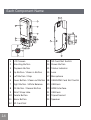
Each Component Name
16
17
15
1
14
18
13
19
2
12
3
20
23
21
4
8
5
9
10 11
7
6
1
LCD Screen
13 SD Card Slot Switch
2
Shooting Button
14 Power Button
3
Playback Button
15 Status Indicator
4
Up Button / Zoom in Button
16 Lens
5
Left Button / Disp
17 Microphone
6
Down Button / Zoom out Button 18 USB/HDMI Card Slot Switch
7
Right Button / White Balance
19 USB lock
8
OK Button / Record Button
20 HDMI Interface
9
Wrist Strap Hole
21 USB Jack
10 Delete Button
22 Tripod Socket
11 Menu Button
23 Speaker
12 SD Card Slot
14
22
Charge and Insert SD Card
Charge:
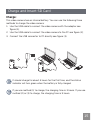
This video camera has an internal battery. You can use the following three
methods to charge the video camera:
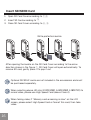
1. Use the USB cable to connect the video camera with the adapter see
figure (1);
2. Use the USB cable to connect the video camera to the PC see figure (2);
3. Connect the USB connector to PC directly see figure (3).
1
2
3
It should charge for about 4 hours for the first time, and the status
indicator will turn green when the battery is fully charged.
If you use method (1) to charge, the charging time is 3 hours. If you use
method (2) or (3) to charge, the charging time is 5 hours.
15
Insert SD/SDHC Card
1. Open SD Card Cover according to ①,②;
2. Insert SD Card according to ③;
3. Close SD Card Cover according to ④, ⑤.
Write-protection buckle
1
2
3
4
5
After opening the buckle on the SD Card Cover according to the arrow
direction shown in the figure ①, SD Card Cover will open automatically. To
remove SD card, gently press it to pop it out.
Optional SD/SDHC cards are not included in the accessories and must
be purchased separately.
When selecting above HD size (1920X1080, 1440X1080, 1280X720) to
record video, please use High Speed Card (above Class 4).
When taking video, if “Memory card accessing is slow” on the LCD
screen, please select High Speed Card or format this card, then take
video.
16
Turning On/Off
Press the Power button to turn the video camera on/off.
When the power is off, press the Power button
for to turn the video camera on.
When the power supply is on, press the Power
button for to turn the video camera off.
If there is no response on the video
camera, press and hold the power
button for at least
button and the
two seconds to reset and power off.
17
Setting Language and Date/Time
Language, Date / Time setting menu will appear when turning the video
camera on for the first time.
Use the following procedures to set the camera to your preferences:
1. Press Power button to turn the video camera on.
2. Press
3. Press
18
button to select the settings.
button to confirm the settings.
Set Display Language
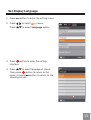
1. Press
2. Press
Press
button to enter the setting menu.
to select
menu;
to select Language option.
3. Press
button to enter the setting
interface.
to select language of choice.
4. Press
button to return to the
Then press
button to return to the
menu; or press
shooting screen.
19
Set Date and Time
1. Press
2. Press
Press
button.
to select
menu;
to select Date / Time option.
button to enter the Set Date/Time
3. Press
program.
to select function option or
4. Press
button to return to the
select , press
menu;
Press
to select the value;
Or press
button to return to the shooting
screen.
5. Press
button to store the value, press
button to return to the shooting
screen.
Date format is: M-D-Y;
Time format is: 24 hour format
When selecting the option, the screen
will display the icons with the following
Two colors:
White: Can’t be selected
Orange: Current selection
20
BASIC OPERATION
Movie Recording
This function can take movies.
1. Press Power button to turn the video camera on.
2. Press
button to begin taking video.
3. Press
button to end the video shooting.
Zoom Function
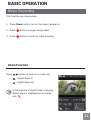
Press
button to zoom in or zoom out:
•
:Digital Zoom in
•
:Digital Zoom out
In the process of digital zoom changing,
digital zoom is displayed as an orange
.
icon
21
White Balance
With White Balance, users can adjust the color temperature under different
light sources to ensure correct color.
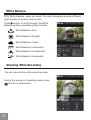
Press button to scroll through the White
Balance options, available options include:
White Balance: Auto
White Balance: Daylight
White Balance: Cloudy
White Balance: Fluorescent
White Balance: Incandescent
White Balance: Underwater
Shooting While Recording
You can take photos while recording video.
During the process of recording video, press
button to take photos.
22
LCD Screen Display in Different Modes
Shooting Screen:
1
1. Battery status indicator
2
07-17-2010 09:13
14
2. Memory card
3. Remaining number of pictures
13
4. image resolution
5. Image Quality
6. White Balance
7. Continuous Shot
8. WT Ratio
12
3
9999+
4
5
6
11
1.0x
9. HDR
10.Histogram
99:59:59
7
8
9
10
11.Video Quality
12.Remaining video time
13.Face Detection
14.Shooting date and time
23
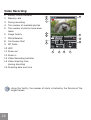
Video Recording:
1. Battery status indicator
2. Memory card
3. During recording
1
2
07-17-2010 09:13
15
3
4. The number of available photos
5. The number of photos have been
taken
6. Image Quality
4
5
14
7. White Balance
8. Continuous Shot
9. WT Ratio
3
00:01:23
6
7
13
12
1.0x
10.HDR
11.Zoom out
6
8
9
10
11
12.Zoom in
13.Video Recording Indicator
14.Video shooting time
(during shooting)
15.Shooting date and time
Using this facility, the number of shots is limited by the file size of the
single frames.
24
Vertical
1
00:10:12
Horizontal
23/342
8
7
8
1
2
00:10:12
23/342
7
3
3
4
4
5
6
6
2010-07-17
2010-07-17
09:13
09:13
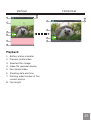
Playback:
1. Battery status indicator
2. Previous photo/video
3. Selected film /image
4. Video file reminder display
5. Next photo/video
6. Shooting date and time
7. Ranking order/number of the
current photos
8. Film length
25
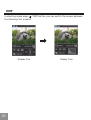
DISP
In shooting mode press / DISP button, you can switch the screen between
the following two screens:
Display One
26
Display Two
PLAYBACK
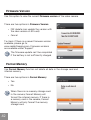
Preview Photos and Videos
You can view photos and videos either
vertically or horizontally when in playback
mode.
1. Press
button.
button to select the
2. Vertical: Press
previous /next photo /video;
Horizontal: Press
button to select the
previous /next photo /video.
3. Play the selected video, press
to enter the playback mode.
button
00:02:11
00:10:12
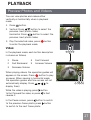
Video:
1 2
In the playback mode, each button description
is shown as follows:
1
Pause
4
Fast Forward
2
Fast Backward
5
Increase Volume
3
Decrease Volume
When playing videos, the operation guides will
button to play
appear on the screen. Press
or pause. When viewing in horizontal mode,
the operation guides and time access will not
automatically display. Press
to
display them).
3
4
5
00:02:11
00:10:12
1
2 3 4 5
While the video is playing, press button
to fast forward the video, or press to fast
reverse it.
In the Pause screen, press button to switch
to the previous frame photo; press button
to switch to the next frame photo.
27
When playing in the video mode, press
screen.
In the Pause screen, press
button to return to Playback
button to return to Playback screen.
In the Playback mode, only the first frame is displayed on the video.
Fast Forward display: 2x / 4x / 8x / 16x
Fast Backward display: 2x / 4x / 8x / 16x.
When the video camera is turned off, press
it on, and enter the Playback mode.
28
button for 2 sec to turn
Zoom in Photos
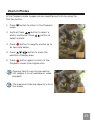
In the Playback mode, images can be magnified up to 4x by using the
function button.
1. Press
mode.
button to return to the Playback
2. Vertical: Press
button to select a
button to
photo; Horizontal: Press
select a photo.
button to magnify photos up to
3. Press
4x See note below.
button to move the
4. Press
position of display area.
button again to return to the
5. Press
Playback screen (the original size).
Zooming facility can only be used on
still images. It is not possible on video
playback.
The maximum zooming capacity is 4x in
this mode.
29
Screen Display in the Playback Mode
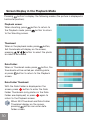
Pressing
button to display the following modes (the picture is displayed in
horizontal position):
Playback screen:
When shooting, press
button to return to
button to return
the Playback mode; press
to the Shooting screen.
Thumbnail:
When in the playback mode, press
button,
3x3 thumbnails will display on the screen,
button to select the photo
pressing
or video to be viewed.
Date Folder:
When in Thumbnail mode, press
button, the
thumbnails will be sorted per shooting date;
or press
button to return to the Playback
screen.
Date Folder Thumbnail:
With the Date Folder is displayed on the
screen, press
button to enter the Date
Folder Thumbnails (only photos in the Date
again to
Folder are displayed); or press
return to the Playback screen.
When 3X3 Thumbnail and Date Folder
Thumbnail display on the screen,
pressing
button can enter date
folder screen.
30
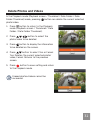
Delete Photos and Videos
In the Playback mode (Playback screen / Thumbnail / Date Folder / Date
button can delete the current selected
Folder Thumbnail) mode, pressing
photo/video.
1. Press
button to return to the Playback
mode (Playback screen / Thumbnail / Date
Folder / Date Folder Thumbnail).
2. Press
button to select the
photo/video to be deleted.
3. Press
button to display the information
to be deleted on the screen.
4. Press
button to select Yes or Cancel:
Yes: Deletes the current selected photo/
video; Cancel: Returns to the previous
screen.
button to save setting and return
5. Press
to the Playback mode.
Erased photos/videos cannot be
recovered.
31
MENU SETUP
Photo Setup
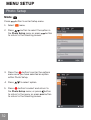
Mode:
Press
1. Select
button to enter Setup menu.
menu.
button to select the option in
2. Press
the Photo Setup menu or press
button
to return to the Shooting screen.
3. Press the
button to enter the options
menu once you have selected an option
within Photo Setup.
4. Press
5. Press
to select option.
button to select and return to
the Photo Setup menu; or press
to return to the menu; or press
to return to the Shooting screen.
32
button
button
Quality
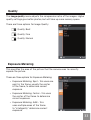
The image quality menu adjusts the compression ratio of the images. Higher
quality settings give better photos, but will take up more memory space.
There are three options for Image Quality:
Quality: Best
Quality: Fine
Quality: Normal
Exposure Metering
This specifies the area of the picture that the camera uses to correctly
expose the picture.
There are three options for Exposure Metering:
• Exposure Metering: Spot - this uses one
point in the frame, usually the center
of the frame, to determine correct
exposure.
• Exposure Metering: Center - this uses
the center of the frame to determine
correct exposure.
• Exposure Metering: AiAE - this
uses multiple areas of the frame
to "intelligently" determine correct
exposure.
33
HDR
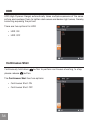
HDR (High Dynamic Range) automatically takes multiple exposures of the same
picture and overlaps them to lighten dark areas and darken light areas, thereby
correcting exposing the picture.
There are two options for HDR:
• HDR: ON
• HDR: OFF
Continuous Shot
Continuously hold down
please release
button to perform continuous shooting; to stop,
button.
The Continuous Shot has two options:
• Continuous Shot: ON
• Continuous Shot: OFF
34
Date Imprint
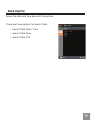
Saves the date and time data with the picture.
There are three options for Imprint Date:
• Imprint Date: Date / Time
• Imprint Date: Date
• Imprint Date: OFF
35
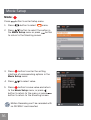
Movie Setup
Mode:
Press
button to enter Setup menu.
1. Press
button to select
menu.
2. Press
button to select the option in
the Movie Setup menu or press
button
to return to the Shooting screen.
button to enter the setting
3. Press
interface of corresponding options in the
Movie Setup menu.
4. Press
5. Press
to select value.
button to save value and return
to the Movie Setup menu; or press
button to return to the menu; or press
button to return to the Shooting screen.
Motion Recording can't be recorded with
no SD/SDHC card inserted.
36
Movie Resolution
Size setup refers to movie Solution ratio expressed in pixels.
The Movie Resolution has five options:
• 1920X1080: 30FPS
• 1280x720: 60FPS
• 1280x720: 30FPS
• 1440X1080: 30FPS
• 640x480: 30FPS
HD recording time limited to below 29min.
Exposure Metering Modes
Exposure Metering is used to setup an area for the exposure to be obtained.
There are three options for Exposure Metering:
• Exposure Metering: Spot
• Exposure Metering: Center
• Exposure Metering: AiAE
37
HDR
HDR (High Dynamic Range) takes several exposes and overlaps them.
This lightens darker areas of the photo and darkens lighter areas, thereby
correctly exposing the picture.
There are two options for HDR:
• HDR: ON
• HDR: OFF
38
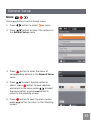
General Setup
Mode:
Press
button to enter Setup menu.
1. Press
button to select
menu.
2. Press
button to select the options in
the General Setup menu.
button to enter the menu of
3. Press
corresponding options in the General Setup
menu.
to select function option or
4. Press
select , press
button to save selection
to select
and return to the menu; press
button to
the menu option; or press
return to the shooting screen.
5. Press
press
screen.
button to save the menu option,
button to return to the Shooting
39
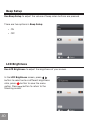
Beep Setup
Use Beep Setup to adjust the volume of beep when buttons are pressed.
There are two options in Beep Setup:
• ON
• OFF
LCD Brightness
Use LCD Brightness to adjust the brightness of your screen.
In the LCD Brightness screen, press
button to select auto or different brightness
ratio, press
button to save the menu
button to return to the
option. Press
Shooting screen.
40
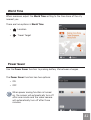
World Time
When overseas, adjust the World Time setting to the time zone of the city
nearest you.
There are two options in World Time:
•
Location
•
Travel Target
Power Saver
Use the Power Saver function to prolong battery life between charges.
The Power Saver function has two options:
• ON
• OFF
When power saving function is turned
on, the screen will automatically turn off
after one minute and the video camera
will automatically turn off after three
minutes.
41
Firmware Version
Use this option to view the current Firmware version of the video camera.
There are two options in Firmware Version:
• FW Update (can update the version with
the new version on SD card)
• Cancel
To check if there is a newer Firmware version
available, please go to:
www.reddotimaging.com. Firmware versions
are available under 'Support'.
The firmware update can't be completed
if the battery is not sufficiently charged.
Format Memory
Use Format Memory function will delete all data in the storage card and
internal memory.
There are two options in Format Memory:
• Yes
• No
When there is no memory storage card
in the camera, Format Memory will
format the internal memory. If there is
a memory card in the camera, Format
Memory will only format the memory
storage card.
42
Reset
Use the Reset function to set the video camera to factory default values.
The Reset has two options:
• Yes
• No
Copy to Card
Use Copy to Card function to copy the files stored in the internal memory
card to storage card.
The Copy to Storage Card has two options:
• Yes
• No
43
Playback Setup
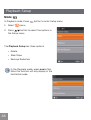
Mode:
In Playback mode, Press
1. Select
button to enter Setup menu.
menu.
2. Press
button to select the options in
the Setup menu.
The Playback Setup has three options:
• Delete
• Slide Show
• Red-eye Reduction
In the Playback mode, press
button,
Note this function will only display in the
horizontal mode..
44
Delete
Using this function will delete the photos/videos stored in the internal
memory or storage card.
The Delete has three options:
• One
• All
• Date Folder
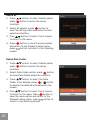
Delete One:
button to select Delete option,
1. Press
button to enter the setup
press
interface.
button to
2. Select One options, press
save the setting value and enter function
selection interface.
button to select Yes or Cancel
3. Pres
to return to the menu.
button to save the menu option
4. Press
and return to the Playback Setup menu,
button to return to the Shooting
press
screen.
45
Delete all:
button to select Delete option,
1. Press
press
button to enter the setup
interface.
2. Select all options, press
button to
save the setting value and enter function
selection interface.
3. Pres
button to select Yes or Cancel
to return to the menu.
4. Press
button to save the menu option
and return to the Playback Setup menu,
press
button to return to the Shooting
screen.
Delete Date Folder:
button to select Delete option,
1. Press
button to enter the setup
press
interface.
button
2. Select Date Folder option, press
to enter Date Folder selection interface.
button to select the Date
3. Press
/
button
Folder to be deleted, press
to display the deleted information on the
screen.
button to select Yes or Cancel
4. Pres
button to
to return to the menu. Press
save the menu option and return to the
Playback Setup menu, press
button to
return to the Shooting screen.
46
Slide Show
This function displays images in sequence at regular intervals (internal
memory card or storage).
1. Select Slide Show option, press
button
to save the setting value to enter the
function selection interface.
button to select Start or
2. Press
Cancel to return the menu.
3. Press
button to start playing.
Only Horizontal mode is used for slide
playing.
4. Press
5. Press
button again to stop playing.
button to select:
•
Continue to Start
•
Return to the Playback screen
The default playing interval time of slide
is 3 seconds.
47
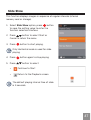
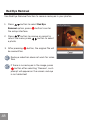
Red Eye Removal
Use Red Eye Removal function to remove red-eyes in your photos.
1. Press
button to select Red Eye
Removal option, press
button to enter
the setup interface.
button to remove or cancel to
2. Press
button to select
return the menu; press
a photo.
3. After pressing
be overwritten.
button, the original file will
Red eye reduction does not work for video
files.
If there is no red eyes in the image, press
button after selecting “Remove”, such
prompt will appear on the screen: red eye
is not detected!
48
CONNECTION
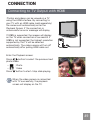
Connecting to TV Output with HDMI
Photos and videos can be viewed on a TV
using the HDMI interface. By connecting to
your TV with an HDMI cable (sold separately)
the camera will automatically enter the
Playback Screen. If the connection is
unsuccessful an error message will display.
If 1080i is supported, the images will display
on the TV when connection is successful. If
1080i is not supported, the highest resolution
supported by the TV will be selected
automatically. The video camera will turn off
automatically after pulling HDMI cable out.
Enter the Playback screen:
button to select the previous/next
Press
photo/video:
•
•
Press
:Photo
:Video
button to start /stop slide playing.
When the video camera is connected
with TV successfully, the playback
screen will display on the TV.
49
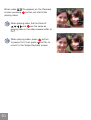
When video (
) file appears on the Playback
button will start/stop
screen, pressing
playing video.
When playing video, the functions of
and
are the same as
playing video in the video camera (refer to
P27).
When playing video, press
button
button to
to pause first, then press
return to the Single Playback screen.
50
Connecting to a PC with USB
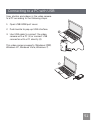
Copy photos and videos in the video camera
to a PC according to the following steps:
1. Open USB/HDMI port cover.
2. Push buckle to pop-up USB interface.
1
3. Use USB cable to connect the video
camera with a PC (1) or connect USB
connector with a PC directly (2).
This video camera supports (Windows 2000,
Windows XP, Windows Vista, Windows 7).
2
51
APPENDICES
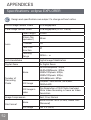
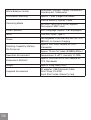
Specifications: eclipse EXPLORER
Design and specifications are subject to change without notice.
Active Image Sensor Pixels
Total Image Sensor Pixels
Lens
5.03 Megapixels
5.08 Megapixels [1/2.5" CMOS]
Focal Length
5.5mm
[35mm film
equivalent]
33mm
F number
2.8
Lens Construction
4P
Focusing
Range
150cm ~ ∞
Anti-Handshake
Digital Image Stabilization
Digital Zoom
4x Digital Zoom
Number of
Recording
Pixels
Movie
1920x1080pixels: 30fps,
1440x1080pixels: 30fps,
1280x720pixels: 60fps,
1280x720pixels: 30fps,
640x480pixels: 30fps
Still Image
(4:3)5MP: 2592x1944, (16:9)3MP:
2560x1440
Still Image in
video
The Resolution of Still Photo Captured
While Video Recording is Same as Video
Resolution
Image Compression
File Format
52
Best, Fine, Normal
Movie
Movie Format: MOV (H.264), Audio: AAC
[Monaural]
Still Image
Exif 2.2 (JPEG)
Shooting Modes
Auto
Detection Features
Face
Red-Eye Removal
Yes
Waterproof
Up to 5m
Shockproof
Up to 1.5m
Dustproof
Equivalent to JIS/IEC (IP6X)
LCD Display
2.5inch (230k Pixels)
ISO Sensitivity
Auto (100 ~ 800)
Exposure Metering Method
Artificial Intelligence AE (AiAE), Centerweighted Average, Spot (Fixed to Center
of Frame), Face AE
Exposure Control Method
Program AE (AE-Lock Available)
AE Range
LV5 ~ LV16
Single Photo, Index (9/16 Thumbnails),
Slide Show, Movie, Date
Playback Modes
Zoom (Approx. 4x), Histogram Display
Fast Forward/Fast Rewind 2x/4x/8x/16x
Per Frame
53
White Balance Control
Auto(AWB), Daylight, Cloudy, Fluorescent,
Incandescent, Underwater
Continuous Shooting
Approx. 7.3fps (Large/Fine Mode)
Internal Memory: Approx. 26MB
Recording Media
Other Features
Multi-Language Support (28 Languages)
Jacks
USB Arm, HDMI (Type C)
Power
Rechargeable Li-ion Battery SKL-50, 3.7V
880mAh, In-Camera Charging
Shooting Capability (Battery
Performance)
54
SD/SDHC Card (Up to 32GB Support)
[Nonsupport MMC Card]
Approx. 260 Shots (Based on CIPA
Standards)
Approx. 70 min for Video (@1080p/30fps )
Operation Environment
Temperature: 0~40OC, Humidity: 0~90%
Dimensions (WxHxD)
Approx. 105.0x55.5x20.1mm (Based on
CIPA Standards)
Weight
Approx. 155g (Body Only)
Supplied Accessories
AC adapter, USB Extension Cable
Wrist Strap, CD-ROM
Quick Start Guide, Warranty Card
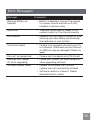
Error Messages
Messages
Explanation
Warning! Battery exhausted
• Battery is depleted, connect the camera
to a power source and wait until fully
charged to resume using
No picture
• There are no pictures or videos in the
memory card or in the internal memory
Pull USB out
• Remove the USB cable or connector after
ensuring you have safely disconnected
the hardware on your system
Connection failed
• Camera is not properly connecting to TV
or computer. USB mode may be incorrect
or USB port may be damaged. Please try
again
File can’t be recognized
• Camera can't recognize such file format
Warning! Don’t power
off when upgrading!
• Please don’t power the video camera off
when upgrading software
Software update failed
• Update for software that controls
camera was not successfully installed
• Software version is incorrect. Please
download latest version
55
Messages
Explanation
Internal memory card full
• The internal memory is full and cannot
store any new files. Copy files to PC
and delete from camera or insert a new
memory card
Memory card full
• Memory card is full and cannot store any
new files. Copy files to PC and delete
from card or insert a new memory card
Write protection of
memory card
• Memory card lock is switched to
protection mode. Take out the memory
card and unlock it
File can’t be edited
• The file has already been edited and
can’t be edited again
Memory card error
• The memory card is not recognized or
failed. Replace with a new memory card
or format this card again
The memory card is not
formatted
• Format the memory card as described on
page 42
Battery exhausted, can’t
update FW
• The firmware cannot be updated without
enough power. Charge the battery fully
before attempting to update FW
56
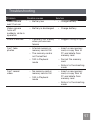
Troubleshooting
Problem
Possible causes
Solution
Video camera
won’t turn on
• Battery low
• Charge battery
Video camera
turns off
suddenly while in
operation
• Battery is discharged
• Charge battery
Photo is blurred
• Camera is not steady
when pictures are
takens
• Suggest using a tripod
Can’t take
photos
• Internal memory or
memory card is full
• The memory card is
not formatted
• Insert a new memory
card, or copy files to
PC and delete from
memory card
• Still in Playback
mode
• Format the memory
card
• Return to the shooting
mode
Can’t record
video
• No memory card or
memory card is full
• Still in Playback
mode
• Insert a new memory
card, or copy files to
PC and delete from
memory card
• Return to the shooting
mode
57
Customer Care
More information on the complete AgfaPhoto digital camera product range
can be found at www.reddotimaging.com. / www.agfaphoto.com.
Service & Repair Hotline (USA):
1-855-243-2937 (from a landline only)
Service & Repair (UK):
+44 1908 488676
Online Service / International contact:
[email protected]
For repair and service in all other countries, please refer to the warranty
pamphlet for additional information.
Manufactured by
RedDot Imaging, 2275 NW 84thAve, Doral, FL 33122.
AgfaPhoto is used under license of Agfa-Gevaert NV & Co. KG or Agfa-Gevaert NV. Neither Agfa-Gevaert NV & Co KG nor Agfa-Gevaert NV manufacture this product or provide any product warranty or support. For service,
support and warranty information, contact the distributor or manufacturer.
All other brands and product names are registered trademarks of their
respective owners. Product design and technical features can be changed
without notice. Contact: AgfaPhoto Holding GmbH, www.agfaphoto.com
58
AgfaPhoto is used under license of Agfa-AgfaPhotovaert NV & Co. KG or Agfa-AgfaPhotovaert NV. Neither AgfaAgfaPhotovaert NV & Co. KG nor Agfa-AgfaPhotovaert NV manufacture this product or provide any product
warranty or support. For service, support and warranty information, contact the distributor or manufacturer. For
service, support and warranty information, contact the distributor or manufacturer. All other brands and product
names are registered trademarks of their respective owners. Product design and technical features can be
chanAgfaPhotod without notice.
AgfaPhoto Holding GmbH, www.agfaphoto.com
Manufactured by RedDot Imaging, www.reddotimaging.com.
59