1
HTB-1026
BLU-RAY DISC PLAYER
Please read this User Manual carefully to ensure proper use of this
product and keep this manual for future reference.
Content
Important Safety Instructions
2
1. Overview
3
2. Front Panel and Rear Panel Illustration
4
3. Output Illustration
7
4. Remote Control
9
5.System Setting
11
6. Audio, Video, Picture files on disk or USB devices
15
7. BD-Live Operation
20
8. Trouble shooting
22
9. Specifications
23
1
Important Safety Instructions
1)
2)
3)
4)
5)
6)
7)
8)
Read these instructions.
Keep these instructions.
Heed all warnings.
Follow all instructions.
Do not use this apparatus near water.
Clean only with dry cloth.
Do not block any ventilation openings, install in accordance with the instructions.
Do not install near any heat sources such as radiators, heat registers, stoves, or other
apparatus (including amplifiers) that produce heat.
9) Do not defeat the safety purpose of the polarized plug. If the provided plug does not fit
into your outlet, consult an electrician for replacement of the obsolete outlet.
10) Protect the power cord from being walked on or pinched particularly at plugs,
convenience receptacles, and the point where they exit from the apparatus.
11) Only use attachments/accessories specified by the manufacturer.
12) Unplug this apparatus during lightening storms or when unused for long periods of time.
13) Refer all servicing to qualified service personnel. Servicing is required when the
apparatus has been damaged in any way, such as power-supply cord or plug is damaged,
liquid has been spilled or objects have fallen into the apparatus, the apparatus has been
exposed to rain or moisture, does not operate normally, or has been dropped.
14) Mains plug is used as the disconnect device, the disconnect device shall remain readily
operable.
15) The ventilation should not be impeded by covering the ventilation openings with items,
such as newspapers, table-cloth, curtains, etc.
16) No naked flame sources, such as lighted candles, should be placed on the apparatus.
17) Attention should be drawn to the environmental aspects of battery disposal.
18) The use of apparatus in moderate climate.
19)Portable Cart Warning
A product and cart combination should be moved with care. Quick stop,
excessive force, and uneven surface may cause the product and cart
combination to overturn.
WARNING: To reduce the risk of fire or electric shock, do not expose this apparatus to rain
or moisture.
WARNING: The batteries must not be exposed to excessive heat such as sunshine, fire or
the like.
The symbol indicates that dangerous voltages constituting a risk of electric shock
are present within this unit.
The symbol indicates that there are important operating and maintenance
instructions in the literature accompanying this unit.
This symbol indicates that this product incorporates double insulation between
hazardous main voltage and user accessible parts. When servicing use only
identical replacement parts.
2
1. OVERVIEW
This BD player has the capability of providing high-definition, cinema-like pictures and
multi-channel audio. Soundtracks in more than one language are usually included on
the disk, and subtitles in more languages are often included as well.
1.1 PLAYABLE DISK TYPES
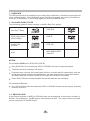
The following types of disks can play in the Blu-Ray Disc player:
Blu-Ray TM Disks
DVD-RW
DVD Video Disks
(DVD-ROM)
DVD-R
Audio CDs
(CDDA)
DTS-CD
VCD
MP3/WMA/JPEG
Data CD
NOTES:
For writeabl e DVD disks ( DVD-RW, DVD-R)
Only DVD-RW/-R recorded with UDF or ISO9660 format can be played back.
The disks must be finalized, VR-mode.
Playback may not work for some types of disks, or when specific operations, such as
angle change and aspect ratio adjustment, are being performed. Information about
the disks is written in detail on the box. Please refer to this if necessary.
Some DVD-VR disks will be playable but not all features are available.
For writeab le CD disks
Only CD-R/-RW media recorded with UDF or ISO9660 format can be played, and they
must be finalized.
1.2 REGION CODE
If the Region number of a BD or DVD disk does not correspond to the region number of
this Blu-ray disk player, the BD player cannot play the disk. The region code is printed
on the rear panel of the BD Player.
5
3
2. Front Panel and Rear Panel Illustration
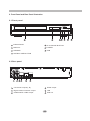
2.1 Front panel
1
2
3 4
1 CABIN DOOR
5 PLAY/PAUSE BUTTON
2 DISPLAY
6 POWER
3 SENSOR
7 USB
4 OPEN/CLOSE BUTTON
2.2 Rear panel
1
2 3 4
5
6
HDMI output
1
2 CH Audio output(L,R)
4
2
Digital Audio COAXIAL output
5
LAN
3
COMPOSITE CVBS output
6
USB 2.0
4
5
6
7
2.3 TV Set Connections
HDMI
R
L
VIDEO
AUDIO IN
VIDEO IN
HDMI IN
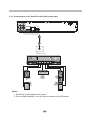
2.3.1 CONNECT BD PLAYER TO TV SET BY AV CABLE
Connect the BD player s L and R jack to the audio input jack on the TV.
Connect the BD player s video out jack to the video input jack of TV.
2.3.2 CONNECT THE BD PLAYER TO TV SET USING THE HDMI OUTPUT
Use the HDMI cable (not supplied) to connect BD player to your TV.
Notes: The player supports video resolution up to 1080p 60Hz on HDMI output.
5
2.3.3 Connecting to an AV Amplifier with Digital Audio Input
Coaxial cable
Coaxial
Digital Amplifier
Notes:
1. Select the Coaxial digital audio output.
2. Set the digital Amplifier to the AV input connected to the BD player.
6
3. Output Illustration
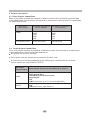
3.1 Video Output Capabilities
Each of the video outputs are capable of different levels of functionality, as described
in the table below. Actual output will depend on setup menu settings and TV capabilities
for HDMI televisions.
Resolutions Supported Resolutions Supported
(NTSC Models)
(PAL Models)
BD Player
Video Output
HDMI
Composite Video
1080p 60/30/24
1080i
720p
480p
480i
1080p 50/25/24
1080i
720p
576p
576i
NTSC SD (480i)
PAL SD (576i)
3.2 Audio Output Capabilities
Each of the audio outputs are capable of different levels of functionality, as described
in the table below. Actual output will depend on
BD player setup menu settings,
What types of audio tracks are encoded on the disk, and,
Surround sound receiver capabilities (for BD players connected to a surroundsound system through HDMI or SPDIF)
BD Player
Audio tracks that can be sent directly to output
Audio Output
HDMI
SPDIF
Dolby TrueHD
Dolby Digital Plus
DTS-HD High-Resolution Audio
Dolby Digital
DTS
PCM (From mono up to 7.1 channels @96 Khz)
Dolby Digital
DTS
PCM (stereo only, up to 96 Khz)
7
3.3 Connectors Description
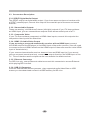
3.3.1 SPDIF Digital Audio Output
The SPDIF output is a digital audio output. If you have a surround-sound receiver with
a SPDIF (coaxial)input, connect this output to the coaxial input of the surround sound
receiver.
3.3.2. Stereo Audio Outputs
These are analog, “old fashioned” stereo (left/right) outputs. If your TV does not have
an HDMI input, you can connect these outputs to the stereo audio inputs of a TV.
3.3.3. Composite Video
If your TV does not have component or HDMI video inputs, connect this output to the
composite video input of the television.
3.3.4. HDMI 1.3 Audio/Video Output
If you are using a surround-sound audio receiver with an HDMI input, connect
the HDMI output of the BD player to the HDMI input of the audio receiver. (You will need
to connect a second HDMI cable from the HDMI output of the audio receiver to the HDMI
input of the television)
If your surround-sound audio receiver does not have an HDMI input (or if you are not
using a surround- sound receiver), connect this output directly to the HDMI input of the
TV. One of the other audio outputs can be connected to the audio receiver.
3.3.5. Ethernet Connector
For BD-Live only, use an Ethernet cable to connect this connector to access Ethernet
while playing BD-Live disk.
3.3.6. USB 2.0 Connector
Used for external USB memory access, play supported audio/video files on USB
memory or store download content into USB memory for BD-Live
8
4. Remote Control
STANDBY
OPEN/CLOSE
19
1
ANGLE
SUBTITLE
AUDIO
POP MENU/TITLE
MENU
RANDOM
20
21
22
2
3
4
5
BONUS
VIEW
SECONDARY
AUDIO
6
SECONDARY
SUBTITLE
7
8
ENTER
SETUP
23
9
DISPLAY
STEP
SLOW
FWD
PREV
10
11
24
REV
NEXT
25
12
26
27
13
MUTE
+
VOL
14
STOP
15
16
1
2
3
4
5
6
28
29
30
31
7
8
0
GOTO
CLEAR
REPEAT
A-B
RETURN
9
17
18
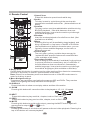
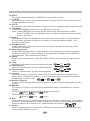
1.Open/Close
Press this button to open/close the disk tray.
2.Audio
This key is used to cycle through the movie audio
soundtracks available on the disk. (Not available on all
disks).
3.Subtitle
This key can be used to enable/disable subtitles during
BD/DVD playback. If the disk has more than one
subtitle language, it can also be used to cycle through
the subtitle languages.
4.Random
Used for random playback of audio files on disk. (Not
available on all disks).
5.Menu
Pressing this key will immediately stop playback, and
bring up the main or 'top' menu of the BD or DVD disk.
(Not available on all disks)In the main menu, you can
typically choose subtitle language, audio track, or
different scene etc.
6.Colour Keys
The red, green, yellow, and blue keys are used to
implement disk-specific features on some BD disks.
(Not available on all disks).
7.Secondary Subtitle
Used to bring up the subtitle (if available) for the picturein-picture (director's commentary, etc) on a BD title. If
the disk has more than one director's commentary
subtitle language, it can also be used to cycle through
the subtitle languages. (Not available on all disks).
8.Bonus View
On BD disks, this button is used to turn the video portion of the director's commentary
(picture-in-a-picture) on and off. (Not available on all disks).
Note: Director's commentary must have been turned on in the BD's main menu in
order for this key to work.
9.Menu Navigation Keys
These keys are used when navigating the menus on BD and DVDs. They are also
used for navigating the setup menus for the BD player.
10.DISPLAY
Press this button to show current play status and time information.
11.SLOW
Pressing this button will cause the video to be played at 1/2, 1/4, 1/8 speed.
x1/2
x1/4
x1/8
12.NEXT
Press this button to play next title, chapter, track or file if valid.
13.PREV
Press this button to play previous title, chapter, track or file if valid.
14.MUTE
Pressing this button to avoid audio output, pressing the MUTE button again will
Mute
Mute Off
resume audio output.
15.Play/Pause
Pressing the bottom of this button will pause audio and video playback. Pressing the
top of this button will resume playback.
9
16.STOP
This button stops playback of a BD/DVD movie or files on disk.
17. CLEAR
When entering numeric values via the numeric keypad , this button is used to clear a
number entered incorrectly.
18.GOTO
This button is used with the numeric keypad to jump to a specific track on an audio CD.
19. STANDBY
Press the STANDBY button to turn the BD player on or off.
Note: Press STANDBY key during system (about 20s) startup will be no effect.
Press STANDBY key during system is on, system will enter low power standby
mode in about 6s.
20.Angle
Some BD and DVDs are filmed with more than one camera angle. During playback
of such a disk, pressing this button will allow you to switch camera angles. (Not
available on all disks)
21.Pop Menu/Title
On BD disks only, this button can be used to bring up the main movie menu. (Not
available on all disks).
22.Secondary Audio
On BD disks equipped with multiple director's commentaries in several languages,
pressing this key will cycle through all of the languages available for the director's
commentaries. (Not available on all disks).
23.Setup
Bring out the settings menu of the BD player. This key will not work during disk playback
24. Step
x2
x 128
…
Pressing this button will play movie by one frame.
25.Fast Reverse
Used to “Fast Reverse” during content playback .
x2
x 128
…
26.Fast Forward
Used to “Fast Forward” during content playback.
27.Volume
Pressing the top (+) half of this button will increase the volume of the BD player's
audio output. Pressing the bottom (-) half of this button will decrease the volume of
the BD player's audio output.
28.Numeric Keypad
These buttons are used with the GOTO button to jump to specific title/chapter (track)
or time.
29.REPEAT
This button is used to cycle through the possible“repeat” modes based on content
played.
BD/DVD or video files on disk: (Not available on all disks)
9
0
T
Repeat Title
C
Repeat Chapter
16
Repeat Off
CDDA or audio Files on disk:
Repeat File
Repeat Off
Repeat All
30.A-B
When a disk is playing, pressing this button once will save a “start point” for repeating
playback. Pressing this button again to select a “end point” then playback will repeat
from the start point to the end point. (Not available on all disks)
31.Return
When navigating files on a data CD or USB stick, pressing this button will return you
to the previous folder or menu.
10
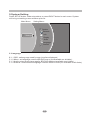
5.System Setting
Press SETUP button under stop status or press RIGHT button in main menu. System
will bring out setting menu as below picture:
Main Menu
Setting Menu
System
Network
Settings
Info
Display
Audio
Language
Parental
5.1Language
5.1.1
5.1.2
5.1.3
5.1.4
OSD: set language used for user interface displayed .
Menu: set language used for BD/DVD menu (not available on all disks).
Audio: select audio language for BD/DVD disk (not available on all disks) .
Subtitle: select subtitle language used for BD/DVD disk (not available on all disks).
11
5.2Display
5.2.1 TV Type: Select to output NTSC or PAL video format .
5.2.2 Resolution: Set maximum resolution of your TV here to get best video quality,
if you are not sure, please use HDMI Auto, system will read the preferred
resolution your TV supported via EDID.
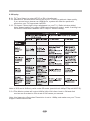
5.2.3 TV Aspect: Select right video ratio based on your TV. ( Refer to below table)
Note: Aspect setting only effect HDMI and component output, and 4:3 setting has
no effect if resolution has been set to 720p or 1080i or1080p).
Note:4:3PS and 4:3LB only valid under SD mode (resolution is 480p/576p or 480i/576i).
5.2.4 Film Mode: system will output 1080p 24Hz if this item is set to ON and disk
movies are recorded on film at rate of 24 frames per second.
Note: this item only effect when Resolution is set to 1080p, and make sure your TV can
support 1080P24Hz mode.
12
5.3 Audio
5.3.1 PCM Downsampling: select right bitrate for PCM signal to ensure your SPDIF
receiver can handle it correctly. It's no effect for HDMI digital audio output.
5.3.2 Digital Output:
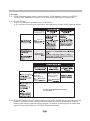
If you only have two speakers, set PCM stereo.
If you connect receiver with more than two speakers, please refer to below tables:
Bitstream
Bitstream
Bitstream
Bitstream
Bitstream
Set to Bitstream
HD for disks with
DTS-HD
soundtracks.
Bitstream
mixed
Set to Bitstream
HD for disks with
Dolby TrueHD
soundtracks.
Bitstream
mixed
Bitstream mixed
5.3.3 Dynamic Range Control: means that you can allow the BD player to make the loud
parts of amovie's audio track quieter than they would be in the theatre, without
making the dialog of theactors any quieter. (It effects on analog audio output and
digital output should be set to PCM or Bitstream Mixed).
13
5.4 System
5.4.1 Optical Disc Auto Play: This option is used to tell the BD player whether or not to
start loading the main title menu of a disk as soon as the disk tray is closed.
5.4.2 BD-Live Internet Access: Control BD player accessing internet
Limit access : Only allow the inserted Blu-Ray disk to download content from a
BD-Live website which has a valid online certificate. This will reduce the chances
of downloading malicious content onto the player.
Always allow access : Allow the BD the inserted Blu-Ray disk to access content
from all BD-Live internet sites whose internet address is encoded onto the disk.
There is no danger of malicious code download from valid commercial BD disks,
but choosing this option and downloading BD-live content via illegally authored
BD disks, or disks obtained from questionable sources, could result in malicious
code being downloaded onto the player.
Prohibit access : Blocks the inserted Blu-Ray disk from accessing BD-Live content
over the internet.
5.4.3 BD-Live Storage:
Show BD-Live storage information, select storage device to clear Blu-ray storage.
5.4.4 Screen Saver Duration:
This BD player will activate screen saver mode by shutting video output (TV will
go “Blank”) after certain period of time set by this item when system is playing
music file or in stop/fullstop mode.
5.4.5 Erase Blu-Ray Storage: Clear Blu-Ray storage.
5.4.6 CEC support:
Set this item to enable/disable CEC:
The CEC feature is designed to allow CEC-enabled devices to command and
control each other without user intervention. For example: If your TV is also CEC
-enabled and you will turn off your TV, the Blu-Ray player will get a CEC signal and
turn off automatically. Or if you turn on your Blu-Ray player, your TV will automatically
turn on and switch to HDMI input.
Note: Not every CEC-Enabled unit is compatible with this unit.
5.4.7 Reset Settings:
Reset all settings to factory default (Parental Control level will not be reset).
5.5 Network
Press “ENTER” button when the item is highlighted, then select “ WIRED” to config
network:
5.5.1 Link Status:
Show if ethernet cable is connected to BD player.
5.5.2 MAC Address
Show MAC address of this BD player.
5.5.3 IP Mode
Choose IP mode here for internet access. Choosing “Manual” mode, 4.5.5 ~ 4.5.8
will be activated for user input, otherwise they are inactivated.
5.5.4 IP Address:
Show current IP address or access user input while in “Manual” IP mode.
5.5.5 Subnet Mask:
Show current Subnet Mask or access user input while in “Manual” IP mode.
5.5.6 Gateway:
Show current Gateway or access user input while in “Manual” IP mode.
5.5.7 Primary DNS:
Show current Primary DNS or access user input while in “Manual” IP mode.
14
5.5.8 Secondary DNS:
Show current Secondary DNS or access user input while in “Manual” IP mode.
Press ENTER key while Apply button is highlighted to activate setting you made,
or press ENTER key while Cancel button is highlighted to cancel changes you made for
network settings.
5.6 Info
This item shows software and hardware information for loader and main board, no
changes are allowed.
5.7 Parental
5.7.1 Parental Country:
Use this menu item to tell the BD player what country you are in.(Currently this
menu item has no effect)
5.7.2 Parental Control:
To turn parental control ON or OFF,
5.7.3 Parental Level:
To restrict playback of disks encoded with a rating level equal to or higher than the
level you set. Parental Control must be turned on for this menu item to have an
affect
5.7.4 Parental Password:
Change new password for Parental Control menu operation. (Default value is: 6666)
6. Audio, Video, Picture files on disk or USB devices
6.1 INTRODUCTION
This section explains how to play back PC-type audio, pictures, and video files
that have been placed onto a disk or USB memory stick.
6.2 Supported Audio, Video, Picture files types
Video
.MPEG4 (.mp4) files
.m4v files
.mkv files
Note: External subtitle file must have name begin with the video file name, and it must
be UTF8 or UTF16 encoded. (e.g. For video file: file001.mkv, external subtitle file
can be: file001_01.srt,file001_eng.srt or file001_ger.sub etc)
Music:
.mp3 files
.wma files
Picture:
.jpeg files
.Png files
6.3 Disk or USB devices preparation
6.3.1 CD-R/RW, DVD+/-R, DVD+/-RW, BD-R or BD-RE with supported files recorded in
UDF or ISO9660 format (must be finalized) can be playback on this BD player.
6.3.2 USB device with supported files on its FAT/FAT32 partition will be recognized.
15
6.4 Browsing video files
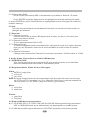
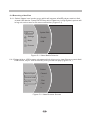
6.4.1 Select Videos icon in main menu which will appear after BD player read out disk
or/and USB device. Press ENTER key while Video icon is highlighted, system will
bring out a sub menu for file source selection.(Figure 5-1)
Videos
Optical Disk
Settings
Playlist
Music
USB
Pictures
Figure 5-1 Video Media Selector
6.4.2 Select disk or USB to open a browser which allow you to view files on current disk/
USB device, so you can choose any files you want to play.( Figure 5-2 )
Folder1
Add all to Playlist
Previous folder
Folder2
…
File1
Play File
...
File2
...
Figure 5-2 Video Browser Screen
16
6.5 Browsing Audio files
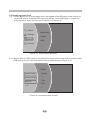
6.5.1 Select Music icon in main menu which will appear after BD player read out disk or
/and USB device. Press ENTER key while Music icon is highlighted, system will
bring out a sub menu for file source selection.( Figure 5-3 )
Videos
Optical Disk
Settings
Playlist
Music
USB
Pictures
Figure 5-3 Audio Media Selector
6.5.2 Select disk or USB to open a browser which allow you to view files on current disk /
USB device, so you can choose any files you want to play .( Figure 5-4 )
Folder1
Add all to Playlist
Previous folder
Folder2
…
File1
Play File
...
File2
...
Figure 5-4 Audio Browser Screen
17
6.6 Browsing picture files
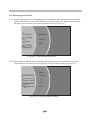
6.6.1 Select Pictures icon in main menu which will appear after BD player read out disk
or/and USB device . Press ENTER key while Pictures icon is highlighted, system
will bring out a sub menu for file source selection.( Figure 5-5)
Videos
Optical Disk
Settings
Playlist
Music
USB
Pictures
Figure 5-5 Picture Media Selector
6.6.2 Select disk or USB to open a browser which allows you to view files on current
disk/USB device, so you can choose any files you want to play.( Figure 5-6 )
Folder1
Add all to Playlist
Previous folder
Folder2
…
File1
Play File
...
File2
...
Figure 5-6 Picture Browser Screen
18
6.7 File playback
6.7.1 Refer to Figure 5-7, select “ Play All” to play all selected type files on selected
media, or select ”Play Current Folder” to play all selected type files in current
folder.
Folder1
Add all to Playlist
Previous folder
Folder2
Play All
…
Play Current Folder
File1
Play File
Cancel
File2
...
Please select play mode
...
Figure 5-7 Multi-files operation
6.7.2 Also you can choose to play current highlighted file refer to Figure 5-8.
Folder1
Add all to Playlist
Previous folder
Folder2
Add to playlist
…
File1
Play(File)
Play File
...
File2
...
Figure 5-8 Single file operation
6.8 Creating Playlist and Playlist Playback
6.8.1 In file browser mode( refer to Figure 5-2, 5-4 and 5-6), press “ ENTER” key while “
Add All to Playlist” is highlighted and will add all selected type files in current folder
into playlist,
or refer to Figure 5-8,choose “Add to playlist” icon and press“ENTER ” to add
current highlighted file into playlist.
6.8.2 In Media Selector Menu(refer toFigure 5-1), you can choose “playlist” to play files
in playlist.
19
7. BD-Live Operation
7.1 Description
Some (but certainly not all) BD disks contain additional features that are made
available to players that are connected to the internet, and have additional memory
added. These additional features may include things like
-the ability to download new movie trailers,
-additional 'commentary' by actors and directors,
- multiperson game play and chat
In order to access BD-Live functions, the player must be properly configured for
BD-Live internet access, and it must be equipped with additional memory.
7.2 Adding external BD-live Memory to player
7.2.1 Obtain USB memory which has been formatted as FAT32.
7.2.2 Insert the USB memory stick into the USB slot on the player.
7.3 Setting BD-Live Internet Access Mode
7.3.1 In the BD Player's main setup menu, go to the 'Other” menu choice;
Then, choose “BD-Live Internet Access”. Be sure that “Limit Access” or “Always
Allow Access” is checked.
7.3.2 Once the USB memory stick has been inserted, if there is not at least 100Mbyte
of free space on the device, you should choose “Clear BD Storage” from the
“Other” setup menu item
7.3.3 In the BD Player's main setup menu, go to the 'Network' menu choice; Then,
choose “IP mode”. Set up the Network IP addresses per your router's or ISPs
recommendations
NOTE: The 'Connectivity Test' must pass, or you are not connected to the internet, and
cannot access BD-Live Content on the web.
7.4 BD-Live Internet Access Example
7.4.1 Obtain a BD-Live disk like <The 6 th Day>
7.4.2 Select BD-Live option from Special Features Menu (or in some disk, you can see
BD-Live option in main menu)
20
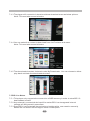
7.4.3 The player will connect to internet and show download menu as below picture.
Note: This can take several minutes.
7.4.4 You can select the content to download from the Previews sub menu.
Note: This can take several minutes.
7.4.5 The downloaded content is stored under My Downloads. You can choose to either
play back or delete the downloaded content
7.5 BD-Live Notes
7.5.1 This player only supports the connection of USB memory in order to store BD 2.0
downloaded content
7.5.2 Any externally connected device will be set as BD-Live storage and internal
storage will be ignored in same time.
7.5.3 Some BD-Live content will be expired and not playable, user need to manually
delete the contents in BD storage in order to free space.
21
8. Trouble shooting
Ensure you have entered the correct AV input for your TV.
Ensure you have entered the correct AV input for your TV.
22
9. Specifications
General
Power requirements: AC 100-240 Volt, 50/60Hz
Power consumption: 35W
Discs Compatibility:
BD,DVD,DVD+/-R/RW,VCD,CD-DA,CD-R/RW.
Video out
CVBS: 1.0V(p-p)/75 , sync, negative polarity, RCA pin jack x 1
HDMI
Audio out
2 channel out: RCA pin jackx2
Coaxial out: 0.5V(p-p)75 , RCA pin Jack x l
Frequency response: 20Hz to 20kHz
S/N ratio:>90dB
Total harmonic distortion: <-65dB
[Accessories]
Remote Control x 1
User s Manual x 1
Specifications are subject to change without notice.
Weight and dimensions are approximate.
This product incorporates copyright protection technology that is protected by U.S. patents and
other intellectual property rights. Use of this copyright protection technology must be authorized
by Macrovision, and is intended for home and other limited viewing uses only unless otherwise by
Macrovision. Reverse engineering or disassembly is prohibited.
Manufactured under license from Dolby Laboratories. Dolby and the double-D symbol are trade
marks of Dolby Laboratories. Copyright 1992 -1997 Dolby Laboratories. All rights reserved.
This device complies with Part 15 of the FCC Rules. Operation is subject to the following two conditions:(1)
this device may not cause harmful interference, and(2) this device must accept any interference received,
including interference that may cause undesired operation.
Manufactured under license under U.S. Patent # s: 5,451,942; 5,956,674; 5,974,380; 5,978,762;
6,487,535 & other U.S. and worldwide patents issued & pending. DTS is a registered trademark
and the DTS logos, Symbol, DTS-HD and DTS-HD Advanced Digital Out are trademarks of DTS,
Inc. 1996-2008 DTS, Inc. All Rights Reserved.
23