1
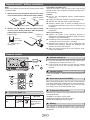
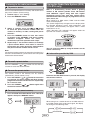
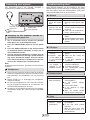
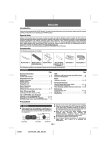
Remote control - battery installation
Note:
Before using remote control, please remove plastic shield
at battery holder.
Precautions for battery use:
Remove the battery if the unit will not be used for long
periods of time. This will prevent potential damage due to
battery leakage.
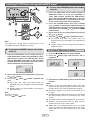
1� Whilst pushing the locking tab towards the center
of the remote control, slide out the battery holder.
Remote
control
Plastic
shield
Battery holder
Back of remote
control
Locking tab
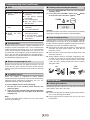
2� Remove the old battery from the battery holder,
insert the new battery and then slide the battery
holder back into the remote control.
Battery holder
Positive (+)
side up
Polarity
(+) symbol
Battery type
Locking tab
Caution:
● Do not use rechargeable battery (nickel-cadmium
battery, etc.).
● Danger of explosion if battery is incorrectly replaced.
● Replace only with the same or equivalent type.
● Batteries (battery pack or battery installed) shall not
be exposed to excessive heat such as sunshine, fire
or the like.
● Installing the battery incorrectly may cause the unit to
malfunction.
Notes concerning use:
● Replace the battery if the operating distance is
reduced or if the operation becomes erratic. Purchase
“CR 2025”, coin lithium battery.
● Periodically clean the transmitter on the remote control
and the sensor on the unit with a soft cloth.
● Exposing the sensor on the unit to strong light may
interfere with operation. Change the lighting or the
direction of the unit if this occurs.
● Keep the remote control away from moisture, heat,
shock, and vibrations.
General control
■
Volume auto set-in
● If you turn off and on the main unit with volume set to
16 or higher, the volume will start at 16.
● If you turn the unit off then on again with the volume
level set to less than 16, it will turn on again at the
level set.
■
Volume control
Press the VOLUME +/– button to increase or decrease the
volume.
■
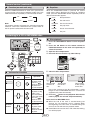
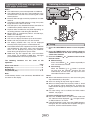
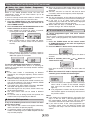
Extra bass control (X-BASS)
When the X-BASS button is pressed, the unit will enter the
extra bass mode which emphasises the bass frequencies
and “X-BASS” indicator will light up. To cancel the extra
bass mode, press the X-BASS button again.
■
■
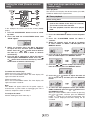
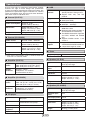
To turn the power on
Function
Power on/
off
Main unit
Remote
control
Operation
Press to turn the
power on or to
go to stand-by
mode.
Auto power off function
The main unit will enter the stand-by mode after 15 minutes
of inactivity during:
CD/USB: In the stop or pause mode.
TUNER: No reception of broadcast signal.
AUDIO IN: No detection of input signal.
■
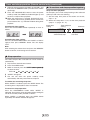
Muting
The volume is muted temporarily when pressing the
MUTE button on the remote control. Press again to restore
the volume.
E-