1
Listening to USB mass storage device/MP3 player
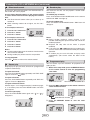
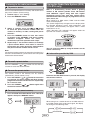
■ To play back USB/MP3 player with folder
mode on
1� Press the USB button on the remote control or
FUNCTION button on main unit repeatedly to
select USB function. Connect the USB memory
device that has MP3/WMA format files on the unit.
When the USB memory is connected to the main
unit, the track information will be displayed.
2� Press the FOLDER button, then press FOLDER
( or ) button to select desired playback folder. To
start playback, go to step 4. To change the playback
folder, press the FOLDER ( or ) button to select
�������
another folder�.
� Select desired file to be played back by pressing
the
or
� Press the
1� Press the USB button on the remote control or
FUNCTION button on main unit repeatedly to select
USB function. Connect the USB memory device
that has MP3/WMA format files on the unit. When
the USB memory is connected to the main unit, the
device information will be displayed.
(USB
) button. Playback will start.
● File name, Title, Artist and Album name are
displayed if they are recorded in the USB memory
device.
● Display content can be changed by pressing the
DISPLAY button.
Note:
This USB mass storage device or MP3 player is not
compatible with MTP and AAC file systems.
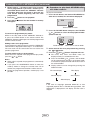
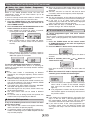
■ To play back USB/MP3 player with folder
mode off
button.
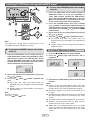
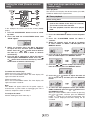
■ To remove USB memory device
1� Press the (USB ) button to stop playback.
2� Press the button again and wait until “OK” is
displayed.
2� Select desired file to be played back by pressing
the
or
button.
� Press the
(USB
) button. Playback will
� Disconnect the USB memory device from the USB
● File name, Title, Artist and Album name are
displayed if they are recorded in the USB memory
device.
● Display content can be changed by pressing the
DISPLAY button.
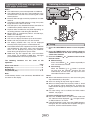
Notes:
● Always remove the USB memory device after “OK”
appears on the display. Improper removal of the USB
memory device may cause irregularities to happen.
● Should this happen, turn off the unit and then turn it
on again.
● SHARP will not be held liable for the loss of data whilst
the USB memory device is connected to the audio
system.
● This USB memory’s format supports FAT 16 or FAT 32.
● SHARP cannot guarantee that all USB memory
devices will work on this audio system.
● USB cable is not recommended for use in this audio
system to connect to USB memory device. Use of the
USB cable will affect the performance of this audio
system.
start.
Note:
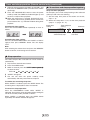
To pause playback:
Press the
(USB
terminal.
) button.
E-