1
andes_p2_QG.book Page 2 Wednesday, May 25, 2011 3:39 PM
English
Your WorkForce 435
After you set up your WorkForce® 435 (see the Start Here sheet), turn to this Quick Guide
and your online User’s Guide for instructions.
Features
Where to find information
Copy, scan, and fax from the easy-to-use
control panel
See this Quick Guide for the basics.
See the online User’s Guide for details.
Process large documents with the 30-page
capacity Automatic Document Feeder
See this Quick Guide for the basics.
See the online User’s Guide for details.
Easy Wi-Fi networking
See the online User’s Guide.
Affordable, low-priced ink cartridges
See this Quick Guide for installation
instructions.
Copy files to and from your computer with the
built-in memory card reader
See this Quick Guide for instructions.
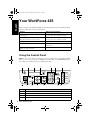
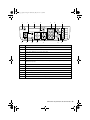
Using the Control Panel
Note: To turn off the “beep” heard when you press a button, press the r/K Copy/Fax
button to select copy mode, press x Menu, press u or d to select Maintenance, then
press OK. Select Sound, then select Off and press OK.
2
1
4
3
5
Stop/
Clear Settings
B&W
Color
8
9
10
11
12
Number
Function
1
Turns product on/off
2
Enters menu mode
3
LCD screen shows menus and status
4
Cancels settings/printing
2 Your WorkForce 435
6
7
Auto Answer
Speed Dial/
Group Dial
Redial/Pause
13
14