1
QUICK GUIDE:
Operation Guide
1.How to play and stop
the music
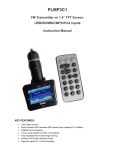
FM transmitter
Press “PLAY” Button : Play the music
Second Press “PLAY” Button: Stop
Remote Controller
Press PLAY/PAUSE
Button
Press “VOL+”” Increase
2.How to adjust the
Volume
Long Press “ ” button :Increase the Volume;
Long press “ ” Button :Decrease the Volume
the Volume;Press
“VOL-”” reduce the
Volume;
3.How to change the
frequency
4.How to choose music
Press “CH” button first, then
press “ ”: increase the frequency
Press ” ”: decrease the frequency
Press “CH+” button:
Increase 0.1MHZ
Press “CH-” button:
reduce 0.1MHZ
Or press the number of
the frequency what you
desired,press”CH+”again
to confirm
Short Press “ ”Button: Play the next song;
Short Press “ ” Button: Play the previous song;
Press “NEXT”Button:
Play the next song;
Press “PREV” Button:
Play the previous song;
Or press the serial
number of the song
directly
5.How to set EQ
Nonsupport
Press “EQ” button to
switch your favorite EQ
6.How to change loop
mode
Long press “play/pause” button, four loop
modes optional: folder, single, random, all
Long press “play/pause”
button
7.How to answer/hang
up the calls
Press “play/pause” button
Press”
/
”button