1
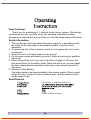
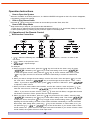
Remote Control
1."Sleep mode" control selector
2.Select the input source
(iPod. AUX. FM.)
3.Tuner number selector
4.iPod/iPhone-toggle repeat selector
5.iPod/iPhone-ok menu selector
6.iPod/iPhone-scroll up/down selector
7.iPod/iPhone -skip selector
8.Select control selector
9.Adjust increase/decrease selector
10.Alarm on/off control selector
11.Tuner band control selector
12.iPod/iPhone-menu selector
13.iPod/iPhone-toggle shuffle selector
14.iPod/iPhone play/pause selector
A: FM Control Area
B: iPod/iPhone Control Area
C: Multi-function Control Area
15.Return to the previous menu
16."Mute mode" control selector
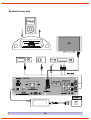
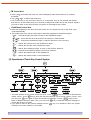
Touch Key Control System
Scroll up or down to different function interfaces.
Enter to the menu and the operation key of the submenu.
Return to the previous menu.
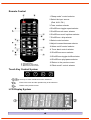
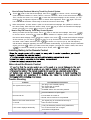
LCD Display System
1. Multi-Function Display Area
2. Current Input Display Area