1
M5 08-book1(EN-FR-DE-NL).qxp
15-09-06
19:07
Page 13
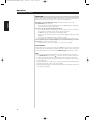
Operation
PLAYBACK AUDIO WITH CD, SACD, MP3 AND WMA
ENGLISH
CD/SACD
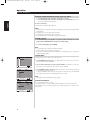
Press CD or SACD on the M5 remote, during play.
MP3/WMA
Press MENU until the desired media directory is selected, and then press ENTER.
FRANÇAIS
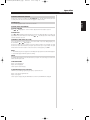
CONNECTING TO A MULTI-CHANNEL SOUND SYSTEM (SACD)
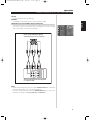
Connect the audio outputs to your integrated multi-channel amplifier or multi-channel preamplifier as
shown below. Then set up the speaker bass response and configuration as per the 5.1 SPEAKER
SETUP, or while playback of the multi-channel SACD media.
ESPAÑOL
NEDERLANDS
DEUTSCH
Rear of M5 CD/SACD player
SACD Multi-Channel, 5.1 Outputs
R
R
R
ITALIANO
EXTERNAL 7.1 INPUT
SURR- B CENTER
SURR
FRONT
L
L
L
SUBW
PORTUGUÊS
A/V Surround Sound Preamplifier
5.1 Inputs used
SVENSKA
NOTES:
• For multi-channel SACD surround sound, connect the 5.1 CHANNEL AUDIO OUT for 2-channel and
multi-channel SACD media to your 5.1 surround sound preamplifier.
• For CD, MP3, and WMA PCM media connect the 2 CHANNEL AUDIO OUT to your stereo system.
PCM media is only available on both Analog Audio OUT and DIGITAL OUT.
13