1
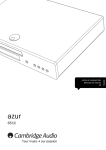
CD30
Your music + our passion
ENGLISH
Compact Disc Player
User’s manual
2
Contents
Introduction.............................................................................................................3
Important safety instructions.................................................................................4
Make sure you register your purchase.
Visit: www.cambridge-audio.com/sts
By registering, you’ll be the first to know about:
G Future product releases
G Software upgrades
G News, events and exclusive offers plus competitions!
This guide is designed to make installing and using this product as easy
as possible. Information in this document has been carefully checked
for accuracy at the time of printing; however, Cambridge Audio's policy
is one of continuous improvement, therefore design and specifications
are subject to change without prior notice.
This document contains proprietary information protected by copyright.
All rights are reserved. No part of this manual may be reproduced by
any mechanical, electronic or other means, in any form, without prior
written permission of the manufacturer. All trademarks and registered
trademarks are the property of their respective owners.
© Copyright Cambridge Audio Ltd 2009
iPod is a trademark of Apple Inc., registered in the U.S. and other
countries.
Limited warranty .....................................................................................................7
Rear panel connections .........................................................................................8
Front panel controls................................................................................................9
Remote control .....................................................................................................10
Operating instructions..........................................................................................11
Loading and unloading discs......................................................................11
Normal disc play..........................................................................................12
Locating a specific track during playback .................................................12
Locating a specific track when playback is stopped.................................12
Repeating discs and tracks ........................................................................13
Playing tracks in random order ..................................................................13
Using the Remain function .........................................................................14
Selecting a track directly.............................................................................14
Troubleshooting ....................................................................................................15
Technical specifications.......................................................................................15
2
ENGLISH
CD30
Introduction
Thank you for purchasing your Sonata CD30. We are confident that you will enjoy
many years of listening pleasure from it. Like all Cambridge Audio products, Sonata
CD30 adheres to three core principles – stunning performance, ease of use and
incredible value.
The Sonata CD30 has been designed to offer truly uncompromised audiophile quality
audio in a small, convenient and stylish package.
The audio circuitry draws on all our previous experience and features high quality
components throughout including a WM8716 digital to analog converter (DAC) from
renowned manufacturer Wolfson.
Ultimate sound quality depends on the whole of your system, naturally we particularly
recommend speakers from the Cambridge Audio Sirocco range as these have been
designed for a perfect acoustic and aesthetic match. Your dealer can also supply
excellent quality Cambridge Audio interconnects to ensure your system realises its full
potential.
Thanks for taking the time to read this manual; we do recommend you keep it for
future reference.
Matthew Bramble
Cambridge Audio Technical Director and the Sonata range development team
3
Important safety instructions
For your own safety please read the following important safety instructions carefully
before attempting to connect this unit to the mains power supply. They will also enable
you to get the best performance from and prolong the life of the unit:
1. Read these instructions.
2. Keep these instructions.
3. Heed all warnings.
4. Follow all instructions.
5. Do not use this apparatus near water.
6. Clean only with a dry cloth.
7. Do not block any ventilation openings. Install in accordance with the
manufacturer's instructions.
8. Do not install near any heat sources such as radiators, heat registers, stoves, or
other apparatus (including amplifiers) that produce heat.
9. Do not defeat the safety purpose of the polarized or grounding-type plug. A
polarized plug has two blades with one wider than the other. A grounding-type
plug has two blades and a third grounding prong. The wide blade or the third prong
are provided for your safety. If the provided plug does not fit into your outlet,
consult an electrician for replacement of the obsolete outlet.
10. Protect the power cord from being walked on or pinched, particularly at plugs,
convenience receptacles and the point where they exit from the apparatus.
11. Only use attachments/accessories specified by the manufacturer.
12. Use with only the cart, stand, tripod, bracket, or table specified by the
manufacturer, or sold with the apparatus. When a cart is used, use
caution when moving the cart/ apparatus combination to avoid injury
from tip-over.
13. Unplug this apparatus during lightning storms or when unused for long periods of
time.
4
14. Refer all servicing to qualified service personnel. Servicing is required when the
apparatus has been damaged in any way, such as the power-supply cord or plug
having been damaged, liquid has been spilled or objects have fallen into the
apparatus, the apparatus has been exposed to rain or moisture, does not operate
normally, or has been dropped.
WARNING – To reduce the risk of fire or electric shock, do not expose this unit to rain
or moisture.
The unit must be installed in a manner that makes disconnection of the mains plug
from the mains socket outlet (or appliance connector from the rear of the unit)
possible. Where the mains plug is used as the disconnect device, the disconnect
device shall remain readily operable. Only use the mains cord supplied with this unit.
Please ensure there is ample ventilation (at least 10cm clearance all round). Do not
put any objects on top of this unit. Do not situate it on a rug or other soft surface and
do not obstruct any air inlets or outlet grilles. Do not cover the ventilation grilles with
items such as newspapers, tablecloths, curtains, etc.
This unit must not be used near water or exposed to dripping or splashing water or
other liquids. No objects filled with liquid, such as vases, shall be placed on the unit.
ENGLISH
CD30
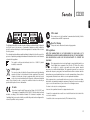
C-Tick mark
This product meets the Australian Communications Authority’s Radio
communications and EMC requirements.
Ross Test Stamp
The lightning flash with the arrowhead symbol within an equilateral triangle is intended
to alert the user to the presence of un-insulated ‘dangerous voltage’ within the
product’s enclosure that may be of sufficient magnitude to constitute a risk of electric
shock to persons.
The exclamation point within an equilateral triangle is intended to alert the user to the
presence of important operating and maintenance instructions in the service literature
relevant to this appliance.
The symbol on this product indicates that it is of CLASS II (double
insulated) construction.
WEEE symbol
The crossed-out wheeled bin is the European Union symbol for indicating
separate collection for electrical and electronic equipment. This product
contains electrical and electronic equipment which should be reused,
recycled or recovered and should not be disposed of with unsorted regular
waste. Please return the unit or contact the authorised dealer from whom you
purchased this product for more information.
CE mark
This product complies with European Low Voltage (2006/95/EC) and
Electromagnetic Compatibility (2004/108/EC) Directives when used and
installed according to this instruction manual. For continued compliance only
Cambridge Audio accessories should be used with this product and servicing must be
referred to qualified service personnel.
This product meets Russian electronic safety approvals.
FCC regulations
NOTE: THE MANUFACTURER IS NOT RESPONSIBLE FOR ANY RADIO OR TV
INTERFERENCE CAUSED BY UNAUTHORIZED MODIFICATIONS TO THIS EQUIPMENT.
SUCH MODIFICATIONS COULD VOID THE USER AUTHORITY TO OPERATE THE
EQUIPMENT.
This equipment has been tested and found to comply with the limits for a
Class B digital device, pursuant to Part 15 of the FCC Rules. These limits
are designed to provide reasonable protection against harmful
interference in a residential installation. This equipment generates, uses and can
radiate radio frequency energy and, if not installed and used in accordance with the
instructions, may cause harmful interference to radio communications. However, there
is no guarantee that interference will not occur in a particular installation.
If this equipment does cause harmful interference to radio or television reception,
which can be determined by turning the equipment off and on, the user is encouraged
to try to correct the interference by one or more of the following measures:
- Re-orient or relocate the receiving antenna.
- Increase the separation between the equipment and receiver.
- Connect the equipment into an outlet on a circuit different from that to which the
receiver is connected.
- Consult the dealer or an experienced radio/TV technician for help.
5
Important safety instructions (continued)
Ventilation
IMPORTANT - The unit will become hot when in use. Do not stack multiple units on top
of each other. Do not place in an enclosed area such as a bookcase or in a cabinet
without sufficient ventilation.
Ensure that small objects do not fall through any ventilation grille. If this happens,
switch off immediately, disconnect from the mains supply and contact your dealer for
advice.
Positioning
Choose the installation location carefully. Avoid placing it in direct sunlight or close to
a source of heat. No naked flame sources, such as lighted candles, should be placed
on the unit. Also avoid locations subject to vibration and excessive dust, cold or
moisture. The unit can be used in a moderate climate.
This unit must be installed on a sturdy, level surface. Do not place in a sealed area
such as a bookcase or in a cabinet. Any space open at the back (such as a dedicated
equipment rack) is fine however. Do not place the unit on an unstable surface or shelf.
The unit may fall, causing serious injury to a child or adult as well as serious damage
to the product.
Due to stray magnetic fields turntables or CRT TVs should not be located nearby due
to possible interference.
Electronic audio components have a running in period of around a week (if used
several hours per day). This will allow the new components to settle down, the sonic
properties will improve over this time.
Power sources
The unit should be operated only from the type of power source indicated on the
marking label. If you are not sure of the type of power-supply to your home, consult your
product dealer or local power company.
6
This unit has been designed to be left in Standby mode when not in use as this will
increase the life of the unit (this is true with all electronic equipment). To turn the unit
off, switch off at the rear panel. If you do not intend to use this unit for a long period
of time, unplug it from the mains socket.
Overloading
Do not overload wall outlets or extension cords as this can result in a risk of fire or
electric shock. Overloaded AC outlets, extension cords, frayed power cords, damaged
or cracked wire insulation, and broken plugs are dangerous. They may result in a shock
or fire hazard.
Be sure to insert each power cord securely. To prevent hum and noise, do not bundle
the interconnect leads with the power cord or speaker leads.
Cleaning
To clean the unit, wipe its case with a dry, lint-free cloth. Do not use any cleaning fluids
containing alcohol, ammonia or abrasives. Do not spray an aerosol at or near the unit.
Battery disposal
Batteries may contain substances harmful to the environment. Please dispose of any
discharged batteries with due consideration and in accordance with local
environmental/electronic recycling guidelines.
Loudspeakers
Before making any connections to loudspeakers, make sure all power is turned off
and only use suitable interconnects.
Servicing
These units are not user serviceable, never attempt to repair, disassemble or
reconstruct the unit if there seems to be a problem. A serious electric shock could
result if this precautionary measure is ignored. In the event of a problem or failure,
please contact your dealer.
ENGLISH
CD30
Limited warranty
Cambridge Audio warrants this product to be free from defects in materials and
workmanship (subject to the terms set forth below). Cambridge Audio will repair or
replace (at Cambridge Audio's option) this product or any defective parts in this
product. Warranty periods may vary from country to country. If in doubt consult your
dealer and ensure that you retain proof of purchase.
To obtain warranty service, please contact the Cambridge Audio authorised dealer
from which you purchased this product. If your dealer is not equipped to perform the
repair of your Cambridge Audio product, it can be returned by your dealer to Cambridge
Audio or an authorised Cambridge Audio service agent. You will need to ship this
product in either its original packaging or packaging affording an equal degree of
protection.
Proof of purchase in the form of a bill of sale or receipted invoice, which is evidence
that this product is within the warranty period, must be presented to obtain warranty
service.
This Warranty is invalid if (a) the factory-applied serial number has been altered or
removed from this product or (b) this product was not purchased from a Cambridge
Audio authorised dealer. You may call Cambridge Audio or your local country
Cambridge Audio distributor to confirm that you have an unaltered serial number
and/or you purchased from a Cambridge Audio authorised dealer.
Some countries and US states do not allow the exclusion or limitation of incidental or
consequential damages or implied warranties so the above exclusions may not apply
to you. This Warranty gives you specific legal rights, and you may have other statutory
rights, which vary from state to state or country to country.
For any service, in or out of warranty, please contact your dealer.
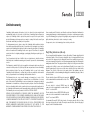
Plug Fitting Instructions (UK only)
The cord supplied with this appliance is factory fitted with a UK mains plug fitted with
a 3 amp fuse inside. If it is necessary to change the fuse, it is important that a 3 amp
one is used. If the plug needs to be changed because it is not suitable for your socket,
or becomes damaged, it should be cut off and an appropriate plug fitted following the
wiring instructions below. The plug must then be disposed of safely, as insertion into
a mains socket is likely to cause an electrical hazard. Should it be necessary to fit a
3-pin BS mains plug to the power cord the wires should be fitted as shown in this
diagram. The colours of the wires in the mains lead of this appliance may not
correspond with the coloured markings identifying the terminals in your plug. Connect
them as follows:
This Warranty does not cover cosmetic damage or damage due to acts of God,
accident, misuse, abuse, negligence, commercial use, or modification of, or to any
part of, the product. This Warranty does not cover damage due to improper operation,
maintenance or installation, or attempted repair by anyone other than Cambridge
Audio or a Cambridge Audio dealer, or authorised service agent which is authorised to
do Cambridge Audio warranty work. Any unauthorised repairs will void this Warranty.
This Warranty does not cover products sold AS IS or WITH ALL FAULTS.
The wire which is coloured BLUE must be connected
to the terminal which is marked with the letter ‘N’ or
coloured BLACK.
REPAIRS OR REPLACEMENTS AS PROVIDED UNDER THIS WARRANTY ARE THE
EXCLUSIVE REMEDY OF THE CONSUMER. CAMBRIDGE AUDIO SHALL NOT BE LIABLE
FOR ANY INCIDENTAL OR CONSEQUENTIAL DAMAGES FOR BREACH OF ANY EXPRESS
OR IMPLIED WARRANTY IN THIS PRODUCT. EXCEPT TO THE EXTENT PROHIBITED BY
LAW, THIS WARRANTY IS EXCLUSIVE AND IN LIEU OF ALL OTHER EXPRESS AND
IMPLIED WARRANTIES WHATSOEVER INCLUDING, BUT NOT LIMITED TO, THE
WARRANTY OF MERCHANTABILITY AND FITNESS FOR A PRACTICAL PURPOSE.
The wire which is coloured GREEN/YELLOW must be
connected to the terminal which is marked with the
letter ‘E’ or coloured GREEN.
The wire which is coloured BROWN must be
connected to the terminal which is marked with the
letter ‘L’ or coloured RED.
If a standard 13 amp (BS 1363) plug is used, a 3 amp fuse must be fitted, or if any
other type of plug is used a 3 amp or 5 amp fuse must be fitted, either in the plug or
adaptor, or on the distribution board.
7
Rear panel connections
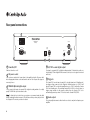
1
Power
On
Off
Designed and engineered in London, England
Sonata CD30
Audio Out
CD Player
L
Digital
Outputs
Power AC
6
Trigger In
2
R
Toslink
Optical
S/P DIF
Co-axial
12V @ 30mA
Tip +ve
3
4
5
2 AC power socket
Once you have completed all connections to the amplifier, plug the AC power cable
into an appropriate mains socket and turn the unit on. Your compact disc player is
now ready for use.
3 TOSLINK Optical digital output
Use to connect to the input of a separate DAC or digital recording machine. Use a high
quality TOSLINK fibre optic interconnect cable.
Note: To obtain the best results from your system we recommend using only high
quality Cambridge Audio interconnects. This will ensure that you hear your system as
we designed it. Please ask you dealer for details
For output to a separate DAC or digital recording machine. To obtain best results, use
a high quality 75ohm digital RCA interconnect cable (not one designed for normal
audio use).
5 Trigger In
The Sonata CD30 can be turned on and off (i.e. brought in and out of Standby mode)
by a trigger voltage connected to the Trigger In. A transition from or to 5-12 DC will
turn the Sonata CD30 on. Another transition from or to 5-12 DC will put the Sonata
CD30 into Standby mode. The matching Sonata AR30 or DR30 receivers’ feature a
trigger output suitable for this purpose which allows the Sonata CD30 to be
automatically powered up when CD is selected on the Sonata AR30/DR30.
6 Audio output
Use good quality interconnect cables from these sockets to any line level input on your
amplifier.
.
8
R
4 S/P DIF co-axial digital output
1 Power On/Off
Switches the unit on or off.
L
ENGLISH
CD30
Front panel controls
4
CD30
Standby / On
5
1
2
3
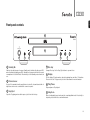
1 Standby/On
Switches the unit between a low power Standby mode (indicated by dim power LED)
and on (indicated by bright power LED). Standby is a low power mode where the power
consumption is less than 5 Watts. The unit may be left in Standby mode when not in
use.
2 Infrared sensor
Receives IR commands from the supplied remote control. A clear, unobstructed line of
sight between the remote control and the sensor is required.
3 Stop/Eject
Stops the CD playing and on a futher press ejects it from the disc tray.
6
7
4 Disc tray
Compact Disc tray. Use the Stop/Eject button to open and close.
5 Display
Used to display CD track number, elapsed/remaining time and other CD functions.
Please refer to the 'CD player setup' section of this manual for more information.
6 Play/Pause
Plays and pauses CD playback.
7 Skip/Scan
Allows for skipping between tracks and also searching within tracks. Press briefly to
skip track, press and hold to search within a track.
9
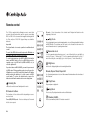
Remote control
The CD30 is supplied with a Navigator remote control that
operates this unit, and which can also operate a matching
AR30 or DR30 2.1 receiver and their supplied docking station
for iPod, and/or a DV30 DVD player. Always use alkaline
batteries.
CD mode – Press the number of the desired track. Playback will start from the
beginning of the track.
Skip/Scan
Use for skipping between tracks during playback or to scroll through available stations
in DAB/FM mode. These buttons are also used to select features in the menus. For
more information refer to 'operating instructions'.
Important!
The default mode for remote operation is multi-functional
control.
Numerical select
To control the CD30 in this mode, first press the CD button on
the remote (which also selects the CD source).
Vol
Band
To control other functions of an AR30 or DR30, their built-in
tuners and DD30 dock for iPod or a DV30, first press the
required source (e.g. MP3 for iPod, DVD for DV30, etc.) to
select the right mode.
If you do not have an AR30 or DR30, you can lock your remote
to CD30 control. This means that you do not need to press the
CD button to access CD30 control. Hold down the CD button
whilst inserting the batteries to lock the remote to CD30
control mode. To restore the default mode, remove the
batteries and allow five minutes before re-inserting them.
Vol
To select a number greater than ten, press -/-- once followed by the second digit (e.g
to select 15 press -/-- followed by 5). To select a number greater than 20, press -/-twice followed by the second digit (e.g. to select 23 press -/-- twice followed by 3).
Brightness
Select
Switches the display brightness between bright and dim.
Remain, Repeat Track, Repeat All
See 'Operating instructions' section of this manual for information on the functions of
these buttons.
i
Remain
Repeat
Track
Repeat
All
Play/Pause
Standby/On
Switches the unit between Standby and On mode.
0-9 numeric buttons
The functions of these buttons differ depending on source
mode selected:
Tuner (AR30/DR30) mode – Press to recall a preset. Press and
hold to store a preset.
10
Plays and pauses playback.
CD
Tuner
DVD
Aux
MP3
Stop/Back
Press to stop CD playback and also works as Back button.
Random/Shuffle
Press to turn random/shuffle CD function on and off.
ENGLISH
CD30
Operating instructions
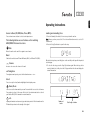
Source buttons (CD, DVD, Aux, Tuner, MP3)
Loading and unloading discs
Press relevant source button to select desired input source.
1. Press the Standby/On switch, if it is necessary to turn the unit on.
The following buttons access features on the matching
AR30/DR30 2-channel receivers.
Note: Ensure you have pressed the CD on the multi-function remote to select CD
control mode.
2. Press the Stop/Eject button to open the disc tray.
Mute
Mutes the audio on the unit. Press again to cancel mute.
Band
Switches the unit between FM and AM bands (AR30) or DAB and FM (DR30).
Volume
Increase or decrease the volume of the unit.
Navigation
When the disc tray has opened fully, place a disc carefully in the tray with the printed
side facing up.
3. To close the disc tray, press the Stop/Eject button again. When the tray, with a
correctly loaded disc, is fully closed the CD player will read the disc and display the
content information.
To navigate around presets, press the directional arrows or .
Select
Press to accept the item/function highlighted in the display menu.
Alarm/Clock
Press to access the alarm and sleep menu. Press and hold to access the clock menu.
Press again to exit out of the menu. Refer to the 'Operation instructions' section of
your Sonata AR30/DR30 manual for more information.
i
Info
Displays information such as music type and station provider. The information on the
FM band is dependent on the strength of the signal.
Number of
tracks
Total length of ablum
11
Operating instructions (continued)
The disc tray can be opened at any time by pressing the Stop/Eject button. If the disc
is playing, press Stop/Eject first to stop playback and then press again to eject the
disc. Only remove the disc after the tray has fully opened.
Note:
- Do not put anything except a Compact Disc into the tray, foreign objects may damage
the mechanism.
- Do not force the tray by hand during the opening and closing operations.
- To avoid dirt and dust entering the mechanism, keep the disc tray closed.
- If the Compact Disc is seriously scratched or too dirty the player may not be able to
read it or play it.
- Never load more than one disc into the disc tray at one time.
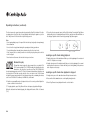
Normal disc play
This unit has been designed to play compact discs, recordable CDs
(CD-R) and re-writable CDs (CD-RW) bearing the identification logo
shown here. No other discs can be used. Any CD-R/CD-RW discs
should contain properly recorded TOC (Table of Contents) information so that they can
be played back. This unit can play only the discs recorded in the CD-DA format
designed for music reproduction. Do not attempt to play a disc containing other data,
such as a CD-ROM for PCs with mp3 or WMA files, on this unit.
4. Switch on your amplifier and set its input selector to the correct position. Adjust the
volume control to a desired level.
5. To begin playback, press Play/Pause. After a short pause, playback will begin.
When the last track has finished playing, the display will return to Table of Contents
(TOC).
12
6. To stop the disc at any point, press the Stop/Eject button. Pressing the Play/Pause
button while the disc is playing will pause the disc and the track time will flash on
the display. Playback can be resumed by pressing Play/Pause again.
Locating a specific track during playback
1. A single short press of the button will take you to the beginning of the next track
on the CD. Repeat as necessary.
2. A single short press of the button will take you to the beginning of the current
track and two short presses of the will take you to the beginning of the previous
track. Repeat as necessary.
Locating a specific track when playback is stopped
1. A single short press of the buttons will skip between tracks.
2. Press and hold the button to scroll rapidly through tracks.
3. Press Play/Pause to start playback from the selected track.
ENGLISH
CD30
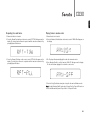
Repeating discs and tracks
Playing tracks in random order
1. Ensure that the disc is loaded.
1. Ensure that a disc is loaded.
2. Press the Repeat Track button on the remote control. ‘RPT-TRK’ will appear on the
display. The current track will now be repeated until the function is turned off by
pressing Repeat Track button.
2. Press the Random/Shuffle button on the remote control. ‘RANDOM’ will appear on
the display.
3. Press the Repeat All button on the remote control. ‘RPT-ALL’ will appear on the
display. The whole disc will now be repeated until the function is turned off by
pressing Repeat All button.
3. The CD player will automatically play the entire disc in random order.
4. Press Random/Shuffle to exit the function. ‘RAN-OFF’ will appear on the display.
The disc will continue playing to the end in the correct order.
5. Press the Stop/Eject button at any time to stop the disc and exit Random mode.
Note: Selecting ‘Random/Shuffle’ mode when ‘Repeat Track’ or ‘Repeat All’ has been
selected will automatically cancel ‘Repeat Track’ or ‘Repeat All’ mode.
13
Operating instructions (continued)
Using the Remain function
Selecting a track directly
1. Ensure that the disc is playing.
Use the 1-9 numeric buttons on the remote control to select any track directly for
playback, either in Stop or Playback modes.
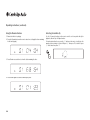
2. Press the Remain button on the remote control once to display the time remaining
for the track playing.
3. Press Remain a second time to show the total remaining disc time.
4. Press Remain again to return to normal display mode.
14
For tracks greater than 9 use press the ‘-/--’ button on the remote to add ten to the
number you are entering i.e. for track 14 press ‘-/--’ then press ‘4’, for track 36 press
‘-/--’ three times then press ’6’.
Troubleshooting
Technical specifications
There is no power
Disc types
CD (CD-DA), CD-R/RW
Ensure the AC power cord is connected securely.
Ensure the plug is fully inserted into the wall socket and is switched on.
Check the unit is switched on at the rear panel.
Check fuse in the mains plug or adaptor.
D/A Converter
Wolfson Microelectronics
WM8716 24-Bit/192kHz capable
Frequency response
20Hz - 20kHz (+/-0.5dB)
THD
<0.003% @ 1Khz 0dBFs
<0.005% 20Hz-20Khz 0dBFs
Linearity
+/- 1dB @ -90dBFs
Stopband rejection (>24kHz)
>90dB
S/N ratio
>90dB
Total correlated jitter
<300pS
Crosstalk @1kHz
<-100dB Crosstalk @20kHz
<-80dB
The disc is skipping
Output impedance
<50ohms
Check that the disc is not too scratched or dirty.
Ensure the player is on a firm surface and not subject to vibrations.
Power Supply
All versions 100-240V AC ~ 50/60Hz
Max. power consumption
7W
There is a hum coming from the speaker
Standby power consumption
<5W
Ensure that all cable connections are secure.
Dimensions
270 x 67 x 285mm (WxHxD)
The remote handset will not function
Weight
2.3kg (5.0lbs)
The player will not read the disc
Check the disc is not loaded upside down.
Check that the disc is not too scratched or dirty.
There is no sound
Ensure that the amplifier is set correctly.
Check that the interconnects are inserted correctly.
ENGLISH
CD30
Check that the batteries have not expired.
Ensure that nothing is blocking the remote sensor.
Check that the correct source is selected on the remote control i.e. CD30.
In the event that the above solutions do not remedy your problem, please consult
our frequently asked questions (FAQ) section on our website:
www.cambridge-audio.com/sts/faqs
You can also use this facility to post a question to our Technical Support team.
For all servicing, in or out of warranty, please contact your dealer.
15
Cambridge Audio is a brand of Audio Partnership Plc
Registered Office: Gallery Court, Hankey Place,
London SE1 4BB, United Kingdom
Registered in England No. 2953313
© 2009 Cambridge Audio Ltd
AP23515/1
www.cambridge-audio.com