1
Remote control
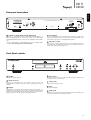
The Topaz CD5 and CD10 are supplied with a remote control that operates
the unit. In addition, the Blue coloured buttons can operate a matching
Topaz AM10 amplifier or SR10 stereo receiver.
Always use a CR2025 Lithium coin cell.
Open/Close
Opens and closes the disc tray.
Numerical track select
Press the number of the desired track. The track will then play
automatically from the start of the track.
Prog
Allows you to program a unique sequence of up to 20 tracks. Refer to
‘Operating Instructions’ section of this manual for more information.
Prog Clear
Clears a programmed sequence. See later section of this manual.
Pause/ Stop/ Play
Press the relevant button to pause, stop or play the CD.
Skip
Right Skip – Press to skip forward by one track on the CD.
Left Skip – Press to skip backward by one track on the CD.
Scan
Press and hold to scan within the selected track. Press the right button to
fast forward, the left button to rewind.
Random, Repeat, Remain
Read the ‘Operating Instructions’ section of this manual for information on
the functions of these buttons.
AM10/SR10 (Blue coloured icons)
To operate the Topaz AM10 or SR10 unit only.
Adjust the volume on a SR10/AM10.
Changes source on a SR10/AM10.
Mutes the output of a SR10/AM10.
Note: These controls work on the Topaz SR10/AM10 only and are not
compatible with Cambridge Audio Azur amplifiers/receivers or units from
other manufacturers.
6