1
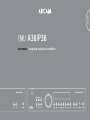
A38
operation
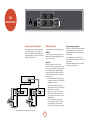
Switching the A38 on
Changing the volume
Selecting an audio source
Recording an audio source
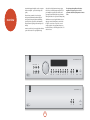
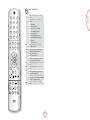
The power button switches the unit on and off;
alternatively, the unit can be switched in and out of
stand-by mode by pressing the 2 button on the remote
control handset.
Use the control knob to change the volume. Turn the
knob clockwise to increase the volume, anti-clockwise
to reduce it.
A source-selection button is used to select the source
that is connected to the input corresponding to the
button. A light above the relevant button indicates which
input is selected and this information is also shown on
the display.
The A38 allows listening to and recording from the
same source, or listening to one source whilst recording
another. The signal to be recorded is sent to both the AV
and PVR output sockets.
Listening using headphones
The recording outputs can be configured in two ways:
1. To allow recording of the source being listened to;
2. To allow recording of a particular (specified)
source, regardless of what is being listened to.
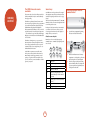
The power light (next to the ‘A38 Integrated Amplifier’
text) indicates the state of the amplifier:
1. A red light means that the amplifier is in stand-by
mode;
2. When you switch your amplifier on, the power
light glows amber for a few seconds; during this
time the outputs are muted;
3. The light changes to green when the amplifier is
ready for use.
The power light may flash if a fault has occurred –
the fault type is shown on the display. See page 17,
‘Troubleshooting’, for help in resolving fault situations.
If the fault cannot be cleared, unplug your amplifier and
contact your Arcam dealer.
The output of the A38 can be muted by pressing mute.
Press mute for a second time (or change the volume) to
cancel the mute.
The headphones socket (Phones) accepts headphones
with an impedance rating between 8Ω and 2kΩ, fitted
with a 6.5mm stereo jack plug.
SP1 and SP2
These buttons allow you to switch the main speakers
(connected to the lower set of speaker terminals) and
secondary speakers (connected to the upper set of
speaker terminals) on and off.
The light above each button glows if the corresponding
speakers are currently selected. If you have connected
the A38 to the speakers using the single-wired
configuration described on page 9, then the SP1 light
should be illuminated; if you have used the bi-wiring
configuration described on page 9, both SP1 and SP2
must be switched on. Note that when both lights are out
then the amplifier will appear not to work, as all speakers
are switched off.
When listening to ‘loud’ inputs, such as CDs, the
amplifier may reach its full power before the display
reads Maximum, in contrast, lower-level inputs, such
as tuners, will sound quieter for the same volume level
shown. To compensate for this, the input levels of each
source may be adjusted. This can be done using the A38
setup menu (see page 11).
The pre-amp. outputs and speakers are muted when
headphones are plugged in. The headphones socket is
always active, unless the volume has been muted.
Balance
In addition to the A38 setup menu (see page 11), you
can also control left-right stereo balance directly from
the Balance button on the front-panel.
Display
The Display front panel button changes the display
brightness. There are three brightness levels: ‘on’,
‘dimmed’ and ‘off ’. If the A38 is switched off while the
display is set to ‘off ’, the display is set to ‘dimmed’ when
the A38 is switched on again.
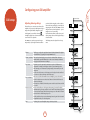
Selecting the source for recording
To record the source being listened to, press the RECORD
button repeatedly until the display shows ‘Record
source’. After a few seconds, the display reverts to
showing the volume level, and you are ready to record.
In this configuration, selecting a different input changes
the source that is routed to the recording outputs.
To record one source whilst listening to another, press
RECORD until the display shows ‘Record’ followed by
the name of an input (e.g., Aux, CD, Tuner, etc.). Now
press the source-selector button on the front-panel for
the source you wish to record. Your selection is shown
on the display for a few seconds, after which the display
reverts to showing the volume level. You are now ready
to record.
Pressing a different source-selection button changes the
source that you are listening to, but does not alter the
source that is routed to the recording outputs.
E-10