1
NOTE
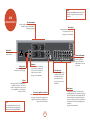
A38
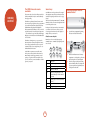
connections
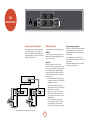
The Trig out and Remote in functions are only used
in multi-room systems. They are not required for
normal use.
Speaker terminals
The A38 is equipped with two pairs of speaker
terminals. See page 8 for information on
connecting loudspeakers.
Phono input
A high quality phono input is available
as an optional extra to the A38.
See page 7 for more information.
�
�����
���
Power inlet
Connect the correct
mains cable here.
�������
������
�����������
�����������������
�
���������
����
���
���
������
��
�������������
�
�
�
�������������
Ensure the voltage selected
matches the local power supply.
������
�������
This allows remote-control signals to
be received by the A38 if the remote
sensor is covered (or otherwise not
‘visible’ to the remote-control).
���
���
�����
��
���
Phono earth terminal
For connecting your
turntable earth lead (if
required). Note that this
terminal must not be used as
a safety earth.
Recording loops
The A38 is equipped with two
recording loops, for use with
recording devices (cassette
decks, CD recorders, etc.).
Trig out
See pages 7 and 10 for more
information.
Audio inputs
Pre-/power-amplifier connections
These sockets are only used if you are using the A38
as a pre-amp, for example, when using the A38 in
conjunction with a P38 in a bi-amplified system.
NOTE
������ ����
���
��
��
������
����
���
��
���
Remote in
See page 7 for more information.
This output provides a 12V signal whenever
the unit is switched on (i.e., not ‘off ’ or in
‘stand-by’). This signal can be used to switch
on power amplifiers (or other equipment)
connected to the A38.
��
�
�������
Voltage select
��
����������
See page 9 for more information.
Please read the ‘Placing the unit’, ‘Power’ and
‘Interconnect cables’ sections on page 5 before
connecting up your A38 integrated amplifier!
These inputs are intended for use with your audio
equipment. The labels above the inputs give suggested
uses, but all 5 inputs have the same characteristics (all
are line-level inputs) and any suitable device may be
connected to any input. (Note, however, that the name
of the input shown on the front-panel display cannot
be changed.)
See page 7 for more information.
E-6