1
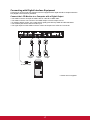
Connecting with Digital Interface Equipment
Connections can be made with equipment that is equipped with a digital interface compliant with the
DVI (Digital Visual Interface) standard.
Connect the LCD Monitor to a Computer with a Digital Output
• The HDMI connector accepts an HDMI cable or a DVI-D to HDMI cable.
• The HDMI connector can connect to the HDMI output or DVI-D output of a PC.
• To maintain display quality, use a cable with a quality prescribed by HDMI and DVI standards.
• The LINE-IN jack can be used for audio input.
• The signal input from the HDMI connector cannot be output to the VGA OUT connector.
To DVI-D
output
To HDMI
output
To DVI-D
output
To audio output
* Cables are not supplied
17