1
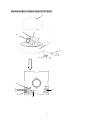
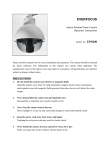
1 Camera Cover
○
This cover will protect the camera for avoiding dust and damage.
2 Lens
○
This vari-focal Lens allows users to adjust the Zoom and Focus manually.
Built-in fixed lens: 3.6; 4.3; 6.0 or 8.0 mm
3 Base
○
The camera unit sets in the dome base, when it is shipping from the factory.
4 Focus Ring (for vari-focal lens only)
○
To set the focus, and loosen the Focus ring knob, please turn the ring toward <F> or <N> if
necessary.
5 Zoom Ring (for vari-focal lens only)
○
If you like to adjust the viewing range, please loosen or tighten the Zoom ring. Turn the ring
towards <W> for Zoom out or <T> for Zoom in. When camera setting is finished, please
tighten the zoom ring knob.
6 Flickerless
○
The factory setting is FL OFF.
7 Mirror
○
The factory setting is Mirror OFF.
8 Auto Gain control on/off switch
○
The factory setting is AGC ON.
9 D/N
○
The factory setting is D/N OFF.
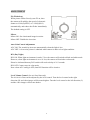
10 Monitor Test Pin
○
For monitor use. When setting up the camera, connect a monitor to this video output pin and
to the GROUND pin using alligator clip cables, then use the image displayed on the monitor,
set the surveillance angle.
11 Level Volume Control (for vari-focal lens only)
○
The iris level control for the lens.
3