1
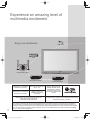
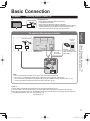
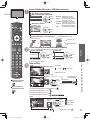
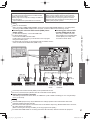
Recommended AV Connections
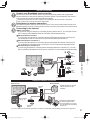
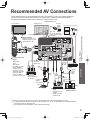
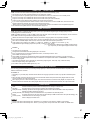
These diagrams show our recommendations of how to connect the TV unit to your various equipment.
For other connections, consult the instructions for each piece of equipment and its specifications.
For additional assistance, please visit our website at: www.panasonic.com
www.panasonic.ca
Front of the TV
Back of the TV
AC 120 V
60 Hz
Cable TV
or
LAN connection (p. 31)
Wireless LAN adapter (p. 31)
USB flash memory (p. 26)
USB keyboard (p. 30)
or
or
or
■ To watch camcorder
images
Camcorder
VCR
DVD Player
or
Connect with
A or B
■ DVD Recorder /
RGB
PC cable
VCR
AUDIO
cable
■ To watch DVDs
DVD Player/
Blu-ray Disk player/
Set Top Box
Conversion
adapter
(if necessary)
Audio
cable
A
HDMI cable
or
Computer
■ PC
B
HDMI-DVI
Conversion
cable +
Audio cable*1
Optical
digital
audio
cable
Advanced
(For HDMI connection,
HDMI compatible
equipment only. For
connection using an
HDMI-DVI Conversion
cable, see HDMI 1,
HDMI 2 or HDMI 3
connection on this page.)
RS232C
connection
(Serial port)*2
Recommended AV Connections
Using Timer
■ USB connections
Cable Box
AC Cord
(Connect after all the
other connections are
complete.)
OPTICAL
IN
Amplifier
■ To watch digital video ■ To listen to the TV
image
DVD Player or Set
Top Box
(HDMI compatible
machines only)
through speakers
*1 Please see p. 38 for the setup when using an external analog audio cable with an HDMI to DVI cable.
*2 For details about the RS232C command, contact Customer Care. (p. 69, 70) Note that we only provide information
in accordance with our disclosure rules.
See “RS232C terminal Specification” sheet. (attached separately)
57
tc_p50_54_vt25_eng_0579.indb 57
2010/03/08 14:09:30