1
Play recored files
You can play DivX/MP3/WMA/JPEG picture
files copied onto a CD-R/RW, recordable DVD
or USB storage device.
Note
Access a category
1
Press
(or ) repeatedly until a
category icon is highlighted.
• when a certain category of files
are not included, the category icon
cannot be highlighted.
2
Press
(or ) to highlight the wanted
category icon.
3
Press OK to confirm.
» The folders that contain the files of this
category are listed.
• You can only play DivX videos rented or
purchased through the DivX registration code
of this unit.
• Subtitle files with the following filename
extensions (.srt, .smi, .sub, .ssa, .ass) are
supported but do not appear on the file
navigation menu.
• The subtitle filename has to be the same as
the file name of the video.
1
2
» The files of this category in the first
folder are listed.
Select a source.
• For a USB storage device, press USB.
• For a disc, press DISC.
Access a folder
1
Insert the USB storage device or disc.
» The play starts automatically.
Press
repeatedly until a folder name is
highlighted.
2
Press /
name.
3
Press OK to confirm.
» The files of the selected category in
the folder are listed.
» The play interface is displayed.
to highlight the wanted folder
Play a file
1
2
3
4
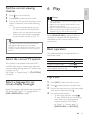
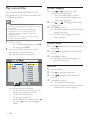
You can see from the interface
• On the top: the name of current file
and the name of current folder
• On the left: the folder list
• On the right: the file list
• At the bottom: the category icons (
for music, for photos, and
for
videos)
14
EN
Access a folder.
Press
Press /
name.
to highlight a file name.
to highlight the wanted file
Press OK to confirm.
» The selected file starts play.
» The play stops automatically at the end
of the last file of same category.