1
Installation
2-Post and 4-Post Open Frame Racks
1
2
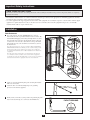
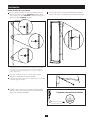
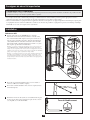
Attach the 3 Mounting Buttons to the bar in the following holes:
(Button 1) three holes from the TOP of the bar. (Button 2) eleven
holes from the TOP of the bar. (Button 3) five holes from the
BOTTOM of the bar.
2
1
Attach the bar to the outside frame of the rack by simply inserting the
Mounting Buttons into the mounting button holes and snapping them
down into place.
Note: The instructions above are specific for mounting in Tripp Lite Open Frame
Racks. Mounting in other rack brands is possible, but will vary depending upon the
application. Several holes are provided along the grounding bar that will allow for a
workable installation into any brand’s rack configuration.
3
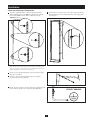
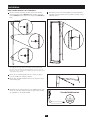
Attach one end of the Grounding Strap to the bar using the included
M4 screws and washers.
4 Attach the other end of the Grounding Strap to the grounding
provision on the intended equipment.
3
5
Finally, attach your facility’s system ground to the grounding lug at the
bottom of the bar. The lug can accommodate 2/0-14AWG wires.
FACILITY GROUND
5
3