1
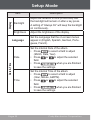
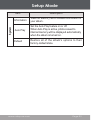
Setup Mode Enter the Setup mode to set your album’s system options. To enter Setup mode, select and confirm SETUP in the Main menu. To select an option, press enter, press . or . To confirm and Press screen. To exit the Setup Menu, press and hold to cancel and return to the previous . The Setup menu contains the following options: Photo, Music, Display, Language, Date & Time, and System. Music Photo Item Description Slide Delay Set the time interval between photos in slideshow mode (in seconds). Slide Effect Set the slide transition effects. Equalizer Set a digital equalizer preset (Normal, Classic, Jazz, Rock, Pop, Bass). Repeat Mode Set the Repeat playback mode: Normal (Play all tracks once) Repeat One (Repeat the current track) Repeat All (Repeat all tracks) Random (Shuffle all tracks). www.cobyusa.com Page 21