1
AXIS M31-VE Series - Video
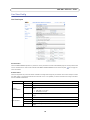
Live View Config
Live View Layout
Stream Profile
From the Stream Profile drop-down list, select the stream profile to be used for the Live View page. The stream profiles listed
are the standard ones as well as those created under Video > Stream Profiles. See the online help files
on this page for
more information.
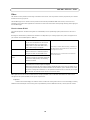
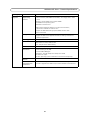
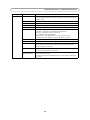
Default Viewer
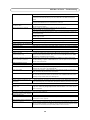
From the drop-down lists, select the default method for viewing video images for your browser. The camera attempts to show
the video images in the selected video format and viewer. If this is not possible, the camera overrides the settings and selects
the best available combination.
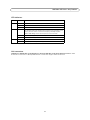
Browser
Windows
Internet Explorer
Other browsers
Viewer
Description
AMC
Recommended viewer in Windows Internet Explorer (H.264/Motion JPEG).
QuickTime
H.264.
Java applet
A slower imaging alternative to AMC. Requires one of the following installed on the
client:
• JVM (J2SE) 1.4.2 or higher
• JRE (J2SE) 5.0 or higher
Still image
Displays still images only. Hit the Refresh button in your browser to view a new
image.
Server Push
Recommended viewer for other browsers (Motion JPEG).
QuickTime
H.264.
Java applet
A slower imaging alternative to Server Push (Motion JPEG only).
Still image
Displays still images only. Hit the Refresh button in your browser to view a new
image.
16