1
EDS1100/2100 User Guide
Part Number 900-567
Revision A March 2010
Copyright and Trademark
© 2010 Lantronix. All rights reserved. No part of the contents of this book may be transmitted or
reproduced in any form or by any means without the written permission of Lantronix. Printed in the
United States of America.
Ethernet is a trademark of XEROX Corporation. UNIX is a registered trademark of The Open
Group. Windows 95, Windows 98, Windows 2000, and Windows NT are trademarks of Microsoft
Corp. Netscape is a trademark of Netscape Communications Corporation.
Warranty
For details on the Lantronix warranty replacement policy, please go to our web site at
www.lantronix.com/support/warranty.
Contacts
Lantronix Corporate Headquarters
167 Technology Drive
Irvine, CA 92618, USA
Toll Free: 800-526-8766
Phone:
949-453-3990
Fax:
949-450-7249
Technical Support
Online: www.lantronix.com/support
Sales Offices
For a current list of our domestic and international sales offices, go to the Lantronix web site at
www.lantronix.com/about/contact.
Disclaimer and Revisions
The information in this guide may change without notice. The manufacturer assumes no
responsibility for any errors that may appear in this guide. For the latest revision of this product
document, please check our online documentation at www.lantronix.com/support/documentation.
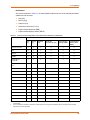
Compliance
This product has been designed to comply with the limits for a Class A digital device pursuant to
FCC Part 15 Subpart B and EN55024:1998 +A2: 2003. Rules when properly enclosed and
grounded. These limits are designed to provide reasonable protection against radio interference in
a residential installation. This equipment generates, uses, and can radiate radio frequency energy,
and if not installed and used in accordance with this guide, may cause interference to radio
communications. For more information, see Compliance on page 150.
Revision History
Date
Rev.
Comments
March 2010
A
Initial Document
EDS1100/2100 User Guide
2
Table of Contents
Copyright and Trademark ____________________________________________________ 2
Warranty _________________________________________________________________ 2
Contacts _________________________________________________________________ 2
Disclaimer and Revisions ____________________________________________________ 2
Compliance _______________________________________________________________ 2
Revision History ___________________________________________________________ 2
1: About This Guide
12
Chapter Summaries ________________________________________________________ 12
Conventions ______________________________________________________________ 13
Additional Documentation ___________________________________________________ 13
2: Overview
15
Key Product Features ______________________________________________________ 15
Applications ______________________________________________________________ 15
Protocol Support __________________________________________________________ 16
Evolution OS™____________________________________________________________ 16
Software Features _________________________________________________________ 16
Modem Emulation ______________________________________________________ 16
Web-Based Configuration and Troubleshooting _______________________________ 16
Command-Line Interface (CLI) ____________________________________________ 17
VIP Access ___________________________________________________________ 17
SNMP Management ____________________________________________________ 17
XML-Based Architecture and Device Control _________________________________ 17
Really Simple Syndication (RSS) __________________________________________ 17
Enterprise-Grade Security ________________________________________________ 17
Terminal Server/Device Management _______________________________________ 18
Troubleshooting Capabilities ______________________________________________ 18
Configuration Methods ______________________________________________________ 18
Addresses and Port Numbers ________________________________________________ 19
Hardware Address ______________________________________________________ 19
IP Address ____________________________________________________________ 19
Port Numbers _________________________________________________________ 19
Product Information Label ___________________________________________________ 19
3: Installation of EDS1100
20
Package Contents _________________________________________________________ 20
User-Supplied Items________________________________________________________ 20
Hardware Components _____________________________________________________ 20
Back Panel ___________________________________________________________ 22
Reset Button __________________________________________________________ 22
Top LEDs_____________________________________________________________ 22
Installing the EDS1100______________________________________________________ 23
EDS1100/2100 User Guide
3
Table of Contents
4: Installation of EDS2100
25
Package Contents _________________________________________________________ 25
User-Supplied Items________________________________________________________ 25
Hardware Components _____________________________________________________ 25
Back Panel ___________________________________________________________ 26
Reset Button __________________________________________________________ 27
Top LEDs_____________________________________________________________ 27
Installing the EDS2100______________________________________________________ 28
5: Using DeviceInstaller
30
Accessing EDS1100/2100 using DeviceInstaller __________________________________ 30
Device Details Summary ____________________________________________________ 30
6: Configuration Using Web Manager
32
Accessing Web Manager ____________________________________________________ 32
Device Status Page _____________________________________________________ 32
Web Manager_____________________________________________________________ 33
Navigating the Web Manager_________________________________________________ 34
7: Network Settings
37
Network 1 Interface Status___________________________________________________ 37
Network 1 Interface Configuration _____________________________________________ 38
Network 1 Ethernet Link_____________________________________________________ 39
8: Line and Tunnel Settings
41
Line Settings _____________________________________________________________ 41
Line Statistics _________________________________________________________ 41
Line Configuration ______________________________________________________ 42
Line Command Mode ___________________________________________________ 44
Tunnel Settings ___________________________________________________________ 46
Tunnel Statistics _______________________________________________________ 47
Serial Settings _________________________________________________________ 47
Packing Mode _________________________________________________________ 49
Accept Mode __________________________________________________________ 51
Connect Mode _________________________________________________________ 54
Multiple Hosts _________________________________________________________ 58
Host List Promotion _____________________________________________________ 61
Disconnect Mode _______________________________________________________ 61
Modem Emulation ______________________________________________________ 63
Command Mode ____________________________________________________ 63
EDS1100/2100 User Guide
4
Table of Contents
9: Terminal and Host Settings
67
Terminal Settings __________________________________________________________ 67
Network Terminal Configuration ___________________________________________ 67
Line Terminal Configuration ______________________________________________ 68
Host Configuration _________________________________________________________ 70
10: Services Settings
72
DNS Status and Cache _____________________________________________________ 72
PPP Configuration _________________________________________________________ 73
SNMP Configuration _______________________________________________________ 75
FTP ____________________________________________________________________77
TFTP ___________________________________________________________________ 78
Syslog __________________________________________________________________ 79
HTTP ___________________________________________________________________ 81
HTTP Statistics ________________________________________________________ 81
HTTP Configuration _____________________________________________________ 82
HTTP Authentication ____________________________________________________ 84
RSS ____________________________________________________________________85
LPD ____________________________________________________________________87
LPD Statistics _________________________________________________________ 87
LPD Configuration ______________________________________________________ 87
11: Security Settings
90
SSH Server Host Keys______________________________________________________ 90
SSH Server Authorized Users ________________________________________________ 92
SSH Client Known Hosts ____________________________________________________ 94
SSH Client User Configuration________________________________________________ 95
SSL Cipher Suites _________________________________________________________ 97
SSL Certificates ___________________________________________________________ 98
SSL RSA or DSA __________________________________________________________ 98
SSL Certificates and Private Keys _____________________________________________ 98
SSL Utilities ______________________________________________________________ 99
SSL Configuration _________________________________________________________ 99
12: VIP
103
Obtain a Bootstrap File ____________________________________________________ 103
Import the Bootstrap File ___________________________________________________ 103
Enable VIP ______________________________________________________________ 104
Configure Tunnels to Use VIP _______________________________________________ 104
VIP Statistics ____________________________________________________________ 104
VIP Configuration _________________________________________________________ 105
EDS1100/2100 User Guide
5
Table of Contents
13: Maintenance and Diagnostics Settings
107
Filesystem ______________________________________________________________ 107
Filesystem Statistics and Actions _________________________________________ 107
Filesystem Browser ____________________________________________________ 108
Protocol Stack ___________________________________________________________ 111
TCP ________________________________________________________________ 111
IP __________________________________________________________________ 112
ICMP _______________________________________________________________ 113
ARP ________________________________________________________________ 113
IP Address Filter__________________________________________________________ 115
Query Port ______________________________________________________________ 116
Diagnostics______________________________________________________________ 117
Hardware ____________________________________________________________ 117
MIB-II _______________________________________________________________ 118
IP Sockets ___________________________________________________________ 119
Ping ________________________________________________________________ 120
Traceroute ___________________________________________________________ 121
DNS Lookup _________________________________________________________ 122
Memory _____________________________________________________________ 124
Buffer Pools __________________________________________________________ 124
Processes ___________________________________________________________ 125
System _________________________________________________________________ 127
14: Advanced Settings
129
Email Statistics___________________________________________________________ 129
Email Configuration _______________________________________________________ 130
Command Line Interface ___________________________________________________ 131
CLI Statistics _________________________________________________________ 131
CLI Configuration______________________________________________________ 132
XML Configuration ________________________________________________________ 134
XML Export Configuration _______________________________________________ 135
Export Status _________________________________________________________ 136
Import Configuration ___________________________________________________ 138
15: Branding the EDS1100/2100
144
Web Manager Customization________________________________________________ 144
Short and Long Name Customization _________________________________________ 144
16: Updating Firmware
146
A: Technical Support
147
EDS1100/2100 User Guide
6
Table of Contents
B: Binary to Hexadecimal Conversions
148
Converting Binary to Hexadecimal____________________________________________ 148
Conversion Table _____________________________________________________ 148
Scientific Calculator ____________________________________________________ 149
C: Compliance
150
Index
153
EDS1100/2100 User Guide
7
List of Figures
Figure 3-1
EDS1100 DB25 (Female) Serial Port ___________________________________ 20
Figure 3-2
EDS1100 RS-232 Pinouts____________________________________________ 21
Figure 3-3
EDS1100 RS-422 (4-wire) Pinouts _____________________________________ 21
Figure 3-4
EDS1100 RS-485 (2-wire) Pinouts _____________________________________ 21
Figure 3-5
EDS1100 Back Panel _______________________________________________22
Figure 3-6
EDS1100 Top LEDs ________________________________________________ 23
Figure 3-7 EDS1100 Connections ________________________________________________ 24
Figure 4-1
EDS2100 Male DB9 DTE Serial Ports __________________________________ 25
Figure 4-2
EDS2100 Pinout Configuration for RS-232 _______________________________ 26
Figure 4-3
EDS2100 Pinout Configuration for RS-422 (4-wire) ________________________ 26
Figure 4-4
EDS2100 Pinout Configuration for RS-485 (2-wire) ________________________ 26
Figure 4-5
EDS2100 Ethernet RJ45 Port, Reset Button, and Power Plug ________________ 26
Figure 4-6
EDS2100 Top LEDs ________________________________________________ 27
Figure 4-7 EDS2100 Connections ________________________________________________ 29
Figure 6-1 Web Manager Home Page _____________________________________________ 33
Figure 6-2 Components of a Typical Web Manager Page ______________________________ 34
Figure 7-1 Network1 (eth0) Interface Status Web Page________________________________ 37
Figure 7-2 Network 1 (eth0) Interface Configuration Web Page _________________________ 38
Figure 7-4 Network1 (eth0) Ethernet Link Web Page__________________________________ 40
Figure 8-1 Line 1 Statistics Web Page _____________________________________________ 42
Figure 8-2 Line 1 Configuration Web Page _________________________________________ 43
Figure 8-4 Line 1 Command Mode Web Page _______________________________________ 45
Figure 8-6 Tunnel 1 Statistics Web Page ___________________________________________ 47
Figure 8-7 Tunnel 1 Serial Settings Web Page ______________________________________ 48
Figure 8-9 Tunnel 1 Packing Mode Web Page_______________________________________ 49
Figure 8-10 Tunnel 1 Packing Mode (Timeout) ______________________________________ 50
Figure 8-12 Tunnel 1 Packing Mode (Send Character) ________________________________ 51
Figure 8-14 Tunnel 1 Accept Mode Web Page ______________________________________ 53
Figure 8-16 Tunnel Connect Mode Page ___________________________________________ 55
Figure 8-18 Host Mode_________________________________________________________ 59
Figure 8-19 Host 2 Configuration Fields____________________________________________ 60
Figure 8-20 Host List Promotion __________________________________________________ 61
Figure 8-21 Tunnel 1 Disconnect Mode Web Page ___________________________________ 62
Figure 8-23 Tunnel 1 Modem Emulation Web Page __________________________________ 65
Figure 9-1 Terminal on Network Configuration Web Page ______________________________ 67
Figure 9-3 Terminal on Line 1 Configuration Web Page _______________________________ 69
Figure 9-5 Host Configuration Web Page___________________________________________ 70
Figure 10-1 DNS Status and Cache Web Page ______________________________________ 73
Figure 10-2 PPP Configuration Web Page __________________________________________ 74
Figure 10-3 SNMP Web Page ___________________________________________________ 76
Figure 10-4 FTP Web Page _____________________________________________________ 77
EDS1100/2100 User Guide
7
List of Figures
Figure 10-5 TFTP Server Web Page ______________________________________________ 78
Figure 10-6 Syslog Web Page ___________________________________________________ 80
Figure 10-7 HTTP Statistics Web Page ____________________________________________ 81
Figure 10-8 HTTP Configuration Web Page_________________________________________ 82
Figure 10-9 HTTP Authentication Web Page ________________________________________ 84
Figure 10-10 RSS Web Page ____________________________________________________ 86
Figure 10-11 LPD Web Page ____________________________________________________ 87
Figure 10-12 LPD Configuration Web Page _________________________________________ 88
Figure 11-1 SSH Server Host Keys Web Page ______________________________________ 91
Figure 11-2 SSH Server Authorized Users Web Page _________________________________ 93
Figure 11-3 SSH Client Known Hosts Web Page_____________________________________ 94
Figure 11-4 SSH Client Users Web Page __________________________________________ 96
Figure 11-5 SSL Web Page ____________________________________________________ 100
Figure 12-1 VIP Statistics Web Page _____________________________________________ 104
Figure 12-2 VIP Configuration Web Page _________________________________________ 106
Figure 13-1 Filesystem Statistics Web Page _______________________________________ 108
Figure 13-2 Filesystem Browser Web Page ________________________________________ 109
Figure 13-3 TCP Web Page ___________________________________________________ 111
Figure 13-4 IP Web Page ______________________________________________________ 112
Figure 13-5 ICMP Web Page ___________________________________________________ 113
Figure 13-6 ARP Web Page ____________________________________________________ 114
Figure 13-7 IP Address Filter Web Page __________________________________________ 115
Figure 13-8 Query Port Web Page _______________________________________________ 116
Figure 13-9 Hardware Web Page ________________________________________________ 118
Figure 13-10 MIB-II Web Page__________________________________________________ 119
Figure 13-11 IP Sockets Web Page ______________________________________________120
Figure 13-12 Ping Web Page ___________________________________________________ 121
Figure 13-13 Traceroute Web Page ______________________________________________122
Figure 13-14 DNS Lookup Web Page ____________________________________________ 123
Figure 13-15 Memory Web Page ________________________________________________ 124
Figure 13-16 Buffer Pools Web Page_____________________________________________ 125
Figure 13-17 Processes Web Page ______________________________________________126
Figure 13-18 System Web Page ________________________________________________ 127
Figure 14-1 Email Statistics Web Page ___________________________________________ 129
Figure 14-2 Email 1 Configuration Web Page ______________________________________ 130
Figure 14-3 CLI Statistics Web Page _____________________________________________ 132
Figure 14-4 CLI Configuration Web Page _________________________________________ 133
Figure 14-5 XML Export Configuration Web Page ___________________________________ 135
Figure 14-6 XML Export Status Web Page ________________________________________ 137
Figure 14-7 Import Configuration Web Page _______________________________________ 138
Figure 14-8 Import Configuration from External File Web Page_________________________139
Figure 14-9 Import Configuration from Filesystem Web Page __________________________ 140
Figure 14-10 Import Lines from Single Line Settings on the Filesystem Web Page _________ 142
EDS1100/2100 User Guide
8
List of Figures
Figure 15-1 EDS System Web Page _____________________________________________ 145
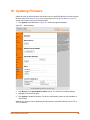
Figure 16-1 System Web Page _________________________________________________ 146
Figure B-2 Scientific Calculator _________________________________________________ 149
Figure B-3 Hex Display________________________________________________________ 149
EDS1100/2100 User Guide
9
List of Tables
Table 1-1 Chapter/Appendix and Summary _________________________________________ 12
Table 1-2 Conventions Used in This Book __________________________________________ 13
Table 3-1 EDS1100 LEDs and Descriptions ________________________________________ 23
Table 4-1 EDS2100 LEDs and Descriptions ________________________________________ 27
Table 5-1 Current Settings and Description _________________________________________ 30
Table 6-3 Summary of Web Manager Pages ________________________________________ 35
Table 7-3 Network 1 Interface Configuration Fields ___________________________________ 38
Table 7-5 Network 1 (eth0) Ethernet Link Fields _____________________________________ 40
Table 8-3 Line 1 Configuration Fields______________________________________________ 43
Table 8-5 Line 1 Command Mode Fields ___________________________________________ 45
Table 8-8 Tunnel 1 Serial Settings Fields___________________________________________ 48
Table 8-11 Tunnel Packing Mode (Timeout) Fields ___________________________________ 50
Table 8-13 Tunnel Packing Mode (Send Character) Fields _____________________________ 51
Table 8-15 Tunnel Accept Mode Fields ____________________________________________ 53
Table 8-17 Tunnel Connect Mode Fields ___________________________________________ 56
Table 8-22 Tunnel Disconnect Mode Fields _________________________________________ 62
Table 8-1 Modem Emulation Commands and Descriptions _____________________________ 63
Table 8-24 Tunnel Modem Emulation Fields ________________________________________ 65
Table 9-2 Terminal on Network Configuration Fields __________________________________ 68
Table 9-4 Terminal on Line 1 Configuration Fields____________________________________ 69
Table 9-6 Host Configuration Fields _______________________________________________71
Table 10-1 PPP Configuration Fields ______________________________________________ 75
Table 10-2 SNMP Fields _______________________________________________________ 76
Table 10-3 FTP Fields _________________________________________________________ 78
Table 10-4 TFTP Server Fields __________________________________________________ 79
Table 10-5 Syslog Fields _______________________________________________________ 80
Table 10-6 HTTP Configuration Fields _____________________________________________ 82
Table 10-7 HTTP Authentication Fields ____________________________________________ 84
Table 10-8 RSS Fields _________________________________________________________ 86
Table 10-9 LPD Configuration Fields ______________________________________________ 88
Table 11-1 SSH Server Host Keys Fields __________________________________________ 91
Table 11-2 SSH Server Authorized Users Fields _____________________________________ 93
Table 11-3 SSH Client Known Hosts Fields _________________________________________ 94
Table 11-4 SSH Client Users Fields _______________________________________________96
Table 11-1 Supported Cipher Suites ______________________________________________ 97
Table 11-5 SSL Fields ________________________________________________________ 101
Table 12-1 VIP Statistics Fields _________________________________________________ 105
Table 13-1 Filesystem Browser Fields ____________________________________________ 110
Table 13-2 TCP Fields ________________________________________________________ 111
Table 13-3 ARP Web Page Fields _______________________________________________ 114
Table 13-4 IP Address Filter Fields ______________________________________________115
EDS1100/2100 User Guide
10
List of Tables
Table 13-5 Ping Fields ________________________________________________________ 121
Table 13-6 Traceroute Fields ___________________________________________________ 122
Table 13-7 DNS Lookup Fields _________________________________________________ 123
Table 13-8 System Fields ______________________________________________________ 127
Table 14-1 Email 1 Configuration Fields __________________________________________ 131
Table 14-2 CLI Configuration Fields ______________________________________________133
Table 14-3 XML Export Configuration Fields _______________________________________ 135
Table 14-4 XML Export Status Fields _____________________________________________ 137
Table 14-5 Import Configuration from Filesystem Fields ______________________________ 140
Table 14-6 Import Lines from Single Line Settings Fields _____________________________ 142
Table B-1 Conversion Values___________________________________________________ 148
Table C-1 Lantronix Product Family Names and Toxic/Hazardous Substances and Elements _ 151
EDS1100/2100 User Guide
11
1: About This Guide
This guide describes how to configure, use, and update the EDS1100/2100. It is for software
developers and system integrators. This chapter contains the following sections:
Chapter Summaries
Conventions
Additional Documentation
Chapter Summaries
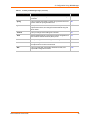
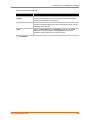
Table 1-1 lists and summarizes each chapter and appendixes.
Table 1-1
Chapter/Appendix and Summary
Chapter
Summary
2: Overview
Main features of the product and the protocols it
supports. Includes technical specifications.
3: Installation of EDS1100
Instructions for installing the EDS1100.
4: Installation of EDS2100
Instructions for installing the EDS2100.
5: Using DeviceInstaller
Instructions for viewing the current configuration using
DeviceInstaller.
6: Configuration Using Web Manager
Instructions for accessing Web Manager and using it to
configure settings for the EDS1100/2100.
7: Network Settings
Instructions for using the web interface to configure
Ethernet settings.
8: Line and Tunnel Settings
Instructions for using the web interface to configure
lines and tunnels.
9: Terminal and Host Settings
Instructions for using the web interface to configure
terminals and host settings.
10: Services Settings
Instructions for using the web interface to configure
settings for DNS, SNMP, FTP, and other services.
11: Security Settings
Description and configuration of SSH and SSL security
settings and instructions for using the web interface to
configure SSH and SSL security settings.
12: VIP
Information about Virtual IP (VIP) features available on
the EDS1100/2100 and instructions for configuring a
Virtual IP.
13: Maintenance and Diagnostics Settings
Instructions for using the web interface to maintain the
EDS1100/2100, view statistics, files, and logs, and
diagnose problems.
14: Advanced Settings
Instructions for using the web interface to configure
email, CLI, and XML settings.
15: Branding the EDS1100/2100
Description of PPP on the EDS1100/2100.
EDS1100/2100 User Guide
12
1: About This Guide
Table 1-1
Chapter/Appendix and Summary (continued)
Chapter
Summary
16: Updating Firmware
Instructions for obtaining the latest firmware and
updating the EDS1100/2100.
A: Technical Support
Instructions for contacting Lantronix Technical Support.
B: Binary to Hexadecimal Conversions
Instructions for converting binary values to
hexadecimals.
C: Compliance
Lantronix compliance information.
Conventions
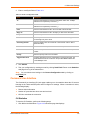
Table 1-2 lists and describes the conventions used in this book.
Table 1-2
Conventions Used in This Book
Convention
Description
Bold text
Default parameters.
Brackets [ ]
Optional parameters.
Angle Brackets < >
Possible values for parameters.
Pipe |
Choice of parameters.
Warning
Warning:
Means that you are in a situation that could
cause equipment damage or bodily injury. Before you work
on any equipment, you must be aware of the hazards
involved with electrical circuitry and familiar with standard
practices for preventing accidents.
Note
Note:
Means take notice. Notes contain helpful suggestions,
information, or references to material not covered in the publication.
Caution
Caution: Means you might do something that could result in faulty
equipment operation, or loss of data.
Screen Font
(Courier New)
CLI terminal sessions and examples of CLI input.
Additional Documentation
Visit the Lantronix web site at www.lantronix.com/support/documentation for the latest
documentation and the following additional documentation.
EDS1100/2100 Quick Start Guide—Instructions for getting the EDS1100/2100 configured
and up and running.
EDS1100/2100 Command Reference—Instructions for accessing Command Mode (the
command line interface) using a Telnet connection or through the serial port. Detailed
information about the commands. Also provides details for XML configuration and status.
DeviceInstaller Online Help—Instructions for using the Lantronix Windows-based utility to
locate the EDS1100/2100 and to view its current settings.
EDS1100/2100 User Guide
13
1: About This Guide
Com Port Redirector Quick Start and Online Help—Instructions for using the Lantronix
Windows-based utility to create virtual com ports.
Secure Com Port Redirector User Guide—Instructions for using the Lantronix Windowsbased utility to create secure virtual com ports.
EDS1100/2100 User Guide
14
2: Overview
The EDS1100/2100 Ethernet Device Server is a complete network-enabling solution. It empowers
original equipment manufacturers (OEMs) to go to market quickly and easily with Ethernet
networking and web page capabilities built into the products.
The EDS1100 and EDS2100 provide the same solution and differ only in the number of serial
ports. The EDS1100 has one serial port supported via a DB25 connector. The EDS2100 has two
serial ports supported via 2 DB9 connectors.
This chapter contains the following sections:
Key Product Features
Applications
Protocol Support
Evolution OS™
Software Features
Configuration Methods
Addresses and Port Numbers
Product Information Label
Key Product Features
Power Supply—Regulated 9 - 30 Vdc input required. There is a step-down converter to 1.5
volts for the processor core. All voltages have LC filtering to minimize noises and emissions.
Controller—A Lantronix DSTni-FX 32-bit microprocessor, running at 166 MHz internal bus and
83 MHz external bus.
Memory—8 MB Flash and 8 MB SDRAM. Please contact your sales representative if you
need larger memory sizes.
Ethernet—10/100 Mbps Ethernet transceiver.
Serial Ports—RS232/422/485 high-speed serial ports with all hardware handshaking signals.
Baud rate is software selectable (300 bps to 921600 bps).
Temperature Range—Operates over an extended temperature range of -40°C to +85°C.
Applications
The EDS1100/2100 device server connects the following types of serial devices to Ethernet
networks using the IP protocol family:
Security, alarm, and access control devices
Patient monitoring equipment
Medical instrumentation
Industrial Manufacturing/Automation systems
Building Automation equipment
Point of Sale Systems
EDS1100/2100 User Guide
15
2: Overview
ATM machines
Data display devices
Modem
Time/attendance clocks and terminals
Protocol Support
The EDS1100/2100 device server supports the following TCP/IP protocols:
ARP, IP, UDP, TCP, ICMP, BOOTP, DHCP, Auto IP, Telnet, DNS, FTP, TFTP, HTTP/HTTPS,
SSH, SSL/TLS, SNMP, SMTP, RSS, PPP and Syslog for network communications and
management.
TCP, UDP, TCP/AES, UDP/AES, Telnet, SSH and SSL/TLS for tunneling to the serial port.
TFTP, FTP, and HTTP for firmware upgrades and uploading files.
Evolution OS™
The EDS1100/2100 features the Lantronix Evolution OS™. Key features of the Evolution OS™
include:
Built-in Web server for configuration and troubleshooting from Web-based browsers
CLI configurability
SNMP management
XML data transport and configurability
Really Simple Syndication (RSS) information feeds
Enterprise-grade security with SSL and SSH
Comprehensive troubleshooting tools
Software Features
Modem Emulation
In modem emulation mode, the EDS1100/2100 can replace dial-up modems. The unit accepts
modem AT commands on the serial port, and then establishes a network connection to the end
device, leveraging network connections and bandwidth to eliminate dedicated modems and phone
lines.
Web-Based Configuration and Troubleshooting
Built upon Internet-based standards, the EDS1100/2100 enables configuration, management, and
troubleshooting by using a browser-based interface accessible anytime from anywhere. As a
result, downtime gets decreased by using the troubleshooting tools and by using the configuration
tools for configuration tasks.
EDS1100/2100 User Guide
16
2: Overview
Command-Line Interface (CLI)
Making the edge-to-enterprise vision a reality, the EDS1100/2100 with the Evolution OS™ uses
industry-standard tools for configuration, communication, and control. For example, the Evolution
OS™ uses a Command Line Interface (CLI) whose syntax is very similar to that used by data
center equipment such as routers and hubs.
VIP Access
Virtual IP Access is the Lantronix technology that solves the access-through-firewall problem. With
VIP Access, the EDS1100/2100 can act as a ManageLinx DSC and provide direct access to your
equipment behind a firewall.
SNMP Management
The EDS1100/2100 supports full SNMP management, making it ideal for applications where
device management and monitoring are critical. These features allow networks with SNMP
capabilities to correctly diagnose and monitor EDS1100/2100.
XML-Based Architecture and Device Control
XML is a fundamental building block for the future growth of M2M networks. The EDS1100/2100
supports XML-based configuration setup records that make device configuration transparent to
users and administrators. The XML is easily editable with a standard text or XML editor.
Really Simple Syndication (RSS)
The EDS1100/2100 supports Really Simple Syndication (RSS) for streaming and managing online content. RSS feeds all the configuration changes that occur on the device. An RSS aggregator
then reads (polls) the feed. More powerful than simple email alerts, RSS uses XML as an
underlying Web page transport and adds intelligence to the networked device, while not taxing
already overloaded email systems.
Enterprise-Grade Security
Evolution OS™ provides the EDS1100/2100 the highest level of networking security possible. This
‘data center grade’ protection ensures that each device on the M2M network carries the same
level of security as traditional IT networking equipment in the corporate data center.
By protecting the privacy of serial data transmitted across public networks, users can maintain
their existing investment in serial technology, while taking advantage of the highest data-protection
levels possible.
SSH and SSL can:
Verify the data received came from the proper source.
Validate that the data transferred from the source over the network has not changed when it
arrives at its destination (shared secret and hashing).
Encrypt data to protect it from prying eyes and nefarious individuals.
Provide the ability to run popular M2M protocols over a secure SSH or SSL connection.
In addition to keeping data safe and accessible, the EDS1100/2100 has robust defenses to hostile
Internet attacks such as denial of service (DoS), which can be used to take down the network.
Moreover, the EDS1100/2100 cannot be used to bring down other devices on the network.
EDS1100/2100 User Guide
17
2: Overview
You can use the EDS1100/2100 with the Lantronix Secure Com Port Redirector (SCPR) to
encrypt COM port-based communications between PCs and virtually any electronic device. SCPR
is a Windows application that creates a secure communications path over a network between the
computer and serial-based devices that are traditionally controlled via a COM port. With SCPR
installed at each computer, computers that were formerly “hard-wired” by serial cabling for security
purposes or to accommodate applications that only understood serial data can instead
communicate over an Ethernet network or the Internet.
Terminal Server/Device Management
Remote offices can have routers, PBXs, servers and other networking equipment that require
remote management from the corporate facility. The EDS1100/2100 easily attaches to the serial
ports on a server, Private Branch Exchange (PBX), or other networking equipment to deliver
central, remote monitoring and management capability.
Troubleshooting Capabilities
The EDS1100/2100 offers a comprehensive diagnostic toolset that lets you troubleshoot problems
quickly and easily. Available from the Web Manager, CLI, and XML interfaces, the diagnostic tools
let you:
View critical hardware, memory, MIB-II, buffer pool, and IP socket information.
Perform ping and traceroute operations.
Conduct forward or backup DNS lookup operations.
View all processes currently running on the EDS1100/2100, including CPU utilization and total
stack space available.
Configuration Methods
After installation, the EDS1100/2100 requires configuration. For the unit to operate correctly on a
network, it must have a unique IP address on the network. There are four basic methods for
logging into the EDS1100/2100 and assigning IP addresses and other configurable settings:
DeviceInstaller—Configure the IP address and related settings and view current settings on
the EDS1100/2100 using a PC GUI attached to a network. See Using DeviceInstaller on
page 30.
Web Manager—Use a web browser to configure the EDS1100/2100 settings using the
Lantronix Web Manager. See Configuration Using Web Manager on page 32.
Command Line Interface (CLI)—There are two methods for accessing CLI: making a Telnet
connection or connecting a terminal (or a PC running a terminal emulation program) to the
serial port. Refer to the EDS1100/2100 Command Reference Guide for instructions and
available commands.
XML—The EDS1100/2100 supports XML-based configuration and setup records that make
device configuration transparent to users and administrators. XML is easily editable with a
standard text or XML editor. Refer to the EDS1100/2100 Command Reference Guide for
instructions and available commands.
EDS1100/2100 User Guide
18
2: Overview
Addresses and Port Numbers
Hardware Address
The hardware address is also referred to as the Ethernet address or MAC address. The first three
bytes of the Ethernet address are fixed and read 00-20-4A, identifying the unit as a Lantronix
product. The fourth, fifth, and sixth bytes are unique numbers assigned to each unit. The following
sample shows a hardware address:
00-20-4A-14-01-18
or
00:20:4A:14:01:18
IP Address
Every device connected to an IP network must have a unique IP address. This address references
the specific unit.
Port Numbers
Every TCP connection and every UDP datagram is defined by a destination and source IP
address, and a destination and source port number. For example, a Telnet server commonly uses
port number 23.
The following is a list of the default server port numbers running on the EDS1100/2100:
TCP Port 22—SSH Server (Command Mode configuration)
TCP Port 23—Telnet Server (Command Mode configuration)
TCP Port 80—HTTP (Web Manager configuration)
TCP Port 443—HTTPS (Web Manager configuration)
UDP Port 161—SNMP
TCP Port 21—FTP
UDP Port 69—TFTP
UDP Port 30718—LDP (Lantronix Discovery Protocol) port
TCP/UDP Port 10001—Tunnel 1
TCP/UDP Port 10002—Tunnel 2
Product Information Label
The bottom of each unit (not shown) has a product information label. The label contains the
following information:
Product ID (name)
Product description
Bar code
Part number
Serial number (which is the hardware address, also referred to as Ethernet or MAC address)
Agency certifications
EDS1100/2100 User Guide
19
3: Installation of EDS1100
This chapter describes how to install the EDS1100 device server. It contains the following
sections:
Package Contents
User-Supplied Items
Hardware Components
Installing the EDS1100
Package Contents
The EDS1100 package includes the following items:
One EDS1100 device
One DB25M-to-DB9F serial cable
Power Cube, 100-240 VAC with international adapters
Power cord restraint
Printed Quick Start Guide
User-Supplied Items
To complete your installation, you need the following items:
RS-232/422/485 serial device that requires network connectivity.
A serial cable, as in the following list, for your serial device. One end of the cable must have a
male DB25 connector for the serial port.
-
A null modem cable to connect the serial port to a DCE device.
-
A straight-through modem cable, such as the one supplied in the package, to connect the
serial port to a DTE device.
An available connection to your Ethernet network and an Ethernet cable.
A working power outlet if the unit will be powered from an AC outlet.
Hardware Components
The EDS1100 has a female DB25 serial port that supports RS-232, RS-422, and RS-485 serial
devices. The default serial port settings are 9600 baud, 8 bits, no parity, 1 stop bit, no flow control.
Figure 3-1 shows the front panel.
Figure 3-1
EDS1100/2100 User Guide
EDS1100 DB25 (Female) Serial Port
20
3: Installation of EDS1100
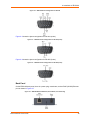
Figure 3-2 shows the RS-232 pinout configuration.
Figure 3-2
EDS1100 RS-232 Pinouts
Figure 3-3 shows the RS-422 (4-wire) pinout configuration.
Figure 3-3
EDS1100 RS-422 (4-wire) Pinouts
Figure 3-3 shows the RS-485 (2-wire) pinout configuration.
Figure 3-4
EDS1100/2100 User Guide
EDS1100 RS-485 (2-wire) Pinouts
21
3: Installation of EDS1100
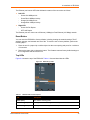
Back Panel
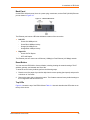
On the EDS1100 back panel, there is a power plug, reset button, and an RJ45 (10/100) Ethernet
port as shown in Figure 3-5.
Figure 3-5
EDS1100 Back Panel
The Ethernet port has two LEDs that indicate the status of the connection.
Left LED
-
Green ON 100Mbps Link
-
Green Blink 100Mbps Activity
-
Orange ON 10Mbps Link
-
Orange Blink 10Mbps Activity
Right LED
-
Green ON Full Duplex
-
OFF Half Duplex
The Ethernet port can connect to an Ethernet (10 Mbps) or Fast Ethernet (100 Mbps) network.
Reset Button
You can reset the EDS1100 to factory defaults, including clearing the network settings. The IP
address, gateway, and netmask are set to 00s.
To reset the unit to factory defaults, perform the following steps.
1. Place the end of a paper clip or similar object into the reset opening (back panel) and press for
a minimum of 3 seconds.
2. Remove the paper clip to release the button. The firmware restores factory default settings to
the configuration and reboots the unit.
Top LEDs
Figure 3-6 shows the top of the EDS1100 and Table 3-1 lists and describes the LEDs that are on
the top of the device.
EDS1100/2100 User Guide
22
3: Installation of EDS1100
Figure 3-6
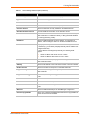
Table 3-1
EDS1100 Top LEDs
EDS1100 LEDs and Descriptions
LED
Description
Power (blue)
ON—EDS is receiving power
TX Serial (green)
Blinking—EDS is transmitting data on the serial port
RX Serial (yellow)
Blinking—EDS is receiving data on the serial port
Diagnostic
ON—EDS firmware has completed booting
Blinking 1x/sec—EDS firmware is booting
Blinking 2x/sec—EDS is writing a file to flash
Blinking 4x/sec—EDS is compacting the file system
Blinking 5x/sec—EDS is restoring factory defaults
Installing the EDS1100
Be sure to place the device on a flat horizontal or vertical surface. The device comes with
mounting brackets for mounting the device vertically, for example on a wall. If using AC power,
avoid outlets controlled by a wall switch.
Observe the following guidelines when connecting the serial devices:
The EDS1100 serial ports support RS-232/422/485 devices.
The null modem cable is the best cable to connect the serial port to a DCE device. The
straight-though (modem) cable is the best cable to connect the serial port to a DTE device.
Power-up the device by using the barrel-power connector only. The barrel-power connector
supports a power range of 9 to 30 VDC.
Note: As soon as you plug the device into power, the device powers up automatically,
the self-test begins, and Evolution OS™ starts.
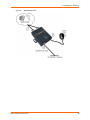
Perform the following steps to install your device. The steps are shown in Figure 3-7.
1. Connect a serial device to your unit.
EDS1100/2100 User Guide
23
3: Installation of EDS1100
2. Connect an Ethernet cable between the EDS1100 RJ45 port and your Ethernet network.
3. Plug the EDS1100 into the power outlet by using the power supply that was included in the
packaging. The required input voltage is 9-30 VDC (center +) with 1.5W maximum power
required.
4. Power up the serial device.
Figure 3-7
EDS1100 Connections
EDS1100/2100 User Guide
24
4: Installation of EDS2100
This chapter describes how to install the EDS2100 device server. It contains the following
sections:
Package Contents
User-Supplied Items
Hardware Components
Installing the EDS2100
Package Contents
The EDS2100 package includes the following items:
One EDS2100 device
One DB9F-to-DB9F serial null modem cable
Power Cube, 100-240 VAC with international adapters
Power cord restraint
Printed Quick Start Guide
User-Supplied Items
To complete your installation, you need the following items:
RS-232/422/485 serial devices that require network connectivity.
A serial cable, as listed below, for each serial device. One end of the cable must have a
female DB9 connector for the serial port.
-
A null modem cable, such as the one supplied in your EDS2100 package, to connect the
serial port to another DTE device.
-
A straight-through modem cable to connect the serial port to a DCE device.
An available connection to your Ethernet network and an Ethernet cable.
A working power outlet if the unit will be powered from an AC outlet.
Hardware Components
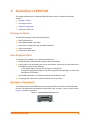
The EDS2100 has two male DB9 serial ports that support RS-232/422/485. Figure 4-1 shows the
front of the device. The default serial port settings are 9600 baud, 8 bits, no parity, 1 stop bit, no
flow control.
Figure 4-1
EDS2100 Male DB9 DTE Serial Ports
The RS-232 pinout configuration is shown in Figure 4-2.
EDS1100/2100 User Guide
25
4: Installation of EDS2100
Figure 4-2
EDS2100 Pinout Configuration for RS-232
Figure 4-3 shows the pinout configuration for RS-422 (4-wire).
Figure 4-3
EDS2100 Pinout Configuration for RS-422 (4-wire)
Figure 4-4 shows the pinout configuration for RS-485 (2-wire).
Figure 4-4
EDS2100 Pinout Configuration for RS-485 (2-wire)
Back Panel
On the EDS2100 back panel, there is a power plug, reset button, and an RJ45 (10/100) Ethernet
port as shown in Figure 4-5.
Figure 4-5
EDS1100/2100 User Guide
EDS2100 Ethernet RJ45 Port, Reset Button, and Power Plug
26
4: Installation of EDS2100
The Ethernet port has two LEDs that indicate the status of the connection as follows:
Left LED
-
Green ON 100Mbps Link
-
Green Blink 100Mbps Activity
-
Orange ON 10Mbps Link
-
Orange Blink 10Mbps Activity.
Right LED
-
Green ON Full Duplex.
-
OFF Half Duplex
The Ethernet port can connect to an Ethernet (10 Mbps) or Fast Ethernet (100 Mbps) network.
Reset Button
You can reset the EDS2100 to factory defaults, including clearing the network settings. The IP
address, gateway, and netmask are set to 00s. To reset the unit to factory defaults, perform the
following steps.
1. Place the end of a paper clip or similar object into the reset opening and press for a minimum
of 3 seconds.
2. Remove the paper clip to release the button. The firmware restores factory default settings to
the configuration and reboots the unit.
Top LEDs
Figure 4-6 shows the top of the EDS2100. Table 4-1 lists and describes the LEDs.
Figure 4-6
Table 4-1
EDS2100 Top LEDs
EDS2100 LEDs and Descriptions
LED
Description
Power (blue)
ON—EDS is receiving power
TX Serial 1 (green)
Blinking—EDS is transmitting data on serial port 1
RX Serial 1 (yellow)
Blinking—EDS is receiving data on serial port 1
EDS1100/2100 User Guide
27
4: Installation of EDS2100
Table 4-1
EDS2100 LEDs and Descriptions (continued)
LED
Description
TX Serial 2 (green)
Blinking—EDS is transmitting data on serial port 2
RX Serial 2 (yellow)
Blinking—EDS is receiving data on serial port 2
Diagnostic
ON—EDS firmware has completed booting
Blinking 1x/sec—EDS firmware is booting
Blinking 2x/sec—EDS is writing a file to flash
Blinking 4x/sec—EDS is compacting the file system
Blinking 5x/sec— EDS is restoring factory defaults
Installing the EDS2100
Be sure to place the device on a flat horizontal or vertical surface. The device comes with
mounting brackets for mounting the device vertically, for example on a wall. If using AC power,
avoid outlets controlled by a wall switch.
Observe the following guidelines when connecting the serial devices:
The EDS2100 serial ports support RS-232/422/485 devices.
The null modem cable is the best cable to connect the serial port to another DTE device. The
straight-though (modem) cable is the best cable to connect the serial port to a DCE device.
Power-up the device by using the Barrel-power connector only. The barrel-power connector
supports a power range of 9 to 30 VDC.
Note: As soon as you plug the device into power, the device powers up automatically,
the self-test begins, and Evolution OS™ starts.
Perform the following steps to install your device which are numbered in Figure 4-7 also.
1. Connect a serial device to your unit.
2. Connect an Ethernet cable between the EDS2100 RJ45 port and your Ethernet network.
3. Plug the EDS2100 into the power outlet by using the power supply that was included in the
packaging. The required input voltage is 9-30 VDC (center +) with1.5W maximum power
required.
4. Power up the serial devices.
EDS1100/2100 User Guide
28
4: Installation of EDS2100
Figure 4-7
EDS2100 Connections
EDS1100/2100 User Guide
29
5: Using DeviceInstaller
This chapter covers the steps for locating a EDS1100/2100 unit and viewing its properties and
device details. It contains the following sections:
Accessing EDS1100/2100 using DeviceInstaller
Device Details Summary
DeviceInstaller is a free utility program provided by Lantronix that discovers, configures, upgrades,
and manages Lantronix Device Servers. It can be downloaded from the Lantronix website at
www.lantronix.com/support/downloads.html. For instructions on using DeviceInstaller to configure
the IP address and related settings or for more advanced features, see the DeviceInstaller online
Help.
Note: AutoIP generates a random IP address in the range of 169.254.0.1 to
169.254.255.254 if no BOOTP or DHCP server is found.
Accessing EDS1100/2100 using DeviceInstaller
Note: Keep a record of the MAC address because the MAC address is required to
locate the EDS1100/2100 using DeviceInstaller.
1. Click Start > All Programs > Lantronix > DeviceInstaller > DeviceInstaller. When
DeviceInstaller starts, it performs a network device search. To perform another search, click
the Search button.
2. Expand the EDS folder by clicking the plus (+) symbol next to the folder icon. The list of
available Lantronix EDS1100 and EDS2100 devices displays.
3. Select the EDS1100 or EDS2100 by expanding its entry and clicking on its hardware (MAC)
address to view its configuration.
4. Click the Device Details tab, on the right. The current EDS1100/2100 configuration displays.
This is only a subset of the complete configuration; access the complete configuration by
using the Web Manager, CLI, or XML.
Device Details Summary
Table 5-1 lists and describes the display only settings unless otherwise noted.
Table 5-1
Current Settings and Description
Current Settings
Description
Name
Name identifying the EDS1100/2100.
Group
Configurable field. Enter a group to categorize the EDS1100/2100.
Double-click the field, type in the value, and press Enter to complete.
This group name is local to this PC and is not visible on other PCs or
laptops using DeviceInstaller.
Comments
Configurable field. Enter comments for the EDS1100/2100. Doubleclick the field, type in the value, and press Enter to complete. This
description or comment is local to this PC and is not visible on other
PCs or laptops using DeviceInstaller.
EDS1100/2100 User Guide
30
5: Using DeviceInstaller
Table 5-1
Current Settings and Description (continued)
Current Settings
Description
Device Family
Shows the EDS1100/2100 device family type as “EDS”.
Type
Shows the device type as either EDS1100 or 2100.
ID
Shows the EDS1100 or 2100 ID embedded within the unit.
Hardware Address
Shows the EDS1100/2100 hardware (MAC) address.
Firmware Version
Shows the firmware currently installed on the EDS1100/2100.
Extended Firmware Version
Provides additional information on the firmware version.
Online Status
Shows the EDS1100/2100 status as Online, Offline, Unreachable (the
EDS1100/2100 is on a different subnet), or Busy (the EDS1100/2100
is currently performing a task).
IP Address
Shows the EDS1100/2100 current IP address. To change the IP
address, click the Assign IP button on the DeviceInstaller menu bar.
IP Address was Obtained
Displays dynamically if the EDS1100/2100 automatically received an
IP address (e.g., from DHCP). Displays statically if the IP address was
configured manually.
If the IP address was assigned dynamically, the following fields
appear:
Obtain via DHCP with values of True or False.
Obtain via BOOTP with values of True or False.
Subnet Mask
Shows the subnet mask specifying the network segment on which the
EDS1100/2100 resides.
Gateway
Shows the IP address of the router of this network. There is no default.
Number of Ports
Shows the number of serial ports on this EDS1100/2100.
Supports Configurable Pins
Shows False, indicating that configurable pins are not available on the
EDS1100/2100.
Supports Email Triggers
Shows True, indicating email triggers are available on the EDS1100/
2100.
Telnet Enabled
Indicates whether Telnet is enabled on this EDS1100/2100.
Telnet Port
Shows the EDS1100/2100 port for Telnet sessions.
Web Enabled
Indicates whether Web Manager access is enabled on this EDS1100/
2100.
Web Port
Shows the EDS1100/2100 port for Web Manager configuration.
Firmware Upgradeable
Shows True, indicating the EDS1100/2100 firmware is upgradeable as
newer versions become available.
EDS1100/2100 User Guide
31
6: Configuration Using Web Manager
This chapter describes how to configure the EDS1100/2100 by using Web Manager, the Lantronix
browser-based configuration tool. The configuration is stored in nonvolatile memory and is
retained without power. All changes take effect immediately, unless otherwise noted. It contains
the following sections:
Accessing Web Manager
Web Manager
Navigating the Web Manager
Accessing Web Manager
Note: You can also access the Web Manager by selecting the Web Configuration tab on
the DeviceInstaller window.
To access the Web Manager, perform the following steps.
1. Open a standard web browser. Lantronix supports the latest version of Internet Explorer,
Mozilla Suite, Mozilla Firefox, or Opera.
2. Enter the IP address of the EDS1100/2100 in the address bar. The IP address may have been
assigned manually using DeviceInstaller or the serial port (see the EDS1100/2100 Quick Start
Guide) or automatically by DHCP.
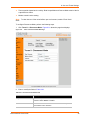
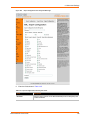
3. Enter your username and password.The factory-default username is “admin” and the factorydefault password is “PASS.” The Device Status web page shown in Figure 6-1 displays
configuration, network settings, line settings, tunneling settings, and product information.
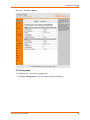
Device Status Page
The Device Status page is the first page that appears after you log into the Web Manager. It also
appears when you click Status in the Main Menu.
EDS1100/2100 User Guide
32
6: Configuration Using Web Manager
Figure 6-1
Web Manager Home Page
Web Manager
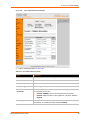
Figure 6-2 shows the components of a typical Web Manager page.
EDS1100/2100 User Guide
33
6: Configuration Using Web Manager
Figure 6-2
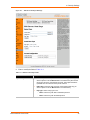
Components of a Typical Web Manager Page
The Menu Bar (orange) always appears at the left side of the web page. There are accessible
sections listed in the Main Menu, such as CLI, Diagnostics, Protocol Stack, etc. To display one of
these sections, click it.
The Help displays on the right side of the web page and contains information or instructions
associated with the page.
The center of a web page contains the following additional sections:
At the top, there are links to configurable fields. The links often indicate the configurable field,
for example, Line, Host, or Tunnel.
In the middle, you can select or enter new configuration settings. Some pages display
statistics or status in this area rather than allow you to enter settings.
At the bottom, the current configuration displays. In some cases, you can reset or clear a
setting.
At the very bottom, the copyright information displays with a link to the Lantronix home page.
Navigating the Web Manager
The Web Manager provides an intuitive point-and-click interface. A menu bar on the left side of
each page provides links you can click to navigate from one page to another. Some pages are
read-only, while others let you change configuration settings.
EDS1100/2100 User Guide
34
6: Configuration Using Web Manager
Note: There may be times when you must reboot the EDS1100/2100 for the new
configuration settings to take effect. The chapters that follow indicate when a change
requires a reboot.
Table 6-3
Summary of Web Manager Pages
Web Manager Page
Description
Page
Status
Shows product information and network, line, and tunneling
settings.
33
CLI
Shows Command Line Interface (CLI) statistics and lets you
change the current CLI configuration settings.
131
Diagnostics
Lets you perform various diagnostic procedures.
107
DNS
Shows the current configuration of the DNS subsystem and the
DNS cache.
73
Email
Shows email statistics and lets you clear the email log, configure
email settings, and send an email.
129
Filesystem
Shows file system statistics and lets you browse the file system
to view a file, create a file or directory, upload files using HTTP,
copy a file, move a file, or perform TFTP actions.
108
FTP
Shows statistics and lets you change the current configuration for
the File Transfer Protocol (FTP) server.
77
Host
Lets you view and change settings for a host on the network.
70
HTTP
Shows HyperText Transfer Protocol (HTTP) statistics and lets
you change the current configuration and authentication settings.
81
IP Address Filter
Lets you specify all the IP addresses and subnets that are
allowed to send data to this device.
115
Line
Shows statistics and lets you change the current configuration
and Command mode settings of a serial line.
42
LPD
Shows LPD (Line Printer Daemon) Queue statistics and lets you
configure the LPD and print a test page.
87
Network
Shows status and lets you configure the network interface.
37
PPP
Lets you configure a network link using Point-to-Point Protocol
(PPP) over a serial line.
74
Protocol Stack
Lets you perform lower level network stack-specific activities.
111
Query Port
Lets you change configuration settings for the query port.
116
RSS
Lets you change current Really Simple Syndication (RSS)
settings.
86
SNMP
Lets you change the current Simple Network Management
Protocol (SNMP) configuration settings.
76
SSH
Lets you change the configuration settings for SSH server host
keys, SSH server authorized users, SSH client known hosts, and
SSH client users.
91
EDS1100/2100 User Guide
35
6: Configuration Using Web Manager
Table 6-3
Summary of Web Manager Pages (continued)
Web Manager Page
Description
Page
SSL
Lets you upload an existing certificate or create a new self-signed
certificate.
100
Syslog
Lets you specify the severity of events to log and the server and
ports to which the syslog should be sent.
80
System
Lets you reboot the EDS1100/2100, restore factory defaults,
upload new firmware, and change the EDS1100/2100 long and
short names.
127
Terminal
Lets you change current settings for a terminal.
67
TFTP
Shows statistics and lets you change the current configuration for
the Trivial File Transfer Protocol (TFTP) server.
78
Tunnel
Lets you change the current configuration settings for a tunnel.
47
VIP
Lets you configure Virtual IP addresses to be used in Tunnel
Accept Mode and Tunnel Connect Mode.
104
XML
Lets you export XML configuration and status records, and
import XML configuration records.
135
EDS1100/2100 User Guide
36
7: Network Settings
This chapter describes how to access, view, and configure network settings from the Network web
page. The Network web page contains sub-menus that enable you to view and configure the
aspects of your network.
This chapter contains the following sections:
Network 1 Interface Status
Network 1 Interface Configuration
Network 1 Ethernet Link
Network 1 Interface Status
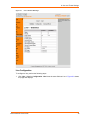
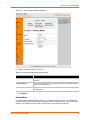
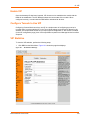
To view the Network 1 interface status, perform the following steps.
1. Click Network on the Main Menu. Figure 7-1 shows the page that displays.
Figure 7-1
Network1 (eth0) Interface Status Web Page
EDS1100/2100 User Guide
37
7: Network Settings
Network 1 Interface Configuration
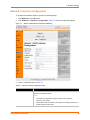
To configure the Network interface, perform the following steps.
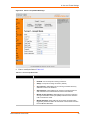
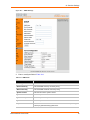
1. Click Network on the Main Menu.
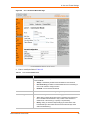
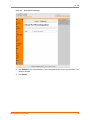
2. Click Network 1 > Interface > Configuration. Figure 7-2 shows the page that displays.
Figure 7-2
Network 1 (eth0) Interface Configuration Web Page
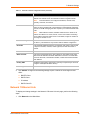
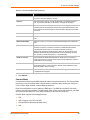
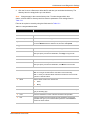
3. Enter or modify the fields in Table 7-3.
Table 7-3
Network 1 Interface Configuration Fields
Field
Description
BOOTP Client
Select On or Off. At boot up the EDS1100/2100 will attempt to obtain an IP
address from a BOOTP server.
Notes:
EDS1100/2100 User Guide
Overrides the configured IP address, network mask, gateway,
hostname, and domain.
When DHCP is On, the system automatically uses DHCP, regardless of
whether BOOTP Client is On.
38
7: Network Settings
Table 7-3
Network 1 Interface Configuration Fields (continued)
Field
Description
DHCP Client
Select On or Off. At boot up the EDS1100/2100 will attempt to lease an IP
address from a DHCP server and maintain the lease at regular intervals.
Note:
Overrides BOOTP, the configured IP address, network mask,
gateway, hostname, and domain.
IP Address
Enter the EDS1100/2100 static IP address. You may enter it alone, in CIDR
format, or with an explicit mask. The IP address is used if BOOTP and DHCP
are both set to Off. Changing this value requires you to reboot the EDS1100/
2100.
Note:
When DHCP is enabled, the EDS1100/2100 tries to obtain an IP
address from DHCP. If it cannot, AutoIP, a server-less method of selecting
the IP address when the DHCP server is unavailable, assigns an address in
the range of 169.254.xxx.xxx.
Default Gateway
Enter the IP address of the router for this network. Or clear the field (appears
as <None>). This address is only used for static IP address configuration.
Hostname
Enter the EDS1100/2100 hostname. It must begin with a letter, continue with
a sequence of letters, numbers, and/or hyphens, and end with a letter or
number.
Domain
Enter the domain name.
DHCP Client ID
Enter the ID if the DHCP server uses a DHCP ID. The DHCP server lease
table shows IP addresses and MAC addresses for devices. The lease table
shows the Client ID, in hexadecimal notation, instead of the EDS1100/2100
MAC address.
Primary DNS
IP address of the primary name server. This entry is required if you choose to
configure a DNS (Domain Name Server).
Secondary DNS
IP address of the secondary DNS.
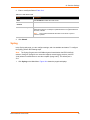
4. Click Submit. Changes to the following settings require a reboot for the changes to take
effect:
BOOTP Client
DHCP Client
IP address
DHCP Client ID
Network 1 Ethernet Link
To display and change settings in the Network 1 Ethernet Link web page, perform the following
steps.
1. Click Network on the Main Menu.
EDS1100/2100 User Guide
39
7: Network Settings
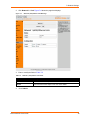
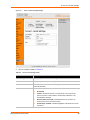
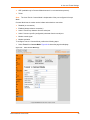
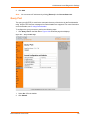
2. Click Network 1 > Link. Figure 7-4 shows the page that displays.
Figure 7-4
Network1 (eth0) Ethernet Link Web Page
3. Enter or modify the fields in Table 7-5.
Table 7-5
Network 1 (eth0) Ethernet Link Fields
Field
Description
Speed
Select the Ethernet link speed. Auto is the default.
Duplex
Select the Ethernet link duplex mode. Auto is the default.
4.
Click Submit.
EDS1100/2100 User Guide
40
8: Line and Tunnel Settings
This chapter describes how to view and configure lines and tunnels. It contains the following
sections:
Line Settings
Tunnel Settings
Line Settings
You can view statistics and configure the serial interfaces (referred to as lines) by using the Line
web page. When you click Line from the Main Menu, Line 1 fields display. To go to Line 2, click
the Line 2 button.
The following sub-menus you can use:
Line Statistics—Displays statistics for the two lines. For example, the bytes received and
transmitted, breaks, flow control, parity errors, etc.
Line Configuration—Enables the change of the name, interface, protocol, baud rates, and
parity, etc.
Line Command Mode—Enables the types of modes, wait time, serial strings, signon
message, etc.
Line Statistics
To display the line statistics, perform the following steps.
1. Click Line on the Main Menu. Figure 8-1 shows the page that displays.
EDS1100/2100 User Guide
41
8: Line and Tunnel Settings
Figure 8-1
Line 1 Statistics Web Page
Line Configuration
To configure a line, perform the following steps.
1. Click Line > Line 1 > Configuration. Line 2 has the same fields as Line 1. Figure 8-2 shows
the page that displays.
EDS1100/2100 User Guide
42
8: Line and Tunnel Settings
Figure 8-2
Line 1 Configuration Web Page
2. Enter or modify the fields in Table 8-3.
Table 8-3
Line 1 Configuration Fields
Field
Description
Name
Enter a name for the line.
Interface
Select the interface type from the drop-down menu. The default is RS232.
State
Indicates whether the current line is enabled. To change the status, select
Enabled or Disabled from the drop-down menu.
Protocol
Select the protocol from the drop-down menu. The default is Tunnel.
Note:
All protocols work in Connect and Accept Mode except the LPD or
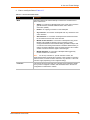
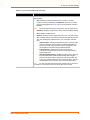
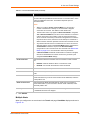
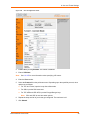
Tunnel protocol option which is supported only in Accept Mode.
Baud Rate
Select the baud rate from the drop-down menu. The default is 9600.
Parity
Select the parity from the drop-down menu. The default is None.
Data Bits
Select the number of data bits from the drop-down menu. The default is 8.
Stop Bits
Select the number of stop bits from the drop-down menu. The default is 1.
EDS1100/2100 User Guide
43
8: Line and Tunnel Settings
Table 8-3
Line 1 Configuration Fields (continued)
Field
Description
Flow Control
Select the flow control from the drop-down menu. The default is None.
Xon Char
Specify the character to use to start the flow of data when Flow Control is set
to Software. Prefix a decimal character with \ or a hexadecimal character with
0x, or provide a single printable character. The default Xon char is 0x11.
Xoff Char
Specify the character to use to stop the flow of data when Flow Control is set
to Software. Prefix a decimal character with \ or a hexadecimal character with
0x, or provide a single printable character. The default Xoff char is 0x13.
Gap Timer
The driver forwards received serial bytes after the Gap Timer delay from the
last character received. By default, the delay is four character periods at the
current baud rate (minimum 1 ms).
Threshold
The driver will also forward received characters after Threshold bytes have
been received.
3. Click Submit.
Line Command Mode
To configure the Command Mode, perform the following steps.
1. Click Line > Line 1 > Command Mode. Figure 8-4 shows the page that displays.
EDS1100/2100 User Guide
44
8: Line and Tunnel Settings
Figure 8-4
Line 1 Command Mode Web Page
2. Enter or modify the fields in Table 8-5.
Table 8-5
Line 1 Command Mode Fields
Field
Description
Mode
Select the method of enabling Command Mode or choose to disable
Command Mode.
Always—Immediately enables Command Mode for the serial line.
Use Serial String—Enables Command Mode when the serial string is
read on the serial line during boot time.
Disabled—Turns off Command Mode.
Wait Time
Enter the wait time for the serial string during boot-up in milliseconds.
Serial String
Enter the serial string characters. Select a string type.
EDS1100/2100 User Guide
Text—String of bytes that must be read on the Serial Line during boot
time to enable Command Mode. It may contain a time element in x
milliseconds, in the format {x}, to specify a required delay.
Binary—String of characters representing byte values where each
hexadecimal byte value starts with \0x and each decimal byte value
starts with backslash (\).
45
8: Line and Tunnel Settings
Table 8-5
Line 1 Command Mode Fields (continued)
Field
Description
Echo Serial String
Select Yes to enable echoing of the serial string at boot-up.
Signon Message
Enter the boot-up signon message. Select a string type.
Text—String of bytes sent on the serial line during boot time.
Binary—One or more byte values separated by commas. Each byte
value may be decimal or hexadecimal. Start hexadecimal values with
0x.
Note:
This string gets output on the serial port at boot, regardless of
whether command mode is enabled or not.
3. Click Submit.
Tunnel Settings
Tunneling allows serial devices to communicate over a network, without “being aware” of the
devices which establish the network connection between them. When any character is transmitted
to the serial port, it gets copied to the network connection.
Tunneling parameters are configured using the Web Manager (see Tunnel Settings on page 46) or
CLI Tunnel Menu (refer to the EDS1100/2100 Command Reference) for the full list of commands.)
The EDS1100/2100 supports two connections simultaneously per serial port. One of the
connections is Connect Mode and the other connection is Accept Mode. The connections on one
serial port are separate from those on the other serial port.
Connect Mode—Makes an active connection. The receiving node on the network must listen
for the Connect Mode connection. Connect Mode is disabled by default.
Accept Mode—Listens for a connection. A node on the network initiates the connection.
Accept Mode is enabled by default.
Disconnect Mode—Defines how an open connection stops the forwarding of data. The specific
parameters to stop the connection are configurable. Once a defined event occurs, the
EDS1100/2100 disconnects Accept Mode and Connect Mode connections on that port.
You can view statistics and configure two tunnels by using the Tunnel web page. When you click
Tunnel from the Main Menu, Tunnel 1 fields display. To go to Tunnel 2, click the Tunnel 2 button.
There are six sub-menus that you can use as follows:
Statistics—Displays statistics for the two lines. For example, completed accepts, completed
connects, disconnects, dropped accepts, dropped connects, etc.
Serial Settings—Configures buffer size and DTR.
Connect Mode—Controls how a tunnel behaves when a connection attempt originates
locally.
Accept Mode—Controls how a tunnel behaves when a connection attempt originates from the
network.
Disconnect Mode—Relates to the disconnect of a tunnel.
Packing Mode—Sends packed data that is queued in larger chunks instead of sending it
immediately after being read on the serial line.
Modem Emulation—Initiates and accepts tunnel connections using the AT commands.
EDS1100/2100 User Guide
46
8: Line and Tunnel Settings
Tunnel Statistics
The EDS1100/2100 logs tunneling statistics. The Dropped statistic shows connections ended by
the remote location. The Disconnects statistic shows connections ended by the EDS1100/2100.
To display the tunnel statistics, perform the following steps.
1. Click Tunnel on the Main Menu. Figure 8-6 shows the page that displays.
Figure 8-6
Tunnel 1 Statistics Web Page
Serial Settings
Serial line settings are configurable for both serial line 1 and serial line 2. Configure the buffer size
to change the maximum amount of data the serial port stores. For any active connection, the
EDS1100/2100 sends the data in the buffer.
The modem control signal DTR on the Line may be continually asserted or asserted only while
either an Accept Mode tunnel or a Connect Mode tunnel is connected.
To configure the serial settings, perform the following steps.
1. Click Tunnel > Tunnel 1 > Serial Settings. Figure 8-7 shows the page that displays.
EDS1100/2100 User Guide
47
8: Line and Tunnel Settings
Figure 8-7
Tunnel 1 Serial Settings Web Page
2. View or modify the fields in Table 8-8.
Table 8-8
Tunnel 1 Serial Settings Fields
Fields
Description
Line Settings
Display only field. Current serial settings for the line.
Protocol
Display only field. The protocol being used for the tunnel.
Buffer Size
Enter the buffer size used for the tunneling of serial data received. Requires
reboot to take effect.
DTR
Select when to assert DTR.
EDS1100/2100 User Guide
Unasserted
TruPort—Asserted whenever a connect mode or an accept mode
tunnel connection is active with the Telnet Protocol RFC2217. The
remote DSR is asserted.
Asserted while connected—Asserted whenever a connect or an
accept mode tunnel connection is active.
Continuously asserted—Asserted regardless of the status of a tunnel
connection.
48
8: Line and Tunnel Settings
3. Click Submit.
Packing Mode
Packing Mode takes data from the serial port, packs it together, and sends over the network.
Packing can be configured based on threshold (size in bytes) or timeout (milliseconds).
Size is set by modifying the threshold field. When the number of bytes exceeds the threshold, a
packet is sent.
The timeout field is used to force a packet to be sent after a maximum time. The packet is sent
even if the threshold maximum is not reached.
When Send Character is configured, there is an optional trailing character parameter which can be
specified. It can be a single printable character or a control character.
To configure the tunnel packing mode, perform the following steps.
1. Click Tunnel > Tunnel 1 > Packing Mode. Figure 8-12 shows the page that displays.
Figure 8-9
Tunnel 1 Packing Mode Web Page
2. Click Timeout. Figure 8-12 shows the page that displays.
EDS1100/2100 User Guide
49
8: Line and Tunnel Settings
Figure 8-10
Tunnel 1 Packing Mode (Timeout)
3. Enter or modify the fields in Table 8-11.
Table 8-11 Tunnel Packing Mode (Timeout) Fields
Field
Description
Threshold
Send the queued data when the number of queued bytes reaches the
threshold.
Timeout
Enter a time, in milliseconds, for the EDS1100/2100 to send the queued data
after the first character was received.
4. Click Submit.
5. Click Send Character. Figure 8-12 shows the page that displays.
EDS1100/2100 User Guide
50
8: Line and Tunnel Settings
Figure 8-12
Tunnel 1 Packing Mode (Send Character)
6. Enter or modify the fields in Table 8-13.
Table 8-13 Tunnel Packing Mode (Send Character) Fields
Field
Description
Threshold
Send the queued data when the number of queued bytes reaches the
threshold.
Send Character
Enter the send character. Upon receiving this character, the EDS1100/2100
sends out the queued data.
Trailing Character
Enter the trailing character. This character is sent immediately following the
send character.
7. Click Submit.
Accept Mode
In Accept Mode, the EDS1100/2100 waits for a connection from the network. The configurable
local port is the port the remote device connects to for this connection. There is no remote port or
address. The default local port is 10001 for serial port 1 and 10002 for serial port 2.
EDS1100/2100 User Guide
51
8: Line and Tunnel Settings
Accept Mode supports the following protocols:
SSH (EDS1100/2100 acts as the server). When using SSH, the SSH server host keys and at
least one SSH authorized user must be configured.
SSL
TCP
AES encryption over TCP
Telnet (EDS1100/2100 supports IAC codes. It drops the IAC codes when Telnetting and does
not forward them to the serial port).
Accept Mode has the following states:
Disabled (never a connection)
Enabled (always listening for a connection)
Active if it receives any character from the serial port
Active if it receives a specific (configurable) character from the serial port (same start
character as Connect Mode’s start character)
Modem control signal
Modem emulation
To configure Accept Mode, perform the following steps.
1. Click Tunnel 1 > Accept Mode. Figure 8-14 shows the page displays.
EDS1100/2100 User Guide
52
8: Line and Tunnel Settings
Figure 8-14 Tunnel 1 Accept Mode Web Page
2. Enter or modify the fields in Table 8-15.
Table 8-15 Tunnel Accept Mode Fields
Field
Description
Mode
Select the method used to start a tunnel in Accept mode. Choices are:
EDS1100/2100 User Guide
Disabled—Do not accept an incoming connection.
Always—Accept an incoming connection. (default)
Any Character—Start waiting for an incoming connection when any
character is read on the serial line.
Start Character—Start waiting for an incoming connection when the
start character for the selected tunnel is read on the serial line.
Modem Control Asserted—Start waiting for an incoming connection
as long as the Modem Control pin (DSR) is asserted on the serial line
until a connection is made.
Modem Emulation—Start waiting for an incoming connection when
triggered by modem emulation AT commands. Connect mode must also
be set to Modem Emulation.
53
8: Line and Tunnel Settings
Table 8-15 Tunnel Accept Mode Fields (continued)
Field
Description
Local Port
Enter the port number for use as the local port. The defaults are port 10001
for Tunnel 1 and port 10002 for Tunnel 2.
Protocol
Select the protocol type for use with Accept Mode. The default protocol is
TCP. If you select TCP AES you will need to configure the AES keys.
TCP Keep Alive
Enter the time, in seconds, the EDS1100/2100 waits during a silent
connection before checking if the currently connected network device is still
on the network. If the unit then gets no response after 8 attempts, it drops that
connection.
Flush Serial Data
Select Enabled to flush the serial data buffer on a new connection.
Block Serial Data
Select On to block, or not tunnel, serial data transmitted to the EDS1100/
2100.
Block Network Data
Select On to block, or not tunnel, network data transmitted to the EDS1100/
2100.
Password
Enter a password that clients must send to the EDS1100/2100 within 30
seconds from opening a network connection to enable data transmission.
The password can have up to 31 characters and must contain only
alphanumeric characters and punctuation. When set, the password sent to
the EDS1100/2100 must be terminated with one of the following: (a) 0x0A
(LF), (b) 0x00, (c) 0x0D 0x0A (CR LF), or (d) 0x0D 0x00.
Email on Connect
Select whether the EDS1100/2100 sends an email when a connection is
made. Select None if you do not want to send an email. Otherwise, select the
Email profile to use for sending.
Email on Disconnect
Select whether the EDS1100/2100 sends an email when a connection is
closed. Select None if you do not want to send an email. Otherwise, select
the Email profile to use for sending.
CP Output
Identifies a CP or CP Group whose value should change when a connection
is established and dropped.
3. Click Submit.
Connect Mode
Connect Mode defines how the EDS1100/2100 makes an outgoing connection. For Connect Mode
to function, it must be enabled, have a remote station configured, and a remote port configured
(TCP or UDP). When enabled, Connect Mode is always on.
Enter the remote station as an IP address or DNS name. The EDS will not make a connection
unless it can resolve the address. For DNS names, after 4 hours of an active connection, the EDS
will re-evaluate the address. If it is a different address, it will close the connection.
Connect Mode supports the following protocols:
TCP
AES encryption over TCP and UDP
SSH (the EDS1100/2100 is the SSH client)
SSL
EDS1100/2100 User Guide
54
8: Line and Tunnel Settings
UDP (available only in Connect Mode because it is a connectionless protocol).
Telnet
Note: The Local Port in Connect Mode is independent of the port configured in Accept
Mode.
Connect Mode has six modes used to initiate and maintain a connection:
Disabled (no connection)
Enabled (always makes a connection)
Active if it sees any character from the serial port
Active if it sees a specific (configurable) character from the serial port
Modem control signal
Modem emulation
To configure Tunnel 1 Connect Mode, perform the following steps.
1. Select Tunnel 1 > Connect Mode. Figure 8-16 shows the page that displays.
Figure 8-16
Tunnel Connect Mode Page
EDS1100/2100 User Guide
55
8: Line and Tunnel Settings
2. Enter or modify the fields in Table 8-17.
Table 8-17 Tunnel Connect Mode Fields
Field
Description
Mode
Select the method to be used to attempt a connection to a remote host or
device. Choices are:
Always—A connection is attempted until one is made. If the connection
gets disconnected, the EDS1100/2100 retries until it makes a
connection. (default)
Disable—An outgoing connection is never attempted.
Any Character—A connection is attempted when any character is read
on the serial line.
Start Character—A connection is attempted when the start character
for the selected tunnel is read on the serial line.
Modem Control Asserted—A connection is attempted as long as the
Modem Control (DSR) is asserted, until a connection is made.
Configure the Modem Control Asserted setting (for DSR or DTR) to start
a connection when the signal is asserted. The EDS1100/2100 will try to
make a connection indefinitely. If the connection closes, it will not make
another connection unless the signal is asserted again.
Modem Emulation—A connection is attempted when triggered by
modem emulation AT commands.
Note:
For the “any character” or “specific character” modes, the
EDS1100/2100 waits and retries the connection. Once it makes a connection
and disconnects, it cannot reconnect until it sees “any character” or the “start
character” again (depending on the configured setting).
Local Port
EDS1100/2100 User Guide
Enter the port for use as the local port. A random port is selected by default.
Once you have configured a number, click the Random link in the Current
Configuration to switch back to random.
56
8: Line and Tunnel Settings
Table 8-17 Tunnel Connect Mode Fields (continued)
Field
Description
Host
Click <None> in the Host field to configure the Host parameters and enter the
following fields:
VIP—Enabling the VIP directs the tunnel to connect to a remote
Lantronix Virtual IP identified by the VIP Name. When VIP is enabled,
the Host 2 field displays. See 12: VIP for more information. Default is
Disabled.
Note:
The EDS1100/2100 supports configuration of up to sixteen hosts.
VIP Name—Displays configured VIP name, used only if VIP is enabled.
Port—Displays configured Port.
Protocol—Select the protocol type (SSH, SSL, TCP, TCP AES, Telnet,
UDP, and UDP AES) for use with Connect Mode. The default protocol is
TCP. The following are enabled for SSH, TCP, TCP AES, and UDP
AES:
SSH Username—Displays configured username, used only if SSH
protocol is selected. This is required. The EDS1100/2100 is the
client and the SSH client username must be configured on the
remote SSH server before using the EDS1100/2100.
TCP Keep Alive—Sends probes to the other end of the
connection to ensure that the connection is still valid. Default is
45000 milliseconds.
AES Encrypt/Decrypt Key—Displays presence of key, used only
if protocol with AES is selected. When setting AES encryption,
both the encrypt key and the decrypt key must be specified. The
encrypt key is used for data sent out. The decrypt key is used for
receiving data. Both of the keys may be set to the same value.
Note:
For UDP, the EDS1100/2100 accepts packets from any device on
the network. It send packets to the last device that sent it packets.
EDS1100/2100 User Guide
57
8: Line and Tunnel Settings
Table 8-17 Tunnel Connect Mode Fields (continued)
Field
Description
Reconnect Timer
Enter the reconnect time in milliseconds. The EDS1100/2100 attempts to
reconnect after the specified amount of time when a connection fails or when
exiting an established connection. This behavior depends upon the
Disconnect Mode.
Notes:
Flush Serial Data
When you configure Tunnel - Connect Mode, you can specify a
number of milliseconds to attempt to reconnect after a dropped
connection has occurred. The default is 1500 milliseconds.
The Reconnect Timer only applies if a Disconnect Mode is configured.
With a Disconnect Mode set, the device server maintains a connection
until the disconnect mode condition is met (at which time the device
server closes the connection). If the tunnel is dropped due to conditions
beyond the device server, the device server attempts to re-establish a
failed connection when the specified reconnect interval reaches its limit.
Any network-side disconnect is considered an error and a reconnect is
attempted without regard to the Connect Mode settings. Simultaneous
Connect Mode connections require some Disconnect Mode
configurations or the connections will never terminate. See Disconnect
Mode on page 61 for more information about the parameters.
If Disconnect Mode is disabled and the network connection is dropped,
then the re-establishment of a tunnel connection is governed by the
configured Connect Mode settings.
Select whether to flush the serial line when a connection is made. Choices
are:
Enabled—Flush the serial line when a connection is made.
Disabled—Do not flush the serial line. This is the default.
Block Serial Data
Select On to block (not tunnel) serial data transmitted to the EDS1100/2100.
Block Network Data
Select On to block (not tunnel) network data transmitted to the EDS1100/
2100.
Email on Connect
Select whether the EDS1100/2100 sends an email when a connection is
made. Select None if you do not want to send an email. Otherwise, select the
Email profile to use.
Email on Disconnect
Select whether the EDS1100/2100 sends an email when a connection is
closed. Select None if you do not want to send an email. Otherwise, select
the Email profile to use.
CP Output
Identifies a CP or CP Group whose value should change when a connection
is established and when it is dropped.
3. Click Submit.
Multiple Hosts
When you configure two or more hosts in the Tunnel web page, Host Mode displays as shown in
Figure 8-18.
EDS1100/2100 User Guide
58
8: Line and Tunnel Settings
Figure 8-18
Host Mode
Host Mode controls how multiple hosts operate in Connect Mode. The following options are
available:
Sequential—A Tunnel to the first host is attempted. If the connection fails, the next host
specified is attempted. This will continue until a connection is made. If a connection is dropped
after a successful connection has been established, tunnel connection attempts begin again
from the first host.This is the default.
Simultaneous—Tunnel connects to all of the hosts that accept a connection.
To configure Host 2 and other hosts up to a maximum of 16, perform the following steps.
1. Click <None> in the Host 2 field. Figure 8-19 shows the page that displays.
EDS1100/2100 User Guide
59
8: Line and Tunnel Settings
Figure 8-19
Host 2 Configuration Fields
2. Enable VIP by clicking Enabled. The default is disabled.
3. Enter a VIP Name.
Note:
See 12: VIP for more information about specifying VIP names.
4. Enter the Port number.
5. Select the Protocol from the pull-down menu. Depending upon the specified protocol, other
options are as follows:
For TCP and Telnet, input the keep alive milliseconds.
For SSH, input the SSH username.
For TCP AES and UDP AES, input the Encrypt/Decrypt keys.
Note:
SSL and UDP do not have other options.
6. Repeat the steps until all of your hosts get configured. The maximum is 16.
7. Click Submit.
EDS1100/2100 User Guide
60
8: Line and Tunnel Settings
Host List Promotion
The EDS1100/2100 allows the host list connection order to be specified. There are two types of
host modes: Sequential and Simultaneous. Simultaneous connections occur approximately at the
same time to all listed hosts.
Sequential host lists establish a prioritized list of tunnels. The host specified as Host 1 will be
attempted first. If that fails, it will proceed to Host 2, 3, etc, in the order they are specified. When a
connection drops, the cycle starts again with Host 1 and proceeds in order. Establishing the host
order is accomplished with host list promotion.
To promote hosts, perform the following steps.
1. Click the arrow icon (
Figure 8-20
) of the host you want to promote as shown in Figure 8-20.
Host List Promotion
2. Click Submit. The hosts change sequence.
Disconnect Mode
Disconnect Mode ends Accept Mode and Connect Mode connections. It runs in the background of
an active connection to determine when to disconnect. When disconnecting, the EDS1100/2100
shuts down connections gracefully. The following settings end a connection:
Stop character received.
EDS1100/2100 User Guide
61
8: Line and Tunnel Settings
Timeout period elapsed and no activity. Both Accept Mode and Connect Mode must be idle for
a specified time frame.
Modem control inactive setting.
Note: To clear data out of the serial buffers upon a disconnect, enable “Flush Serial
Data”.
To configure Disconnect Mode, perform the following steps.
1. Click Tunnel 1 > Disconnect Mode. Figure 8-21 shows the page that displays.
Figure 8-21
Tunnel 1 Disconnect Mode Web Page
2. Enter or modify the fields in Table 8-22.
Table 8-22 Tunnel Disconnect Mode Fields
Field
Description
Stop Character
Enter the stop character in ASCII, hexadecimal, or decimal
notation. Select <None> to disable.
Modem Control
Select Enabled to disconnect when the modem control pin is
not asserted on the serial line.
EDS1100/2100 User Guide
62
8: Line and Tunnel Settings
Table 8-22 Tunnel Disconnect Mode Fields (continued)
Field
Description
Timeout
Enter a time, in milliseconds, for the EDS1100/2100 to
disconnect on a timeout. The value 0 (zero) disables the idle
timeout.
Flush Serial Data
Select Enabled to flush the serial data buffer on a
disconnection.
3. Click Submit.
Modem Emulation
The EDS1100/2100 supports Modem Emulation mode for devices that send out modem signals.
There are two different modes supported:
Command Mode—Sends verbal response codes.
Data Mode—Information transferred in gets transferred out.
It is possible to change the default settings for verbose response codes, echo commands, and
quiet mode, by using Command Mode commands. The current settings can be overridden;
however on reboot, the settings return to the programmed settings.
Configure the connect string as required. The connect string appends to the communication
packet when the modem connects to a remote location. It is possible to append additional text to
the connect message.
Command Mode
The Modem Emulation Command Mode supports the standard AT command set. For a list of
available commands from the serial or Telnet login, enter AT?. Use ATDT, ATD, and ATDP to
establish a connection. All of these commands behave like a modem. For commands that are valid
but not applicable to the EDS1100/2100, an “OK” message is sent (but the command is silently
ignored).
The EDS1100/2100 attempts to make a Command Mode connection as per the IP/DNS/port
numbers defined in Connect Mode. It is possible to override the remote address, as well as the
remote port number.
Table 8-1 lists and describes the available commands.
Table 8-1
Modem Emulation Commands and Descriptions
Command
Description
+++
Switches to Command Mode if entered from serial port during connection.
AT?
Help.
ATDT<Address Info>
Establishes the TCP connection to socket (<ipaddress>:<port>).
ATDP<Address Info>
See ATDT.
ATD
Like ATDT. Dials default Connect Mode remote address and port.
ATD<Address Info>
Sets up a TCP connection. A value of 0 begins a command line interface
session.
ATO
Switches to data mode if connection still exists. Vice versa to '+++'.
EDS1100/2100 User Guide
63
8: Line and Tunnel Settings
Table 8-1
Modem Emulation Commands and Descriptions (continued)
Command
Description
ATEn
Switches echo in Command Mode (off - 0, on - 1).
ATH
Disconnects the network session.
ATI
Shows modem information.
ATQn
Quiet mode (0 - enable results code, 1 - disable results code.)
ATVn
Verbose mode (0 - numeric result codes, 1 - text result codes.)
ATXn
Command does nothing and returns OK status.
ATUn
Accept unknown commands. (n value of 0 = off. n value of 1 = on.)
AT&V
Display current and saved settings.
AT&F
Reset settings in NVR to factory defaults.
AT&W
Save active settings to NVR.
ATZ
Restores the current state from the setup settings.
ATS0=n
Accept incoming connection.
N value of 0—Disable
N value of 1—Connect automatically
N value of 2+—Connect with ATA command.
ATA
Answer incoming connection (if ATS0 is 2 or greater).
A/
Repeat last valid command.
For commands that can take address information (ATD, ATDT, ATDP), the destination address
can be specified by entering the IP Address, or entering the IP Address and port number. For
example, <ipaddress>:<port>. The port number cannot be entered on its own.
For ATDT and ATDP commands less than 255 characters, the EDS1100/2100 replaces the last
segment of the IP address with the configured Connect Mode remote station address. It is possible
to use the last two segments also, if they are under 255 characters. For example, if the address is
100.255.15.5, entering “ATDT 16.6” results in 100.255.16.6.
When using ATDT and ATDP, enter 0.0.0.0 to switch to the Command Line Interface (CLI). Once
the CLI is exited by using the CLI exit command, the EDS1100/2100 reverts to modem emulation
mode. By default, the +++ characters are not passed through the connection. Turn on this
capability using the modem echo pluses command.
To configure modem emulation, perform the following steps.
1. Select Tunnel 1 > Modem Emulation. Figure 8-23 shows the page that displays.
EDS1100/2100 User Guide
64
8: Line and Tunnel Settings
Figure 8-23
Tunnel 1 Modem Emulation Web Page
2. Enter or modify the fields in Table 8-24.
Table 8-24 Tunnel Modem Emulation Fields
Field
Description
Echo Pluses
Select On to echo +++ when entering modem Command Mode.
Echo Commands
Select On to echo the modem commands to the console.
Verbose Response
Select On to send modem response codes out on the serial line.
Response Type
Select the type of response code: Text or Numeric.
Error Unknown
Commands
Select whether an ERROR or OK response is sent in reply to unrecognized
AT commands. Choices are:
Incoming Connection
EDS1100/2100 User Guide
Enabled—ERROR is returned for unrecognized AT commands.
Disabled—OK is returned for unrecognized AT commands. Default is
Disabled.
Select whether Incoming Connection requests will be disabled, answered
automatically, or answered manually. Default is Disabled.
65
8: Line and Tunnel Settings
Table 8-24 Tunnel Modem Emulation Fields (continued)
Field
Description
Connect String
Enter the connect string. This modem initialization string prepares the
modem for communications. It is a customized string sent with the
“CONNECT” modem response code.
Display Remote IP
Selects whether the incoming RING sent on the Serial Line is followed by the
IP address of the caller. Default is Disabled.
3. Click Submit.
EDS1100/2100 User Guide
66
9: Terminal and Host Settings
This chapter describes how to view and configure terminals and hosts. It contains the following
sections:
Terminal Settings
Host Configuration
Terminal Settings
You can configure a terminal on a serial line or on the network by using the Terminal web page.
When you click Terminal from the Main Menu, Line 1 fields display. To go to the network or line 2,
click the Network or Line 2 button.
Network Terminal Configuration
To configure menu features applicable to CLI access via the network, perform the following steps.
1. Click Terminal > Network. Figure 9-1 shows the page that displays.
Figure 9-1
Terminal on Network Configuration Web Page
EDS1100/2100 User Guide
67
9: Terminal and Host Settings
2. Enter or modify the fields in Table 9-2.
Table 9-2
Terminal on Network Configuration Fields
Field
Description
Terminal Type
Enter text to describe the type of terminal. The text will be sent to a host via
interpret as command (IAC).
Note:
IAC is a method to send commands over the network such as send
break or start echoing.
Login Connect Menu
Select the interface to display when the user logs in. Choices are:
Enabled = shows the Login Connect Menu.
Disabled = shows the CLI
Exit Connect Menu
Select whether to display a choice for the user to exit the Login Connect
Menu and reach the CLI. Choices are:
Enabled = a choice allows the user to exit to the CLI.
Disabled = there is no exit to the CLI.
Echo
Applies only to Connect Mode Telnet connections, not to Accept Mode. Only
disable Echo if your terminal echoes, in which case you will see double of
each character typed.
3. Click Submit.
Line Terminal Configuration
To configure a line to support an attached terminal, perform the following steps.
1. Click Terminal on the Main Menu. Figure 9-3 shows the page that displays.
EDS1100/2100 User Guide
68
9: Terminal and Host Settings
Figure 9-3
Terminal on Line 1 Configuration Web Page
Enter or modify the fields in Table 9-4.
Table 9-4
Terminal on Line 1 Configuration Fields
Field
Description
Terminal Type
Enter text to describe the type of terminal. The text will be sent to a host via
interpret as command (IAC).
Note:
IAC is a method to send commands over the network such as send
break or start echoing.
Login Connect Menu
Exit Connect Menu
EDS1100/2100 User Guide
Select the interface to display when the user logs in. Choices are:
Enabled —Shows the Login Connect Menu.
Disabled—Shows the CLI
Select whether to display a choice for the user to exit the Login Connect
Menu and reach the CLI. Choices are:
Enabled—A choice allows the user to exit to the CLI.
Disabled—There is no exit to the CLI.
69
9: Terminal and Host Settings
Table 9-4
Terminal on Line 1 Configuration Fields (continued)
Field
Description
Send Break
Enter a Send Break control character, e.g., <control> Y, or blank to disable.
When the Send Break control character is received from the network on its
way to the serial line, it is not sent to the line; instead, the line output is forced
to be inactive (the break condition).
Break Duration
Enter how long the break should last in milliseconds.
Echo
Applies only to Connect Mode Telnet connections, not to Accept Mode. Only
disable Echo if your terminal echoes, in which case you will see double of
each character typed.
1. Click Submit.
Host Configuration
You can configure a remote host by using the Host web page. To configure a remote host, perform
the following steps.
1. Click Host > Host 1 or Host 2. Figure 9-5 shows the page that displays.
Figure 9-5
Host Configuration Web Page
EDS1100/2100 User Guide
70
9: Terminal and Host Settings
2. Enter or modify the fields in Table 9-6.
Table 9-6
Host Configuration Fields
Field
Description
Name
Enter a name for the host. This name appears on the Login Connect Menu.
To leave a host out of the menu, leave this field blank.
Protocol
Select the protocol to use to connect to the host. Choices are:
Telnet
SSH
Note:
SSH keys must be loaded or created on the SSH page for the SSH
protocol to work.
SSH Username
Appears if you selected SSH as the protocol. Enter a username to select a
pre-configured Username/Password/Key (configured on the SSH: Client
Users page), or leave it blank to be prompted for a username and password
at connect time.
Remote Address
Enter an IP address for the host to which the XPort will connect.
Remote Port
Enter the port on the host to which the XPort will connect.
3. Click Submit.
EDS1100/2100 User Guide
71
10: Services Settings
This chapter describes the available services and how to configure each. It contains the following
sections:
DNS Status and Cache
PPP Configuration
SNMP Configuration
FTP
TFTP
Syslog
HTTP
RSS
LPD
DNS Status and Cache
The primary and secondary domain name system (DNS) addresses come from the active
interface. The static addresses displayed on the Network Interface Configuration web page may
be overridden by DHCP or BOOTP. The DNS web page enables you to view the status and cache.
When a DNS name is resolved using a forward lookup, the results get stored in the DNS cache
temporarily. The EDS1100/2100 checks the cache when performing forward lookups. Each item in
the cache eventually times out and gets removed automatically after a certain period or you can
delete it manually.
To view the DNS status and cache, perform the following steps.
1. Click DNS on the Main Menu. Figure 10-1 shows the page that displays.
EDS1100/2100 User Guide
72
10: Services Settings
Figure 10-1
DNS Status and Cache Web Page
PPP Configuration
The Point-to-Point Protocol (PPP) establishes a direct connection between two nodes. It defines a
method for data link connectivity between devices using physical layers (such as serial lines). The
EDS1100/2100 supports two types of PPP authentication: Password Authentication Protocol
(PAP) and Challenge Handshake Authentication Protocol (CHAP). Both of these authentication
methods require the configuration of a username and password.
PAP is an authentication protocol in PPP. It offers a straightforward method for the peer to
determine its identity. Upon the link establishment, the user ID and password are repeatedly sent
to the authenticator until it is acknowledged or the connection is terminated. However, PAP is not a
strong authentication process. There is no protection against trial-and-error attacks. The peer is
responsible for the frequency of the communication attempts.
CHAP is a more secure method than PAP. It works by sending a challenge message to the
connection requestor. Using a one-way hash function, the requestor responds with its value. If the
value matches the server’s own calculations, authentication is provided. Otherwise, the connection
is terminated.
Note:
RFC1334 defines both CHAP and PAP.
EDS1100/2100 User Guide
73
10: Services Settings
The EDS1100/2100 also supports authentication scheme of “None” when no authentication is
required during link negotiation.
Since the EDS1100/2100 does not support Network Address and Port Translation (NAPT), static
routing table entries must be added to the serial-side and network-side devices (both of which are
external devices).
Use the EDS1100/2100 Web Manager or CLI to configure a network link using PPP over a serial
line. Turn off Connect Mode, Accept Mode, and Command mode before enabling PPP. The
EDS1100/2100 acts as the server side of the PPP link; it can require authentication and assign an
IP address to the peer. Upon PPP configuration, IP packets are routed between Ethernet and PPP
interfaces.
The EDS1100/2100 does not perform network address translation (NAT) between the serial-side
network interface and the Ethernet/WLAN network interface. Therefore, to pass packets through
the EDS1100/2100, a static route must be configured on both the PPP Peer device and the remote
device it wishes to communicate with. The static route in the PPP Peer device must use the PPP
Local IP Address as its gateway, and the static route in the remote device must use the Ethernet/
WLAN IP Address of the EDS1100/2100 as its gateway.
To configure PPP, perform the following steps.
1. Click PPP on the Main Menu. Figure 10-2 shows the page that displays.
Figure 10-2
PPP Configuration Web Page
EDS1100/2100 User Guide
74
10: Services Settings
2. Enter or modify the fields in Table 10-1.
Table 10-1 PPP Configuration Fields
Field
Description
Local IP Address
Enter the IP address assigned to the EDS1100/2100’s PPP interface.
Peer IP Address
Enter the IP address assigned to the peer (when requested during
negotiation).
Authentication Mode
Choose the authentication mode:
None—No authentication is required.
PAP—Password Authentication Protocol.
CHAP—Challenge Handshake Authentication Protocol.
3. Click Submit.
SNMP Configuration
Simple Network Management Protocol (SNMP) is a network management tool that monitors
network devices for conditions that need attention. The Web Manager configured SNMP service
sends traps whenever a request for information that contains an incorrect community name and
does not match an accepted system name for the service gets sent.
To configure SNMP, perform the following steps.
1. Click SNMP on the Main Menu. Figure 10-3 shows the page that displays.
EDS1100/2100 User Guide
75
10: Services Settings
Figure 10-3
SNMP Web Page
2. Enter or modify the fields in Table 10-2.
Table 10-2 SNMP Fields
Field
Description
SNMP Agent
Select On to enable SNMP.
Read Community
Enter the SNMP read-only community string.
Write Community
Enter the SNMP read/write community string.
System Contact
Enter the name of the system contact.
System Name
Enter the system name.
System Description
Enter the system description.
System Location
Enter the system location.
Traps Enabled
Select On to enable the transmission of the SNMP cold start trap messages.
This trap is generated during system boot.
EDS1100/2100 User Guide
76
10: Services Settings
Table 10-2 SNMP Fields (continued)
Field
Description
Primary Trap Dest IP
Enter the primary SNMP trap host.
Secondary Trap Dest IP
Enter the secondary SNMP trap host.
3. Click Submit.
Note: You can delete the read and write communities, and system name by clicking the
[Delete] link in the Current Configuration table.
FTP
The FTP web page shows the FTP configuration and statistics about the FTP server. To configure
FTP, perform the following steps.
1. Click FTP on the Main Menu. Figure 10-4 shows the page that displays.
Figure 10-4
FTP Web Page
EDS1100/2100 User Guide
77
10: Services Settings
2. Enter or modify the fields in Table 10-3.
Table 10-3 FTP Fields
Field
Description
State
Select Enabled to enable the FTP server.
Admin Username
Enter the username to use when logging in via FTP.
Admin Password
Enter the password to use when logging in via FTP.
3. Click Submit.
TFTP
In the TFTP web page, you can configure the server, and view the status and statistics. To
configure TFTP server, perform the following steps.
1. Click TFTP on the Main Menu. Figure 10-5 shows the page that displays.
Figure 10-5
TFTP Server Web Page
EDS1100/2100 User Guide
78
10: Services Settings
2. Enter or modify the fields in Table 10-4.
Table 10-4 TFTP Server Fields
Field
Description
State
Select Enabled to enable the TFTP server.
Allow TFTP File
Creation
Select whether to allow the creation of new files stored on the TFTP server.
Allow Firmware Update
Specifies whether or not the TFTP Server is allowed to accept a firmware
update for the device. An attempt to update firmware is recognized based on
the name of the file.
Note:
TFTP cannot authenticate the client so the device is open to
malicious updates.
3. Click Submit.
Syslog
In the Syslog web page, you can configure settings, and view statistics and status. To configure
the Syslog, perform the following steps.
Note: The Syslog file gets saved to lRAM and gets discarded when the EDS1100/2100
reboots. Saving the Syslog file to a server that supports remote logging services (see RFC
3164) allows the administrator to save the complete Syslog history. The default port is
514.
1. Click Syslog on the Main Menu. Figure 10-6 shows the page that displays.
EDS1100/2100 User Guide
79
10: Services Settings
Figure 10-6
Syslog Web Page
2. Enter or modify the fields in Table 10-5
Table 10-5 Syslog Fields
Field
Description
State
Select to enable or disable the syslog.
Host
Enter the IP address of the remote server to which system logs are sent for
storage.
Local Port
Enter the number of the local port on the EDS1100/2100 from which system
logs are sent.
Remote Port
Enter the number of the port on the remote server that supports logging
services. The default is 514.
Severity Log Level
From the drop-down box, select the minimum level of system message the
EDS1100/2100 should log. This setting applies to all syslog facilities. The
drop-down list is in descending order of severity (e.g., Emergency is more
severe than Alert.)
EDS1100/2100 User Guide
80
10: Services Settings
HTTP
HyperText Transfer Protocol (HTTP) is an application layer standard for Internet documents.
HTTP defines how messages get formatted and transmitted. It also defines the actions web
servers and browsers should take in response to different commands. HTTP Authentication
enables the requirement of usernames and passwords for access to the EDS1100/2100 device.
The HTTP web page contains the following sub-menus:
Statistics—Viewing statistics such as bytes received and transmitted, bad requests,
authorizations required, etc.
Configuration—Configuring and viewing the current configuration.
Authentication—Configuring and viewing the authentication.
HTTP Statistics
To view HTTP statistics, perform the following steps.
1. Click HTTP > Statistics. Statistics is the default. Figure 10-7 shows the page that displays.
Figure 10-7
HTTP Statistics Web Page
EDS1100/2100 User Guide
81
10: Services Settings
Note: The HTTP log is a scrolling log, with the last Max Log Entries cached and
viewable. You can change the maximum number of entries that can be viewed on the
HTTP Configuration Web Page.
HTTP Configuration
To configure HTTP, perform the following steps.
1. Click HTTP > Configuration. Figure 10-8 shows the page that displays.
Figure 10-8
HTTP Configuration Web Page
2. Enter or modify the fields in Table 10-6.
Table 10-6 HTTP Configuration Fields
Field
Description
HTTP Server
Select On to enable the HTTP server.
EDS1100/2100 User Guide
82
10: Services Settings
Table 10-6 HTTP Configuration Fields (continued)
Field
Description
HTTP Port
Enter the port for the HTTP server to use. The default is 80.
HTTPS Port
Enter the port for the HTTPS server to use. The default is 443. The HTTP
server only listens on the HTTPS Port when an SSL certificate is configured.
HTTPS Protocols
Select to enable or disable the following protocols:
SSL3 = Secure Sockets Layer version 3
TLS1.0 = Transport Layer Security version 1.0. TLS 1.0 is the
successor of SSL3 as defined by the IETF.
TLS1.1 = Transport Layer Security version 1.1
The protocols are enabled by default.
Note:
A server certificate and associated private key needs to be installed
in the SSL configuration section to use HTTPS.
Max Timeout
Enter the maximum time for the HTTP server to wait when receiving a
request. This prevents Denial-of-Service (DoS) attacks. The default is 10
seconds.
Max Bytes
Enter the maximum number of bytes the HTTP server accepts when
receiving a request. The default is 40 kB (this prevents DoS attacks).
Logging
Select On to enable HTTP server logging.
Max Log Entries
Sets the maximum number of HTTP server log entries. Only the last Max
Log Entries are cached and viewable.
Log Format
Set the log format string for the HTTP server. Follow these Log Format
rules:
%a—Remote IP address (could be a proxy)
%b—Bytes sent excluding headers
%B—Bytes sent excluding headers (0 = '-')
%h—Remote host (same as '%a')
%{h}i—Header contents from request (h = header string)
%m—Request method
%p—Ephemeral local port value used for request
%q—Query string (prepend with '?' or empty '-')
%t—Timestamp HH:MM:SS (same as Apache '%(%H:%M:%S)t' or
'%(%T)t')
%u—Remote user (could be bogus for 401 status)
%U—URL path info
%r—Rirst line of request (same as '%m %U%q <version>')
%s—Return status
3. Click Submit.
EDS1100/2100 User Guide
83
10: Services Settings
HTTP Authentication
To configure HTTP authentication, perform the following steps.
1. Click HTTP > Authentication. Figure 10-9 shows the page that displays.
Figure 10-9
HTTP Authentication Web Page
2. Enter or modify the fields in Table 10-7.
Table 10-7 HTTP Authentication Fields
Fields
Description
URI
Enter the Uniform Resource Identifier (URI).
Note:
Realm
EDS1100/2100 User Guide
The URI must begin with ‘/’ to refer to the filesystem.
Enter the domain, or realm, used for HTTP. Required with the URI field.
84
10: Services Settings
Table 10-7 HTTP Authentication Fields (continued)
Fields
Description
Auth Type
Select the authentication type:
Username
None—No authentication is necessary.
Basic—Encodes passwords using Base64.
Digest—Encodes passwords using MD5.
SSL—The page can only be accessed over SSL (no password is
required).
SSL/Basic—The page is accessible only over SSL and encodes
passwords using Base64.
SSL/Digest—The page is accessible only over SSL and encodes
passwords using MD5.
Enter the Username used to access the URI.
Note:
More than one username per URI is permitted. Click Submit and
enter the next Username.
Password
Enter the Password for the Username.
3. Click Submit.
Notes:
You can delete URI and users by clicking the [Delete] link in the Current Configuration table.
The URI, realm, username, and password are user-specified, free-form fields. The URI must
match the directory created on the filesystem.
RSS
Really Simple Syndication (RSS) (sometimes referred to as Rich Site Summary) is a method of
sending online content to Web users. Instead of actively searching for EDS1100/2100
configuration changes, RSS enables viewing relevant and new information regarding changes
made to the EDS1100/2100 via an RSS publisher. RSS can be stored to the file system cfg_log.txt
file.
To configure RSS, perform the following steps.
1. Click RSS on the Main Menu. Figure 10-10 shows the page that displays.
EDS1100/2100 User Guide
85
10: Services Settings
Figure 10-10 RSS Web Page
2. Enter or modify the fields in Table 10-8.
Table 10-8 RSS Fields
Fields
Description
RSS Feed
Select On to enable RSS feeds to an RSS publisher.
Persistent
Select On to enable the RSS feed to be written to a file (cfg_log.txt) and to be
available across reboots.
Max Entries
Sets the maximum number of log entries. Only the last Max Entries are
cached and viewable.
3. Click Submit.
Note: You can view and clear settings in the Current Status table by clicking [View] or
[Clear].
EDS1100/2100 User Guide
86
10: Services Settings
LPD
The EDS1100/2100 acts as a print server if a printer gets connected to one of its serial ports.
Clicking the Line Printer Daemon (LPD) link in the Main Menu displays the LPD web page. The
LPD web page has three sub-menus for viewing print queue statistics, changing print queue
configuration, and printing a test page. Because the LPD lines operate independently, you can
specify different configuration settings for each.
LPD Statistics
To view LPD statistics, perform the following steps.
1. Click LPD on the Main Menu. Figure 10-11 shows the page that displays.
Figure 10-11 LPD Web Page
LPD Configuration
To configure LPD, perform the following steps.
1. Click LPD > Configuration. Figure 10-12 shows the page that displays.
EDS1100/2100 User Guide
87
10: Services Settings
Figure 10-12 LPD Configuration Web Page
2. Enter or modify the fields in Table 10-9.
Table 10-9 LPD Configuration Fields
Field
Description
Banner
Select Enabled to print the banner even if the print job does not specify to do
so. Selected by default.
Binary
Select Enabled for the EDS1100/2100 to pass the entire file to the printer
unchanged. Otherwise, the EDS1100/2100 passes only valid ASCII and valid
control characters to the printer. Valid control characters include the tab,
linefeed, formfeed, backspace, and newline characters. All others are
stripped. Disabled by default.
Start of Job
Select Enabled to print a "start of job" string before sending the print data.
End of Job
Select Enabled to send an "end of job" string.
Formfeed
Select Enabled to force the printer to advance to the next page at the end of
each print job.
EDS1100/2100 User Guide
88
10: Services Settings
Table 10-9 LPD Configuration Fields (continued)
Field
Description
Convert Newlines
Select Enabled to convert single newlines and carriage returns to DOS-style
line endings.
SOJ String
If Start of Job (above) is enabled, enter the string to be sent to the printer at
the beginning of a print job. The limit is 100 characters.
Indicate whether the string is in text or binary format.
EOJ String
If End of Job (above) is enabled, enter the string to send at the end of a print
job. The limit is 100 characters. Indicate whether the string is in text or binary
format.
Queue Name
To change the name of the print queue, enter a new name. The name cannot
have white space in it and is limited to 31 characters. The default is
LPDQueueX (for line number X)
EDS1100/2100 User Guide
89
11: Security Settings
The EDS1100/2100 supports Secure Shell (SSH) and Secure Sockets Layer (SSL). SSH is a
network protocol for securely accessing a remote device. SSH provides a secure, encrypted
communication channel between two hosts over a network. It provides authentication and
message integrity services.
Secure Sockets Layer (SSL) is a protocol that manages data transmissiong security over the
Internet. It uses digital certificates for authentication and cryptography against eavesdropping and
tampering. It provides encryption and message integrity services. SSL is widely used for secure
communication to a web server. SSL uses certificates and private keys.
Note: The EDS1100/2100 supports SSLv3 and its successors, TLS1.0 and TLS1.1. An incoming
SSlv2 connection attempt is answered with an SSlv3 response. If the initiator also supports
SSLv3, SSLv3 handles the rest of the connection.
This chapter contains the following sections:
SSH Server Host Keys
SSH Server Authorized Users
SSH Client Known Hosts
SSH Client User Configuration
SSH Server Host Keys
SSL Certificates
SSL RSA or DSA
SSL Certificates and Private Keys
SSL Utilities
SSL Configuration
SSH Server Host Keys
The SSH Server Host Keys web page opens when you click SSH from the Main Menu. It has four
sub-menus for viewing and changing SSH server host keys, SSH server authorized keys, SSH
client known hosts, and SSH client users.
Note: SSH keys may be created on another computer and uploaded to the EDS1100/2100. For
example, use the ssh-keygen -b 1024 -t dsa command to create a 1024-bit DSA key pair. SSH
Keys from other programs may be converted to the required EDS1100/2100 format. Use Open
SSH to perform the conversion.
To create or upload SSH server host keys, perform the following steps.
1. Click SSH on the Main Menu. Figure 11-1 shows the page that displays.
EDS1100/2100 User Guide
90
11: Security Settings
Figure 11-1
SSH Server Host Keys Web Page
2. Enter or modify the fields in Table 11-1.
Table 11-1 SSH Server Host Keys Fields
Field
Description
Upload Keys
Private Key—Enter the path and name of the existing private key you
want to upload or use the Browse button to select the key. Be sure the
private key will not be compromised in transit. This implies the data is
uploaded over some kind of secure private network
Public Key—Enter the path and name of the existing public key you
want to upload or use the Browse button to select the key.
Key Type—Select a key type to use.
EDS1100/2100 User Guide
-
RSA—Use this key with SSH1 and SSH2 protocols.
-
DSA—Use this key with the SSH2 protocol.
91
11: Security Settings
Table 11-1 SSH Server Host Keys Fields (continued)
Field
Description
Create New Keys
Key Type—Select a key type to use for the new key. RSA = use this
key with the SSH1 and SSH2 protocols. DSA = use this key with the
SSH2 protocol.
Bit Size—Select a bit length for the new key: 512, 768, 1024. Using a
larger bit size takes more time to generate the key. Approximate times
are:
-
10 seconds for a 512 bit RSA Key
-
15 seconds for a 768 bit RSA Key
-
1 minute for a 1024 bit RSA key
-
30 seconds for a 512 bit DSA key
-
1 minute for a 768 bit DSA key
-
2 minutes for a 1024 bit DSA key
Note:
long.
Some SSH clients require RSA host keys to be at least 1024 bits
3. Click Submit.
SSH Server Authorized Users
You can change SSH server settings for Authorized Users which are accounts that enable access
to the EDS1100/2100. For example, these SSH accounts can be used to log into the CLI or open
an SSH connection to a device port. Every account must have a password.
The public keys are optional and only necessary if public key authentication is required. Using
public key authentication allows a connection to be made without a password.
Under Current Configuration, User has a Delete User link, and Public RSA Key and Public DSA
Key have View Key and Delete Keylinks. If you click a Delete link, a message asks whether you
are sure you want to delete this information. Click OK to proceed or Cancel to cancel the
operation.
To configure the SSH server for authorized users, perform the following steps.
1. Click SSH > Server Authorized Users. Figure 11-2 shows the page that displays.
EDS1100/2100 User Guide
92
11: Security Settings
Figure 11-2
SSH Server Authorized Users Web Page
2. Enter or modify the fields in Table 11-2.
Table 11-2 SSH Server Authorized Users Fields
Field
Description
Username
Enter the name of the user authorized to access the SSH server.
Password
Enter the password associated with the username.
Public RSA Key
Enter the path and name of the existing public RSA key you want to use with
this user or use the Browse button to select the key. If authentication is
successful with the key, no password is required.
Public DSA Key
Enter the path and name of the existing public DSA key you want to use with
this user or use the Browse button to select the key. If authentication is
successful with the key, no password is required.
3. Click Submit.
EDS1100/2100 User Guide
93
11: Security Settings
SSH Client Known Hosts
You can change SSH client settings for known hosts. You do not have to complete the fields on
this page for communication to occur. However, adding information in the fields adds another layer
of security that protects against Man-In-The-Middle (MITM) attacks.
To configure the SSH client for known hosts, perform the following steps.
1. Click SSH > Client Known Hosts. Figure 11-3 shows the page that displays.
Figure 11-3
SSH Client Known Hosts Web Page
2. Enter or modify the fields in Table 11-3.
Table 11-3 SSH Client Known Hosts Fields
Field
Description
Server
Enter the name or IP address of a known host. If you enter a server name,
the name should match the name of the server used as the Remote
Address in Connect mode tunneling.
Public RSA Key
Enter the path and name of the existing public RSA key you want to use with
this known host or use the Browse button to select the key.
EDS1100/2100 User Guide
94
11: Security Settings
Table 11-3 SSH Client Known Hosts Fields (continued)
Public DSA Key
Enter the path and name of the existing public DSA key you want to use with
this known host or use the Browse button to select the key.
3. Click Submit.
Note: You can delete stored settings when the [Delete] link displays in the Current
Configuration table.
SSH Client User Configuration
You can configure SSH client settings for users. SSH client known users are used by all
applications that play the role of an SSH client, specifically tunneling in Connect Mode.
Minimumally, a password or key pair must be configured for a user.
The keys for public key authentication can be created on another device and uploaded to the
EDS1100/2100 or automatically generated on the EDS1100/2100. If uploading existing keys, be
sure the private key does not get compromised in transit. Upload the data over a secure private
network. If you are uploading a key, ensure that it is not password protected.
To configure the SSH client users, perform the following steps.
1. Click SSH > SSH Client Users. Figure 11-4 shows the page that displays.
EDS1100/2100 User Guide
95
11: Security Settings
Figure 11-4
SSH Client Users Web Page
2. Enter or modify the fields in Table 11-4.
Table 11-4 SSH Client Users Fields
Field
Description
Username
Enter the name that the EDS1100/2100 uses to connect to a SSH server.
Password
Enter the password associated with the username.
Remote Command
Enter the command that can be executed remotely. Default is shell, which
tells the SSH server to execute a remote shell upon connection. This
command can be changed to anything the remote host can perform.
Private Key
Enter the name of the existing private key you want to use with this SSH
client user. You can either enter the path and name of the key, or use the
Browse button to select the key.
Public Key
Enter the path and name of the existing public key you want to use with this
SSH client user or use the Browse button to select the key.
Key Type
Select the key type to be used. Choices are:
EDS1100/2100 User Guide
RSA—Use this key with the SSH1 and SSH2 protocols.
DSA—Use this key with the SSH2 protocol.
96
11: Security Settings
Table 11-4 SSH Client Users Fields (continued)
Field
Description
Create New Keys
Username—Enter the name of the user associated with the new key.
Key Type—Select the key type to be used for the new key. Choices are:
RSA—Use this key with the SSH1 and SSH2 protocols.
DSA—Use this key with the SSH2 protocol.
Bit Size—Select the bit length of the new key:
-
512
-
768
-
1024
Note:
Using a larger Bit Size takes more time to generate the key.
Approximate times are:
10 seconds for a 512 bit RSA Key
15 seconds for a 768 bit RSA Key
1 minute for a 1024 bit RSA key
30 seconds for a 512 bit DSA key
1 minute for a 768 bit DSA key
2 minutes for a 1024 bit DSA key
Note:
long.
Some SSH clients require RSA host keys to be at least 1024 bits
3. Click Submit.
Note: You can delete stored settings when the [Delete] link displays in the Current
Configuration table.
SSL Cipher Suites
The SSL standard defines only certain combinations of certificate type, key exchange method,
symmetric encryption, and hash method. Such a combination is called a cipher suite. Table 11-1
lists the supported cipher suites.
Table 11-1 Supported Cipher Suites
Certificate
Key Exchange
Encryption
Hash
DSA
DHE
3DES
SHA1
RSA
RSA
128 bits AES
SHA1
RSA
RSA
Triple DES
SHA1
RSA
RSA
128 bits RC4
MD5
RSA
RSA
128 bits RC4
SHA1
RSA
1024 bits RSA
56 bits RC4
MD5
RSA
1024 bits RSA
56 bits RC4
SHA1
RSA
1024 bits RSA
40 bits RC4
MD5
EDS1100/2100 User Guide
97
11: Security Settings
Whichever side is acting as server decides which cipher suite to use for a connection. It is usually
the strongest common denominator of the cipher suite lists supported by both sides.
SSL Certificates
The goal of a certificate is to authenticate its sender. It is analogous to a paper document that
contains personal identification information and is signed by an authority, for example a notary or
government agency.
The principles of Security Certificate required that in order to sign other certificates, the authority
uses a private key. The published authority certificate contains the matching public key that allows
another to verify the signature but not recreate it.
The authority’s certificate can be signed by itself, resulting in a self-signed or trusted-root
certificate, or by another (higher) authority, resulting in an intermediate authority certificate. You
can build up a chain of intermediate authority certificates, and the last certification will always be a
trusted-root certificate.
An authority that signs another certificates is also called a Certificate Authority (CA). The last in
line is then the root-CA. VeriSign is a famous example of such a root-CA. Its certificate is often
built into web browsers to allow verifying the identity of website servers, which need to have
certificates signed by VeriSign or another public CA. Since obtaining a certificate signed by a CA
that is managed by another company can be expensive, it is possible to have your own CA. Tools
exist to generate self-signed CA certificates or to sign other certificates.
A certificate request is a certificate that has not been signed and only contains the identifying
information. Signing it makes it a certificate. A certificate is also used to sign any message
transmitted to the peer to identify the originator and prevent tampering while transported.
When using HTTPS, SSL Tunneling in Accept mode, and/or EAP-TLS, the EDS1100/2100 needs
a personal certificate with a matching private key to identify itself and sign its messages. When
using SSL Tunneling in Connect mode and/or EAP-TLS, EAP-TTLS or PEAP, the EDS1100/2100
needs the authority certificate that can authenticate users with which it wishes to communicate.
SSL RSA or DSA
As mentioned above, the certificates contain a public key. Different key exchange methods require
different public keys and thus different styles of certificate. The EDS1100/2100 supports key
exchange methods that require a RSA-style certificate and key exchange methods that require a
DSA-style certificate. If only one of these certificates is stored in the EDS1100/2100, only those
key exchange methods that can work with that style certificate are enabled. RSA is sufficient in
most cases.
SSL Certificates and Private Keys
You can obtain a certificate by completing a certificate request and sending it to a certificate
authority that will create a certificate/key combo, usually for a fee. Or generate your own. A few
utilities exist to generate self-signed certificates or sign certificate requests. The EDS1100/2100
also has the ability to generate its own self-signed certificate/key combo.
You can use XML to export the certificate in PEM format, but you cannot export the key. Hence the
internal certificate generator can only be used for certificates that are to identify that particular
EDS1100/2100.
EDS1100/2100 User Guide
98
11: Security Settings
Certificates and private keys can be stored in several file formats. Best known are PKCS12, DER
and PEM. Certificate and key can be in the same file or in separate files. The key can be encrypted
with a password or not. The EDS1100/2100 currently only accepts separate PEM files. The key
needs to be unencrypted.
SSL Utilities
Several utilities exist to convert between the formats as follows:
OpenSSL—Open source set of SSL related command line utilities. It can act as server or
client. It can generate or sign certificate requests. It can convert all kinds of formats.
Executables are available for Linux and Windows. To generate a self-signed RSA certificate/
key combo use the following commands in the order shown:
openssl req –x509 –nodes –days 365 –newkey rsa:1024 –keyout
mp_key.pem –out mp_cert.pem
Note: Signing other certificate requests is also possible with OpenSSL. See
www.openssl.org or www.madboa.com/geek/openssl for more information.
Steel Belted Radius—Commercial radius server by Juniper Networks that provides a GUI
administration interface. It also provides a certificate request and self-signed certificate
generator. The self-signed certificate has extension .sbrpvk and is in the PKCS12 format.
OpenSSL can convert this into a PEM format certificate and key by usig the following
commands in the order shown:
openssl pkcs12 -in sbr_certkey.sbrpvk -nodes -out sbr_certkey.pem
The sbr_certkey.pem file contains both certificate and key. If loading the SBR certificate into
EDS1100/2100 as an authority, you will need to edit it. Open the file in any plain text editor.
Delete all info before the following:
“----- BEGIN CERTIFICATE-----“
and after
“----- END CERTIFICATE-----“
and save as sbr_cert.pem. SBR accepts trusted-root certificates in the DER format. Again,
OpenSSL can convert any format into DER by using the following commands in the order
shown:
openssl x509 -inform pem -in mp_cert.pem -outform der -out mp_cert.der
Note: With SBR, when the identity information includes special characters such as
dashes and periods, SBR changes the format it uses to store these strings and becomes
incompatible with the current EDS1100/2100 release. We will add support for this and
other formats in future releases.
Free Radius—Linux open-source Radius server. It is versatile, but complicated to configure.
SSL Configuration
To configure SSL, perform the following steps.
1. Click SSL from the Main Menu. Figure 11-5 shows the page that displays.
EDS1100/2100 User Guide
99
11: Security Settings
Figure 11-5
SSL Web Page
EDS1100/2100 User Guide
100
11: Security Settings
2. Enter or modify the fields in Table 11-5.
Table 11-5 SSL Fields
Field
Description
Upload Certificate
New Certificate—This certificate identifies the EDS1100/2100 to peers. It is
used for HTTPS and SSL Tunneling. Enter the path and name of the
certificate you want to upload, or use the Browse button to select the
certificate. RSA or DSA certificates with 512 to 1024 bit public keys are
allowed.
Note:
The file format must be PEM. The file must start with “-----BEGIN
CERTIFICATE-----“ and end with “-----END CERTIFICATE-----“. Some
Certificate Authorities add comments before and/or after these lines. Those
need to be deleted before upload.
New Private Key—Enter the path and name of the private key you want to
upload, or use the Browse button to select the private key. The key needs to
belong to the certificate entered above.
Note:
The format of the file must be PEM. The file must start with “----BEGIN RSA PRIVATE KEY-----” and end with “-----END RSA PRIVATE
KEY-----”. Read DSA instead of RSA in case of a DSA key. Some Certificate
Authorities add comments before and/or after these lines. Those need to be
deleted before upload.
Upload Authority
Certificate
Authority—One or more authority certificates are needed to verify a peer's
identity. It is used for SSL Tunneling. These certificates do not require a
private key. Enter the path and name of the certificate you want to upload, or
use the Browse button to select the certificate. RSA or DSA certificates with
512 to 1024 bit public keys are allowed.
Note:
The format of the file must be PEM. The file must start with “----BEGIN CERTIFICATE-----” and end with “-----END CERTIFICATE-----”.
Some Certificate Authorities add comments before and/or after these lines.
Those need to be deleted before upload.
Create New Self-Signed
Certificate
Country (2 Letter Code)—Enter the 2-letter country code to be assigned to
the new self-signed certificate. Examples: US for United States and CA for
Canada
State/Province—Enter the state or province to be assigned to the new selfsigned certificate.
Locality (City)—Enter the city or locality to be assigned to the new selfsigned certificate.
Organization—Enter the organization to be associated with the new selfsigned certificate. Example: If your company is called Widgets, and you are
setting up a web server for the Sales department, enter Widgets for the
organization.
Organization Unit—Enter the organizational unit to be associated with the
new self-signed certificate. Example: If your company is setting up a web
server for the Sales department, enter Sales for your organizational unit.
EDS1100/2100 User Guide
101
11: Security Settings
Table 11-5 SSL Fields (continued)
Field
Description
Expires—Enter the expiration date, in mm/dd/yyyy format, for the new selfsigned certificate. Example: An expiration date of May 9, 2010 is entered as
05/09/2010.
Key Length—Select the bit size of the new self-signed certificate. Choices
are:
512 bits
768 bits
1024 bits
The larger the bit size, the longer it takes to generate the key. Approximate
times are:
10 seconds for a 512-bit RSA key
30 seconds for a 768-bit RSA key
1 minute for a 1024-bit RSA key
30 seconds for a 512-bit DSA key
2 minutes for a 768-bit DSA key
6 minute for a 1024-bit DSA key
Type—Select the type of key:
EDS1100/2100 User Guide
RSA—Public-Key Cryptography algorithm based on large prime
numbers, invented by Rivest Shamir and Adleman. Used for encryption
and signing.
DSA—Digital Signature Algorithm also based on large prime numbers,
but can only be used for signing. Developed by the US government to
avoid the patents on RSA.
102
12: VIP
VIP (Virtual IP) takes advantage of the Lantronix ManageLinx technology that solves the accessthrough-firewall problem. ManageLinx utilizes existing network infrastructure to create a virtual
device network (VDN).
VDN provides direct access to only authorized equipment, behind firewalls, from anywhere via the
net. The VDN technology enables you to create dedicated TCP/IP connections between any two
devices, using easily deployed hardware appliances. There is no client software to install. No
changes are required to network software or applications at either end of the connection.
ManageLinx is a secure and totally transparent remote access solution. The VDN hardware
consists of a publicly accessible Device Services Manager (DSM) and individual Device Services
Controller (DSC) appliances in multiple locations. Together, these two components enable you to
set up and manage individual Virtual IP (VIP) addresses and routes.
The EDS1100/2100 with VIP enabled takes the place of a DSC and provides direct access to your
equipment.
The EDS1100/2100 supports both Accept and Connect Mode tunneling through VIPs. Configuring
an EDS1100/2100 to use VIP Access involves:
Obtaining a ManageLinx XML bootstrap file
Importing the ManageLinx XML bootstrap file
Enabling VIP access
Configuring your tunnels to use the VIPs
Once the EDS1100/2100 is configured and enabled to use VIPs, it will immediately attempt to
establish a conduit with the ManageLinx DSM. Once the conduit is up, tunneling via VIP Access is
ready to go.
This chapter contains the following sections:
Obtain a Bootstrap File
Import the Bootstrap File
Enable VIP
Configure Tunnels to Use VIP
VIP Statistics
VIP Configuration
Obtain a Bootstrap File
The ManageLinx XML bootstrap file is an XML file that contains the information required to contact
and authenticate to a DSM. This file must be generated and sent to you by the DSM administrator.
See the ManageLinx documentation for more details.
Import the Bootstrap File
To configure an EDS1100/2100 to use VIP Access, import the bootstrap file as you would any
XML Configuration Record (XCR). For instructions on importing XCRs, see Chapter 14: Advanced
Settings.
EDS1100/2100 User Guide
103
12: VIP
Enable VIP
Once the bootstrap file has been imported, VIP Access can be enabled and a conduit with the
DSM will be established. The VIP Statistics shows the current state of the conduit. When
configured correctly, a conduit with the DSM will be maintained at all times.
Configure Tunnels to Use VIP
Configuring Connect Mode tunnels to use VIP is a simple matter of configuring a tunnel as is
normally done, but also enabling VIP in the Tunnel Host settings, and using a VIP Name for the
address. VIP Accept Mode tunnels do not require special configuration. If VIP access is enabled
(in the VIP configuration page), then VIP Accept Mode requests from a ManageLinx device will be
accepted.
VIP Statistics
To view the VIP statistics, perform the following steps.
1. Click VIP from the Main Menu. Figure 12-1 shows the page that displays.
Figure 12-1
VIP Statistics Web Page
EDS1100/2100 User Guide
104
12: VIP
2. Enter or modify the fields in Table 12-1.
Table 12-1 VIP Statistics Fields
Field
Description
DSM IP Address
Address of the Device Services Manager (DSM) from the bootstrap file.
Local DNA ID
Identity of this device from the bootstrap file.
Tunnel User
username of this device from the bootstrap file.
Tunnel Port List
DSM listening ports from the bootstrap file.
Current Tunnel Port
DSM port currently used by the conduit.
Conduit Status
Indicates the status of the secure communications channel to the
ManageLinx DSM.
Conduit Uptime
Amount of time the XPort has had conduit established.
Time of Last Replication
Time and date when configuration information was last received from a
ManageLinx DSM.
Config Name
The name used by the ManageLinx DSM to identifies the EDS1100/2100.
Network Interfaces
VIPs that can be used in Connect Mode VIP tunnels.
VIP Configuration
To configure VIP, perform the following steps.
1. Click VIP > Configuration from the Main Menu. Figure 12-2 shows the page that displays.
EDS1100/2100 User Guide
105
12: VIP
Figure 12-2
VIP Configuration Web Page
2. Click Enabled to use VIP addresses in Tunnel Accept Mode and Tunnel Connect Mode. The
default is disabled.
3. Click Submit.
EDS1100/2100 User Guide
106
13: Maintenance and Diagnostics Settings
This chapter describes maintenance and diagnostic methods and contains the following sections:
Filesystem
Protocol Stack
IP Address Filter
Query Port
Diagnostics
System
Filesystem
The EDS1100/2100 uses a flash filesystem to store files. You can view file diagnostics and/or
modify files. There are two subsections: Statistics and Browse.
The Statistics section of the Filesystem Statistics window shows current statistics and usage
information of the flash file system. In the FileSystem Browser section of the Filesystem Statistics
web page, you can create files and folders, upload files, copy and move files, and use TFTP.
Filesystem Statistics and Actions
To display the filesystem statistics, compact, or format the filesystem, perform the following steps.
1. Click Filesystem on the Main Menu. Figure 13-1 shows the page that displays.
EDS1100/2100 User Guide
107
13: Maintenance and Diagnostics Settings
Figure 13-1
Filesystem Statistics Web Page
2. Click Compact in the Actions row to compact the files.
Note: The compact should not be needed under normal circumstances as the system
manages this automatically.
3. Back up all files before you perform Step 4, because all user files get erased in that step.
4. Cick Format in the Actions row. The configuration gets retained.
Filesystem Browser
To browse the filesystem, perform the following steps.
1. Click Filesystem > Browse. Figure 13-2 shows the page that displays.
EDS1100/2100 User Guide
108
13: Maintenance and Diagnostics Settings
Figure 13-2
Filesystem Browser Web Page
2. Click a filename to view the contents.
EDS1100/2100 User Guide
109
13: Maintenance and Diagnostics Settings
3. Click the X next to a filename to delete the file and then you can delete the directory. The
directory has to be empty before you can delete it.
Note: Changes apply to the current directory view. To make changes within other
folders, click the folder or directory and then enter the parameters in the settings listed in
Table 13-1.
Files can be copied or moved by using the fields noted in Table 13-1.
Table 13-1 Filesystem Browser Fields
Field
Description
Create
File
Enter the name of the file you want to create, and then click Create.
Directory
Enter the name of the directory you want to create, and then click Create.
Upload File
Enter the path and name of the file you want to upload by means of HTTP(S)
or use the Browse button to select the file, and then click Upload.
Copy File
Source
Enter the location where the file you want to copy resides.
Destination
Enter the location where you want the file copied.
After you specify a source and destination, click Copy to copy the file.
Move
Source
Enter the location where the file you want to move resides.
Destination
Enter the location where you want the file moved.
After you specify a source and destination, click Move to move the file.
TFTP
Action
Select the action that is to be performed via TFTP:
Get—A TFTP get command will be executed to store a file locally.
Put— A TFTP put command will be executed to send a file on the local file
system to a remote location.
Mode
Select a TFTP mode to use. Choices are:
ASCII
Binary
Local File
Enter the name of the local file.
Remote File
Enter the name of the file at the remote location that is to be stored locally
(get) or externally (put).
Host
Enter the IP address or name of the host involved in this operation.
Port
Enter the number of the port involved in TFTP operations on which the
specified TFTP get or put command will be performed. Click Transfer to
perform the TFTP transfer.
EDS1100/2100 User Guide
110
13: Maintenance and Diagnostics Settings
Protocol Stack
In the Protocol Stack web page, you can configure TCP, IP, ICMP, and ARP.
TCP
To configure the network protocols, perform the following steps.
1. Click Protocol Stack on the Main Menu. TCP is the default. Figure 13-3 shows the page that
displays.
Figure 13-3
TCP Web Page
2. Enter or modify the fields in Table 13-2.
Table 13-2 TCP Fields
Field
Description
Send RSTs
Click Enabled to send RSTs or Disabled to stop sending RSTs. TCP
contains six control bits, with one or more defined in each packet. RST is one
of the control bits. The RST bit is responsible for telling the receiving TCP
stack to end a connection immediately.
Caution:
EDS1100/2100 User Guide
Setting the RSTs may pose a security risk.
111
13: Maintenance and Diagnostics Settings
Table 13-2 TCP Fields (continued)
Field
Description
Ack Limit
Enter a number to limit how many packets get received before an ACK gets
forced. If there is a large amount of data to acknowledge, an ACK gets
forced. If the sender TCP implementation waits for an ACK before sending
more data even though the window is open, setting the Ack Limit to 1
packet improves performance by forcing immediate acknowledgements.
Send Data
The Send Data selection governs when data may be sent into the network.
The Standard implementation waits for an ACK before sending a packet less
than the maximum length. Select Expedited to send data whenever the
window allows it.
3. Click Submit .
IP
To change the IP settings, perform the following steps.
1. Click Protocol Stack > IP. Figure 13-4 shows the page that displays.
Figure 13-4
IP Web Page
2. Enter the number of hops a multicast packet can complete before it is terminated as a
Multicast Time to Live.
EDS1100/2100 User Guide
112
13: Maintenance and Diagnostics Settings
3. Click Submit.
ICMP
To set the ICMP, perform the following steps.
1. Click Protocol Stack < ICMP. Figure 13-5 shows the page that displays.
Figure 13-5
ICMP Web Page
2. Click Enabled.
3. Click Submit.
ARP
1. Click Protocol Stack > ARP. Figure 13-6 shows the page that displays.
EDS1100/2100 User Guide
113
13: Maintenance and Diagnostics Settings
Figure 13-6
ARP Web Page
1. Enter the fields in Table 13-3.
Table 13-3 ARP Web Page Fields
Field
Description
ARP Timeout
Enter hours, minutes and seconds. This is the maximum duration an address
remains in the cache.
IP Address
Enter the IP address for the ARP cache.
MAC Address
Enter the MAC address to add to the ARP cache.
Current State
[Remove All]
Removes all entries in the ARP cache or click [Remove] in the specific table
entry to remove that entry.
2. Click Submit for ARP or click Add for ARP Cache.
Note:
Both the IP and MAC addresses are required for the ARP cache.
EDS1100/2100 User Guide
114
13: Maintenance and Diagnostics Settings
IP Address Filter
The IP address filter allows specified hosts and subnets to communicate with the EDS1100/2100.
Note:
If using DHCP/BOOTP, ensure the DHCP/BOOTP server IP address is in the list.
To configure the IP address filter, perform the following steps.
1. Click the IP Address Filter on the Main Menu. Figure 13-7 shows the page that displays.
Figure 13-7
IP Address Filter Web Page
Note: Be aware not to assign your network IP address as “filtered.” You will have to
reset your system because the EDS1100/2100 has locked your network out.
2. Enter or modify the fields in Table 13-4
Table 13-4 IP Address Filter Fields
Field
Description
IP Address
Enter the IP address to add to the IP filter table.
Network Mask
Enter the IP address’ network mask in dotted notation.
EDS1100/2100 User Guide
115
13: Maintenance and Diagnostics Settings
3. Click Add.
Note:
You can remove IP addresses by clicking [Remove] in the Current State table.
Query Port
The query port (0x77FE) is used for the automatic discovery of the device by the DeviceInstaller
utility. Only 0x77FE discover messages from DeviceInstaller are supported. For more information
on DeviceInstaller, see 5: Using DeviceInstaller
To configure the query port server, perform the following steps.
1. Click Query Port on the Main Menu. Figure 13-8 shows the page that displays.
Figure 13-8
Query Port Web Page
1. Select On. Off is the default.
2. Click Submit.
EDS1100/2100 User Guide
116
13: Maintenance and Diagnostics Settings
Diagnostics
The EDS1100/2100 has several tools to perform diagnostics and view device statistics. These
include information on:
Hardware
MIB-II
IP Sockets
Ping
Traceroute
DNS Lookup
Memory
Buffer Pools
Processes
Hardware
To display the Hardware configuration, perform the following steps.
1. Click Diagnostics > Hardware. Figure 13-9 shows the page that displays.
EDS1100/2100 User Guide
117
13: Maintenance and Diagnostics Settings
Figure 13-9
Hardware Web Page
MIB-II
The MIB-II Network Statistics page shows the available SNMP MIBs. To display MIB-II statistics,
perform the following steps.
1. Click Diagnostics > MIB-II at the top of the page. Figure 13-10 shows the page that displays.
EDS1100/2100 User Guide
118
13: Maintenance and Diagnostics Settings
Figure 13-10 MIB-II Web Page
2. Click any of the links to open the corresponding table and statistics.
Note:
For more information, refer to the following Requests for Comments (RFCs):
RFC 1213—MIB-II definitions.
RFC 2011—Updated definitions for IP and ICMP.
RFC 2012—Updated definitions for TCP.
RFC 2013—Updated definitions for UDP.
RFC 2096—Definitions for IP forwarding.
IP Sockets
To display all open IP sockets, perform the following steps.
1. Click Diagnostics > IP Sockets. Figure 13-11 shows the page that displays.
EDS1100/2100 User Guide
119
13: Maintenance and Diagnostics Settings
Figure 13-11 IP Sockets Web Page
Ping
To ping a remote device or computer, perform the following steps.
1. Click Diagnostics > Ping. Figure 13-12 shows the page that displays.
EDS1100/2100 User Guide
120
13: Maintenance and Diagnostics Settings
Figure 13-12 Ping Web Page
2. Enter or modify the fields in Table 13-5.
Table 13-5 Ping Fields
Field
Description
Host
Enter the IP address or host name for the EDS1100/2100 to ping.
Count
Enter the number of ping packets EDS1100/2100 should attempt to send to
the Host. The default is 3.
Timeout
Enter the time, in seconds, for the EDS1100/2100 to wait for a response
from the host before timing out. The default is 5 seconds.
3. Click Submit.
Traceroute
You can trace a packet route from the EDS1100/2100 to an Internet host, showing how many hops
the packet requires to reach the host, and how long each hop takes. If you visit a web site whose
pages appear slowly, you can use traceroute to determine where the longest delays are occurring.
To use traceroute, perform the following steps.
1. Click Diagnostics > Traceroute. Figure 13-13 shows the page that displays.
EDS1100/2100 User Guide
121
13: Maintenance and Diagnostics Settings
Figure 13-13 Traceroute Web Page
2. Enter or modify the fields in Table 13-6.
Table 13-6 Traceroute Fields
Field
Description
Host
Enter the IP address or DNS hostname. This address is used to show the
path between it and the EDS1100/2100 when issuing the traceroute
command.
Count
Enter the number of ping packets EDS1100/2100 should attempt to send to
the Host. The default is 3 attempts.
Timeout
Enter the time, in seconds, for the EDS1100/2100 to wait for a response
from the host before timing out. The default is 5 seconds.
3. Click Submit.
DNS Lookup
You can specify a DNS Hostname for a forward lookup or an IP address for a reverse lookup. You
can also perform a lookup for a Mail (MX) record by prefixing a DNS Hostname with @.
Note:
A DNS server must be configured for DNS Lookup to work.
EDS1100/2100 User Guide
122
13: Maintenance and Diagnostics Settings
To use forward or reverse DNS lookup, perform the following steps.
1. Click Diagnostics < DNS Lookup. Figure 13-14 shows the page that displays.
Figure 13-14 DNS Lookup Web Page
2. Enter or modify the fields in Table 13-7.
Table 13-7 DNS Lookup Fields
Field
Description
Host
Perform one of the following:
For reverse lookup to locate the hostname for that IP address, enter an
IP address.
For forward lookup to locate the corresponding IP address, enter a
hostname.
To look up the Mail Exchange (MX) record IP address, enter a domain
name prefixed with @.
3. Click Submit.
EDS1100/2100 User Guide
123
13: Maintenance and Diagnostics Settings
Memory
The Memory web page displays total and available memory in bytes, along with the number of
fragments, allocated blocks, and memory status.To display memory statistics, perform the
following steps.
1. Click Diagnostics > Memory. Figure 13-15 shows the page that displays.
Figure 13-15 Memory Web Page
Buffer Pools
Private buffer pools ensure deterministic memory management. To display the buffer pools,
perform the following steps.
1. Click Diagnostics > Buffer Pools. Figure 13-16 shows the page that displays.
EDS1100/2100 User Guide
124
13: Maintenance and Diagnostics Settings
Figure 13-16 Buffer Pools Web Page
Processes
The Processes web page shows all the processes currently running on the system. It shows the
Process ID (PID), the percentage of total CPU cycles a process used within the last three
seconds, the total stack space available, the maximum amount of stack space used by the
process since it started, and the process name. To display the processes, perform the following
steps.
1. Click Diagnostics > Processes. Figure 13-17 shows the page that displays.
EDS1100/2100 User Guide
125
13: Maintenance and Diagnostics Settings
Figure 13-17 Processes Web Page
Note:
The Adobe SVG plug-in is required to view the CPU Load Graph.
EDS1100/2100 User Guide
126
13: Maintenance and Diagnostics Settings
System
The System web page enables the rebooting of the device, restoring factory defaults, uploading
new firmware, specifying the short and long name, and viewing the current system configuration.
To configure system settings, perform the following steps.
1. Click System on the Main Menu. Figure 13-18 shows the page that displays.
Figure 13-18 System Web Page
2. Enter or modify the fields in Table 13-8.
Table 13-8 System Fields
Field
Description
Reboot Device
Click Reboot to reboot the system. The system refreshes and redirects the
browser to the home page.
EDS1100/2100 User Guide
127
13: Maintenance and Diagnostics Settings
Table 13-8 System Fields (continued)
Field
Description
Restore Factory
Defaults
Click Factory Defaults to restore the EDS1100/2100 to the original factory
settings. All configurations will be lost. The EDS1100/2100 automatically
reboots upon setting back to the defaults.
Upload New Firmware
Click Browse to locate the firmware file location. Click Upload to install the
firmware on the EDS1100/2100. The device automatically reboots upon the
installation of new firmware.
Name
Enter a new Short Name and a Long Name (if necessary). The Short
Name maximum is 32 characters. The Long Name maximum is 64
characters. Changes take place upon the next reboot.
3. Click Submit.
EDS1100/2100 User Guide
128
14: Advanced Settings
This chapter describes advanced configuration of Email, CLI, and XML. It contains the following
sections:
Email Statistics
Email Configuration
Command Line Interface
XML Configuration
Email Statistics
The Email Statistics web page displays when you click Email from the Main Menu. It shows
statistics and current usage information about the email subsystem. When you transmit an email,
the transimission to the SMTP server gets logged and displayed in the bottom portion of the page.
To view the statistics, perform the following steps.
1. Click Email on the Main Menu. Figure 14-1 shows the page that displays.
Figure 14-1
Email Statistics Web Page
EDS1100/2100 User Guide
129
14: Advanced Settings
2. Click the Log [Clear] link to clear the log.
Email Configuration
The EDS1100/2100 allows you to view and configure email alerts relating to the events occurring
within the system. To configure email settings, perform the following steps.
1. Click Email > Email 1 > Configuration. Figure 14-2 shows the page that displays.
Figure 14-2
Email 1 Configuration Web Page
EDS1100/2100 User Guide
130
14: Advanced Settings
2. Enter or modify the fields in Table 14-1.
Table 14-1 Email 1 Configuration Fields
Field
Description
To
Enter the email address to which the email alerts will be sent. Multiple
addresses are separated by semicolon (;).
Cc
Enter the email address to which the email alerts will be copied. Multiple
addresses are separated by semicolon (;).
From
Enter the email address to list in the From field of the email alert.
Reply-To
Enter the email address to list in the Reply-To field of the email alert.
Subject
Enter the subject for the email alert.
File
Enter the path of the file to send with the email alert. This file appears within
the message body of the email.
Overriding Domain
Enter the domain name to override the current domain name in EHLO
(Extended Hello).
Server Port
Enter the SMTP server port number. The default is port 25.
Local Port
Enter the local port to use for email alerts. The default is a random port
number.
Priority
Select the priority level for the email alert.
Trigger Email Send
Configure this field to send an email based on a CP Group trigger. The
EDS1100/2100 sends an email when the specified Value matches the
current Group’s value.
3. Click Submit.
4. Test your configuration by sending an email by clicking Send Email. Return to the Statistics
web page for a log of the transmission.
Note: You can delete stored settings in the Current Configuration table by clicking on
the [Delete] link.
Command Line Interface
The Command Line Interface (CLI) web page enables you to view statistics about the CLI servers
listening on the Telnet and SSH ports and to configure CLI settings. When a connection is active,
the following display:
Remote client information
Number of bytes that have been sent and received
Kill link to terminate the connection
CLI Statistics
To view the CLI Statistics, perform the following steps.
1. Click CLI on the Main Menu. Figure 14-3 shows the page that displays.
EDS1100/2100 User Guide
131
14: Advanced Settings
Figure 14-3
CLI Statistics Web Page
CLI Configuration
To configure the CLI, perform the following steps.
1. Click CLI > Configuration. Figure 14-4 shows the page that displays.
EDS1100/2100 User Guide
132
14: Advanced Settings
Figure 14-4
CLI Configuration Web Page
2. Enter or modify the fields in Table 14-2.
Table 14-2 CLI Configuration Fields
Field
Description
Login Password
Enter the password for Telnet access.
Enable Level Password
Enter the password for access to the Command Mode Enable level. There is
no password by default.
Quit connect line
Enter a string to terminate a connect line session and resume the CLI. Type
<control> before any key the user must press when holding down the Ctrl
key. An example of such a string is <control>L.
Inactivity Timeout
Set an Inactivity Timeout value so the CLI session will disconnect if no data
is received after the designated time period. Default is 15 minutes. Enter a
value of 0 to disable.
Telnet State
Select On to enable Telnet access. Telnet is enabled by default.
Telnet Port
Enter the Telnet port to use for Telnet access. The default is 23.
Telnet Max Sessions
Maximum number of simultaneous Telnet sessions.
EDS1100/2100 User Guide
133
14: Advanced Settings
Table 14-2 CLI Configuration Fields (continued)
Field
Description
SSH State
Select On to enable SSH access. SSH is enabled by default.
SSH Port
Enter the SSH port to use for SSH access. The default is 22.
SSH Max Sessions
Maximum number of simultaneous SSH sessions.
3. Click Submit.
XML Configuration
The EDS1100/2100 enables configuration of devices by using XML configuration records (XCRs).
You can export an existing configuration for use on other EDS1100/2100s or import a saved
configuration file.
On the XML: Export Configuration web page, you can export the current system configuration in
XML format. The generated XML file can be imported later to restore a configuration. It can also be
modified and imported to update the configuration on this EDS1100/2100 unit or another. The
XML data can be exported to the browser window or to a file on the file system.
By default, all groups are selected except those pertaining to the network configuration (Ethernet
and WLAN). This is so that if you later import the entire XML configuration, it will not break your
network connectivity. You may select or clear the checkbox for any group.
In the XML: Import System Configuration Page you can import a system configuration from an
XML file. The XML data can be imported from a file on the file system or uploaded using HTTP.
The groups to import can be specified by toggling the respective group item or entering a filter
string. When toggling a group item, all instances of that group will be imported. The filter string can
be used to import specific instances of a group. The text format of this string is:
<g>:<i>;<g>:<i>;...
For example, if you only wanted to import the line 1 setting from an XCR, use a filter string of
line:1.
Each group name <g> is followed by a colon and the instance value <i>. Each <g> :<i> value is
separated with a semicolon. If a group has no instance, specify the group name <g> only.
EDS1100/2100 User Guide
134
14: Advanced Settings
XML Export Configuration
To export a system configuration record, perform the following steps.
1. Click XML on the Main Menu. Figure 14-5 shows the page that displays.
Figure 14-5
XML Export Configuration Web Page
2. Enter or modify the fields in Table 14-3:
Table 14-3 XML Export Configuration Fields
Field
Description
Export to browser
Select this option to export the XCR data in the selected fields to a web
browser.
EDS1100/2100 User Guide
135
14: Advanced Settings
Table 14-3 XML Export Configuration Fields (continued)
Field
Description
Export to local file
Select this option to export the XCR data to a file on the device. If you select
this option, enter a file name for the XML configuration record.
Export secrets
Only use this with extreme caution. If selected, secret password and key
information will be exported. Use only with a secure link, and save only in
secure locations.
Lines to Export
Select the instances you want to export in the line, LPD, PPP, tunnel, and
terminal groups.
Groups to Export
Check the configuration groups that are to be exported to the XML
configuration record.
3. Click Export. The groups display if exporting to the browser. If exporting to the file system, the
EDS1100/2100 requests a filename for the XML configuration record.
Export Status
To export system status in XML format, perform the following steps.
1. Click XML > Export Status. Figure 14-6 shows the page that displays.
EDS1100/2100 User Guide
136
14: Advanced Settings
Figure 14-6
XML Export Status Web Page
2. Enter or modify the fields in Table 14-4.
Table 14-4 XML Export Status Fields
Field
Description
Export to browser
Select this option to export the XML status record to a web browser.
Export to local file
Select this option to export the XML status record to a file on the device. If
you select this option, enter a file name for the XML status record.
Lines to Export
Select the instances you want to export in the line, LPD, PPP, tunnel, and
terminal groups.
Groups to Export
Check the configuration groups that are to be exported into the XML status
record.
3. Click Export. The groups display if exporting to the browser. If exporting to the file system, the
EDS1100/2100 requests a filename.
EDS1100/2100 User Guide
137
14: Advanced Settings
Import Configuration
To import a system configuration, perform the following steps.
1. Click XML > Import Configuration. Figure 14-7 shows the page that displays.
Figure 14-7
Import Configuration Web Page
2. Click Configuration from External file. Figure 14-8 shows the page that displays.
EDS1100/2100 User Guide
138
14: Advanced Settings
Figure 14-8
Import Configuration from External File Web Page
3. Enter the path and file name of the external XCR file you want to import or browse to select the
XCR file.
4. Go back to the Import Configuration web page.
5. Click Configuration from Filesystem. Figure 14-9 shows the page that displays.
EDS1100/2100 User Guide
139
14: Advanced Settings
Figure 14-9
Import Configuration from Filesystem Web Page
6. Enter the fields shown in Table 14-5.
Table 14-5 Import Configuration from Filesystem Fields
Field
Description
Filename
Enter the name of the file on the EDS1100/2100 (local to its filesystem) that
contains XCR data.
EDS1100/2100 User Guide
140
14: Advanced Settings
Table 14-5 Import Configuration from Filesystem Fields (continued)
Field
Description
Lines to Import
Select the lines or network whose settings you want to import. Click the
Select All link to select all the serial lines and the network lines. Click the
Clear All link to clear all of the checkboxes. By default, all line instances are
selected.
Only the selected line instances will be imported in the line, LPD, PPP,
tunnel, and terminal groups.
Whole Groups to Import
Select the configuration groups to import from the XML configuration record.
This option imports all instances of each selected group unless it is one of
the Lines to Import.
Note:
By default, all groups are checked except those pertaining to the
network configuration; this is so that import will not break your network
connectivity.
You may check or uncheck any group to include or omit that group from
import. To import all of the groups, click the Select All but Networking link
to import all groups. To clear all the checkboxes, click the Clear All link.
Text List
Enter a string to import specific instances of a group. The textual format of
this string is: <g>:<i>;<g>:<i>;.
Each group name <g> is followed by a colon and the instance value <i> and
each <g>:<i> value is separated by a semi-colon. If a group has no instance,
then specify the group name <g> only.
Use this option for groups other than those affected by Lines to Import.
7. Go back to the Import Configuration web page.
8. Click Line(s) from single line Settings on the Filesystem. Figure 14-10 shows the page that
displays.
EDS1100/2100 User Guide
141
14: Advanced Settings
Figure 14-10 Import Lines from Single Line Settings on the Filesystem Web Page
Note: You can copy line settings from the single line instance in the input file to selected
lines by using this page. The import file may only contain records from a single line
instance; this is done by selecting a single Line to Export when exporting the file.
9. Enter or modify the fields in Table 14-6.
Table 14-6 Import Lines from Single Line Settings Fields
Field
Description
Filename
Provide the name of the file on the EDS1100/2100 (local to its file system)
that contains XCR data.
EDS1100/2100 User Guide
142
14: Advanced Settings
Table 14-6 Import Lines from Single Line Settings Fields (continued)
Field
Description
Lines to Import
Select the line(s) whose settings you want to import. Click the Select All link
to select all the serial lines and the network lines. Click the Clear All link
clear all of the checkboxes. By default, all serial line instances are selected.
Whole Groups to Import
Select the configuration groups to import from the XML configuration record.
Note:
By default, all groups are checked except #those pertaining to the
network configuration; this is so that import will not break your network
connectivity.
You may check or uncheck any group to include or omit that group from
import. To import all of the groups, click the Select All but Networking link
to import all groups. To clear all the checkboxes, click the Clear All link.
EDS1100/2100 User Guide
143
15: Branding the EDS1100/2100
This chapter describes how to brand your EDS1100 or EDS2100 by using Web Manager and
Command Line Interface (CLI). It contains the following sections:
Web Manager Customization
Short and Long Name Customization
Web Manager Customization
Customize the Web Manager appearance by modifying index.html and style.css. The style (fonts,
colors, and spacing) of the Web Manager get controlled with style.css and the text and graphics
are controlled with index.html.
The Web Manager files are hidden and are incorporated directly into the firmware image but may
be overridden by placing the appropriate file in the appropriate directory on the file system.
To retrieve and overwrite Web Manager files, perform the following steps.
1. FTP to the EDS1100 or EDS2100.
2. Make a directory (mkdir) and name it http/config.
3. Change to the directory (cd) that you created in Step 2 (http/config).
4. Get the file by using get <filename>.
5. Modify the file as required or create a new one with the same name.
6. Put the file by using put <filename>.
7. Type quit.
The overriding files display in the http/config directory. Restart any open browser to view the
changes. If you want to return to the default files in the firmware image, delete the overriding files
from the file system.
Short and Long Name Customization
You can customize the short and long names in Web Manager. The names display in the CLI
show command and in the System web page in the Current Configuration table.. The short name
is used for the show command. Both names display in the CLI Product Type field in the following
example:
enable)# show
Product Information: EDS1100-YourCompanyName
Product Type: Lantronix EDS1100
In the Web Manager, the short and long names are shown in the System web page in the Current
Configuration table.
To change the short and long names by using the Web Manager, perform the following steps.
1. Click System in the menu bar. Figure 15-1 shows the page that displays.
EDS1100/2100 User Guide
144
15: Branding the EDS1100/2100
Figure 15-1
EDS System Web Page
2. In the Short Name field, enter a short name up to 32 characters.
3. In the Long Name field, enter a long name up to 64 characters.
4. Click Submit.
5. Click Reboot to display the names.
EDS1100/2100 User Guide
145
16: Updating Firmware
Obtain the most up-to-date firmware and release notes for the EDS1100/2100 from the Lantronix
Web site (http://www.lantronix.com/) or by using anonymous FTP (ftp://ftp.lantronix.com/). To
upload new firmware, perform the following steps.
1. Click System in the Main Menu. Figure 16-1 shows the page that displays.
Figure 16-1
System Web Page
2. Click Browse in the Upload New Firmware section. The Choose File window displays.
3. Highlight the file and click Open.
4. Click Upload to install the firmware. The device automatically reboots on the installation of
new firmware.
Alternatively, firmware can be updated by sending the file to the EDS1100/2100 over a FTP or
TFTP connection.
EDS1100/2100 User Guide
146
A: Technical Support
If you are unable to resolve an issue by using the information in this user guide, please contact
Technical Support at the following web site or phone numbers:
Technical Support US
Check our online knowledge base or send a question to Technical Support at
http://www.lantronix.com/support.
Technical Support Europe, Middle East, Africa
Phone: +33 13 930 4172
Email: [email protected] or [email protected]
Firmware downloads, FAQs, and the most up-to-date documentation are available at
http://www.lantronix.com/support.
When you report a problem, please provide the following information:
Your name, and your company name, address, and phone number
Lantronix model number
Lantronix serial number
Firmware version (on the first screen shown when you Telnet to the device and type show)
Description of the problem
Status of the unit when the problem occurred (please try to include information on user and
network activity at the time of the problem)
Additionally, it may be useful to export and submit the XML Configuration and XML Status files
EDS1100/2100 User Guide
147
B: Binary to Hexadecimal Conversions
Many of the configuration procedures require that you assemble a series of options (represented
as bits) into a complete command (represented as a byte). The resulting binary value must be
converted to a hexadecimal representation.
Use this chapter to learn to convert binary values to hexadecimals or to look up hexadecimal
values in the tables of configuration options. The tables include:
Command Mode (serial string sign-on message)
AES Keys
Converting Binary to Hexadecimal
Following are two simple ways to convert binary numbers to hexadecimal notation.
Conversion Table
Hexadecimal digits have values ranging from 0 to F, which are represented as 0-9, A (for 10), B
(for 11), etc. To convert a binary value (for example, 0100 1100) to a hexadecimal representation,
treat the upper and lower four bits separately to produce a two-digit hexadecimal number (in this
case, 4C).
Use the following table to convert values from binary to hexadecimal.
Table B-1
Conversion Values
Decimal
Binary
Hex
0
0000
0
1
0001
1
2
0010
2
3
0011
3
4
0100
4
5
0101
5
6
0110
6
7
0111
7
8
1000
8
9
1001
9
10
1010
A
11
1011
B
12
1100
C
13
1101
D
EDS1100/2100 User Guide
148
B: Binary to Hexadecimal Conversions
Table B-1
Conversion Values (continued)
Decimal
Binary
Hex
14
1110
E
15
1111
F
Scientific Calculator
Another simple way to convert binary to hexadecimal is to use a scientific calculator, such as the
one available on the Windows operating systems. For example:
1. On the Windows Start menu, click Programs > Accessories > Calculator.
2. On the View menu, select Scientific. The scientific calculator appears.
3. Click Bin (Binary) and type the number you want to convert.
Figure B-2
Scientific Calculator
4. Click Hex. The hexadecimal value appears.
Figure B-3
Hex Display
EDS1100/2100 User Guide
149
C: Compliance
The following meet the ISO/IEC Guide 17050-1, 17050-2 and EN 45014 compliances.
Manufacturer Name & Address
Lantronix, Inc.,
167 Technology, Irvine, CA 92618 USA
Product Name Model
EDS1100/2100 Device Server
Conforms to the following standards or other normative documents:
Radiated and conducted emissions
FCC Part 15 Subpart B
Industry Canada ICES-003 Issue 4 2004
CISPR 22: 2005 Information Technology Equipment
VCCI V-3/2009.04
AS/NZS CISPR 22: 2006
EN55022: 2006
EN61000-3-2: 2006
EN61000-3-3: 1995 + A1: 2001 + A2: 2005
Immunity
EN55024: 1998 + A1: 2001 + A2: 2003
Direct & Indirect ESD
EN61000-4-2: 1995 + A2: 2001
RF Electromagnetic Field Immunity
EN61000-4-3: 2006 + A1: 2008
Electrical Fast Transient/Burst Immunity
EN61000-4-4: 2004
Surge Immunity
EN61000-4-5: 2006
RF Common Mode Conducted Susceptibility
EN61000-4-6: 2007
Power Frequency Magnetic Field Immunity
EN61000-4-8: 1994 +A1: 2001
Voltage Dips and Interrupts
EN61000-4-11: 2004
Safety
UL 60950-1
CAN/CSA-C22.2 No. 60950-1-03
EN 60950-1:2001, Low Voltage Directive (73/23/EEC)
EDS1100/2100 User Guide
150
C: Compliance
RoHS Notice
All Lantronix products in Table C-1 are China RoHS-compliant and free of the following hazardous
substances and elements:
Lead (Pb)
Mercury (Hg)
Cadmium (Cd)
Hexavalent Chromium (Cr (VI))
Polybrominated biphenyls (PBB)
Polybrominated diphenyl ethers (PBDE)
Table C-1
Lantronix Product Family Names and Toxic/Hazardous Substances and Elements
Product Family Name
Toxic or hazardous Substances and Elements
Lead
(Pb)
Mercury
(Hg)
UDS1100 and 2100
0
0
EDS
0
MSS100
Hexavalent
Chromium (Cr (VI))
Polybrominated
biphenyls (PBB)
Polybrominated
diphenyl ethers
(PBDE)
0
0
0
0
0
0
0
0
0
0
0
0
0
0
0
IntelliBox
0
0
0
0
0
0
XPress DR and
XPress-DR+
0
0
0
0
0
0
SecureBox 1101 and
2101
0
0
0
0
0
0
WiBox
0
0
0
0
0
0
UBox
0
0
0
0
0
0
MatchPort
0
0
0
0
0
0
SLC
0
0
0
0
0
0
XPort
0
0
0
0
0
0
WiPort
0
0
0
0
0
0
SLB
0
0
0
0
0
0
SLP
0
0
0
0
0
0
SCS
0
0
0
0
0
0
SLS
0
0
0
0
0
0
DSC
0
0
0
0
0
0
0:
x:
Cadmium
(Cd)
Toxic or hazardous substance contained in all of the homogeneous materials for this part is below the limit requirement in SJ/
T11363-2006.
Toxic or hazardous substance contained in at least one of the homogeneous materials used for this part is above the limit
requirement in SJ/T11363-2006.
EDS1100/2100 User Guide
151
C: Compliance
Manufacturer Contact
Lantronix Inc.
167 Technology, Irvine, CA 92618 USA
Phone: 949-453-3990
Fax:
949-450-7249
EDS1100/2100 User Guide
152
Index
D
A
device control 17
default server port numbers 19
device details summary 30
about this guide 12
additional documentation .................................... 13
chapter summaries .............................................. 12
conventions ......................................................... 13
device management 18
deviceinstaller
accessing the EDS1100/2100 ..............................30
device details summary .......................................30
using ....................................................................30
advanced settings
CLI configuration ............................................... 132
CLI statistics ...................................................... 131
command line interface ..................................... 131
email configuration ............................................ 130
email statistics ................................................... 129
xml configuration ............................................... 134
export status 136
import configuration 138
xml export configuration 135
B
binary to hex conversion 148
conversion table ................................................ 148
hex display ........................................................ 149
scientific calculator ............................................ 149
diagnostic toolset 18
E
EDS1100 installation 20
back panel ............................................................22
device top LEDs ...................................................22
ethernet LEDs ......................................................22
hardware components .........................................20
installation steps ..................................................23
package contents .................................................20
reset button ..........................................................22
rs-232 pinout configuration ..................................21
rs-422 pinout configuration ..................................21
rs-485 pinout configuration ..................................21
user-supplied items ..............................................20
EDS2100 installation 25
C
command line interface 17
command line interface settings 131
compliance
direct and indirect ESD ..................................... 150
electricl fast transient and burst immunity ......... 150
immunity ............................................................ 150
power frequency magnetic field immunity ......... 150
radiated and conducted emissions .................... 150
RF common mode conducted susceptibility ...... 150
RF electromagnetic field immunity .................... 150
RoHS notice ...................................................... 151
safety ................................................................. 150
surge immunity .................................................. 150
voltage dips and interrupts ................................ 150
back panel ............................................................26
device top LEDs ...................................................27
ethernet port LEDs ...............................................27
hardware components .........................................25
installation steps ..................................................28
package contents .................................................25
reset button ..........................................................27
rs-232 pinout configuration ..................................25
rs-422 pinout configuration ..................................26
rs-485 pinout configuration ..................................26
user-supplied items ..............................................25
email configuration 130
encrypt ion 18
Enterprise-Grade Security 17
ethernet address 19
Europe, Middle East and Africa technical support 147
Evolution OS™ 16
create new self-signed certificate field 101
EDS1100/2100 User Guide
153
Index
F
N
Filesystem 35
network settings
ethernet link .........................................................39
interface configuration ..........................................38
interface status .....................................................37
H
host configuration 70
O
L
overview
addresses and port numbers ...............................19
applications ..........................................................15
configurations methods ........................................18
Lantronix discovery protocol 19
line settings 41
command mode .................................................. 44
configuration ........................................................ 42
statistics .............................................................. 41
CLI 18
deviceinstaller 18
web manager 18
xml 18
Evolution OS™ ....................................................16
hardware address ................................................19
IP address ............................................................19
key product features ............................................15
port numbers ........................................................19
product information label ......................................19
protocol support ...................................................16
software features .................................................16
M
maintenance and diagnostics settings 107
diagnostics
buffer pools 124
DNS lookup 122
hardware 117
IP sockets 119
CLI 17
memory 124
enterprise-grade security 17
MIB-II 118
modem emulation 16
ping 120
rss 17
processes 125
snmp management 17
terminal server/device management 18
traceroute 121
filesyste
troubleshooting capabilities 18
vip access 17
browser 108
filesystem .......................................................... 107
web-based configuration and troubleshooting
16
statistics 107
IP address filter ................................................. 115
protocol stack .................................................... 111
ARP 113
ICMP 113
IP 112
TCP 111
query port .......................................................... 116
system ............................................................... 127
xml-based architecture and device control 17
P
port numbers 19
R
rss 17
EDS1100/2100 User Guide
154
Index
S
line terminal configuration ....................................68
network terminal configuration .............................67
secure com port redirector 18
troubleshooting capabilities 18
security
tunnel settings 46
accept mode ........................................................51
connect mode ......................................................54
disconnect mode ..................................................61
host list promotion ................................................61
modem emulation ................................................63
enterprise-grade .................................................. 17
security settings
SSH client known hosts ...................................... 94
SSH client user configuration .............................. 95
SSH server authorized users .............................. 92
SSH server host keys .......................................... 90
SSL certificates ................................................... 98
SSL certificates and private keys ........................ 98
SSL cipher suites ................................................ 97
SSL configuration ................................................ 99
SSL rsa or dsa .................................................... 98
SSL utilities ......................................................... 99
command mode 63
multiple hosts .......................................................58
packing mode .......................................................49
sequential host mode ...........................................59
serial settings .......................................................47
simultaneous host mode ......................................59
statistics ...............................................................47
services settings 72
chap authentication ............................................. 73
dns status and cache .......................................... 72
ftp ........................................................................ 77
http ...................................................................... 81
authentication 84
configuration 82
U
updating firmware 146
upload authority certificate 101
US technical support 147
statistics 81
lpd
V
87
configuration 87
VIP
statistics 87
pap authentication ............................................... 73
ppp configuration ................................................. 73
rss ....................................................................... 85
snmp configuration .............................................. 75
syslog .................................................................. 79
tftp ....................................................................... 78
bootstrap file ......................................................103
configurations .....................................................105
configure tunnels for VIP ....................................104
enable VIP .........................................................104
importing a bootstrap file ....................................103
statistics .............................................................104
snmp management 17
SSH
client known hosts ............................................... 94
protection level .................................................... 17
SSL
protection level .................................................... 17
T
terminal
server .................................................................. 18
W
web manager
accessing .............................................................32
components of typical web page ..........................33
configuration ........................................................32
device status web page .......................................32
navigating .............................................................34
navigation .............................................................34
summary of web pages ........................................35
web-based configuration 16
terminal settings
EDS1100/2100 User Guide
155
Index
X
xml 18
xml configuration 134
EDS1100/2100 User Guide
156