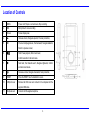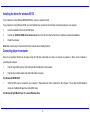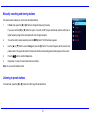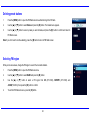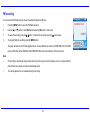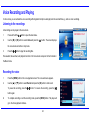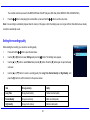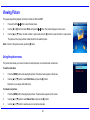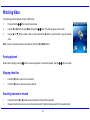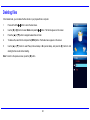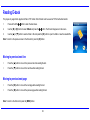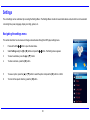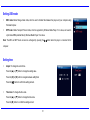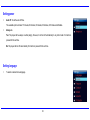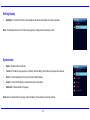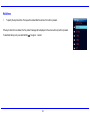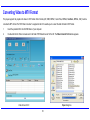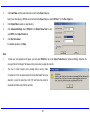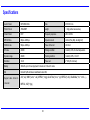
1
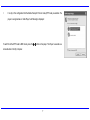
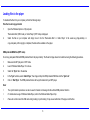
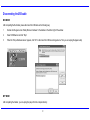
TABLE OF CONTENTS Introduction ............................................................................................................................................................................................................................... 1 Important Safety Precautions................................................................................................................................................................................................... 2 Features ..................................................................................................................................................................................................................................... 3 Location of Controls ................................................................................................................................................................................................................. 4 Connecting with the Computer ................................................................................................................................................................................................ 5 System requirements.............................................................................................................................................................................................................. 5 Installing the driver for windows 98 SE................................................................................................................................................................................... 6 Connecting player to computer............................................................................................................................................................................................... 6 Loading files to the player....................................................................................................................................................................................................... 8 Disconnecting the USB cable ................................................................................................................................................................................................. 9 Charging the battery............................................................................................................................................................................................................. 10 Basic Operation....................................................................................................................................................................................................................... 11 Turning on/off the player....................................................................................................................................................................................................... 11 Adjusting the volume ............................................................................................................................................................................................................ 11 Resetting the player.............................................................................................................................................................................................................. 11 Selecting main menu or mode.............................................................................................................................................................................................. 11 Listening to Music................................................................................................................................................................................................................... 13 Turning on and playing ......................................................................................................................................................................................................... 13 Display ................................................................................................................................................................................................................................. 13 Pausing playback ................................................................................................................................................................................................................. 14 Skipping tracks ..................................................................................................................................................................................................................... 14 i Searching backward or forward within a track ...................................................................................................................................................................... 14 Using the music menu .......................................................................................................................................................................................................... 15 Displaying lyric synchronously.............................................................................................................................................................................................. 18 Listening to the FM Radio....................................................................................................................................................................................................... 19 Display ................................................................................................................................................................................................................................. 19 Changing search mode ........................................................................................................................................................................................................ 20 Automatic searching and storing the frequencies ................................................................................................................................................................. 20 Manually searching and storing stations............................................................................................................................................................................... 21 Listening to preset stations................................................................................................................................................................................................... 21 Deleting preset stations ........................................................................................................................................................................................................ 22 Selecting FM region.............................................................................................................................................................................................................. 22 FM recording ........................................................................................................................................................................................................................ 23 Voice Recording and Playing ................................................................................................................................................................................................. 24 Listening to the recordings ................................................................................................................................................................................................... 24 Recording the voice.............................................................................................................................................................................................................. 24 Setting the recording quality ................................................................................................................................................................................................. 25 Viewing Picture........................................................................................................................................................................................................................ 26 Using the picture menu......................................................................................................................................................................................................... 26 Watching Video........................................................................................................................................................................................................................ 27 Pausing playback ................................................................................................................................................................................................................. 27 Skipping video files............................................................................................................................................................................................................... 27 Searching backward or forward ............................................................................................................................................................................................ 27 Deleting files............................................................................................................................................................................................................................ 28 ii Reading E-book ....................................................................................................................................................................................................................... 29 Moving to previous/next line ................................................................................................................................................................................................. 29 Moving to previous/next page............................................................................................................................................................................................... 29 Settings .................................................................................................................................................................................................................................... 30 Navigating the settings menu ............................................................................................................................................................................................... 30 Setting USB mode................................................................................................................................................................................................................ 31 Setting time .......................................................................................................................................................................................................................... 31 Setting power ....................................................................................................................................................................................................................... 32 Setting language .................................................................................................................................................................................................................. 32 Setting display ...................................................................................................................................................................................................................... 33 System tools......................................................................................................................................................................................................................... 33 Hold time .............................................................................................................................................................................................................................. 34 Converting Video to MTV Format........................................................................................................................................................................................... 35 Troubleshooting ...................................................................................................................................................................................................................... 37 Specifications .......................................................................................................................................................................................................................... 38 Listening Cautions .................................................................................................................................................................................................................. 39 Precautions.............................................................................................................................................................................................................................. 40 FCC Caution............................................................................................................................................................................................................................. 41 FCC Compliance...................................................................................................................................................................................................................... 41 iii Introduction Congratulations on purchasing the MP3 Player. Before using the player, read this manual thoroughly and keep it for future reference. This manual will help you use all of the exiting features to make your player view more enjoyable. This manual contains important safety information and correct operation instructions. Read the manual carefully before you use the player in order to avoid any confusion. We have done our best to produce a complete and accurate manual; however, we cannot ensure there are no errors or omissions. We have no responsibility for damages or loss of data caused by improper operation. The instruction manual is subject to change for improvement without notice. The player may power off if suffers in lightning strikes or certain static electricity. You can turn on the player again or press the RESET hole to re-initialize the system of your player. Trademarks and trade names used in this instruction manual are owned by their respective companies or organizations. 1 Important Safety Precautions Always follow these basic safety precautions when using your player. This will reduce the risk of product damage and personal injury. y Do not disassemble, repair or modify the player by yourself. Refer servicing to qualified personnel. y Do not dispose of the player in fire to avoid explosion because the player has built-in battery. y Do not touch the player with bare hands if the built-in battery is leaking. In this case, contact service center for help since the liquid may remain in the player. If your body or clothes has contacted with the battery liquid, wash it off thoroughly with water. Also, if some of liquid gets into your eyes, do not rub your eyes but immediately wash them with clean water, and consult a doctor. y Keep the player away from direct sunlight and heat source. y Do not expose the unit to rain or moisture to avoid any malfunction. y Do not use the player in rather dry environment to avoid static. y Never apply heavy impact on the player like dropping it or placing it on the magnet. y Route USB cable so that people and pets are not likely to trip over or accidentally pull on them as they move around or walk through the area. y Disconnect the USB cable from the computer when you do not use the player for a long time. y Clean only with dry cloth. Make sure the player is turned off before cleaning. Do not use liquid cleanser. y Be sure to back up your files. We will not be liable for the loss of data due to improper operation, repair or other causes. Precautions in using the earphone y Do not use the earphone while driving an automobile or riding a bicycle. It is not only dangerous, but also against the law. To avoid an accident, do not turn up the volume of the earphones too high while walking. y It’s not recommended that you use the earphones at a high volume for an extended time as this may cause hearing damage. 2 Features y 1.8 inch CSTN color LCD (65K color, 128×160 pixel) y Built-in rechargeable Li-polymer battery y USB 2.0 high speed transmission y Supports playback of MP3, WMA, WAV and DRM(Digital Rights Management)-protected WMA music files y Supports multiple equalizer (EQ) and 3D sound effects y Supports multiple playback mode: section repeat, file repeat, folder repeat and random y Supports the basic information of titles, artists and albums of music files(ID3 tag) or lyrics synchronization show while music is playing y Supports browse of JPEG and BMP picture files y Supports converted MTV video format (file transformation tool included) y Supports browse of e-book in TXT format y FM stereo receiver with auto channel search and channel preset function y Supports FM and Voice recording via the build-in microphone y Multiple language user’s interface 3 Location of Controls 1 MENU Power on/off; Open or exit sub-menu; Stop recording 2 MIC Microphone for voice recording. 3 Screen Screen display area ; 4 S Increase volume; Navigate upwards; Previous picture/line; 5 W Previous track/page/screen; Fast backward; Navigate leftwards; Return to previous screen; 6 Start /Pause playback; Enter main menu; Confirm selection in the main menu 7 X Next track; Fast forward search; Navigate rightwards; Confirm 8 T Decrease volume; Navigate downwards; Next picture/line; 9 RESET Press the RESET hole if a malfunction occurs. 10 USB port cover and enter next screen. Remove the USB cover and connect to the computer with the supplied USB cable. 11 Earphone Jack Connect with the supplied earphone. 4 Connecting with the Computer System requirements You computer system must meet the following specifications: - Microsoft Windows 98/SE or later version Intel Pentium II 200MHz or AMD K6 or above 128 MB RAM - Mac OSX V10.0 or later version Power PC G5 800MHz or above 512 MB RAM - Linux OS Kernel V2.4.0 or later version Intel Pentium II 200MHz or above 128 MB RAM DRM10 support requires Windows XP or higher and Windows Media Player 10 or higher USB Support, 50 MB Free Hard Drive Space Installed Mouse, Audio Card, CD-ROM Drive 5 Installing the driver for windows 98 SE If your computer is running Windows ME/2000/XP/Vista, no driver is required to install. If your computer is running Windows 98 SE, you must install the driver provided on the CD before connecting the player to your computer. 1. Insert the installation CD into the CD-ROM driver. 2. Execute the “USB Disk Win98 Driver Version xxx.exe” file in the CD and follow the instructions in window to complete the installation. 3. Restart the computer. Note: Make sure the player is disconnected from the computer when installing the driver. Connecting player to computer Files can be transferred directly into the player using the USB data cable. Make sure that your computer is powered on. Below is the procedure of connecting with computer: 1. Plug the larger USB connector of the USB cable into the USB port on the computer. 2. Plug the other end (the smaller end) of the USB cable to the player. For Windows 98 SE/ME /2000 y When the MP3 player is connected to your computer, a “Removable Disk” will be created in the “My computer”. This is called the USB standard mode, also the Media Storage Class mode (MSC mode). For Windows XP (with Media Player 10 or above)/Windows Vista 6 y It is only in this configuration that the Media Transport Protocol mode (MTP mode) is available. The player is recognized as an “Audio Player” and following is displayed: To switch from the MTP mode to MSC mode, press the [ ] button on the player. The Player now exists as a removable disc in the My Computer. 7 Loading files to the player To download the files from your computer, perform the following steps: Files that are not copy-protected 1. Open the Windows Explorer or My computer. “Removable Disk” (MSC mode) or “Audio Player” (MTP mode) is displayed. 2. Select the files on your computer and simply move it into the “Removable Disk” or “Audio Player” in the usual way (drag-and-drop, or copy-and-paste). After copying is completed, the data will be available on the player. DRM-protected WMA files (MTP mode) Do not copy and paste WMA with DRM-protected files to the player directly. The file will not play unless it is transferred using the following procedures. 1. Make sure the MP3 player is in MTP mode. 2. Launch Windows Media Player 10 or above. 3. Select the “Sync” tab in the window. 4. In the “Sync” window, select “Audio Player”, then drag and drop the DRM-protected WMA files into the “Sync List”. 5. Click on “Start Sync”. You DRM-protected tracks will be synchronized with your MP3 player. Note: y The synchronization procedures can also be used to transfer and manage the files without DRM-protected function. y For details about usage of Windows Media Player, refer to the Windows Media Player Help. y Please do not disconnect the USB cable during loading or synchronizing. It may cause malfunction of the player and the files. 8 Disconnecting the USB cable MSC MODE After completing the file transfer, please disconnect the USB cable as the following way: 1 Double click the green arrow “Safety Remove Hardware” in the taskbar on the bottom right of the window. 2 Select “USB Device” and click “Stop”. 3 When the “Stop a Hardware device” appears, click “OK” to disconnect the USB mass storage device. Then you can unplug the player safely. MTP MODE After completing the transfer, you can unplug the player from the computer directly. 9 Charging the battery Preparation: The battery of the player is charging automatically when the player is connected to the computer. Make sure the computer is turned on. The battery of the player is 80-percent charged in about three hours and fully charged in about five hours. If you charge the player while loading files to the player, it might take longer. indicates that the battery is full and battery power will be reduced when using. indicates the low battery and the player should be recharged right now. Important: y Recommended temperature for battery charging is 0℃ to 35 ℃. y Fully charge it before you use the player for the first time or when you haven’t used it for a long time. y Charge the player right now when the “Low battery” message is displayed. y Do not over charge or discharge the player. Over charging or discharging will shorten the battery life. y The battery could be over discharged if the player is not used for a long time (over three months). To avoid over discharge, fully charge the player every two or three month and always keep the voltage of the battery above 50%. y If the player is not used for a long time, keep it under the temperature of 23±5℃ and the moisture of 65±20% RH to maintain the performance of the battery. 10 Basic Operation Turning on/off the player y To turn on the player, press the [MENU] button. y To turn off the player, press and hold the [MENU] button for two seconds. Adjusting the volume Press the [S] button to increase the volume. Press the [T] button to decrease the volume. Resetting the player If a malfunction of the player occurs, take a metal pin, e.g. the end of a paper clip, and press it into the RESET hole to re-initialize the system of your player. Selecting main menu or mode The MP3 player has different modes. Press and hold the [ item and press the [ Music FM Radio Voice Photo ] button for approx. 1 second to open the main menu. Use the [W] or [X] button to select an ] button to confirm your selection. All available options are listed as the below table. Music playback & music setting FM radio playback, FM setting and FM recording Voice recording and playback Photo playback & photo setting 11 Movie Delete Settings Video playback Delete files USB mode Time Power Language Display Record Sys tools E-Book Hold Time E-book view MTP | MSC Adjust Time zone Auto off: 15 minutes | 30 minutes | 60 minutes | 90 minutes | 120 minutes | Disable Always on: Yes | No English | German | Italian | Spanish | French | Dutch | Portuguese | Russian Backlight: 15 seconds | 30 seconds | 1 Minute | Always on Quality: Long time | Normal quality | High quality Delete Format: Quick | Complete Reset: Yes | No About Delete All : Yes | No 10 Seconds | 30 Seconds | 1 Minute | 3 Minutes | 5 Minutes | Off 12 Listening to Music Turning on and playing 1. Make sure that the battery is enough and the earphone is connected correctly. 2. Press the [MENU] button to turn on the player. The DISPLAY lights up. The MP3 player enters Main menu with Music option selected by default. 3. Press the [ ] button to enter the Music mode. By default the player will be in STOP mode. 4. Press the [ ] button to start playing the music. Display 1. Play mode indicator 9. Remaining battery power indicator 2. Volume level 10. File format 3. Playing file name / ID3 tag /Lyrics 11. Current EQ indicator 4. Spectrum display 12. Current track / Total track number 5. Bit rate 13. Current mode 6. Sampling frequency 14. Play/Pause/Stop/Fast forward/Rewind 7. Elapsed time of the track 15. Total time of the track 8. Key locked indicator 13 Pausing playback While a song is playing, press the [ ] button to pause the playback. To resume the playback, press the [ Skipping tracks y Press the [W] button to skip to the previous track. y Press the [X] button to skip to the next track. Searching backward or forward within a track y Press and hold the [W] button to search backward within a track. y Press and hold the [X] button to search forward within a track. y Once you release the pressed button, the file will be played back from the searched point. 14 ] button once again. Using the music menu The music menu allows you to manage all factors of listening, such as repeating tracks, selecting equalizers, and so on. Note: To exit the menu, press the [MENU] or [W] button. To set play mode The play mode setting enables you to select a play mode to enjoy the music in desired order. 1. 2. Press the [MENU] button while listening to the music. The music menu appears on the screen. Press the [S] or [T] button to select Repeat, and press the [X] button. The play mode menu appears on the screen. 3. Press the [S] or [T] button to select the desired mode as below and press the [X] button to confirm and return to the previous screen. y No Repeat: Play all saved music files in order once. y Repeat One: Play the current or selected file repeatedly. y Repeat All: Play all the music files repeatedly. y Random All: Play all the files in random once. y Folder Normal: Play all the files in the current folder in order once. y Folder Repeat: Play all the files in the current folder repeatedly. y Folder Random: Play all the files in the current folder in random. 15 To set equalizer The equalizer setting enables you to select an equalizer from the six preset equalizer settings to suit the type of audio output or customize your personal equalizer effect. 1. Press the [MENU] button while listening to the music. The music menu appears on the screen. 2. Use the [S] or [T] button to select Equalizer, and press the [X] button. The equalizer menu appears on the screen. 3. Use the [S] or [T] button to select the desired equalizer from Normal, Pop, Rock, Classic, Jazz, Bass and Custom EQ. Press the [X] button to confirm and return to the previous screen. To customize EQ, select Custom EQ, and press the [X] button. The Custom EQ menu appears on the screen. Press the [S] or [T] button to navigate between value bars. When navigating to a value bar, press the [ ] button to select it. The blue arrow becomes red. Use the [S] or [T] button to adjust the value and press the [ ] button to confirm. After completing the setting, press the [MENU] button to exit. 16 To set 3D effect 1. Press the [MENU] button while listening to the music. The music menu appears on the screen. 2. Use the [S] or [T] button to select 3D, and press the [X] button. The 3D menu appears on the screen. 3. Use the [S] or [T] button to select On or Off. Press the [X] button to confirm and return to the previous screen. To set play rate 1. 2. Press the [MENU] button while listening to the music. The music menu appears on the screen. Use the [S] or [T] button to select Play Rate, and press the [X] button. The play rate menu appears on the screen. 3. Use the [S] or [T] button to select a play rate from 1.00X, 1.14X, 1.33X, 0.67X and 0.80X. Press the [X] button to confirm and return to the previous screen. 17 To navigate music files 1. Press the [MENU] button while listening to the music. The music menu appears on the screen 2. Use the [S] or [T] button to select File, and press the [X] button. The music file list appears on the screen. 3. Use the [S] or [T] button to select a folder or file and press the [X] button to open the folder or play the selected file. Displaying lyric synchronously This player supports lyrics display while playing the music. Only the lyrics in LRC format can be displayed. To add lyrics to the music, perform the following steps: 1. Choose an MP3/WMA file, for example “love music. Mp3”. 2. Download the corresponding lyrics with extension “.lrc” from the Internet. 3. Rename the lyrics file. Make sure that the lyrics filename is the same as the music file name. For example “love music.lrc” 4. Copy both files into the same folder on the player. 5. Start playback of the music file. The lyrics will be displayed on the screen synchronously while the music is being played. 18 Listening to the FM Radio Important: Always connect your earphones to the earphone jack, since the earphone cable serves as antenna for the internal radio. ] button to enter the main menu. 1. Press and hold the [ 2. Select the FM Radio using the [W] or [X] button and press the [ ] button to enter the FM Radio mode. The MP3 player automatically searches for all radio stations with the strongest reception and save up to 20 radio stations in the memory if you use the FM Radio function for the first time or restore all default settings. The unit will start to play the first channel automatically after finishing the search. 3. To exit the FM Radio mode, press and hold the [ ] button to return to the main menu. Display 1. Volume indicator 2. Current playing frequency 3. Preset Channel No. 4. Remaining battery power indicator 5. MONO or STEREO indicator 19 Changing search mode Scan mode Select this mode if you want to manually search one frequency through the FM band at a time. Preset mode Select this mode if you want to search one preset channel through the FM band at a time. Press the [ ] button repeatedly to switch between the Preset and Scan mode. In Preset mode, the current preset channel is displayed on the screen. Automatic searching and storing the frequencies You can store and preset up to 20 received stations in the player’s memory automatically by using “Auto scan” function. 1. Press the [MENU] button to open the FM Radio sub-menu while listening to the FM radio. 2. Use the [S] or [T] button to select Auto Scan and press the [X] button to start the search. The MP3 player automatically searches for all radio stations with the strongest reception and store up to 20 received stations. The unit will start to play the first channel automatically after finishing the search. 3. Use the [W] or [X] button to select and listen to the other preset station. 20 Preset mode Manually searching and storing stations The manual search enables you only to store the desired stations. 1. In Scan mode, press the [W] or [X] button to change the frequency (fine-tune). If you press and hold [W] or [X] button for approx. 2 second, the MP3 player automatically searches with lower or higher frequency range for the radio station with next strongest reception. 2. 3. To save the station manual searched, press the [MENU] button. The FM sub-menu appears. Use the [S] or [T] button to select Saving and press the [X] button. The current frequency will be saved in next preset location. The player will switch to Preset mode and the corresponding preset number appears on the screen. ] button to switch to Scan mode. 4. Press the [ 5. Repeat step 1 to step 4 to search and store more stations. Note: You can save 20 stations at most. Listening to preset stations In Preset mode, press the [W] or [X] button to scroll through the stored stations. 21 Deleting preset stations 1. Press the [MENU] button to open the FM Radio sub-menu while listening to the FM radio. 2. Use the [S] or [T] button to select Delete and press the [X] button. The Delete menu appears. 3. Use the [S] or [T] button to select a preset you want to delete, and press the [X] button to confirm and return to FM Radio screen. Note: If you don’t want to continue deleting, press the [W] button to return to FM Radio screen. Selecting FM region When you travel overseas, change the FM region to search the local radio stations. 1. Press the [MENU] button to open the FM Radio sub-menu. 2. Use the [S] or [T] button to select BAND and press the [X] button. 3. Use the [S] or [T] button to select a FM region from US (87.5-108.0), EUROPE (87.5-108.0) and 4. To exit the FM Radio sub-menu, press the [W] button. JAPAN(76.0-90.0), then press the [X] button to confirm. 22 FM recording You can record the FM Radio program at any time while listening to the FM radio. 1. Press the [MENU] button to open the FM Radio sub-menu. 2. Use the [S] or [T] button to select Record and press the [X] button to start record. 3. To pause the recording, press the [ 4. To stop and finish the recording, press the [MENU] button. ] button. To resume the recording, press the [ ] button again. The player will return to the FM radio playback mode. The recorded files are saved in the FMIN.DIR folder of the MP3 player as WAV files (format: FM000001.WAV, FM000002.WAV) and can be listened to in the Voice mode. Note: y FM recording is automatically stopped when the memory of the player is full or the battery power is no longer sufficient. Date that has been already recorded is automatically saved. y The volume adjustment is not available during the recording. 23 Voice Recording and Playing In Voice mode, you can activate the voice recording with integrated microphone and play back the recorded files, e.g. radio or voice recordings. Listening to the recordings All recordings can be played in the voice mode. ] button to open the main menu. 1. Press and hold the [ 2. Use the [W] or [X] button to select Voice and press the [ ] button. The screen displays the voice mode and will be in stop mode. 3. Press the [ ] button to play the recording files. File selected, file searched, and playback function in the Voice mode correspond to the functions in the Music mode. Recording the voice 1. 2. Press the [MENU] button in the voice playback screen. The voice sub-menu appears. Use the [S] or [T] button to select Record and press the [X] button to start record. To pause the recording, press the [ ] button. To resume the recording, press the [ ] button again. 3. To complete recording or exit the recording mode, press the [MENU] button. The player will go to the Voice playback interface. 24 The recorded voice files are saved in the MICIN.DIR folder of the MP3 player as WAV files (format: MIC00001.WAV, MIC00002.WAV). 4. Press the [ ] button to start playing the recorded files or press and hold the [ ] button to exit the voice mode. Note: Voice recording is automatically stopped when the memory of the player is full or the battery power is no longer sufficient. Date that has been already recorded is automatically saved. Setting the recording quality Before starting the recording, you can set the recording quality. 1. Press and hold the [ 2. Use the [W] or [X] button to select Settings and press the [ 3. Use the [S] or [T] button to select Record and press the [X] button. Press the [X] button again to open the Quality ] button to open the main menu. ] button. The Settings menu appears. sub-menu. 4. Use the [S] or [T] button to select a recording quality from Long Time, Normal Quality and High Quality, and press the [X] button to confirm and return to the pervious screen. Item Occupy memory Long Time Occupy least memory Qulity Normal recorded quality Normal Quality Occupy less memory Better recorded quality High Quality Occupy much memory Best recorded quality 25 Viewing Picture This player supports the playback of pictures in formats of JPEG and BMP. ] button to enter the main menu. 1. Press and hold the [ 2. Use the [W] or [X] button to select Photo and press the [ 3. Use the [S] or [T] button to select a folder or picture and press the [X] button to open the folder or view pictures. ] button. The picture list appears on the screen. The pictures on the player will start a slide show from the selected picture. Note: To return to the previous screen, press the[W] button. Using the picture menu The picture menu allows you to select a manner to view the pictures, such as slide show, manual scan. To watch a slide show 1. 2. Press the [MENU] button while viewing the pictures. The picture menu appears on the screen. Use the [S] or [T] button to select Slide Show, and press the [X] button. All pictures on your player starts slide show. To manual scan pictures 1. Press the [MENU] button while playing the pictures. The picture menu appears on the screen. 2. Use the [S] or [T] button to select Manual Scan, and press the [X] button. 3. Use the [S] or [T] button to select previous or next picture manually. 26 Watching Video This player supports the playback of videos in MTV format. ] button to enter the main menu. 1. Press and hold the [ 2. Use the [W] or [X] button to select Movie and press the [ 3. Use the [S] or [T] button to select a folder or video and press the [X] button to open the folder or play the selected ] button. The video list appears on the screen. video. Note: To return to the previous screen in the video list, press the [W] or [MENU] button. Pausing playback While a video is playing, press the [ ] button to pause the playback. To resume the playback, press the [ ] button once again. Skipping video files y Press the [X] button to skip to the next video file. y Press the [W] button to skip to the previous video file. Searching backward or forward y Press and hold the [W] or [X] button to search backward or forward within a video file. y Release the button when you have move to the desired position. The file will be played back from the searched point. 27 Deleting files In the Delete mode, you can delete the files stored on your player without a computer. ] button to enter the main menu. 1. Press and hold the [ 2. Use the [W] or [X] button to select Delete and press the [ 3. Press the [S] or [T] button to navigate between files or folder. 4. To delete a file, select the file and press the [MENU] button. The Delete menu appears on the screen. 5. ] button. The file list appears on the screen. Use the [S] or [T] button to select Yes (continue delete) or No (cancel delete), and press the [X] button to start deleting the files or exit without deleting. Note: To return to the previous screen, press the [W] button. 28 Reading E-book This player only supports the playback of files in TXT format. Other formats must be saved as TXT format before transfer. ] button to enter the main menu. 1. Press and hold the [ 2. Use the [W] or [X] button to select E-Book and press the [ 3. Use the [S] or [T] button to select a folder or file and press the [X] button to open the folder or view the selected file. ] button. The E-book list appears on the screen. Note: To return to the previous screen in the E-book list, press the [W] button. Moving to previous/next line y Press the [S] button to move to the previous line while reading the text. y Press the [T] button to move to the next line while reading the text. Moving to previous/next page y Press the [X] button to move to the next page while reading the text. y Press the [W] button to move to the previous page while reading the text. Note: To return to the E-book list, press the [MENU] button. 29 Settings The unit settings can be customized by accessing the Settings Menu. The Settings Menu consists of several items where various functions can be selected concerning time, power, language, display, recording, system, etc. Navigating the settings menu This section describes how to access and change various features through the MP3 player settings menu. ] button to open the main menu. 1. Press and hold the [ 2. Select Settings using the [W] or [X] button and press the [ 3. To select a submenu, press the [S] or [T] button. 4. To enter a submenu, press the [X] button. ] button. The Settings menu appears. 5. To save an option, press the [S] or [T] button to select the option and press the [X] button to confirm. 6. To return to the superior directory, press the [W] button. 30 Setting USB mode y MSC mode: Media Storage Class mode, which is used to transfer files between the player and your computer using Windows Explorer. y MTP mode: Media Transport Protocol mode, which is supported by Windows Media Player 10 or above, and used to synchronize DRM-protected files by Windows Media Player 10 or above. Note: The MSC and MTP mode can also be exchanged by pressing the [ computer. Setting time y Adjust: To change the current time. Press the [S] or [T] button to change the setting value. Press the [W] or [X] button to navigate between setting filed. Press the [ y ] button to confirm the setting and exit. Time Zone: To change the time zone. Press the [S] or [T] button to change the time zone. Press the [X] button to confirm the setting and exit. 31 ] button when the player is connected to the Setting power y Auto off: To set the auto off time. The available options include: 15 minutes, 30 minutes, 60 minutes, 90 minutes, 120 minutes and Disable. y Always on Yes: The player will be always on while playing. However, it will turn off automatically in any other mode if no button is pressed for the set time. No: The player will turn off automatically if no button is pressed for the set time. Setting language y To select a desired menu language. 32 Setting display y Backlight: To set the LCD off time. The backlight will be off after the set time if no button is pressed. Note: The backlight will never turn off when viewing picture, reading E-book or watching a video. System tools y Delete: To delete a file in the file list. y Format: To format the player quickly or completely. After formatting, all the data on the player will be erased. y Reset: To restore all settings of the player to factory default settings. y About: To check the free memory and firmware version of the player. y Delete All: To delete all files in the player. Note: Back up important files in the player before formatting. The erased files cannot be restored. 33 Hold time y To specify the key locked time. The keys will be locked after the set time if no button is pressed. If the key lock function is activated, the “Key locked” message will be displayed on the screen when any button is pressed. To deactivate the key lock, press and hold the [ ] for approx. 1 second. 34 Converting Video to MTV Format This player supports the playback of videos in MTV format. Other formats (AVI, WMV, MEPG1, Quick Time, MPEG2, RealMedia, MPEG4, 3GP) must be converted to MTV format. The “MTVVideo Converter” is supplied on the CD to enable you to convert the other formats to MTV format. 1. Insert the provided CD to the CD-ROM driver of your computer. 2. Double-click the file “Video Conveter.exe” in the folder “MTVVideoConverter” of the CD. The Video Converter V2.9 window appears. Video Convert V2.9 Open dialog box 35 3. Click Input Video, and then select the input source from the Open dialog box. Note: If your video files (e.g. MP4 file) cannot be found in the Open dialog box, select All Files (*.*) in the File of type box. 4. Click Output Video to select an output directory. 5. Click Advanced Settings. Select 160x128 in the Output Frame Size box and select MTV in the Output Format box. 6. Click Start Conversion. For detailed operations, click Help. Note: y To make your video playable on the player, you must select 160x128 or less in the Output Frame Size box (Advanced Setting). Otherwise, the message “Device Not Support” will appear on the screen when you play the video file. y You have to install relevant codec package before running “Video Converter.exe”. If not, the system will prompt “Load Video Failed!” when you attempt to convert the video files. Click “OK” and follow the prompt to download and install codec from the web sites. 36 Troubleshooting If you have problems in operating your player, please check the points below before sending it to service center. Cannot power on y The battery may be exhausted. Please recharge the battery. Files cannot be downloaded y Check if the driver is installed correctly in the computer. y Check the connection between the player and PC. No sound from the earphone y Please ensure the volume is not 0, and the connection of earphone is no problem. y Check if the format of music file is supported by the player. Recording cannot be done y Check if there is enough memory and battery capacity. The words of LCD display abnormality y Please ensure you select the correct language. The buttons do not work y The key may be locked. Press and hold the [ y Press the reset hole with metal pin to re-initialize the system of the player. ] button to deactivate the lock function. Poor FM reception y Check whether an earphone is connected to the earphone jack. The earphone cord functions as an antenna. y Adjust the position of the player and earphone. y Turn off the power of the electric devices near the player. If it is effective, move and use the player away from those electric devices. 37 Specifications Audio Format MP3/WMA/WAV Size 43*84*8.3 mm Photo Format JPEG/BMP weight <40g (without accessories) Video Format MTV Frequency response 20Hz~20KHz MP3 bit Rate 8Kbps–320Kbps Dynamic current ≤40mA (Play Mp3, backlight off) WMA bit rate 5Kbps–320Kbps Power off current ≤0.30mA S/N rate ≥85dB Storage condition Humidity <90%, Normal temperature Dynamic range ≥80dB Working condition Humidity <85%,-10~40℃ Distortion <0.2% Power out 2*1mW(16 ohm load) Battery 300mAh, up to 8 hours playback for music and 3 hours for video EQ Normal/Pop/Rock/Classic/Jazz/Bass/Custom EQ Support video format to AVI(*.avi), WMV(*.wmv, *.asf), MPEG1(*.mpg), QuickTime(*.mov, *.qt), MPEG2(*.vob), RealMedia(*.rm, *.rmvb,…), converter MPEG4, 3GP(*.3gp) 38 Listening Cautions Do not play your headphones or earphones at a high volume. Hearing experts advise against continuous extended play. If you experience a ringing in your ears, reduce volume or discontinue use. Do not use while operating a motorized vehicle. It may create a traffic hazard and is illegal in many areas. You should use extreme caution or temporarily discontinue use in potentially hazardous situations. Even if your headphones or earphones are the open-air type designed to let you hear outside sounds, don’t turn up the volume so high that you can’t hear what’s around you. Sound can be deceiving. Over time your hearing “comfort level” adapts to higher volumes of sound. So what sounds “normal” can actually be loud and harmful to your hearing. Guard against this by setting your equipment at a safe level BEFORE your hearing adapts. To establish a safe level: Start your volume control at a low setting. Slowly increase the sound until you can hear it comfortably and clearly, and without distortion. Once you have established a comfortable sound level: Leave it there. 39 Precautions 1). When not using the player for an extended period of time, please charge the battery at least once per month to extend the battery life. 2). Do not use the player in extremely hot, cold, dusty or damp environments. 3). Make sure the keys are unlocked before using the player (otherwise controls will not function). 4). Avoid dropping or striking the unit .This may cause external and internal physical damage to the player. 5). Charge the battery if: 6). 7). a) The battery level icon displays b) The player powers off automatically and off again when restarted. c) No response when pressing keys with keys unlocked and battery installed (An empty battery) To prevent damage from static shock, never use the player in very dry conditions. When player is being formatted or transferring a file, do not interrupt the connection. Otherwise, data may be corrupt of lost. 8). When the player is used as a portable HD, please use only per instructions. Otherwise, permanent data loss could occur. 40 FCC Caution This equipment has been tested and found to comply with the limits for a Class B digital device, pursuant to Part 15 of the FCC Rules. These limits are designed to provide reasonable protection against harmful interference in a residential installation. This equipment generates uses and can radiate radio frequency energy and, if not installed and used in accordance with the instructions, may cause harmful interference to radio communications. However, there is no guarantee that interference will not occur in a particular installation. If this equipment does cause harmful interference to radio or television reception, which can be determined by turning the equipment off and on, the user is encouraged to try to correct the interference by one or more of the following measures: Reorient or relocate the receiving antenna. Increase the separation between the equipment and receiver. Connect the equipment into an outlet on a circuit different from that to which the receiver is connected. Consult the dealer or an experienced radio/TV technician for help. FCC Compliance To assure continued compliance, following the attached installation instructions. Use only the provided shielded the interface cables when connecting to computer. Any unauthorized changes or modifications to this equipment would void the user’s authority to operate this device. This device complies with Part 15 of the FCC Rules. Operation is subjected to the following two conditions: (1) This 41 device may not cause harmful interference, and (2) this device must accept any interference received, including interference that may cause undesired operation. This product may receive radio interference caused by mobile telephones or other products during operation. If such interference is apparent, please increase separation between the product and the mobile telephone or other product. This product may receive radio interference caused by mobile telephones or other products during operation. If such interference is apparent, please increase separation between the product and the mobile telephone or other product. Industry Canada Requirement: This Class B digital apparatus complies with Canadian ICES-003. Cet appareil numérique de la classe B est conforme á la norme NMB-003 du Canada Other names of system and products mentioned in these instructions are usually the registered trademarks or trademarks of the manufacturers who developed the system or product concerned. The TM and ® are not used to identify registered trademarks and trademarks in these instructions. 42 This manual was correct and complete at the time of printing. However, the specifications and updates can occur at any time without prior notice. No part of this manual may be copied, republished, reproduced, transmitted or distributed in any way without prior written consent of Nextar, Inc. Any unauthorized distribution of this manual is expressly forbidden. © 2008Nextar (Hong Kong) Limited, Nextar is a trademark and service mark of Nextar (Hong Kong) Limited. All other brand names, trademarks and service marks are properly of their owners. Nextar may find it necessary to modify, amend or otherwise change or update this manual. We reserve the right to do this at any time, without any prior notice. All specifications and features are subject to change without notice. All screen shots shown are simulated and may not represent the actual screen on production units sold to consumers. For instruction manuals, updated drivers or other information, be sure to visit our website at: www.Nextar.com Or write us at: Nextar 1661 Fairplex Dr. LaVerne, CA USA 91750 Copyright © 2008 43