1
42810_Manual.qxp
29.05.2007
12:23
Seite 21
baking cycle. When baking is done, you hear a bell sound. The heating elements turn off
automatically and the ON indicator light goes out.
NOTE: The functioning control setting has to be on bake/broil or a temperature otherwise only
the browning control is working. This way you can not bake or broil.
NOTE: For best results, always preheat the oven for 5 minutes.
3. The upper and lower heating elements will cycle on and off to maintain the temperature.
To stop cooking, open the oven door. To continue cooking, close the door. Check food
for doneness at minimum time.
4. When finished cooking, you will hear a bell sound once the timer reaches the set time.
If not, when cooking is done, turn the timer to 0 (OFF). The heating elements will turn off an
the ON indicator light goes out.
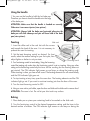
6. Using an oven mitt or pot holder, open the door and slide out the slide rack to remove
the bake pan.
ATTENTION: The oven is hot. Do not let your skin touch any surface.
bake pan
Broiling
funktioning control
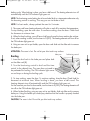
1. Insert the broil rack in the bake pan and place both
on the slide rack (B).
2. Turn the functioning control to broil and the timer
control to the desired time. The oven does not need to
be preheated for broiling. The ON indicator light comes
on and stays on during the broiling cycle.
timer
3. To stop cooking, open the door. To continue cooking, close the door. Check food for
doneness at minimum time. When broiling is done, you hear a bell sound. The
heating elements turn off automatically and the ON indicator light goes out.
For the case that your food is done earlier, turn the timer to 0 (OFF). The heating elements will
turn off an the ON indicator light goes out.
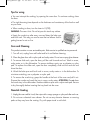
4. When finished broiling, using an oven mitt or pot holder, slide out slide rack to remove
bake pan. Using the handle you should pay attention that the handle is properly hooked
into the bake pan.
CAUTION: The oven is hot. Do not let you skin touch any surface.
21