1
Using an electronic lock
Basic Electronic Lock
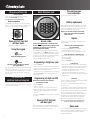
Battery installation
To power the lock, four alkaline AA batteries, equalling
voltage: 6Vdc, (not included) are required.
You now know your
new combination.
For your records, please copy it here:
____ ____ ____ ____ ____
NOTE: Non-alkaline and rechargeable batteries
ARE NOT RECOMMENDED.
Battery replacement
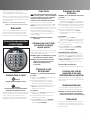
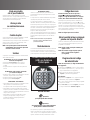
To install batteries, turn the electric lock case to the right and
remove. (Fig. H) Insert four new batteries as indicated, replace
the electric lock case and turn to the left to reassemble.
When old batteries are removed for replacement, your user PIN
will be voided; only electronic lock combination and user code
will work. To reestablish your user PIN, follow the directions
above under “Programming a 5-digit user PIN”.
NOTE: If your safe does not appear to be working,
please check batteries before calling Sentry
Customer Service.
H
Open unit first, then test
with door open!
(See cover of this manual for your factory code.)
Using the keypad
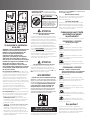
Caution!
Liquids can damage the keypad!
Caution!
Pen points or other sharp objects can puncture
the keypad membrane!
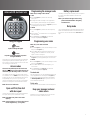
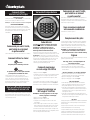
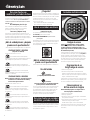
Only a light touch is needed. A green PROCEED light and a single
beep indicate that the keypad “felt” your touch. The lock allows
5 seconds for each key press. If you pause longer, an error signal
will occur (blinking red light and three beeps), indicating you
should start over.
For safes with an
electronic lock and a key lock
For added security, some models have dual locking system
(electronic lock plus key lock). You must use both the electronic
code and the key to open the safe.
Signals
Access codes
There are three possible ways to unlock and access
the safe—by entering its preset 5-digit electronic lock
combination, your own user code or a User PIN
(Personal Identification Number).
You can always open the safe by entering the 5-digit electronic
lock combination. This code cannot be deleted. But if you prefer
to employ your own code, you can program the safe to open to
the 5-digit user code of your choice. If you wish to give someone
else temporary access to the safe, you can program a
5-digit user PIN that can later be erased.
Programming a 5-digit user code
1. Press the Program key.
2. Enter the electronic lock combination. The green LED remains
ON while you enter the 5-digit user code of your choice. After 5
digits are entered the green LED turns OFF.
(To enter a new user code, repeat these steps. To erase the user
code, press the Program key and enter your electronic lock
combination twice.)
Programming a 5-digit user PIN
NOTE: You must program a user code before
programming a User PIN.
1. Press the Program key.
2. Press it a second time.
3. Enter your 5-digit user code. The green LED remains ON.
4. Enter the 5-digit User PIN of your choice (any combination
except 00000.) After 5 digits are entered the green LED
turns OFF.
(Tuser PIN, press Program twice, enter your user code and then
enter 00000.)
Open unit first, then test
with door open!
Test your new electronic lock combination several times with
the door open, to make sure you have recorded it correctly. Your
new electronic lock combination is ready to use.
4
Your electronic-lock safe communicates by means of several
audio/visual signals.
Red (Error) LED + three beeps indicates
one of the following:
1. You have pressed Program key out of sequence
2. You have entered an invalid code or user pin.
3. You have let 5 seconds or more elapse between key entries.
Green (Proceed) LED + single beep occurs
1. After entering each digit of electronic lock combination,
user code, or user PIN
2. After pressing Clear key
3. After pressing Program key
Green LED only
1. Comes ON after you enter a valid code/user PIN and remains
lit during the 4-second period in which the safe can be opened.
2. Comes ON in the Program user code mode after you enter
the electronic lock combination and remains lit until you
have finished entering a 5-digit user code.
3. Comes ON in the Program user PIN mode after you have
entered your user code and remains ON until you have entered
a 5-digit user PIN.
Yellow LED
Indicates “low battery” and will typically not turn ON until battery
has been in use two years or longer.
Your electronic lock automatically performs a low battery test
during each lock use.
If a “low battery” condition is detected the yellow LED will come
ON and remain ON during each subsequent lock operation. (The
lock will continue to function in a Low Battery state, until battery
failure.) The yellow LED will turn OFF only after three
consecutive “Good Battery” readings or after the low batteries
are replaced. (Note: If the new batteries are installed in less
than 60 seconds the yellow LED may come ON and stay ON
during the first lock operation before it returns to OFF.)
NOTE: It is recommended you replace the batteries after
two years, or when the yellow LED remains on.
Delay mode
The lock automatically enters a two-minute delay mode after an
invalid code has been entered three consecutive times. In this
mode, the lock can not be activated and any key entry will
generate an ERROR signal.