1
Advanced LCD electronic lock
Programming the manager code
Battery replacement
NOTE: One (1) manager code is allowed.
To add:
1. Press the Prog/Enter key and then enter the 5-digit
factory code.
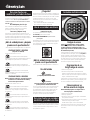
2. An empty lit box means no manager code is programmed.
A boxed lighted means a manager code is programmed.
3. Enter a 4 to 8 digit code and press the Prog/Enter key to finish
programming the code into the unit.
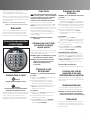
The battery icon will light when the battery needs to be replaced.
No codes are erased when old batteries are removed for
replacement.
*
To delete:
1. Press the Prog/Enter key and then enter the 5-digit factory
code.
2. A boxed lighted icon indicates there is a code programmed
and can be deleted.
3. Press 0, 0, 0, 0, then the Prog/Enter key to delete the
manager code. ( 0, 0, 0, 0, Prog/Enter)
*
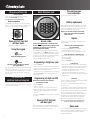
Using the keypad
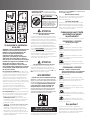
Caution!
Liquids can damage the keypad!
Caution!
Pen points or other sharp objects can puncture
the keypad membrane!
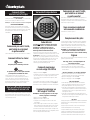
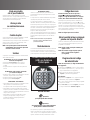
Only a light touch is needed. Press any button, the keypad lights
up and a single beep will indicate that the keypad “felt” your
touch. If there is no key press within 5 seconds, the unit “times
out” indicating you should start over.
Access codes
There are three possible ways to unlock and access
the safe—by entering its preset 5-digit electronic lock
combination, your own manager code or a user code.
You can always open the safe by entering the 5-digit electronic
lock combination. This code cannot be deleted. But if you prefer
to employ your own code, you can program the safe to open to a
4-8 digit manager code of your choice. If you wish to give
someone else temporary access to the safe, you can program a
maximum of six 4-8 digit user codes that can later be erased.
NOTE: All zeros is an invalid code.
Open unit first, then test
with door open!
Test your new LCD electronic lock codes several times with the
door open to be sure you have entered them correctly.
NOTE: If your safe does not appear to be working,
please check batteries before calling Sentry
Customer Service.
Delay mode
The lock automatically enters a two-minute delay mode after an
invalid code has been entered three consecutive times. In this
mode, the lock can not be activated and the PADLOCKED icon
lights.
Programming user codes
NOTE: Six (6) user codes are allowed.
To add:
1. Press the Prog/Enter key 2 times, enter the manager code and
then press the Prog/Enter key.
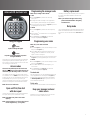
2. Use the << or >> to scroll between the lighted boxes. An
empty box means it is available for a code entry; a boxed
lighted means it is being used.
3. Enter a 4 to 8 digit code in the selected position and press the
Prog/Enter key to finish programming the code into the unit.
*
To delete:
1. Press the Prog/Enter key 2 times, enter the manager code and
then press the Prog/Enter key.
2. Use the << or >> to scroll to the boxed lighted icon
to be removed.
3. Press 0, 0, 0, 0, then the Prog/Enter key to delete the
selected user. (0, 0, 0, 0, Prog/Enter)
*
To unlock safe:
Enter the 5-digit factory code, a pre-programmed manager code
or a pre-programmed user code and press the Prog/Enter key.
An asterisk will be lighted each time a digit is entered. When
the unlocked padlock icon appears you have 4 seconds to
turn the handle and open the safe.
To lock safe:
Close the door and return the handle to the horizontal position.
Keep your manager and user
codes secure
Maintain a record of your manager and user codes and store
them in a secure location, other than in the safe.
NOTE: Press CLEAR at any time to return to the
beginning.
NOTE: To turn the beeper on or off, press the 0 key and
then the Prog/Enter key. (0, Prog/Enter)
5