1
Installing Your LCD Monitor
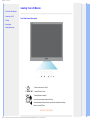
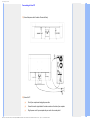
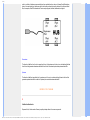
Rear View
1
Kensington anti-thief lock
2
AC power input
3
VGA input
RETURN TO TOP OF THE PAGE
Optimizing Performance
●
For best performance, ensure that your display settings are set at 1366 x 768, 60Hz.
Note: You can check the current display settings by pressing the 'MENU' button once. The
current display mode is shown in OSD main controls called RESOLUTION.
file:///F|/manual spec/813/philips TV&lcd/cd/Q70G9002813 8A 191EW9/lcd/manual/ENGLISH/191EW9/install/install.htm(第 2/3 页)2008-9-2 13:16:06