1
HOW TO USE THE NEW SPRING OPERATED
SCREEN
1 Hang it on a wall or from the ceiling,
making sure it is perfectly horizontal and in
line with the projector’s focal plane.
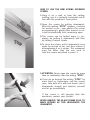
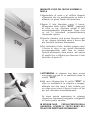
2 Open the screen by pulling downwards.
After the writing “STOP” appears, continue
for around 10 cm.; now release the screen
accompanying it gently. After around 10 cm.
it will automatically lock, remaining open.
3 This screen can be locked every 13 cm.,
always by pulling it downwards and then
by letting it return slowly.
4 To close the screen, pull it downwards once
again by around 10 cm. and then release it
accompanying it as it returns. This movement
must be faster than the one used to
lock the screen described in point 2.
5 ATTENTION: Never open the screen by more
than 20 centimetres after the writing “STOP”.
6 If you do go beyond the writing “STOP” by
more than 20 centimetres and the screen
jams, take hold of it with two hands, jerk it
downwards sharply and towards yourself
and let go immediately.
If the screen is still jammed after this
operation, contact your stockist.
NEVER REMOVE THE BLACK FRAME PLUG TO
MAKE REPAIRS AS THIS INVALIDATES THE
GUARANTEE!