1
VIVOTEK
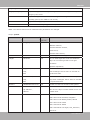
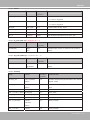
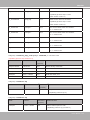
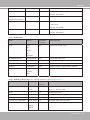
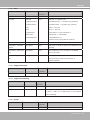
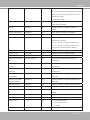
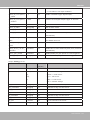
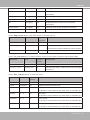
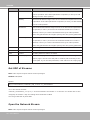
ftp_passive
0, 1
6/6
Enable or disable passive mode.
0 = disable passive mode
1 = enable passive mode
email_address
string[128]
6/6
Email server address.
email_sslmode
0, 1
6/6
Enable support SSL.
email_port
0~65535
6/6
Port to connect to the server.
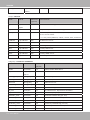
email_username
string[64]
6/6
Username to log in to the server.
email_passwd
string[64]
6/6
Password of the user.
email_senderemail
string[128]
6/6
Email address of the sender.
email_recipientemail
string[128]
6/6
Email address of the recipient.
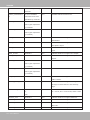
ns_location
string[128]
6/6
Location to upload or store the media.
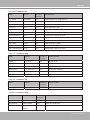
ns_username
string[64]
6/6
Username to log in to the server.
ns_passwd
string[64]
6/6
Password of the user.
ns_workgroup
string[64]
6/6
Workgroup for network storage.
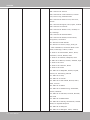
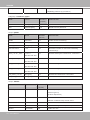
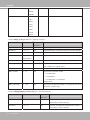
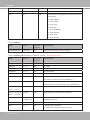
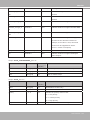
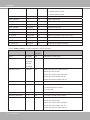
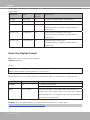
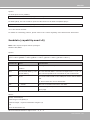
Group: media_i<0~4> (media_freespace is used internally.)
PARAMETER
VALUE
SECURITY DESCRIPTION
(get/set)
name
string[40]
6/6
Identification of this entry
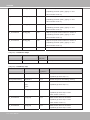
type
snapshot,
6/6
Media type to send to the server or store on the server.
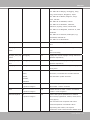
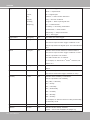
6/6
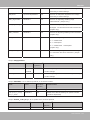
Indicate the source of media stream.
systemlog,
videoclip,
recordmsg
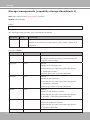
snapshot_source
<integer>
0 means the first stream.
1 means the second stream and etc.
2 means the third stream and etc.
3 means the fourth stream and etc.
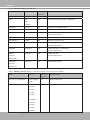
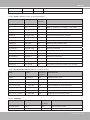
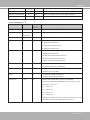
snapshot_prefix
string[16]
6/6
Indicate the prefix of the filename.
snapshot_datesuffix
0, 1
6/6
Add date and time suffix to filename:
1 = Add date and time suffix.
0 = Do not add.
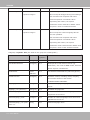
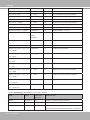
snapshot_preevent
0~7
6/6
Indicates the number of pre-event images.
snapshot_postevent
0~7
6/6
The number of post-event images.
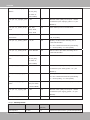
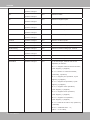
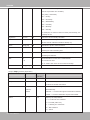
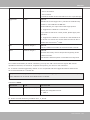
videoclip_source
<integer>
6/6
Indicate the source of media stream.
0 means the first stream.
1 means the second stream and etc.
2 means the third stream and etc.
3 means the fourth stream and etc.
138 - User's Manual