1
8-Port Rackmount PoE Midspan • User Manual
English
Thank you for purchasing the INTELLINET NETWORK SOLUTIONS 8-Port
Rackmount PoE Midspan, Model 502931. For a full list of specifications, refer
to the datasheet available at www.intellinet-network.com.
™
Connections & Indicators
1
2
3
RJ45 10/100 Mbps ports
4
5
6
7
8
POWER + DATA (OUT)
PD LINK
POWER
DATA (IN)
1 2 3 4 5 6 7 8
Ports
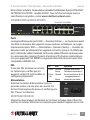
The lower row of RJ45 ports — Data (In) — on the front panel delivers data
to the Midspan from existing network devices. The upper row of RJ45 ports
— Power + Data (Out) — delivers data while also powering added devices
(up to 15.4 Watts per port). Use standard Cat5 or better Ethernet cables for
connections to PoE-supported IP cameras, wireless access points, other
switches, etc. NOTE: Powered devices should also comply with IEEE 802.3af.
LEDs
If an LED doesn’t light to
LEDStatusOperation
indicate a link or activity,
POWER On
Power on
check the corresponding
Off
Check the AC connection; power on
device for proper setup and
PD Link On
Port is linked and providing 48 V to a
(1-8)
powered device
operation.
Off
No link is established
Power
On the rear panel, plug in the included power
ON
cord and connect the switch to an AC outlet.
Toggle the Power switch to On and confirm that
the Power LED is lit.
Rack Mounting
OFF
Simply align the two brackets with the holes on each side panel and secure
them with the included screws. Use the remaining screws to mount the
device in a rack.
2
ENGLISH