1
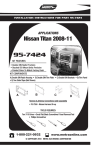
INSTALLATION INSTRUCTIONS FOR PART 99-7424
APPLICATIONS
Nissan Titan 2008-11
99-7424
KIT FEATURES
• DIN Radio Provision with Pocket
• ISO Mount Radio Provision with Pocket
• Painted To Match Factory Dash
KIT COMPONENTS
A) Single DIN Radio Housing • B) ISO Trim Plate • C) ISO Brackets • D) Trim Panel
• E) Two Sided Tape (Not Shown)
A
B
C
D
Harness & Antenna Connections (sold separately)
• 70-7550 - Nissan Harness 95-up
TOOLS REQUIRED:
Torx T-10 Driver • Small Flat Blade Screwdriver/ Panel Removal Tool
• Phillips Screwdriver
1-800-221-0932
www.metraonline.com
© COPYRIGHT 2010 METRA ELECTRONICS CORPORATION
99-7424
TABLE OF CONTENTS
Dash Disassembly
Nissan Titan 2008-11 . . . . . . . . . . . . . . . . . . . . . . . . . . . . . . . . 1
Kit Preparation . . . . . . . . . . . . . . . . . . . . . . . . . . . . . . . . . . . .. . . . . . . 2
Kit Assembly
- DIN Radio Provision with Pocket. . . . . . . . . . . . . . . . . . . . . . . . . . . . . 3
- ISO Mount Radio Provision with Pocket. . . . . . . . . . . . . . . . . . . . . . . . 4
Final Assembly . . . . . . . . . . . . . . . . . . . . . . . . . . . . . . . . . . . . . . . . . . .5
*Note:
Refer also to the instructions included with the aftermarket radio.
99-7424 DASH DISASSEMBLY
NISSAN Titan 2008-11
A
1 Disconnect the negative battery terminal to prevent an accidental short
circuit.
2 Unclip the entire dash panel including
the radio and climate controls. Unplug
and remove the panel. (Figure A)
3 Remove (4) Phillips screws securing
the radio chassis. Unplug and remove
the chassis. (Figure B)
B
4 Remove (4) T-10 Torx screws securing
the climate controls to the dash panel
and remove the controls from the
panel. (Retain the screws and climate
controls for re-use during kit preparation.) (Figure C)
5 Remove (2) T-10 Torx screws securing
the passenger air bag status light
assembly to the dash panel and
remove the light from the panel.
(Retain the screws and light for reuse during kit preparation.) (Figure C)
C
NOTE: The small round Airbag sticker
also needs to be removed from the factory panel and placed onto the 99-7424
radio housing panel. (A round piece of
double-sided tape is provided in case
the factory sticker is not strong
enough.) (Figure C)
Continue to kit preparation
1
99-7424
KIT PREPARATON
NISSAN Titan 2008-11
A
1 Attach the climate controls to the Trim
Panel using the factory hardware
removed during the dash disassembly. (Figure A)
2 Attach the passenger air bag status
light assembly to the Trim Panel using
the factory hardware removed during
the dash disassembly. Also, apply to
air bag button the small round airbag
sticker previously removed in Step 5
dash disassembly. (Figure B)
Continue to kit assembly.
B
2
99-7424 KIT ASSEMBLY
DIN RADIO PROVISION WITH POCKET
*Note: Refer also to the instructions included with the aftermarket radio.
A
1 Slide the DIN cage into the Single DIN
Radio Housing and secure by bending
the metal locking tabs outward.
2 Slide the aftermarket radio into the
cage until it snaps into place.
(Figure B)
Continue to final assembly.
B
3
99-7424 KIT ASSEMBLY
ISO MOUNT RADIO PROVISION WITH POCKET
*Note: Refer also to the instructions included with the aftermarket radio.
A
1 Mount the ISO Brackets to the radio
using the screws supplied with the
radio. (Figure A)
2 Slide the radio into the radio housing
until it snaps into place. (Figure B)
3 Snap the Trim plate onto the front of
the Radio Housing. (Figure B)
Continue to final assembly.
B
4
99-7424 FINAL ASSEMBLY
FINAL ASSEMBLY
A
(A) Strip wire ends back 1/2"
B
B) Twist ends together
C) Solder
D) Tape
C
D
1
Locate the factory wiring harness in the dash. Metra recommends using the
proper mating adapter and making connections as shown. (Isolate and individually tape off the ends of any unused wires to prevent electrical short circuit.)
2
Re-connect the negative battery terminal and test the unit for proper operation.
3
Reassemble in reverse order of disassembly using the 99-7424 Trim Panel in
place of the factory radio trim panel.
FINAL WIRING CONNECTIONS
Make wiring connections using the EIA color code chart shown below and the instructions included with the
head unit. Metra recommends making connections as shown below; Strip, Splice, Solder, Tape. Isolate and
individually tape off ends of any unused wires to prevent electrical short circuit.
METRA / EIA WIRING CODE
12V Ignition / Acc. . . . . . . . . . Red
Right Front (+) . . . . . . . . . . . . Gray
12V Batt / Memory. . . . . . . . . Yellow
Right Front (-). . . . . . . . . . . . . Gray/ Black
Ground. . . . . . . . . . . . . . . . . . Black*
Left Front (+) . . . . . . . . . . . . . White
Power Antenna. . . . . . . . . . . . Blue
Left Front (-). . . . . . . . . . . . . . White / Black
Amp Turn-On . . . . . . . . . . . . . Blue / White
Right Rear (+) . . . . . . . . . . . . Violet
Amp Ground. . . . . . . . . . . . . . Black / White
Right Rear (-) . . . . . . . . . . . . . Violet / Black
Illumination . . . . . . . . . . . . . . Orange
Left Rear (+) . . . . . . . . . . . . . Green
Dimmer . . . . . . . . . . . . . . . . . Orange / White
Left Rear (-) . . . . . . . . . . . . . . Green / Black
*NOTE: When a Black wire is not present, ground radio to vehicle chassis.
All colors may not be present on all leads due to manufacturer’s specifications.
5
99-7424 INSTRUCTIONS
1-800-221-0932
www.metraonline.com
REV. 11/18/10 © COPYRIGHT 2010 METRA ELECTRONICS CORPORATION INST99-7424