1
E-VOL40
Volume Control
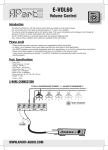
4-WIRE CONNECTION WITH PRIORITY
IN
100Volt
com
TOTAL LOUDSPEAKER POWER : 3 - 40 WATTS MAXIMUM !!!
OUT
USE ONLY HIGH IMPEDANCE
100VOLT LOUDSPEAKERS
Amplifier
24Volt Priority output
- 24V +
e.g. You can use one of
these APart amplifiers
to connect up to 50pcs
volume controllers.
• MA200
• MA200R
• MA200CDR
• MA125
• PA240P (only 30pcs)
100V
+ 24V -
Microphone
com
What does a priority system do ?
When the volume controller is turned to 0 there is no background-music. (e.g. meeting room, office)
At this moment if there is a microphone call the information is lost.
With the priority system connected, the volume controller is set to maximum volume during the microphone call.
In this way there is no information lost.
To be able to use a priority system you need the following components :
- Volume controller with priority relay
- Amplifier with 24Volts priority output contact (24Volts / 1A : you can connect up to 50pcs of volume controllers)
- 4-wire cable connection
- Microphone (MICPAT-D)
Mounting
• Keep the inside of the wallbox clear of all wires, this to prevent
short circuits between the wires in the wallbox and the
printed circuit of the volume controller.
• Don’t use solid copper conductor wires, the screw connectors
on the printed circuit board of the volume controller are designed
for flexible wires.
• Don’t connect more then one wire in each onboard screw
connectors of the volume controller.
• Don’t use force when mounting the volume controller in the
wallbox.
WWW.APART-AUDIO.COM