1
8
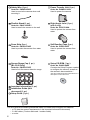
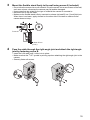
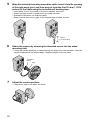
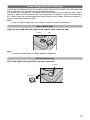
Secure the safety wire to the wall using screw A (included) and washer
L (included).
• When mounting to a hard surface like mortar or concrete, use an anchor to help secure the
camera to the wall.
• Leave some slack in the safety wire, as shown.
Safety wire
Washer L
Screw A
9
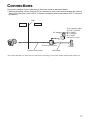
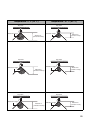
Connect a LAN cable to the power transfer unit and to the switching
hub, router, etc.
• The power transfer unit can be fixed in place with 2 pieces from screw A (4 mm x 20 mm
[3/16 inch x 13/16 inch]).
LAN Cable
10
Connect the outdoor LAN cable connected to the camera to the power
transfer unit.
11
Connect the AC adaptor to the power transfer unit and plug the other
end into the power outlet.
• The camera will activate.
To the power outlet
(For BL-C140CE/BL-C140E/
BL-C160CE/BL-C160E
use an AC cord)
To router
Hook for AC adaptor
21