Transcript
AMPLIFIED SPEAKER
Operation Instruction:
Caution:
A. Operation by hand(as diagram 1):
1. Do not exposed to dripping or splashing.
1. Turn on the power switch on the back of the subwoofer, the system into
ST-BY mode, the ST-BY/MUTE LED is lighted, turn the master volume
knob to turn on the system.
2. Do not placed any objects filled with water over the apparatus.
3. Do not block the ventilation holes.
4. For indoor use only.
2. Press INPUT SEL button to select the audio input mode between
5.1CH/CD and AUX.
3. Turn the master volume knob to adjust the volume level.
5. When using high output signal, please don't turn the volume to
maximum to avoid distortion.
6. In case of long time not using, please plug off the power plug.
B. Operation by remote control(as diagram 2):
1.While ST-BY mode,ST-BY/MUTE LED is lighted, other indicator off. Press
ST-BY key, the system turn on, the ST-BY/MUTE LED off
2.Press INPUT SEL key to select 5.1CH/CD or AUX.
3.Press MODE key to select 5.1CH or 2.1CH output.
4.Press Volume +/- key adjusting Volume, adjusting range 0-80dB (default
40dB). (1)press VOLUME+, VOLUME LED is flashed, until 80dB the LED
flashed stop. (2)press VOLUME-, VOLUME LED is flashed, unitl 0dB the
LED flashed stop.
5.Press SUB-WOOF +/- key adjusting subwoofer volume, adjusting range
+/-7 dB (default 0dB). While press SUB-WOOF +/- key, the VOLUME LED
is flashed as above.
6.Press CENTER +/- adjusting the CENTER VOLUME, adjusting range
+/- 7dB, and the CENTER LED is flashed.
7.Press SURR +/- key adjusting the tone of surround, adjusting range
+/- 7dB, and the VOLUME LED is flashed.
8.Press MUTE key,the sound will be muted,and the ST-BY/MUTE LED is
flashed, press again or press Volume key, the MUTE off.
9.Press RESET key, the adjusted SUB-W +/-,CENTER+/- and SURR +/Volume reset to normal(0dB).
Specification
*Amplifier specification:
AC IN
220V-240V~ 50Hz 300mA
Power output
22W+8Wx5 RMS
Frequency response
30Hz-20KHz
Sensitivity
350mV
Harmonic distortion
<0.3% 1W 1KHz
S/N
>80dB
Separation
*Speaker unit:
>45dB
Subwoofer 5.25" magnetically shielded
Satellite 2.5"x5 magnetically shielded
*Audio input:
RCA
*Audio output:
RCA
*Product size:
DxWxH
Subwoofer
340x165x240mm
Satellites
85x100x165mm
M-860
User Manual
80-M860-97-0001-02 2008-07-04出
(Diagram 1) Front Panel
(Diagram 2) Remote Control
1
VOLUME
Reset
Inside Package:
ST-BY
MUTE
Mute
Stand by
Subwoofer speaker
1 pc
Satellite speaker
5 pcs
3.5ST-2RCA audio cable
1 pc
2RCA-2RCA audio cables
3 pcs
2
―
Remote control
1 pc
User manual
1 pcs
VOLUME
INPUT SEL
INPUT
MODE
Output Mode
SURR+
CENTER+ SUB-W+
SURR-
CENTER- SUB-W-
Center fine adjusting
+
AUX
G CD
R 5.1
STBY/MUTE
INPUT SEL RESET
Input selection
Surround fine adjusting
2.1
5.1
Subwoofer fine adjusting
VOLUME -
3
VOLUME +
Volume + Control
Volume- control
OUTPUT
Controls on the front of Subwoofer
1. Remote Control Signal Receiving Window and LED display
2. Master Volume Knob:
The master volume could be adjusted either by hand or remote control
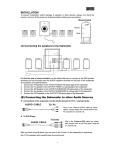
System Connection(as diagram 3):
3. Input selection button
Warning: before connecting the speakers, make sure that the power plug is
disconnected from the AC outlet.
1. Connect Front Left/Right, Center, Surround Left/Right speaker cables to
the appropriate audio output jacks on the back of the subwoofer.
CENTER
(Diagram 3)
To stereo audio source
2.Connect one end of the 2RCA-2RCA audio cable to the appropriate
To computer 5.1 channel sound
card or DVD player
5.1CH/CD input jacks of the Front Left/Right, Center, Surround Left/Right
channel on the back of the subwoofer, the other end to the appropriate
audio output jacks on the DVD or the other audio source.
3.If connect to any 2-channel audio source, just connect one end of the
FRONT L
FRONT R
2RCA-2RCA audio cable to the R/L AUX input jacks on the back of the
subwoofer.
4.If connect to PC soundcard or any audio source only with headset output,
L
R
FL
FR
CEN
SW
SL
SR
6.Make sure all the cables are connected correctly, connect the power plug
5.1CH/CD INPUT
plug to a matching color coded jack.
AUX INPUT
then please use the 2RCA-3.5mm audio cable.
5.the jacks and plugs are color-coded. Be sure to attach each color-coded
to the correct AC outlet.
Remarks the system positioning:
AUDIO OUTPUT
SURROUND R
FR
SR
FL
SL
SURROUND L
* The system is magnetically shielded which could be positioned besides
the PC monitor or near the TV.
CEN
* Please refer to sound card instruction when connect 5.1 channel sound
card.
* Statement indicating that the socket-outlet shall be installed near the
FUSE
T630mAL250V
AC IN
ON
OFF
equipment and shall be easily accessible.
* The highest environmental temperature suitable for this product is 40oC.
*Please note the correct placement of speaker is shown in the above picture.