1
Installation
Important
1.
Before you begin, make sure that the power to all the devices you will be connecting has
been turned off. You must unplug the power cords of any computers that can be powered
on from the keyboard. Otherwise, the KVM switch will receive power from the computer.
2.
To prevent damage to your equipment, make sure that all the devices you will be
connecting are properly grounded.
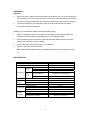
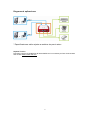
Installing your new ENKVM-USBB involves the following steps:
1.
Plug your keyboard, monitor, and mouse into their ports on the ENKVM-USBB. The
keyboard and mouse ports are labeled with an icon to distinguish them.
2.
Plug the USB and video connectors of the attached KVM cables into their respective
ports on the computers you are installing.
3.
Position the Easy Switch within reach on your desktop.
4.
Power on the power to the computers.
Note: The ENKVM-USBB’s Power On by default will link to the first computer you turn
on.
Specifications
Function
Computer Connections
Port Selection
Keyboard or USB Hub
Console
Mouse or USB Hub
Ports
Video
Connectors
Keyboard/ Mouse
KVM
Ports
Video
LEDs
Cable
Length
Selected
Computers
Easy Switch
Physical
Properties
4 x USB Type A Male (Black)
2 x HDB-15 Male (Blue)
2 (Green)
1.2 m
1.8 m
2048 x 1536; DDC2B
0-50°C
-20-60°C
0-80% RH, Non-condensing
Plastic
0.31 kg
Video
Environment
ENKVM-USBB
2
Easy Switch
1 x USB Type A Female (Black)
1 x USB Type A Female (Black)
1 x HDB-15 Female (Blue)
Operating Temp.
Storage Temp.
Humidity
Housing
Weight
Dimensions (L x W x H)
8.24 x 7.71 x 2.46 cm
iii