1
English
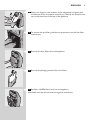
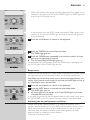
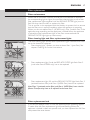
, The power-on light and one of the AIR QUALITY lights on the
control panel goes on.
English
11
11
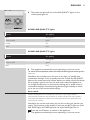
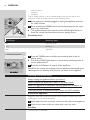
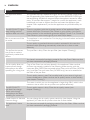
Theairqualitylightringshowsthequalityoftheair.
AC4004: AiR QUAliTY lights
Colour
Air quality
Blue
very good
Deep purple
Purple
Red
Colour
Blue
Deep purple
Purple
Colour
Red
Blue
good
Air quality indication
fair
bad
Airquality
very good
AC4002: AiR QUAliTY lights
good
fair
Air quality
bad
very good
Deep purple
goodlight ring, press the AIR QUALITY button.
To switch off the air quality
Red
Note:The air quality lightbad
ring automatically goes on when the appliance is
switched on.
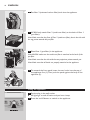
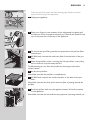
, TheapplianceautomaticallystartsoperatingintheAUTOmode.
The appliance automatically starts operating in the auto mode.
on/offagain
button
until
To switch
switchoff
offthe
theappliance,
appliance,press
pressand
the hold
on/offthe
button
andagain
unplug
thethe
power-on light goes out and unplug the appliance.
appliance.
Note:When the humidity level in the room is very high, it is possible that
condensation develops on the air quality sensor. As a result, the AIR QUALITY
lightson
onthe
thecontrol
controlpanel
paneland
maythe
indicate
that light
the air
is bad even
light
air quality
ringquality
may indicate
thatthough
the
the quality
air quality
is good.
this case,
thequality
auto mode
causes
appliance
to
air
is bad
even In
though
the air
is good.
In thisthecase,
the auto
run at causes
high fanthespeed.
You can
solveatthis
cleaning
mode
appliance
to run
highbyfan
speed.the
Youair
canquality
solve sensor.
this by If
condensation
develops
during periods
of high frequently
humidity, we
advise
cleaning
the air
quality frequently
sensor. If condensation
develops
during
you to use
one of
the manual
speedyou
settings.
periods
of high
humidity,
we advise
to use one of the manual speed
settings.
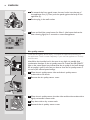
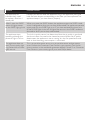
Auto mode
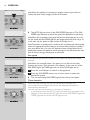
Fan speed lights/filter replacement lights
When the appliance is switched on, the built-in air quality sensor
- The lights on the right-hand side of the control panel have a dual
automatically measures the ambient air quality. When the auto mode is
function: they either indicate the fan speed or they indicate that the
activated, the appliance selects the most appropriate fan speed for the
filters should be replaced or cleaned.
measured air quality.
- When lights 1 to 3/4 light up continuously, they indicate the current fan
Note:speed.
When you use the auto mode, you can also use the timer function (see
‘Timer
function
in this
this the
case,pre-filter.
the AUTO
light, lights
one of2the
-section
When
light
1 flashes,
youchapter).
have to In
clean
When
FANand/or
SPEED3/4
lights,
theyou
TIMER
and onethese
of thefilters.
HOURIf lights
on.
flash,
havelight
to replace
lights are
2 and/or
3/4 flash, the REPLACE FILTER light also flashes (see chapter ‘Filter
1 Press the on/off button to switch on the appliance.
replacement’ for more information).
, The appliance automatically starts operating in the auto mode.
- When lights 2, 3/4 and the REPLACE FILTER light are on continuously,
the appliance is locked (see chapter ‘Filter replacement lock’ for more
information).