1
English
PHONE/FAX/MODEM/NETWORK PROTECTION CONNECTION (OPTIONAL)
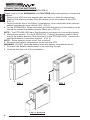
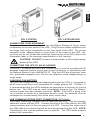
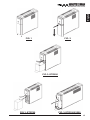
Connect a 10/100 Base-T network, single line phone, fax or modem line to the
RJ-11/45 modular connectors on the rear panel of the UPS. This connection
will require another length of telephone cable (provided) or network cable. The
cable coming from the telephone service or network system is connected to the
port marked “IN”. The equipment to be protected is connected to the port
marked "OUT". NOTE: Connecting to the phone/fax/modem/network modular
connectors is optional. The UPS works properly without this connection.
SYSTEM OVERVIEW
This Line-Interactive UPS protects computers, internetworking, and telecommunications equipment from blackouts, brownouts, overvoltages, and surges.
The AVR function continuously corrects the voltages, in-between the brownout
and overvoltage transfer points (90 - 150VAC), to a safe usable level. When the
UPS is operating in the AVR mode the audible alarm will remain silent and the
AC Mode indicator will blink. During normal AC operation, the UPS will quietly
and confidently protect your system from power anomalies.
The UPS will charge the batteries with the UPS in the on or off position when
the UPS is plugged into the wall outlet and there is an acceptable AC voltage
present (90 - 150VAC). When a blackout, brownout, or an overvoltage condition
occurs; the UPS will transfer to the battery mode, the On Battery indicator will
illuminate and the audible alarm will sound once every five seconds indicating
that the commercial power is lost or unacceptable. When the commercial
power returns or is at an acceptable level, the UPS will automatically transfer
back to the AC normal mode and start recharging the batteries. During an
extended outage when there is approximately two minutes of backup time remaining the audible alarm will sound twice every five seconds. This Low Battery Warning is letting the user know that they should save all open files and
turn off their computer. When the batteries reach the predetermined level the
UPS will automatically shutdown protecting the batteries from over discharging. Once the commercial power returns the UPS will automatically restart,
providing safe usable power to the connected equipment and start recharging
the batteries.
10