1
L. Connecting to Other Equipment
1. AV Out
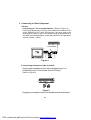
Connecting to a TV or Another Monitor ( Refer to Figure 4)
Connect the black end (1/8” plug) of the audio/video cable into the
unit’s DVD’s A/V OUT jack, and connect the other end to the
AUDIO INPUT jacks on your TV or Monitor using an additional set of
AV cable (not included) (white = left audio channel, red = right audio
channel, yellow = video).
not included
Figure 4
2. Connecting Headphones (Not included)
Simply plug the headphones into either Headphone jack 1 or
Headphone jack 2 on the left side of the DVD Player.
(Refer to Figure 5)
Figure 5
Plugging into Headphone jack 1 will disable the internal speakers.
20
PDF created with pdfFactory Pro trial version www.pdffactory.com