1
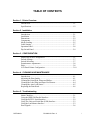
TABLE OF CONTENTS
Section 1. Printer Overview
Introduction..................................................................................................1-1
Specifications...............................................................................................1-2
Section 2. Installation
Introduction..................................................................................................2-1
Installation ...................................................................................................2-1
Dimensions ..................................................................................................2-2
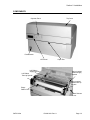
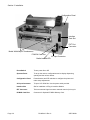
Components .................................................................................................2-3
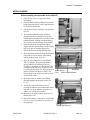
Media Loading .............................................................................................2-5
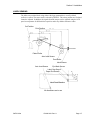
Label Sensing...............................................................................................2-7
Operation Panel............................................................................................2-8
Dip Switch Panel .........................................................................................2-9
Section 3. CONFIGURATION
Printer Dip Switch Configuration ................................................................3-1
Default Settings............................................................................................3-7
Switch Selections .........................................................................................3-7
Potentiometer Adjustments..........................................................................3-8
Pitch .............................................................................................................3-8
LCD Panel Printer Configuration ................................................................3-10
Section 4. CLEANING AND MAINTENANCE
Introduction..................................................................................................4-1
Adjusting the Print Quality ..........................................................................4-1
Cleaning the Print Head, Platen and Rollers................................................4-2
Cleaning the Label Edge and Paper End Sensors ........................................4-4
Cleaning the Auto Load Sensor ...................................................................4-5
Replacing the Print Head .............................................................................4-6
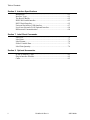
Section 5. Troubleshooting
Initial Checklist............................................................................................5-1
Using the IEEE1284 Parallel Interface ........................................................5-1
Using the RS232C Serial Interface ..............................................................5-2
Using The Universal Serial Bus (USB) Interface ........................................5-3
Using the Lan Ethernet Interface .................................................................5-3
Error Signals ................................................................................................5-6
SATO M10e
PN 9001101 Rev. A
i