1
INSTALLATION INSTRUCTIONS
Instrucciones de instalación
Installationsanleitung
Instruções de Instalação
Istruzioni di installazione
Installatie-instructies
Instructions d´installation
Fixed / Adjustable Length Extension Columns
Barras de extensión de longitud ajustable / fija
Verlängerungssäulen mit fester / verstellbarer Länge
Colunas de extensão de comprimento fixo / ajustável
Colonne di prolunga a lunghezza fissa/regolabile
Verlengkolommen met vaste / instelbare lengte
Colonnes d'extension fixes/à longueur réglable
CMS Series Columns
CMS Series Columns
DISCLAIMER
CSAV, Inc., and its affiliated corporations and subsidiaries
(collectively, "CSAV"), intend to make this manual accurate and
complete. However, CSAV makes no claim that the information
contained herein covers all details, conditions or variations, nor
does it provide for every possible contingency in connection
with the installation or use of this product. The information
contained in this document is subject to change without notice
or obligation of any kind. CSAV makes no representation of
warranty, expressed or implied, regarding the information
contained herein. CSAV assumes no responsibility for
accuracy, completeness or sufficiency of the information
contained in this document.
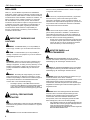
IMPORTANT WARNINGS AND
CAUTIONS!
Installation Instructions
atención sobre la posibilidad de dañar o destruir el equipo si
no sigue las instrucciones.
AVISO: Si no lee, comprende perfectamente y sigue todas
las instrucciones, podría causar daños graves daños
personales y materiales o anular la garantía de fábrica. El
instalador es el responsable de asegurarse de que todos los
componentes están correctamente montados e instalados
siguiendo las instrucciones indicadas.
AVISO: Si se excede el peso máximo, podrían causarse
graves daños personales o materiales. El instalador es
responsable de asegurarse de que el peso combinado de
todos los componentes montados en la barra de extensión
de la serie CMS no excede 226 kg (500 libras).
•
El peso que la columna de extensión de la serie CMS
es capaz de soportar podría estar LIMITADO al peso
mínimo de cada uno de los componentes ubicados
entre dicha barra y la estructura de apoyo.
WARNING: A WARNING alerts you to the possibility of
serious injury or death if you do not follow the instructions.
CAUTION: A CAUTION alerts you to the possibility of
WICHTIGE WARN- und
VORSICHTSHINWEISE!
damage or destruction of equipment if you do not follow the
corresponding instructions.
WARNING: Failure to read, thoroughly understand, and
follow all instructions can result in serious personal injury,
damage to equipment, or voiding of factory warranty! It is the
installer’s responsibility to make sure all components are
properly assembled and installed using the instructions
provided.
WARNUNG: Ein WARNHINWEIS macht auf mögliche
schwere oder tödliche Verletzungen aufmerksam, die bei
Nichtbefolgung der Anweisungen eintreten können.
VORSICHT: Ein VORSICHTSHINWEIS macht auf Schäden
oder mögliche Zerstörung des Geräts aufmerksam, die bei
Nichtbefolgung der Anweisungen eintreten können.
WARNING: Exceeding the weight capacity can result in
serious personal injury or damage to equipment! It is the
installer’s responsibility to make sure the combined weight of
all components attached to the CMS Series Extension
Column does not exceed 500 lbs (226 kg).
•
The weight capacity of the CMS Series Extension
Column may be LIMITED to the lowest weight capacity
of any other component located between the CMS
Series Extension Column and the supporting structure!
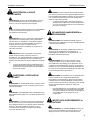
iAVISOS
y PRECAUCIONES
IMPORTANTES!
AVISO: Un AVISO llama su atención sobre la posibilidad de
sufrir lesiones de gravedad o incluso mortales si no sigue las
instrucciones.
PRECAUCIÓN: Una nota de PRECAUCIÓN llama su
2
WARNUNG: Falls nicht alle Anweisungen gelesen und gut
verstanden werden, kann dies zu schweren
Körperverletzungen, Schaden an den Geräten führen und die
Werksgarantie nichtig machen! Der Monteur ist dafür
verantwortlich, dass alle Komponenten unter Einhaltung der
mitgelieferten Anweisungen korrekt zusammengebaut und
eingebaut werden.
WARNUNG: Wenn das zulässige Gewicht überschritten
wird, kann dies zu schweren Körperverletzungen oder
Schäden an den Geräten führen! Der Monteur ist dafür
verantwortlich, dass das kombinierte Gewicht aller
Komponenten, die an der Verlängerungssäule der CMS
Serie befestigt sind, nicht mehr als 226 kg beträgt.
•
Das zulässige Gewicht für der Verlängerungssäule der
CMS Serie kann auf das geringste zulässige Gewicht
einer der Komponenten zwischen der
Verlängerungsäule der CMS Serie und dem tragenden
Bauwerk BESCHRÄNKT sein!
Installation Instructions
ADVERTÊNCIAS e AVISOS
IMPORTANTES!
ADVERTÊNCIA: Os alertas de ADVERTÊNCIA avisam-no
para a possibilidade de ocorrência de graves lesões ou
morte no caso de incumprimento das instruções.
AVISO: Os alertas de AVISO avisam-no para a possibilidade
de danos ou destruição do equipamento no caso de
incumprimento das instruções.
ADVERTÊNCIA: Se não ler, compreender completamente e
seguir todas as instruções podem ocorrer graves lesões
pessoais, danos no equipamento e a garantia de fábrica
pode ser anulada! É da responsabilidade do instalador
certificar-se de que todos os componentes são
correctamente montados e instalados de acordo com as
instruções fornecidas.
ADVERTÊNCIA: Exceder a capacidade de peso pode
resultar em graves lesões pessoais ou danos no
equipamento! É da responsabilidade do instalador certificarse de que o peso combinado de todos os componentes
ligados à coluna de extensão da gama CMS não excede 226
kg.
•
A coluna de extensão pode ser LIMITADA à menor
capacidade de peso de qualquer outro componente
situado entre a coluna de extensão da série CMS e a
estrutura de suporte!
AVVERTENZE e PRECAUZIONI
IMPORTANTI!
AVVERTENZA: Un'AVVERTENZA mette in guardia in merito
alla possibilità di gravi infortuni, anche letali, qualora non si
osservino le istruzioni.
CMS Series Columns
AVVERTENZA: Un peso superiore alla capacità nominale
può arrecare gravi infortuni o danneggiare l'apparecchiatura.
È responsabilità dell'installatore verificare che il peso totale di
tutti i componenti montati sulla colonna di prolunga serie
CMS non superi 226 kg (500 lb).
•
BELANGRIJKE AANWIJZINGEN en
WAARSCHUWINGEN!
WAARSCHUWING: Een WAARSCHUWING vestigt uw
aandacht op de mogelijkheid van ernstig of dodelijk letsel als
u de instructies niet opvolgt.
VOORZICHTIG: De aanwijzing VOORZICHTIG vestigt uw
aandacht op de mogelijkheid van beschadiging of
onherstelbare beschadiging van de apparatuur als u de
betreffende instructies niet opvolgt.
WAARSCHUWING: Door niet alle instructies te lezen,
volledig te begrijpen en op te volgen, riskeert u ernstig
persoonlijk letsel, beschadiging van de apparatuur en het
vervallen van de fabrieksgarantie. Degene die het product
installeert is ervoor verantwoordelijk dat alle onderdelen aan
de hand van de meegeleverde handleiding op de juiste wijze
worden samengebouwd en gemonteerd.
WAARSCHUWING: Overschrijding van het draagvermogen
kan de oorzaak zijn van ernstig persoonlijk letsel en
beschadiging van de apparatuur! Degene die het product
installeert is ervoor verantwoordelijk dat het totale gewicht
van alle componenten die aan de verlengkolom van de CMS
Serie worden bevestigd een gewicht van 226 kg niet
overschrijdt.
•
ATTENZIONE: Un'ATTENZIONE indica la possibilità di gravi
danni all'attrezzatura qualora non ci si attiene alle istruzioni al
riguardo.
AVVERTENZA: La mancata comprensione e ottemperanza
alle istruzioni fornite può provocare gravi lesioni personali,
danni all'apparecchiatura o annullare la garanzia fornita dal
produttore. Spetta all'installatore verificare che tutti i
componenti siano assemblati correttamente e installati
secondo le istruzioni fornite.
La capacità di peso della colonna di prolunga serie
CMS può essere LIMITATA al valore nominale minore
di uno dei componenti montati tra la colonna stessa e
la struttura di sostegno.
De draagcapaciteit van de verlengkolom van de CMS
Serie kan beperkt zijn tot de laagste draagcapaciteit
van andere componenten die tussen de verlengkolom
van de CMS Serie en de draagstructuur zijn
aangebracht!
IMPORTANTS AVERTISSEMENTS et
PRÉCAUTIONS!
ADVERTISSEMENT: Un ADVERTISSEMENT vous met en
garde contre les possibilités de blessures graves ou de
danger de mort si vous ne suivez pas les instructions.
3
CMS Series Columns
PRÉCAUTION: Une PRÉCAUTION vous met en garde
contre les possibilités d´endommagements et de destruction
de l´équipement si vous ne suivez pas les instructions
correspondantes.
ADVERTISSEMENT: Le manque de la lecture, de la
compréhension et du respect total de toutes les instructions,
peut entraîner des blessures corporelles graves,
endommager l'équipement ou annuler la garantie d'usine. Il
incombe à l'installateur de s'assurer que tous les composants
sont correctement assemblés et installés à l'aide des
instructions fournies.
ADVERTISSEMENT: Dépasser la capacité pondérale peut
entraîner des blessures corporelles graves ou endommager
l'équipement. Il incombe à l'installateur de s'assurer que le
poids combiné de tous les composants attachés à la colonne
d'extension de la série°CMS n'est pas supérieur à 226°kg
(500°lb).
•
La capacité pondérale de la colonne d'extension de la
série°CMS peut°être LIMITÉE à la capacité pondérale
la plus faible de n'importe quel autre composant situé
entre la colonne d'extension de la série°CMS et la
structure portante.
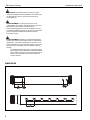
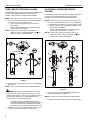
DIMENSIONS
4
Installation Instructions
Installation Instructions
CMS Series Columns
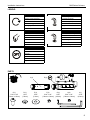
LEGEND
Tighten Fastener
Security Wrench
Apretar elemento de fijación
Llave de seguridad
Befestigungsteil festziehen
Sicherheitsschlüssel
Apertar fixador
Chave de segurança
Serrare il fissaggio
Chiave di sicurezza
Bevestiging vastdraaien
Veiligheidssleutel
Serrez les fixations
Clé de sécurité
By Hand
Hex-Head Wrench
A mano
Llave de cabeza hexagonal
Von Hand
Sechskantschlüssel
Com a mão
Chave de cabeça sextavada
A mano
Chiave esagonale
Met de hand
Zeskantsleutel
À la main
Clé à tête hexagonale
Optional
Opcional
Optional
Opcional
Opzionale
Optie
En option
PARTS
A(1)
C(1)
5/16" x 5/8"
(7.9mm x 15mm)
D(1)
5/16"
(7.9mm)
E(1)
5/16"
(7.9mm)
B(1)
F(2)
5/16" x 1/4"
(7.9mm x 6.4mm)
G(1)
5/32"
(4.0mm)
H(2)
5/16" x 1/4"
(7.9mm x 6.4mm)
J(1)
3/16"
(4.8mm)
5
CMS Series Columns
Installation Instructions
FIXED LENGTH EXTENSION COLUMN
The following procedure assumes that the ceiling plate/adapter
(accessory purchased separately) has been previously
installed. See instructions provided with plate/adapter.
ADJUSTABLE LENGTH EXTENSION
COLUMN
NOTE: Intended for use with Chief accessories and mounts.
The following procedure assumes that the ceiling plate/adapter
(accessory purchased separately) has been previously
installed. See instructions provided with plate/adapter.
1.
NOTE: Intended for use with Chief accessories and mounts.
Install 1-1/2" NPT threaded column (A) into plate/adapter
(See Figure 1). Securely tighten column.
•
Ensure column (A) engages four full threads into
plate/adapter.
•
Ensure cable access opening is rotated to desired
position (optional installation).
1.
NOTE: Cable access opening provided on columns > 9"
(229mm) in length. Optional installation used when
cables must exit below plate/adapter.
Install 1-1/2" NPT threaded column (A or B, as applicable)
into plate/adapter (See Figure 2). Securely tighten column.
•
Ensure column (A or B, as applicable) engages four full
threads into plate/adapter.
•
Ensure cable access opening is rotated to desired
position (optional installation, column (A)).
NOTE: Cable access opening provided on columns > 9"
(229mm) in length. Optional installation used when
cables must exit below plate/adapter.
2
2
A
1
4X
B
A
1
1
4X
4X
1
4X
3
3
A
B
Figure 1
2.
Secure column (A) by tightening set screw in plate/adapter
(See Figure 1).
NOTE: Hex key and set screw provided with plate/adapter.
Figure 2
WARNING: Exceeding the weight capacity can result in
serious personal injury or damage to equipment! It is the
installer’s responsibility to make sure the combined weight of
all components attached to the CMS Series Extension
Column does not exceed 500 lbs (226 kg).
•
3.
6
The weight capacity of the CMS Series Extension
Column may be LIMITED to the lowest weight capacity
of any other component located between the CMS
Series Extension Column and the supporting structure!
Install and secure projector/display mount to lower end of
column (A). See instructions provided with mount.
2.
Secure column (A or B, as applicable) by tightening set
screw in plate/adapter (See Figure 2).
NOTE: Hex key and set screw provided with plate/adapter.
3.
Install mating column (A or B, as applicable) (See Figure 2).
Installation Instructions
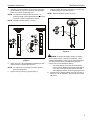
4.
CMS Series Columns
Using key (J), loosely install screw (C) through lock washer
(D), flat washer (E), and outer column (B) into adjustment
hole in inner column (A) (See Figure 3).
7.
Install and tighten set screws (standard (F) or security (H),
as desired) using key (G) (See Figure 4).
NOTE: Optional installation similar; not shown.
NOTE: Two adjustment holes provided in columns > 6"
(152mm) in length. Either adjustment hole can be used
to provide 1" (25mm) adjustment increments.
NOTE: Optional installation similar; not shown.
F x2
7
H x2
5
4
B
6
C D E
A
Figure 4
WARNING: Exceeding the weight capacity can result in
serious personal injury or damage to equipment! It is the
installer’s responsibility to make sure the combined weight of
all components attached to the CMS Series Extension
Column does not exceed 500 lbs (226 kg).
Figure 3
5.
Adjust column (A or B, as applicable) to desired length, then
rotate and lock into position (See Figure 3).
•
NOTE: Any locking slot can be used to provide 2" (51mm)
adjustment increments.
6.
Tighten screw (C) using key (J) (See Figure 3).
8.
The weight capacity of the CMS Series Extension
Column may be LIMITED to the lowest weight capacity
of any other component located between the CMS
Series Extension Column and the supporting structure!
Install and secure projector/display mount to lower end of
column (A or B, as applicable). See instructions provided
with mount.
7
CMS Series Columns
Installation Instructions
USA/International
Europe
Asia Pacific
8803-000071 Rev C
2006 Chief Manufacturing
www.chiefmfg.com
10/06
A
P
F
A
P
F
A
8401 Eagle Creek Parkway, Savage, MN 55378
800.582.6480 / 952.894.6280
877.894.6918 / 952.894.6918
Fellenoord 130 5611 ZB EINDHOVEN, The Netherlands
31 (0)40 2668620
31 (0)40 2668615
Room 30I, Block D, Lily YinDu International Building
LuoGang, BuJi Town, Shenzhen, CHINA. Post Code: 518112
P +86-755-8996 9226 ; 8996 9236 ; 8996 9220
F +86-755-8996 9217