1
Model: K-Series
Installation Instructions
MOUNT INSTALLATION
IMPORTANT ! : IF you will be installing a SINGLE
display with RECESSED mounting holes, then proceed
to "DISPLAY INSTALLATION" before continuing with this
mount installation procedure.
INSTALLATION TO WALL
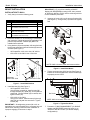
1. Verify that you have the following parts:
Item
Description
Qty
10
MOUNT, Wall, K-Series
1
20
BRACKET, Wall
1
30
SCREW, Phillips Pan Sheet Metal, #10 x 2-1/2"
(ALL EXCEPT KSA-1015/-1016)
2
40
SCREW, Hex Head Lag, 3/8" x 3"
(KSA-1015/-1016 ONLY)
2
50
WASHER, Flat Machine Screw, #10
(ALL EXCEPT KSA-1015/-1016)
2
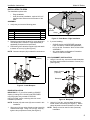
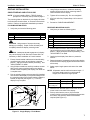
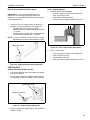
5. Insert top of mount (10) over lip on top of bracket (20)
(See Figure 2). Swing mount (10) down flush against
wall.
10
2. Determine location for mount keeping in mind display
size, extension, height adjustment (if applicable), and
pitch/roll requirements. Bracket (20) MUST be
installed into wood stud.
20
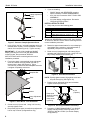
3. Using bracket (20) as a template, drill two pilot holes
through top and bottom holes of bracket (20) into wall
structure (See Figure 1):
•
•
All Except KSA-1015/-1016: Use 1/8" drill bit
KSA-1015/-1016 ONLY: Use 1/4" drill bit
NOTE: KWS-110 shown; other wall mounts similar.
20
Figure 2: Install Wall Mount
50 20
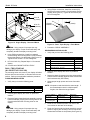
6. Tighten set screw using 5/32" hex key (See Figure 3).
Ensure set screw engages back side of bracket (20)
to properly secure mount.
30
40
All except
KSA-1015/-1016
KSA-1015/-1016
Figure 1: Install Wall Bracket
4. Install bracket (20) (See Figure 1):
•
•
All Except KSA-1015/-1016:
Using Phillips screwdriver, install screws (30)
through washers (50), plate (20), and drywall into
wood stud. Ensure bracket (20) is vertical, then
tighten screws (30).
KSA-1015/-1016 ONLY:
Using 9/16" wrench, install screws (40) through
plate (20) and drywall into wood stud. Tighten
screws (40).
IMPORTANT ! : Overtightening screws (30 or 40, as
applicable) may cause bracket (20) to compress into soft
wall surface, resulting in difficult mount installation or
improper engaging of set screw in step 6.
4
20
Set Screw
NOTE: KWS-110 shown; other wall mounts similar.
Figure 3: Tighten Set Screw
7. Proceed to "CABLE MANAGEMENT" (for SINGLE
display with RECESSED mounting holes), or to
"DISPLAY INSTALLATION" (for all other display
configurations).