1
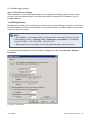
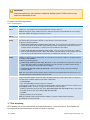
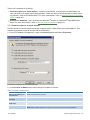
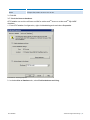
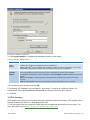
Administration & Configuration Manual
Find out how to configure GFI FaxMaker in different environments, and
configure advanced features.
The information and content in this document is provided for informational purposes only and is
provided "as is" with no warranty of any kind, either express or implied, including but not limited to
the implied warranties of merchantability, fitness for a particular purpose, and non-infringement.
GFI Software is not liable for any damages, including any consequential damages, of any kind that
may result from the use of this document. The information is obtained from publicly available
sources. Though reasonable effort has been made to ensure the accuracy of the data provided, GFI
makes no claim, promise or guarantee about the completeness, accuracy, recency or adequacy of
information and is not responsible for misprints, out-of-date information, or errors. GFI makes no
warranty, express or implied, and assumes no legal liability or responsibility for the accuracy or
completeness of any information contained in this document.
If you believe there are any factual errors in this document, please contact us and we will review
your concerns as soon as practical.
Windows, Exchange, IIS, .NET, Internet Explorer, Outlook, SQL Server and Microsoft are either
registered trademarks or trademarks of Microsoft Corporation in the United States and/or other
countries.
All product and company names herein may be trademarks of their respective owners.
GFI FaxMaker is copyright of GFI SOFTWARE Ltd. - 1999-2012 GFI Software Ltd. All rights reserved.
Document Version: 1.2.1
Last updated (month/day/year): 12/3/2012
Contents
1 Introduction
1.1 About
1.2 System requirements
1.3 Installing GFI FaxMaker instructions
1.4 How GFI FaxMaker works - Sending faxes
1.5 How GFI FaxMaker works - Receiving faxes
2 Using GFI FaxMaker
2.1 How users send faxes
2.2 How users view received faxes
2.3 Monitoring GFI FaxMaker operation
3 General configuration settings
3.1 Fax Lines
3.2 Licensed users
3.3 Fax administrators
3.4 Email2Fax gateway
3.5 Fax and SMS domain names
3.6 Dialling Options
3.7 Fax archiving
3.8 Fax services
3.9 Log files
3.10 HP Digital Sender integration
3.11 Storing faxes
3.12 GFI FaxMaker Licensing information
3.13 Version information
3.14 Product Patches
4 Configuration - Sending faxes
4.1 Sending options
4.2 Document Conversion
4.3 Transmission reports
4.4 Header/Footer options
4.5 Call blocking
4.6 Public contacts
4.7 Coverpages
4.8 NetPrintQueue2FAX
4.9 TextAPI & XMLAPI
4.10 Enabling TextAPI
4.11 Enabling XMLAPI
4.12 Billing
4.13 Sending faxes via Nuance eCopy ShareScan
5 Configuration - Receiving faxes
5.1 Receiving Options
1
1
1
1
2
3
4
4
8
9
11
12
20
23
23
26
28
29
32
34
35
36
37
37
38
39
40
41
42
46
47
48
51
60
65
66
67
67
68
74
74
5.2 Fax routing
5.3 Printers
5.4 Junk Fax filter
5.5 OCR
6 SMS
6.1 How to send an SMS
6.2 Receiving SMS
6.3 Requirements
6.4 Configure SMS settings
75
88
90
90
92
92
94
95
96
7 Uninstalling GFI FaxMaker
105
8 Troubleshooting and support
106
8.1 Introduction
8.2 Common issues
8.3 Troubleshooting options
8.4 Knowledge Base
8.5 Web Forum
8.6 Request technical support
8.7 Documentation
9 Appendix 1: Microsoft® Exchange 2000/2003 Connector
9.1 Creating the connector automatically
9.2 Creating the connector manually
9.3 Removing the connector automatically
9.4 Removing the connector manually
10 Appendix 2: Microsoft® Exchange 2007/2010/2013 Connector
10.1 Creating the connectors automatically
10.2 Creating the connectors manually
10.3 Removing the connectors automatically
10.4 Removing the connectors manually
106
106
108
109
109
109
109
110
110
110
114
115
116
116
116
117
118
11 Glossary
119
12 Index
122
List of Figures
Screenshot 1: Sending a fax using the email client
4
Screenshot 2: Printing document to fax
6
Screenshot 3: The GFI FaxMaker Fax Message form
7
Screenshot 4: Faxes are received in the inbox
8
Screenshot 5: The GFI FaxMaker monitor
9
Screenshot 6: The Line/Devices dialog
12
Screenshot 7: Adding an ISDN channel
13
Screenshot 8: The line options tab
15
Screenshot 9: The advanced line/device options
16
Screenshot 10: The users tab
17
Screenshot 11: Line test tab
18
Screenshot 12: Custom modem properties dialog
19
Screenshot 13: List of GFI FaxMaker users and groups
20
Screenshot 14: Import users from remote machine
22
Screenshot 15: List of Fax administrators
23
Screenshot 16: Email2Fax Gateway setup
24
Screenshot 17: The POP3 connector
25
Screenshot 18: Customizing the fax and SMS domain names
27
Screenshot 19: Dialing options
28
Screenshot 20: Archiving to an email archiving package
30
Screenshot 21: Archiving properties
31
Screenshot 22: Database configuration
32
Screenshot 23: New fax service account
34
Screenshot 24: Configuring the Digital Sender
35
Screenshot 25: HP Digital sender set-up
36
Screenshot 26: Viewing current licensing information
37
Screenshot 27: GFI FaxMaker version information
38
Screenshot 28: Sending options
40
Screenshot 29: Document conversion options
41
Screenshot 30: Fax transmission report
42
Screenshot 31: Fax transmission report options
43
Screenshot 32: SMS transmission report options
44
Screenshot 33: Header/Footer options for outgoing faxes
46
Screenshot 34: Stamping options for incoming faxes
47
Screenshot 35: Call blocking rules
48
Screenshot 36: New call block entry
48
Screenshot 37: Public contacts node
50
Screenshot 38: Coverpage users
53
Screenshot 39: Coverpage options tab
54
Screenshot 40: Creating a new coverpage
55
Screenshot 41: Coverpage options
56
Screenshot 42: Front covernote users
57
Screenshot 43: Creating a new front covernote
58
Screenshot 44: Front covernote options
59
Screenshot 45: A document ready to be printed to NetPrintQueue2FAX
61
Screenshot 46: Printing a document to NetPrintQueue2FAX
62
Screenshot 47: NetPrintQueue2FAX configuration
63
Screenshot 48: Enabling TextAPI
66
Screenshot 49: Enabling TextAPI
67
Screenshot 50: Enforcing billing options
68
Screenshot 51: GFI FaxMaker connector settings
70
Screenshot 52: GFI FaxMaker Nuance eCopy ShareScan connector SMTP settings
71
Screenshot 53: Nuance eCopy ShareScan Connector fax details
73
Screenshot 54: Receiving options
74
Screenshot 55: Creating a new DID route
76
Screenshot 56: Creating a new MSN route
77
Screenshot 57: OCR routing properties
78
Screenshot 58: New search phrase - Creating a new OCR search phrase
79
Screenshot 59: Creating a new Line route
79
Screenshot 60: Creating a new CSID route
80
Screenshot 61: Users to route incoming faxes to
81
Screenshot 62: Automatically print fax
83
Screenshot 63: Automatically backup faxes
84
Screenshot 64: Routing properties - users that receive all incoming faxes
85
Screenshot 65: Routing properties - specifying default fax routers
86
Screenshot 66: Configuring the Network Share path
87
Screenshot 67: Configuring printers
89
Screenshot 68: The junk fax filter options
90
Screenshot 69: OCR properties
91
Screenshot 70: Sending SMS from email client
93
Screenshot 71: Sending SMS from email client
94
Screenshot 72: Received SMS viewed in email client
95
Screenshot 73: Configuring the GFI SMS server
97
Screenshot 74: Configuring an SMS service provider
99
Screenshot 75: Configuring the Clickatell service
100
Screenshot 76: SMS options
101
Screenshot 77: Configuring SMS users
102
Screenshot 78: SMS routing properties
103
Screenshot 79: Specifying IP/Name of GFI FaxMaker machine
111
Screenshot 80: Specifying FAX as an address space
112
Screenshot 81: Specifying faxmaker.com
113
Screenshot 82: The address space tab
114
List of Tables
Table 1: Terms and conventions used in this manual
1
Table 2: Real-time monitoring features
9
Table 3: Add fax line options
13
Table 4: Fax line device options
13
Table 5: Fax line - Line options
15
Table 6: Fax line advanced options
16
Table 7: Fax line users
17
Table 8: Manage fax modems
19
Table 9: Advanced fax modem options
20
Table 10: Managing licensed users and groups
21
Table 11: Managing fax administrators
23
Table 12: SMTP Connector options
24
Table 13: POP3 Downloader options
25
Table 14: Dialling Options
29
Table 15: Archiving to mailbox options
30
Table 16: Archiving to database options
32
Table 17: New fax service account
34
Table 18: GFI FaxMaker log files
34
Table 19: Storing faxes
36
Table 20: Sending options
40
Table 21: Document conversion options
41
Table 22: Transmission reports options
43
Table 23: Fax report templates
44
Table 24: Fax report fields
45
Table 25: Header and footer options
46
Table 26: Stamping options
47
Table 27: Coverpages
56
Table 28: General front covernote options
59
Table 29: Coverpage merge fields - sender’s details
59
Table 30: Coverpage merge fields - recipient’s details
60
Table 31: Coverpage merge fields
60
Table 32: NetPrintQueue2FAX configuration options
63
Table 33: TextAPI options
66
Table 34: GFI FaxMaker connector configuration
71
Table 35: GFI FaxMaker connector configuration
71
Table 36: GFI FaxMaker connector configuration
72
Table 37: GFI FaxMaker connector configuration
72
Table 38: Nuance eCopy ShareScan Connector fax details
73
Table 39: General receiving options
74
Table 40: Fax routing methods
75
Table 41: DTMF/DID routing options
76
Table 42: OCR routing options
78
Table 43: Routing rules user options
81
Table 44: Fax routing to public folder
88
Table 45: Printer properties
89
Table 46: Junk fax filter options
90
Table 47: OCR properties
91
Table 48: SMS service properties
97
Table 49: SMS service properties
99
Table 50: Clickatell SMS service properties
100
Table 51: SMS options
101
Table 52: SMS routing properties tabs
103
Table 53: SMS log files
103
Table 54: Troubleshooting: Email2FaxGatew
106
Table 55: Troubleshooting: Sending faxes
106
Table 56: Troubleshooting: Receiving faxes
108
Table 57: Troubleshooting: SMS
108
Table 58: Performance options
108
1 Introduction
1.1 About
GFI FaxMaker is a fax server that enables you to send and receive faxes and SMS using your email
infrastructure. GFI FaxMaker for Exchange/SMTP integrates with Microsoft® Exchange Server, Lotus
Notes and with other SMTP/POP3 mail servers.
1.2 System requirements
For a complete list of system requirements and other installation settings, refer to the GFI
FaxMakerGetting Started Guide available from:
http://www.gfi.com/faxmaker/manual
1.3 Installing GFI FaxMaker instructions
For a complete set of installation instructions and information on how to configure GFI FaxMaker for
first use, refer to the GFI FaxMakerGetting Started Guide available from:
http://www.gfi.com/faxmaker/manual
1.3.1 Terms and conventions used in this manual
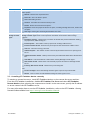
Table 1: Terms and conventions used in this manual
Term
Description
Additional information and references essential for the operation of GFI FaxMaker.
Important notifications and cautions regarding potential issues that are commonly encountered.
>
Step by step navigational instructions to access a specific function.
Bold text
Items to select such as nodes, menu options or command buttons.
Italics text
Parameters and values that you must replace with the applicable value, such as custom paths and file
names.
Code
Indicates text values to key in, such as commands and addresses.
GFI FaxMaker
1 Introduction | 1
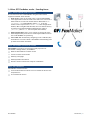
1.4 How GFI FaxMaker works - Sending faxes
Step 1: Various methods used to send a fax
The fax content is sent to GFI FaxMaker using one of the various
supported methods. These include:
Email server: Users use an email client or use the GFI FaxMaker
client application to send an email to the mail server. The local or
hosted mail server routes all emails that are addressed to [email protected] to GFI FaxMaker (where 1111 is the fax
number of the recipient and faxmaker.com is the configured fax
domain). When using Microsoft Outlook, users can also fax directly
to contacts in the address book by addressing the email to
[FAX:1111] (where 1111 is the recipient's fax number).
NetPrintQueue2Fax: Users ‘print’ content to send by fax to the
NetPrintQueue2Fax printer driver. NetPrintQueue2Fax sends content to GFI FaxMaker for processing.
Text & XML API: Send faxes by configuring a text or XML file (API)
and submit it to a central folder. GFI FaxMaker automatically picks
up faxes stored within this folder.
Step 2: GFI FaxMaker processes fax content
GFI FaxMaker: Processes received content and prepares it for
transmission. Amongst others, GFI FaxMaker:
Resolves and formats the number to dial
Converts content to fax format
Adds any coverpages
Adds any headers and footers
Delivers content to fax device ready for transmission
Step 3: Fax transmission
GFI FaxMaker transmits the fax:
to an installed fax device which in turn transmits the fax over the
telephone line
or to a hosted fax service.
GFI FaxMaker
1 Introduction | 2
1.5 How GFI FaxMaker works - Receiving faxes
Step 1: Receive fax call
The sender transmits the fax. This is received by GFI FaxMaker either
from the fax line or from the hosted fax service.
Step 2: GFI FaxMaker processes fax & content
GFI FaxMaker processes the received fax. Amongst others:
(Optional) Blocks junk faxes.
(Optional) Optically recognizes text in fax (OCR).
Determines recipients according to fax routing settings.
Forwards fax by email to appropriate users.
GFI FaxMaker
1 Introduction | 3
2 Using GFI FaxMaker
Topics in this chapter:
2.1 How users send faxes
4
2.2 How users view received faxes
8
2.3 Monitoring GFI FaxMaker operation
9
2.1 How users send faxes
There are various ways how users can send faxes:
Via email
Printing content to GFI FaxMaker - NetPrintQueue2Fax
Using the GFI FaxMaker Client application
TextAPI/XMLAPI
2.1.1 Via email
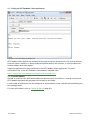
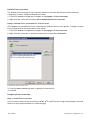
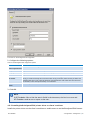
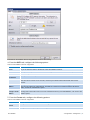
Screenshot 1: Sending a fax using the email client
Licensed users can send faxes directly from their email client:
GFI FaxMaker
2 Using GFI FaxMaker | 4
Use the Microsoft® Outlook® address book for recipients that have a fax number configured.
Address the email to [FAX:faxnumber], where faxnumber is replaced by the Outlook® contact’s fax number.
Address an email to [email protected], where faxnumber is replaced by the recipient’s fax number.
NOTE
The default fax (faxmaker.com) and SMS (smsmaker.com) domains can be
customized by the GFI FaxMaker administrator. Use the configured fax domain
accordingly.
The first page of the fax contains the recipient’s name, sender’s name, email subject and email body.
If the email includes attachments, these are included in subsequent pages of the fax.
This method is available for all email users, with no installation of other software or custom
configurations required.
To use this method:
Add users in the Licensed Users list. For more information, refer to Licensed users (page 20).
Configure mail servers to forward emails addressed to *@faxmaker.com, *@smsmaker.com,
Fax:* and SMS:* to GFI FaxMaker. For more information, refer to the GFI FaxMaker Getting
Started Guide available from: http://www.gfi.com/faxmaker/manual.
NOTE
The default fax (faxmaker.com) and SMS (smsmaker.com) domains can be
customized by the GFI FaxMaker administrator. If domains are modified, use the
configured domain names. For more information, refer to Fax and SMS domain names
(page 26).
GFI FaxMaker
2 Using GFI FaxMaker | 5
2.1.2 Printing content to GFI FaxMaker - NetPrintQueue2Fax
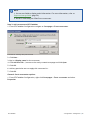
Screenshot 2: Printing document to fax
Users print content to the GFI FaxMaker printer driver - NetPrintQueue2Fax - to send faxes. Fax
recipient number is keyed in within the document in a customizable format, for example Fax:
12345678.
This enables fax sending in any format that allows printing of content (without installing application
on GFI FaxMaker machine).
This method also enables automatically customized fax sending to a number of recipients. For
example, through Microsoft® Word®’s Mail Merge feature you can send faxes to a large number of
recipients.
Configure the NetPrintQueue2Fax printer driver on client machines to use this method. For more
information, refer to NetPrintQueue2FAX (page 60).
GFI FaxMaker
2 Using GFI FaxMaker | 6
2.1.3 Using the GFI FaxMaker Client application
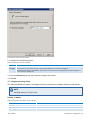
Screenshot 3: The GFI FaxMaker Fax Message form
GFI FaxMaker Client application enables Fax message conversion and preview (.FAX format) directly
from the clients’ machines. It also provides an address book for fax contacts, or uses the Microsoft
Outlook address book information.
Install the application on client machines to use GFI FaxMaker Client application. For more
information refer to the GFI FaxMaker Client Manual, available from:
http://support.gfi.com/manuals/en/fax2013client/Default.htm
2.1.4 TextAPI/XMLAPI
Use XML or text files with information about the faxes to send. Store files to a central location and
GFI FaxMaker automatically processes files located in this folder.
A wide range of applications can be configured to automatically create such files and automating the
fax sending process.
For more information, refer to TextAPI & XMLAPI (page 65).
GFI FaxMaker
2 Using GFI FaxMaker | 7
2.2 How users view received faxes
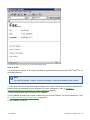
Received faxes are forwarded to the user via email. The email will contain a fax report and the fax
file included with the email as an attachment. Faxes can be attached in several formats, such as PDF.
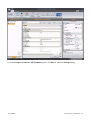
Screenshot 4: Faxes are received in the inbox
Configure routing options for GFI FaxMaker to route received faxes to the correct recipient. For more
information, refer to Fax routing (page 75).
GFI FaxMaker
2 Using GFI FaxMaker | 8
2.3 Monitoring GFI FaxMaker operation
Screenshot 5: The GFI FaxMaker monitor
Use the GFI FaxMaker Monitor to monitor GFI FaxMaker operation. It can be used to monitor multiple
instances of GFI FaxMaker and both local and remote installations.
Load GFI FaxMaker Monitor from Start > Programs > GFI FaxMaker > GFI FaxMaker Monitor.
GFI FaxMaker Monitor shows status of:
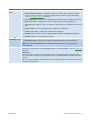
Table 2: Real-time monitoring features
Feature
Description
Status of fax lines
& devices
Navigate to the Fax Server node. This displays the list of fax devices/lines and their status.
Other functionality:
Initialise - Start devices/lines that are not initialized.
Abort - Stop a particular device/line.
Debug - Generate a debug log of the device in the logs folder within the GFI FaxMaker installation folder.
Change view - Change how to display list of devices/lines.
Restart server - Restart the GFI FaxMaker Fax Server service.
GFI FaxMaker
2 Using GFI FaxMaker | 9
Feature
Description
Faxes in queue
Select the Queued Faxes node to show all faxes that are waiting to be sent.
Other options:
Refresh - Refresh view of queued faxes
Select all - Select all faxes in queue
Grid - Show/hide grid lines
Columns - Customize the columns to show per fax.
Delete - Delete selected faxes from queue.
Properties - View the properties of faxes in queue, including message date/time, sender and
recipient.
View logs - Load log file containing details about sent faxes.
Status of the
Message Transfer
Agent
The Message Transport Agent is the transport service for SMTP, POP3 and SMS messages. Click
Message Transfer Agent node to view important information and statistics about message
transport.
Email2Fax Gateway - Shows activity of number of threads that perform POP3 down loading,
fax preparation, SMTP sending etc.
Inbound Queue - The number of faxes prepared for sending to SMTP clients.
Inbound transfer thread - Shows activity of the process that sends faxes to SMTP clients.
Last file - The last file being processed.
Outbound Queue - The number of faxes collected by the POP3 connector for queuing to fax
server.
Outbound transfer thread - Shows process activity that downloads POP3 mail from POP3 mailbox.
Last address - Last email address or SMS number used by Message Transfer Agent.
SMS transfer thread - Shows status of thread that prepares and transfers messages to SMS
server.
Incoming SMS transfer thread - Shows activity of incoming SMS.
Click:
Process messages - Forces the Message Transfer Agent to poll for any new fax/SMS.
Restart - Click to restart the GFI FaxMaker Message Transfer Agent service.
2.3.1 Installing GFI FaxMaker Monitor remotely
To monitor a remote fax server, install GFI FaxMaker Monitor on the remote fax server machine.
From the GFI FaxMaker installation, disable GFI FaxMaker Fax Server and select GFI FaxMaker
Remote Monitor when selecting the components to install. In the next screen, specify the IP address
or server name of the GFI FaxMaker server.
For more information how to run the GFI FaxMaker installation, refer to the GFI FaxMaker Getting
Started Guide available from http://www.gfi.com/faxmaker/manual.
GFI FaxMaker
2 Using GFI FaxMaker | 10
3 General configuration settings
Topics in this chapter:
3.1 Fax Lines
12
3.2 Licensed users
20
3.3 Fax administrators
23
3.4 Email2Fax gateway
23
3.5 Fax and SMS domain names
26
3.6 Dialling Options
28
3.7 Fax archiving
29
3.8 Fax services
32
3.9 Log files
34
3.10 HP Digital Sender integration
35
3.11 Storing faxes
36
3.12 GFI FaxMaker Licensing information
37
3.13 Version information
37
3.14 Product Patches
38
GFI FaxMaker
3 General configuration settings | 11
3.1 Fax Lines
A fax line is a physical telephone line assigned to a fax device (modem or ISDN/fax card). Depending
on the device type, fax devices may support multiple lines. GFI FaxMaker enables you to configure
different options per fax line.
Screenshot 6: The Line/Devices dialog
Fax lines are configurable from GFI FaxMaker Configuration > Lines/Devices > Properties. For more
information, refer to:
Adding Fax lines to GFI FaxMaker
Editing Fax lines
Deleting Fax lines
3.1.1 Adding Fax lines to GFI FaxMaker
1. Navigate to GFI FaxMaker Configuration > Lines/Devices > Properties and click Add….
NOTE
When adding new fax modems after installing GFI FaxMaker, click Detect in the
Lines/Devices dialog to add them to the list of devices.
GFI FaxMaker
3 General configuration settings | 12
Screenshot 7: Adding an ISDN channel
2. Specify the following details:
Table 3: Add fax line options
Setting
Configuration
Available fax lines
Select one of the available fax line numbers. This is used as a reference to that particular
line.
Device type
Specify the type of fax device used.
Physical line/port
Select the channel or port to configure.
Copy settings from
installed device
To copy the settings of a previously configured fax line, select this option and specify the
fax line to copy settings from.
Click OK.
3. From the Device tab in the line properties dialog, configure:
Table 4: Fax line device options
Device Type
Settings
ISDN
ISDN BRI CAPI2.0
devices
ISDN PRI/IP
CAPI2.0 devices
ANALOG CAPI2.0
devices
Gateway devices
ISDN type - Select the ISDN device type.
Brooktrout
Card type - Select the Brooktrout device type
MSN numbers - Enter the number to answer incoming calls for. Key in a full number entry
(for example, 82733099) or a prefix number (for example, 82733 to answer all numbers in the
range 82733000-8273099).
Answer All - Click to answer all incoming calls received on the ISDN channel.
Line capabilities - depending on the properties of your fax device, select the appropriate
type, None, DTMF or DID/ISDN.
Tone dialling - If supported, select for faster dialling. If disabled, pulse dialling is used.
Wait for dialtone - Starts dialling only when a dial tone is established.
Rings until answer - Configure the number of rings before answering incoming calls.
GFI FaxMaker
3 General configuration settings | 13
Device Type
GFI Fax Modem
Driver
Settings
Modem type - Select the fax modem type.
Advanced Modem Options - GFI FaxMaker ships with a number of pre-configured devices.
Click to create new devices or manually configure device options. For more information,
refer to Fax modem properties (page 19).
Initialisation string - Displays the string used by the modem driver to initialize the modem.
Rings until answer - Configure the number of rings before answering incoming calls.
Tone dialling - If supported, select this option for faster dialling. If disabled, pulse dialling is
used.
Wait for dialtone - Starts dialling only when a dial tone is established.
Check for busy tone - Checks if line is busy before sending fax.
Speaker mode - Configure speaker settings: Always Off, Until Connected or Always On.
Speaker volume - Set the appropriate volume.
Microsoft®
Fax Modem Driver
Type - Select the Fax type.
Rings until Answer - Configure the number of rings before answering incoming calls.
NOTE: Ensure that the Fax Server role is installed and the Fax service is running from the
Services applet.
Fax Services
GFI FaxMaker
Displays settings for the selected Fax Service line. To send faxes through an online fax provider,
specify your account details in the Fax Services node. For more information, refer to Fax services
(page 32).
IMPORTANT:
Online fax services require the full recipient number, including the international dial symbol "+",
the country and area codes. Do not use hyphens, spaces or dashes between any parts of the fax
number.
The full recipient number is also required when sending faxes locally. In this case, the fax is still
charged at a local fax rate.
3 General configuration settings | 14
Screenshot 8: The line options tab
4. From the Line options tab, configure:
Table 5: Fax line - Line options
Option
Configuration
Max. resolution
Set the maximum resolution for faxes sent and received on this line.
Max. speed
Set the maximum speed for faxes sent and received on this line. A lower speed limit will increase
call duration but on an analog line, it helps to avoid loss of quality when there is noise in the
telephone line.
Local fax ID
This number is sent to recipient faxes as part of the transmission process. The fax number is usually
entered here.
NOTE: Some PABX devices do not accept the local fax ID when making outbound calls. When the fax
device is behind this type of PABX device, leave this field empty.
Receive
incoming faxes
Allow receiving faxes on this fax line.
Send outgoing
faxes
Allow transmission of faxes on this fax line.
Dial prefix &
suffix
If your lines are located behind a PBX, you can specify a dial prefix or suffix.
Do not dial
prefix if fax
number is
Exclude dialling of prefix when the fax number is less than, equal to or more than a certain number
of digits. This can be useful when using different providers for local, national or international faxes.
Fax header
Key in the text to show at the very top of a fax, for example the company name.
Number of
retries
Sets the number of times GFI FaxMaker will try to re-send a fax.
Retry delay
Set a delay between retries, in seconds.
GFI FaxMaker
3 General configuration settings | 15
Option
Configuration
Disable use of
ECM if available
By default, GFI FaxMaker automatically corrects errors caused by noise that interferes with the
transmission of a fax. Select this option to disable automatic correction.
Screenshot 9: The advanced line/device options
5. From the Advanced tab, configure:
Table 6: Fax line advanced options
Option
Configuration
Auto-print faxes
received on this
line
Automatically print faxes received on this line. Click Setup printers... to configure printing
settings.
In the Incoming faxes auto-print setup, configure how to size faxes for printing or select Nearest
size to automatically detect the appropriate size to use.
Click Print setup... to select the printer to print for that particular paper size.
Click OK.
Backup faxes
received on this
line
Stores a copy of all incoming faxes in a folder. Key in the folder where to store received faxes.
Backup faxes sent
on this line
Stores a copy of all outgoing faxes in a folder . Key in the folder where to store received faxes.
Backup faxes in
the following file
format
Select the format to use when backing up faxes.
Number of DID
digits to capture
Routes faxes to individual users based on the DID number. Set the number of digits to capture.
For example, use 2 to capture from 00 to 99.
GFI FaxMaker
3 General configuration settings | 16
Option
Configuration
Generate beep
tone before
capture
Fax device gives a beep when answering a call as a signal to the user to enter the DTMF number.
If available, it is recommended that this option is always selected. From the drop down list select
the tone of the beep.
Flash after DTMF
capture and before
fax tone
Only used for Multitech modems. Select this option so that after successfully detecting a tone,
the fax server goes 500ms on hook (flash).
Screenshot 10: The users tab
6. From the Users tab, select the users allowed to send faxes using this line. Configure:
Table 7: Fax line users
Option
Description
All users/groups can send on this line
Allows all licensed users to send faxes on this line.
Listed users/groups can send on this line
Limits the users that can send faxes on this line.
Add…
Specify users/groups allowed to send faxes on this line.
Delete
Deletes selected users/groups from the list of allowed users.
Reserve line only for listed users/groups
Sets the line exclusively reserved for the selected users/groups
GFI FaxMaker
3 General configuration settings | 17
Screenshot 11: Line test tab
7. From the Line test tab, you can send a fax to test the line settings. Key in a fax number where to
send the test fax in Fax number to dial and click Send test fax. Click Monitor test fax to launch the
GFI FaxMaker Monitor and monitor the status of the test fax.
8. Click OK to save settings.
9. When changing settings for any lines/devices, it is necessary to restart the GFI FaxMaker Fax
Server service for changes to take effect. Click Yes to restart.
3.1.2 Editing Fax lines
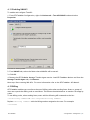
1. Navigate to GFI FaxMaker Configuration > Lines/Devices > Properties.
2. Select the device line to edit and click Properties.
3. Perform the required changes in the rule properties and click OK to save changes.
4. When changing settings for any lines/devices, it is necessary to restart the GFI FaxMaker Fax
Server service for changes to take effect. Click Yes to restart.
3.1.3 Deleting Fax lines
1. Navigate to GFI FaxMaker Configuration > Lines/Devices Properties.
2. Select the device line to remove and click Delete.
3. Click OK to save settings.
4. When changing settings for any lines/devices, it is necessary to restart the GFI FaxMaker Fax
Server service for changes to take effect. Click Yes to restart.
GFI FaxMaker
3 General configuration settings | 18
3.1.4 Fax modem properties
GFI FaxMaker can send and receive faxes using a wide range of fax modems connected to the server’s
Communications ports.
To send faxes using these devices:
1. In the Lines/Devices list, add the modem as a GFI Fax Modem Driver.
2. In the device properties dialog, select the Modem type by model name and number, or select a
Generic class that best matches device’s properties.
3. Click Advanced modem options… and select:
Table 8: Manage fax modems
Option
Description
New modem (current
modem as template)…
Adds a new modem to modems lists. Initial properties are based on selected modem type.
For more information, refer to Custom Modem Properties (page 19).
Edit modem…
Loads the modem properties. For more information, refer to Custom Modem Properties
(page 19).
Delete modem
Removes selected modem from list.
Reset all modem drivers
to default
Resets all modems properties to default.
4. Configure the other device/line options and click OK.
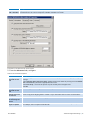
Custom Modem Properties
Screenshot 12: Custom modem properties dialog
Customize the following options, based on fax modem specifications:
GFI FaxMaker
3 General configuration settings | 19
Table 9: Advanced fax modem options
Option
Description
Modem type
Key in a user friendly name for the modem type, such as the device brand, name or model
number.
Flow control
Provide settings based on device specifications.
Fax class
Voice chipset
DLE codes
method
Thread priority
Data initialization
string
Fax initialization
string
Voice initialization string
Pre-command
delay
Character delay
Click OK to apply settings.
3.2 Licensed users
The list of users who can send or receive faxes must be configured in GFI FaxMaker.
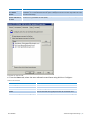
Screenshot 13: List of GFI FaxMaker users and groups
The list of licensed users is available from GFI FaxMaker Configuration > Licensed Users node.
GFI FaxMaker
3 General configuration settings | 20
Table 10: Managing licensed users and groups
Managing
users/groups
Description
Adding
users or
groups
Active Directory: To add users or groups click New licensed user/group.... Key in the user/group
name and click OK.
No Active Directory: To add users click New licensed user/group.... Key in the user login name,
Full name and E-mail address. Click Personal to enter more information. Click OK.
User/Group
properties
Right-click a user/group and click Properties.
NOTE: When GFI FaxMaker is not installed in an Active Directory environment, user properties are
customizable. When GFI FaxMaker is installed in an Active Directory environment, user properties are
imported from Active Directory.
Removing
users/groups
Right-click a user/group to delete and click Delete. Click OK to confirm.
NOTE: Deleted users are not recoverable and must be re-added.
NOTE
You can also create a dedicated Active Directory group (for example, GFI FaxMaker
users) so that you can manage all GFI FaxMaker users directly in Active Directory.
3.2.1 Types of users
NOTE
Only applicable to the GFI FaxMaker Unlimited Users license.
Configure the types of users allowed to send/receive faxes using GFI FaxMaker. Navigate to GFI
FaxMaker Configuration > Advanced > Miscellaneous node:
Allow non-AD users to send faxes - Allows all faxes/SMS to be processed by GFI FaxMaker, even if
user is not in Active Directory.
Only allow users in the Licensed user list to send faxes - allows a user to send faxes/SMS only if
included in the Licensed User list.
3.2.2 Importing list of users from CSV
NOTE
Only available if GFI FaxMaker is installed on a machine not connected to a domain.
GFI FaxMaker can import the list of users from a Comma Separated Values (CSV) file. This allows bulk
addition of users.
Ensure that the text is formatted as follows:
"first name","last name","company","department","fax number","voice
number","email address","display name","internet email address"
For example:
"Joe","Bloggs","MyCompany","Sales","+1-555-12345678","+1-555-87654321",
"[email protected]","Joe Bloggs","[email protected]"
GFI FaxMaker
3 General configuration settings | 21
NOTE
All fields can be left empty, except for Email address and Display name. Email address
must be unique.
To import a list of users from a CSV file:
1. From GFI FaxMaker Configuration, right click Licensed users and select Import users from file….
2. Select CSV file and click Open.
3. Launch GFI FaxMaker Monitor and from Fax Server node click Restart server to restart the GFI
FaxMaker Fax Server service.
3.2.3 Importing list of users from Windows®
NOTE
Only available when GFI FaxMaker is installed on a machine not connected to a domain.
GFI FaxMaker can import the list of Windows® users from the local or a remote machine.
1. Right-click Licensed users and select Import users….
Screenshot 14: Import users from remote machine
2. (Optional) If importing list of Windows® users from a remote machine, select Use remote server,
key in server name or IP and click List users.
3. Select the users to add from the Users on server list and click Add.
4. To add a custom internal email domain, enter domain in Append domain name.
5. Click OK.
GFI FaxMaker
3 General configuration settings | 22
6. Launch GFI FaxMaker Monitor and from Fax Server node click Restart server to restart the GFI
FaxMaker Fax Server service.
3.3 Fax administrators
Fax administrators monitor and manage the fax server. They are also emailed when certain critical
conditions occur.
Screenshot 15: List of Fax administrators
To manage the list of Fax administrator, from GFI FaxMaker Configuration navigate to Advanced >
Fax administrators.
Table 11: Managing fax administrators
Function
Description
Add administrators
Click New….
Edit administrator properties
Right-click administrator and select Properties.
Remove administrators
Right-click administrator and select Delete.
3.4 Email2Fax gateway
The Email2Fax gateway settings dictate how GFI FaxMaker communicates with the mail server for
sending and receiving faxes.
3.4.1 Mail server settings
Configure the mail server to use when GFI FaxMaker sends emails:
1. From GFI FaxMaker Configuration, right-click Email2FaxGateway and select Properties.
GFI FaxMaker
3 General configuration settings | 23
Screenshot 16: Email2Fax Gateway setup
2. From the SMTP Connector tab, configure the following options:
Table 12: SMTP Connector options
Option
Description
Mail server name/IP
and port
Enter the name or IP address of the mail server and the port number.
Use SSL
Instructs GFI FaxMaker to connect and communicate with the mail server using SSL.
Use SMTP
Authentication
Instructs GFI FaxMaker to connect to the mail server using a particular user credentials. Enter
credentials in the Account and password text boxes.
Secure Password
Authentication
Select this option if Secure Password Authentication is required by the mail server.
3. To ensure that GFI FaxMaker can send email through the configured mail server, enter an email
address and click Send test email. Ensure that the test email is received in the mailbox. If the test
fails, troubleshoot setup and configuration. For more information, refer to Email2FaxGateway test
fails (page 106).
4. Click OK.
GFI FaxMaker
3 General configuration settings | 24
3.4.2 POP3 Downloader
GFI FaxMaker can be configured to retrieve faxes and SMS for transmission from a POP3 mailbox.
Configure the POP3 Connector to poll and download faxes from a dedicated GFI FaxMaker POP3
mailbox.
NOTE
1. Option not available if mail server is configured to route faxes and SMS to GFI
FaxMaker.
2. Ensure that POP3 mailbox is be dedicated to GFI FaxMaker. GFI FaxMaker downloads
all emails contained mailbox for processing and emails are permanently deleted after
download.
Configure POP3 mailbox settings:
1. From GFI FaxMaker Configuration, right-click Email2FaxGateway and select Properties.
Screenshot 17: The POP3 connector
2. From the POP3 Downloader tab, configure the following options:
Table 13: POP3 Downloader options
Option
Description
Enable POP3 downloader
Enable downloading of faxes from a POP3 mailbox.
Mail server name/IP and port
Enter the name or IP address of the mail server and the port number.
Mailbox account and password
Key in credentials to access mailbox.
GFI FaxMaker
3 General configuration settings | 25
Option
Description
Full email address of mailbox
specified above
The email address of the POP3 mailbox.
Use SSL
Instructs GFI FaxMaker to connect and communicate with the mail server
using SSL.
Time interval to check for new faxes
Key in the frequency for GFI FaxMaker to check for new faxes in the GFI
FaxMaker mailbox.
3. Click OK.
3.5 Fax and SMS domain names
When installing GFI FaxMaker, connectors are configured on the mail server (either automatically or
manually) to route all emails addressed to particular domains to GFI FaxMaker. The default fax and
SMS domains are *@faxmaker.com and *@smsmaker.com.
When domain users send emails to these domains, the mail server routes these emails to GFI
FaxMaker which converts and transmits them over fax or SMS.
For example, with the default fax domain, users can send a fax to number 123456 by composing an
email addressed to [email protected].
3.5.1 Modifying the default fax and SMS domain names
IMPORTANT - Use this feature with caution.
Failing to complete the steps described in this topic will hinder mail flow and
consequently fax transmission.
It is recommended to only modify the domain names when constraints in the mail
environment do not allow using the default domain names. For example, when using
Microsoft® Office 365™ 'P1' or 'Email only' account types.
GFI FaxMaker enables modification of the default fax and SMS domain names. When these are
modified, users send an email addressed to the custom domain name.
For example, when modifying the fax domain name to fax.mydomain.com, users can send a fax to
number 123456 by composing an email addressed to [email protected].
Step 1: Configure connectors on mail server
NOTE
When GFI FaxMaker is installed on the Microsoft® Exchange Server, the connectors are
modified automatically in Step 2.
Create new or modify existing connectors on the mail server using the new domain names.
Connectors should route all emails addressed to the fax and SMS domain names to the GFI FaxMaker
server.
For example, to use fax.mydomain.com as your fax domain name, on your mail server create a
connector that routes all emails addressed to fax.mydomain.com to GFI FaxMaker.
GFI FaxMaker
3 General configuration settings | 26
IMPORTANT
If the connectors on the mail server are not modified, emails addressed to the custom
fax & SMS domains are sent over the Internet, probably resulting in an NDR.
For more information how to configure connectors in your environment, refer to:
Microsoft Exchange 2007/2010/2013
Microsoft Exchange 2000/2003
Other environments: refer to the GFI FaxMaker Getting Started Guide available
from: http://www.gfi.com/faxmaker/manual.
Step 2: Change domain names from GFI FaxMaker Configuration
1. From GFI FaxMaker Configuration, right-click Email2FAXGateway node and select Properties.
Screenshot 18: Customizing the fax and SMS domain names
2. From the Fax/SMS domains tab, specify custom Fax domain name and/or SMS domain name, for
example, fax.mydomain.com and sms.mydomain.com.
NOTE
To restore the default faxmaker.com and smsmaker.com domains, click Reset to
default and click OK.
GFI FaxMaker
3 General configuration settings | 27
3. Click OK to apply changes.
Step 3: Test the new settings
When completed, it is recommended to test this functionality by sending a test fax from an email
account to the new domain names. Check that the email is received by GFI FaxMaker in the GFI
FaxMaker Monitor.
3.6 Dialling Options
Dialling options enable you to configure area codes and other special dialing procedures. This ensures
that GFI FaxMaker processes the fax number in a structured manner and dials numbers in the correct
format for the phone system.
NOTE
1. GFI FaxMaker can only apply dialling configurations for fax numbers that are entered
in the following format: +<country code> (<area code>) <fax number>. For example,
+44 (0) 555 5555, +1 (151) 5555 5555, +356 2555 5555
2. Dialling options are not applied when sending faxes through online fax services.
To configure dialling options, from GFI FaxMaker Configuration right-click Advanced > Dialling >
Properties.
Screenshot 19: Dialing options
GFI FaxMaker
3 General configuration settings | 28
IMPORTANT
Customize options for your country’s telephone dialling system. Failure to do so may
cause fax transmission to fail.
Configure the following options:
Table 14: Dialling Options
Option
Description
My country
code is
Key in your country telephone code, excluding the international dial prefix (the dial prefix is usually
defined as +). For example, for the United States the country code is 1.
NOTE: The dial prefix is the number that a user must dial to place an international call. The country
code is the number identifying the country to call to.
My area
code is
Key in your area code.
International
dialling
Configure dialling options for sending faxes to international recipients. GFI FaxMaker identifies a call as
international when the number contains a + (dial prefix) in front of the number.
Configure the following options:
If dial string starts with my country code, strip it off - select this option to automatically remove
the country code from the number when dialling a number containing the local country code. If
numbers match this condition, a custom prefix can be added to the number.
If dial string does not start with my country code - select this option to replace the + symbol
with the international dial prefix, that is, the number required to place an international call from
your country/area/telephone service provider, for example 00, 010, 0011, 011, etc...
National
dialling
Configure dialling options when sending faxes within the same country but to a different area. GFI
FaxMaker identifies a call as national when an area code is included in a number in round parenthesis,
for example, (234)-56789012.
Configure the following options:
If dial string contains my area code, strip it off - select to automatically remove area code from
the number when dialling a number containing the local area code. If numbers match this condition, a custom prefix can be added to the number.
If dial string does not contain my area code - select to add a custom prefix when dialling a
national number.
NOTE: The area code in the fax number must be included in round parentheses for the fax server to
determine which part of the number is the area code.
Exceptions
Some national dialling procedures can be more complex and some exceptions may be required, for
example to handle multiple local area codes. Exceptions allow you to add a prefix and/or exclude an
area code when a number matches a particular combination.
1. Click Exceptions.
2. Key in the Area code for which to apply an exception.
3. If exception is required for a particular exchange number (number right after the area code), key in
the Exchange number, or key in * to apply for all numbers in that area code.
4. To add a prefix before the area code, select Dial prefix before the area code and key in the prefix.
5. To not dial the area code, select Do not dial the area code.
6. Click Add.
7. Repeat procedure for all exceptions.
NOTE: Use commas to add a delay between numbers, if required. Each comma represents
approximately a two second delay.
3.7 Fax archiving
GFI FaxMaker can archive all inbound and outbound faxes to a central location. This enables the
recording all fax communications and the retrieval of old faxes.
GFI FaxMaker
3 General configuration settings | 29
There are 2 methods of archiving:
Send fax copies to an email address - copies of transmitted, received and/or failed faxes are
sent via email to a central (journaling) mailbox. Faxes are then archived through an email archiving solution, such as GFI MailArchiver. For more information, refer to Send fax copies to an email
address (page 30).
Archive to a database - Store all faxes in a Microsoft® Access or a Microsoft® SQL/MSDE database. For more information, refer to Archive faxes to database (page 31).
3.7.1 Send fax copies to an email address
Use this option to send a copy of incoming, outgoing and/or failed faxes to an email address. This
includes transmission reports and the fax as attachment.
1. From GFI FaxMaker Configuration, right-click Archiving node and select Properties.
Screenshot 20: Archiving to an email archiving package
2. In the Archive to Mailbox tab, select the type of faxes to archive:
Table 15: Archiving to mailbox options
Option
Description
Enable mail archiving for
received faxes
Enable received faxes archival.
Enable mail archiving for
sent faxes
Enable sent faxes archival
Enable mail archiving for
failed faxes
Enable failed faxes archival
Email address
Specify the email address where to forward archived faxes.
NOTE: Email address must be included in the Licensed users list of GFI FaxMaker.
GFI FaxMaker
3 General configuration settings | 30
Option
Description
Archive faxes in this
format
By default, GFI FaxMaker archives faxes in .fax format. To archive in a different format (for
example PDF) enable and select the format.
3. Click OK.
3.7.2 Archive faxes to database
GFI FaxMaker can archive all faxes and SMS to a Microsoft® Access or a Microsoft® SQL/MSDE
database.
1. From GFI FaxMaker Configuration, right-click Archiving node and select Properties.
Screenshot 21: Archiving properties
2. In the Archive to Database tab, select Enable database archiving.
GFI FaxMaker
3 General configuration settings | 31
Screenshot 22: Database configuration
3. Click Setup Database to configure the database where to store faxes:
Table 16: Archiving to database options
Option
Description
Microsoft®
Enable archiving to a Microsoft® Access database. Key in or browse to the location where to store the
database file and specify the database name in .MDB format.
NOTE: A Microsoft® Access database size is limited to 2 GB in size. When the database reaches 2GB,
GFI FaxMaker automatically renames the old database and creates a new database.
Archive to a Microsoft® SQL Server® or MSDE database. Key in database server name/IP or select from
Access
database
Microsoft®
SQL/MSDE
database
the list of automatically detected servers. Enter credentials to connect to the database.
GFI FaxMaker automatically creates a database called GFI FaxMaker Archive dedicated for archiving
of faxes.
NOTE 1: GFI FaxMaker archiving requires mixed mode authentication to be enabled on the SQL
Server® .
NOTE 2: Some databases may have size limitations. Ensure that this limit is not exceeded.
4. Click Test to verify settings and click OK.
5. By default, GFI FaxMaker archives faxes in .fax format. To archive in a different format, for
example PDF, select Archive faxes in this format and specify custom format required.
6. Click OK.
3.8 Fax services
GFI FaxMaker can send and receive faxes through supported online fax providers. This enables faxing
without installing fax devices or dedicated phone lines.
To use this feature you are required to subscribe with a supported online fax service provider. For
more information go to http://go.gfi.com/?pageid=FM_FaxServices.
GFI FaxMaker
3 General configuration settings | 32
3.8.1 Faxing using Fax Services
IMPORTANT
Online fax services require the full recipient number, including the international dial
symbol "+", the country and area codes. Do not use hyphens, spaces or dashes between
any parts of the fax number.
The full recipient number is also required when sending faxes locally. In this case, the
fax is still charged at a local fax rate.
Example 1: When sending a fax to Czech Republic number 313-414-515 use
[email protected]. Where:
+ is the international dial prefix
420 is the Czech Republic country code
313414515 is the fax number
Example 2: Sending a fax to a UK number, with area code 01273, and number 123-456. In this case
use [email protected]. Where:
+ is the international dial prefix
44 is the UK country code
1273 is the area code (in the case of the UK the preceding 0 is dropped when using the international dial number)
123456 is the fax number
3.8.2 Configuring a Fax Service account
When a fax service account from a supported provider is available, specify account details in GFI
FaxMaker:
1. From GFI FaxMaker Configuration, right-click Fax Services node and select New fax service
account.
2. Select the fax service provider and click OK.
GFI FaxMaker
3 General configuration settings | 33
Screenshot 23: New fax service account
3. Configure the following options:
Table 17: New fax service account
Option
Description
Account details
Enter the subscription account information that enables you to log in to the fax service.
Validate Account
Click to check if GFI FaxMaker can access the service.
Receive poll interval in
minutes
Key in the frequency for GFI FaxMaker to check for new faxes with the online fax
service provider.
4. Click OK.
Next, configure a fax line for the fax service so that GFI FaxMaker can start sending/receiving faxes
from this service. For more information, refer to Fax Lines (page 12).
3.9 Log files
GFI FaxMaker logs all activity of incoming and outgoing faxes in two log files within the GFI FaxMaker
installation folder:
Table 18: GFI FaxMaker log files
Log file
Description
Sendlog.txt
Contains a log of sent faxes in the following format:
Date,Time,SenderEmail,SenderName,BillingCode,RemoteId,RecipientName,
RecipientCompany,RecipientNumber,CallDuration,PagesTransferred,Result,Info,Port,
FilesInArchiveDir
For example:
"7/1/2012","2:16:48AM","[email protected]","John","","88888888","Bob","Company",
"99999999","05:30","3","SUCCESS","Fax has been sent successfully","COM2",
"C:\Sent\20110701_015642_00001.pdf"
GFI FaxMaker
3 General configuration settings | 34
Log file
Description
Rcvlog.txt
Contains a log of received faxes in the following format:
Date, Time, RemoteID, CallDuration, PagesReceived, Result, Info, Port,
FileInArchiveDir, RoutedTo
For example:
"6/30/2012","8:47:01AM","+557(833)343-3948","03:30","2","SUCCESS","Fax received
from +557(833)343-3948","Line0","C:\Received Faxes\20110630_084657_00003.pdf",
"[email protected]"
3.10 HP Digital Sender integration
GFI FaxMaker supports HP Digital sender scanner/copier. This enables you to send faxes directly from
the Digital sender device, by entering the document in the tray and dialling recipient fax number.
Faxes are sent via GFI FaxMaker and the user will receive a confirmation in his mailbox.
NOTE
For the latest list of supported HP Digital Sender devices, refer to
http://go.gfi.com/?pageid=FM_HPDigitalSender.
To send faxes from an HP Digital sender:
Screenshot 24: Configuring the Digital Sender
1. From the HP Digital sender link applet, select Inbox tab.
2. Select Enable receive.
3. In Path to receive inbox, provide a directory where the HP Digital Sender will pick up the fax
information files.
4. From GFI FaxMaker Configuration, right-click HPDS/SAP node and select Properties.
GFI FaxMaker
3 General configuration settings | 35
Screenshot 25: HP Digital sender set-up
2. From the HPDS tab, select Scan folder for HPF files. Key in or browse to the directory specified in
the HP Digital Sender app and select the HPFSCAN folder.
3. Click OK.
4. From the HP Digital sender JetAdmin utility, modify your HP Digital Sender to enable fax. Choose
Other vendors with notification support as Network Fax Server.
3.11 Storing faxes
By default, GFI FaxMaker stores copies of fax attachments on the GFI FaxMaker server for a number of
days:
Sent faxes - A copy is stored for 2 days.
Failed faxes - A copy is stored for 1 week.
These are stored in <GFI FaxMaker installation folder>\data\attachments folder. This allows
resending of fax attachments.
To configure storage of fax attachments:
1. From GFI FaxMaker Configuration, right-click Advanced > Miscellaneous node and select
Properties.
2. From Fax server options area, configure:
Table 19: Storing faxes
Option
Description
Do not store sent fax attachments for resending
Select option to not store sent fax attachments.
Do not store failed fax attachments for resending
Select option to not store failed fax attachments.
GFI FaxMaker
3 General configuration settings | 36
3. Click OK.
3.12 GFI FaxMaker Licensing information
To review and modify licensing details, from GFI FaxMaker Configuration, right-click General >
Licensing and select License product….
Screenshot 26: Viewing current licensing information
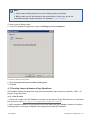
Use this node to view current licensing information or to enter your License key number.
Click Enter License Key to edit your license key.
3.13 Version information
To review information about your GFI FaxMaker installation, from GFI FaxMaker Configuration, rightclick General > Version information and select Properties.
You can also check for newer versions of GFI FaxMaker from the GFI web site.
GFI FaxMaker
3 General configuration settings | 37
Screenshot 27: GFI FaxMaker version information
3.14 Product Patches
The Product Patches feature verifies if there are any software patches available for your version of
GFI FaxMaker by directly connecting to the GFI Update Servers.
NOTE
It is highly recommended to check for patches periodically to keep GFI FaxMaker
updated.
1. From GFI FaxMaker Configuration, go to General > Product Patches.
2. GFI FaxMaker connects to the GFI Update Server and lists all available updates.
3. Click the link of patches to download.
4. Decompress the downloaded patch file.
5. Follow the instructions included with the downloaded file to implement the patch.
NOTE
Incorrect patch installation (for example, by not following instructions) may cause GFI
FaxMaker to malfunction or degrade its performance.
GFI FaxMaker
3 General configuration settings | 38
4 Configuration - Sending faxes
Topics in this chapter:
4.1 Sending options
40
4.2 Document Conversion
41
4.3 Transmission reports
42
4.4 Header/Footer options
46
4.5 Call blocking
47
4.6 Public contacts
48
4.7 Coverpages
51
4.8 NetPrintQueue2FAX
60
4.9 TextAPI & XMLAPI
65
4.10 Enabling TextAPI
66
4.11 Enabling XMLAPI
67
4.12 Billing
67
4.13 Sending faxes via Nuance eCopy ShareScan
68
GFI FaxMaker
4 Configuration - Sending faxes | 39
4.1 Sending options
1. From GFI FaxMaker Configuration, right-click Sending/Receiving Options and select Properties.
Screenshot 28: Sending options
2. Select Sending tab and configure the following options:
Table 20: Sending options
Option
Description
Enhance fax image
when sending normal
resolution faxes
Improves the quality of low-resolution faxes.
Send fax report
attachments in the
following format
By default GFI FaxMaker attaches incoming fax in .FAX format. Select this option to customize
the attachment format, for example attach the fax in PDF format.
Automatically print
outgoing faxes if
successful
Automatically print all outgoing faxes that are sent successfully. Click Setup printers... to
configure printer options.
Auto print if failed
Automatically print all outgoing faxes that fail. Click Setup printers... to configure printer
options.
Automatically print
outgoing fax report if
successful
Automatically print transmission report after successfully sending a fax. GFI FaxMaker will also
print 6 fax pages on one printer page. Click Setup printers... to configure printer options,
including how many pages of the report to print.
Auto print report if
failed
Automatically print all transmission reports for outgoing faxes that fail. Click Setup printers...
to configure printer options.
3. Click OK.
GFI FaxMaker
4 Configuration - Sending faxes | 40
4.2 Document Conversion
GFI FaxMaker enables users to send faxes by attaching content to an email. GFI FaxMaker
automatically converts the attachment to fax. For this purpose, a built-in conversion engine is
included for PDF, HTML, PNG, GIF, JPG, RTF and TXT files.
NOTE
Microsoft® Office® 97 or higher is required on the GFI FaxMaker server to convert
Microsoft® Office® file formats. Microsoft® Office® 2007 or higher is required on the GFI
FaxMaker server to convert Microsoft® Office® Open XML files, such as DOCX and XLSX
files.
1. From GFI FaxMaker Configuration, right-click Advanced > Document conversion and select
Properties.
Screenshot 29: Document conversion options
2. Configure the following options:
Table 21: Document conversion options
Option
Description
File extension list
to ignore
Enter the extensions to ignore, separated by semi-colons - ;
File extension list
allowed for
conversion
List of extensions that can be converted by GFI FaxMaker.
GFI FaxMaker
4 Configuration - Sending faxes | 41
Option
Description
Add
To add new file formats for conversion, key in the Extension to add. In Command text box, key in
the Application Command that prints the file in Windows® Explorer (Usually this is Print). Click
Add.
NOTE: To verify whether GFI FaxMaker can convert a file extension, from Windows® Explorer,
right-click a file in that format and select Print. The file must print successfully.
Remove
Click to delete a selected file extension.
3. Click OK.
4.3 Transmission reports
GFI FaxMaker notifies the user about the status of sent faxes/SMS by sending a transmission report.
The report contains details of the fax/SMS transmission. Optionally you can configure to include the
fax content and fax body.
Screenshot 30: Fax transmission report
4.3.1 Configuring fax transmission reports
1. From GFI FaxMaker Configuration, right-click Advanced > Transmission reports and select
Properties.
GFI FaxMaker
4 Configuration - Sending faxes | 42
Screenshot 31: Fax transmission report options
2. Configure the following options:
Table 22: Transmission reports options
Option
Description
Report successful
outgoing FAX
transmissions
Send a transmission report when a fax is sent successfully.
Include attachments with
success reports
Includes the transmitted fax with successful transmission reports.
Report failed outgoing
FAX transmissions
Send a transmission report when a fax fails.
Include attachments with
failure reports
Includes the fax content with failed transmission reports.
Append original message
body
Include the original fax message body in the transmission report, below the report text.
Using this option allows users to re-submit faxes and find sent faxes.
3. Click OK.
4.3.2 Configuring SMS transmission reports
1. From GFI FaxMaker Configuration, right-click Advanced > Transmission reports and select
Properties.
GFI FaxMaker
4 Configuration - Sending faxes | 43
Screenshot 32: SMS transmission report options
2. From the SMS tab, select Report successful outgoing SMS transmissions to notify a user when an
SMS is sent successfully.
NOTE
A report is always sent if transmission of SMS fails.
3. Click OK.
4.3.3 Customizing transmission reports
The template of transmission reports can be customized. To do this:
1. Navigate to <GFI FaxMaker installation folder>\data\reports.
2. Open the template to edit in Notepad:
Table 23: Fax report templates
Report template
Description
error.fbt
Transmission report for failed faxes
recv.fbt
Fax report for received faxes
sent.fbt
Fax report for sent faxes
smserror.fbt
Transmission report for failed SMS
smsrecv.fbt
Fax report for received SMS
smssent.fbt
Fax report for sent SMS
GFI FaxMaker
4 Configuration - Sending faxes | 44
NOTE
Reports starting with html prefix (for example, htmlrecv.fbt), are the equivalent
reports in HTML format.
3. Modify the file using the following fields:
NOTE
Some fields may not be applicable for certain reports.
Table 24: Fax report fields
Field
Description
<status>
Transmission status
<date>
Transmission date
<time>
Transmission time
<date_time>
Shows both transmission date and time
<speed>
Transmission speed
<connection_time>
Duration of transmission
<pages>
Number of pages sent
<total_pages>
Total number of pages requested to be sent
<resolution>
The fax resolution.
<remote_id>
Recipient’s line number
<local_id>
Local line number
<line>
GFI FaxMaker line number.
<retries>
Number of retries that GFI FaxMaker tried to establish connection with recipient.
<description>
A description of the status of fax transmission.
<dtmf_did>
The DTMF/DID number.
<subject>
The subject of the email requesting the fax transmission.
<billing_code>
The billing code.
<r_last_name>
Recipient’s last name
<r_first_name>
Recipient’s first name
<r_name>
Recipient’s display name
<r_company>
Recipient’s company name
<r_department>
Recipient’s department
<r_email>
Recipient’s email address
<r_fax>
Recipient’s fax number
<r_voice>
Recipient’s phone number
<s_last_name>
Sender’s last name
<s_first_name>
Sender’s first name
<s_name>
Sender’s name
<s_company>
Sender’s company name
<s_department>
Sender’s department
<s_email>
Sender’s email address
<s_fax>
Sender’s fax number
<s_voice>
Sender’s phone number
GFI FaxMaker
4 Configuration - Sending faxes | 45
4.4 Header/Footer options
GFI FaxMaker enables you to customize the header and footer text for all outgoing and incoming
faxes.
4.4.1 Outgoing faxes
1. From GFI FaxMaker Configuration, right-click Advanced > Header/Footer/Stamping and select
Properties.
Screenshot 33: Header/Footer options for outgoing faxes
2. From the Header/Footer tab, configure:
Table 25: Header and footer options
Option
Description
Formatting and alignment
Configure font, font size and alignment.
NOTE: During configuration, select the header and footer fields configuring to
apply different formatting.
Render this header text on all
outgoing faxes
Select to add a header on all outgoing faxes. Key in the text to display.
Set to default - Click to reset text to default.
Insert field... - Select custom field to add where there is the cursor.
Render this footer text on all
outgoing faxes
Select to add a footer to all outgoing fax. Key in the text to display.
Set to default - Click to reset text to default.
Insert field... - Select custom field to add where there is the cursor.
3. Click OK.
GFI FaxMaker
4 Configuration - Sending faxes | 46
4.4.2 Incoming faxes
1. From GFI FaxMaker Configuration, right-click Advanced > Header/Footer/Stamping and select
Properties.
Screenshot 34: Stamping options for incoming faxes
2. From the Stamping tab, configure:
Table 26: Stamping options
Option
Description
Formatting and alignment
Configure font, font size and alignment.
NOTE: During configuration, select the header and footer fields configuring to
apply different formatting.
Render this header text on all
incoming faxes
Select to add a header on all incoming faxes. Key in the text to render.
Set to default - Click to reset text to default.
Insert field... - Select custom field to add where there is the cursor.
Render this footer text on all
incoming faxes
Select to add a footer on all incoming faxes. Key in the text to render.
Set to default - Click to reset text to default.
Insert field... - Select custom field to add where there is the cursor.
3. Click OK.
4.5 Call blocking
Call blocking enables you to control the fax numbers to which users can send faxes. GFI FaxMaker
checks the call block rules before fax transmission to block faxes sent to numbers starting with
matching entries.
GFI FaxMaker
4 Configuration - Sending faxes | 47
For example, to block specific users from sending faxes to international numbers, add a call blocking
rule to your international dial prefix (example, 00 or 011).
Screenshot 35: Call blocking rules
1. From GFI FaxMaker Configuration, navigate to Advanced > Call blocking node.
2. Click New….
Screenshot 36: New call block entry
3. Key in the number to block and click OK.
4. Assign users to the configured Call block or leave empty to apply the rule to every user.
5. Click OK.
4.6 Public contacts
Configure Public Contacts to enable GFI FaxMaker to retrieve user information when users send faxes
using the email client.
GFI FaxMaker
4 Configuration - Sending faxes | 48
NOTE
1. Public Contacts do not have to be configured if:
users are not using the email client to send faxes (for example when using the GFI
FaxMaker Fax Message form only), or
not showing user information on cover pages.
2. In a Microsoft® Exchange Server environment, MAPI Client and Collaboration Data
Objects 1.2.1 is required when using Public Contacts. Install on GFI FaxMaker server,
when:
not installing GFI FaxMaker on the Microsoft® Exchange server machine
installing on Microsoft® Exchange Server 2007/2010/2013
Download from: http://go.gfi.com/?pageid=FM_MAPICDO
3. When using Microsoft® Exchange 2013 as your mail server,further configurations are
required due to certain compatibility issues between Microsoft® Exchange 2013, and
MAPI/CDO. For more information, refer to Using Public Contacts with Microsoft®
Exchange 2013 (page 50).
To configure Public Contacts:
1. Ensure that you have a working profile, configured as the default profile, to connect to your
Exchange Server.
2. From GFI FaxMaker Configuration, right-click Advanced > Public Contacts and select Properties.
GFI FaxMaker
4 Configuration - Sending faxes | 49
Screenshot 37: Public contacts node
3. Select Enable Exchange Public Contacts retrieval.
4. Click Add and select the public contacts list from where to retrieve company information.
5. Click Test to ensure that GFI FaxMaker can query the listed public contacts folders.
6. Click OK.
4.6.1 Using Public Contacts with Microsoft® Exchange 2013
This topic describes how to enable Public Contacts in an environment running Microsoft® Exchange
2013 as the mail server.
Step 1: Install MAPI/CDO
Install MAPI Client and Collaboration Data Objects 1.2.1 on the GFI FaxMaker server. Download
from: http://go.gfi.com/?pageid=FM_MAPICDO.
Step 2: Modify registry key
IMPORTANT
1. Apply these changes to the user profile used by GFI FaxMaker. Ensure that you are
logged in to Windows with the same user credentials used by GFI FaxMaker.
2. This process requires changes in the Windows Registry. It is important to follow these
steps with attention as incorrect configuration can cause serious, system-wide
problems.
1. Go to Start > Run and key in regedit.
GFI FaxMaker
4 Configuration - Sending faxes | 50
2. Locate the following key:
HKEY_CURRENT_USER\Software\Microsoft\Windows NT\CurrentVersion\Windows Messaging
Subsystem
3. Right-click Windows Messaging Subsystem node and click New > String Value.
4. Key in RPCHTTPProxyMap_GFIFaxMaker and press Enter.
5. Right-click the newly added key and click Modify.
6. Key in the domain mappings in the following format:
<domain>=<ProxyServer>,ntlm,ntlm,false
Where: Property
Description
<domain>
Replace with your domain name
<ProxyServer>
The FQDN of the RPC/HTTP endpoint (mail server) that should be used for the domains provided.
For example:
mydomain.com=https://mail.mydomain.com,ntlm,ntlm,false
Click OK.
7. Close registry.
Step 3: Configure MAPI Server in GFI FaxMaker Public Contacts
1. From GFI FaxMaker Configuration, right-click Advanced > Public Contacts and select Properties.
2. Select Enable Exchange Public Contacts retrieval.
3. Click Add.
4. For the first time only, the MAPI client requires the details of the Microsoft Exchange server. If a
MAPI profile is already configured, skip to step 9, else continue with the next step.
5. Select the Microsoft Exchange instance to use and click Next.
6. In Microsoft Exchange server, key in the personalized name of the RPC endpoint. To find this, from
a machine on the network that runs Microsoft Outlook 2007/2010/2013, press Ctrl + Right-click on
the Microsoft Outlook icon in the system tray. Click Test E-mail AutoConfiguration.... Click Test. The
personalized name of the RPC endpoint is the value of Server in the Results view.
7. In Mailbox, key in the name of the mailbox that has access to the network public contacts and click
Next.
8. Complete the wizard steps.
9. Select the public contacts list from where to retrieve company information and click OK.
10. Click Test to ensure that GFI FaxMaker can query the listed public contacts folders.
11. Click OK.
4.7 Coverpages
GFI FaxMaker enables you to include a front page to your fax content that includes custom
information and design. This page is attached and sent as the first page of a fax.
There are two types of coverpages:
GFI FaxMaker
4 Configuration - Sending faxes | 51
Coverpage: A page that includes fax details (such as recipient and sender’s information) and the
message text (email body when user sends email via email client or fax message form). For more
information, refer to Coverpages (page 52).
Front covernotes: Aimed to contain less details than a Coverpage, Front covernotes serve to add
a brief message before the coverpage (similar to a ‘With Compliments’ note). For more information, refer to Front covernotes (page 56).
Coverpages and front covernotes are customizable on a per-user or per-group basis.
By default, GFI FaxMaker includes a number of built-in coverpages. To access the list of coverpages,
from GFI FaxMaker Configuration navigate to Coverpages node and select Coverpages or Front
Covernotes.
4.7.1 Coverpages
Default coverpage
The default coverpage is the coverpage applied for all users that have no other coverpage configured.
To select a different default coverpage:
1. From GFI FaxMaker Configuration navigate to Coverpages > Coverpages.
2. Right-click the coverpage and select Set as default global coverpage.
Using a custom coverpage for a list of users
GFI FaxMaker can use different coverpages for different users or user groups. To apply a custom
coverpage for a particular user or user group:
1. From GFI FaxMaker Configuration, navigate to Coverpages > Coverpages.
2. Right-click the coverpage to a associate custom user for, and select Properties.
GFI FaxMaker
4 Configuration - Sending faxes | 52
Screenshot 38: Coverpage users
3. From the Users tab add the users for which to apply the coverpage.
4. Click OK.
Editing built-in coverpages
1. From GFI FaxMaker Configuration navigate to Coverpages > Coverpages.
2. Right-click the coverpage to edit and select Properties.
GFI FaxMaker
4 Configuration - Sending faxes | 53
Screenshot 39: Coverpage options tab
3. From the Options tab, click Edit. Coverpage is loaded in text editor.
4. Edit the page as required.
NOTE
When editing coverpages, you can use fields to show custom information. For more
information, refer to Supported merge-fields (page 59).
5. Save and exit when complete.
6. Click OK.
Designing coverpages
Step 1: Create coverpage
You can create custom coverpages in HTML, RTF or MHT format, using custom designs, text and fields.
Use your preferred editor to create the page.
NOTE
1. You can use fields to display useful information. For more information, refer to
Supported merge-fields (page 59).
2. Use UTF-8 encoding for HTML coverpages.
GFI FaxMaker
4 Configuration - Sending faxes | 54
Step 2: Add coverpage to GFI FaxMaker
1. From GFI FaxMaker Configuration, navigate to Coverpages > Coverpages.
Screenshot 40: Creating a new coverpage
2. Click New….
3. Key in a Display name.
4. Click Add from file…, browse to the newly created coverpage and click Open.
5. Click OK.
6. Add any particular users to apply this coverpage for.
7. Click OK.
Previewing built-in coverpages
To preview coverpages, navigate to <GFI FaxMaker installation folder>\coverpage\. Double-click
coverpage to preview in web browser (HTML or MHT format) or word editor (RTF format).
General coverpage options
1. From GFI FaxMaker Configuration, right-click Coverpages > Coverpages and select Properties.
GFI FaxMaker
4 Configuration - Sending faxes | 55
Screenshot 41: Coverpage options
2. Configure the following options:
Table 27: Coverpages
Option
Description
Send coverpages
Enable or disable coverpages.
NOTE: Disabling coverpages from the Coverpages properties dialog box also disables
Front Covernotes.
Only if message text is present
Include a coverpage only when sending a fax that contains a message body (for
example, when sending a fax as an attachment via email and the email also
contains an email body).
Use this coverpage when no
default coverpage is associated
with a user
Select the default coverpage to use when a user does not have a custom coverpage
configured.
3. From the Rendering tab set the coverpage margins (in Inches).
4. Click OK.
4.7.2 Front covernotes
NOTE
Front covernotes are aimed to compliment coverpages. Disabling Coverpages, disables
also Front covernotes.
GFI FaxMaker
4 Configuration - Sending faxes | 56
Default Front covernote
The default Front covernote is the covernote applied for all users that have no other covernote
configured. To select a different default covernote:
1. From GFI FaxMaker Configuration navigate to Coverpages > Front covernotes.
2. Right-click the covernote and select Set as default global front covernote.
Using a custom Front covernote for a list of users
GFI FaxMaker can use different Front covernotes for different users or user groups. To apply a custom
front covernote for a particular user or user group:
1. From GFI FaxMaker Configuration navigate to Coverpages > Front covernote.
2. Right-click the covernote to associate custom user for and select Properties.
Screenshot 42: Front covernote users
3. From the Users tab add the users to apply the covernote for.
4. Click OK.
Designing Front covernotes
Step 1: Create Front covernote
You can create custom Front covernotes in HTML, RTF or MHT format, using custom designs, text and
fields. Use your preferred editor to create the page.
GFI FaxMaker
4 Configuration - Sending faxes | 57
NOTE
1. You can use fields to display useful information. For more information, refer to
Supported merge-fields (page 59).
2. Use UTF-8 encoding for HTML Front covernotes.
Step 2: Add covernote to GFI FaxMaker
1. From GFI FaxMaker Configuration navigate to Coverpages > Front covernotes.
Screenshot 43: Creating a new front covernote
2. Click New….
3. Key in a Display name for the covernote.
4. Click Add from file…, browse to the newly created coverpage and click Open.
5. Click OK.
6. Add any particular users to apply this covernote for.
7. Click OK.
General front covernotes options
1. From GFI FaxMaker Configuration, right-click Coverpages > Front covernotes and select
Properties.
GFI FaxMaker
4 Configuration - Sending faxes | 58
Screenshot 44: Front covernote options
2. Configure the following options:
Table 28: General front covernote options
Option
Description
Use front
coverpage
Select this option to always send a front covernote for emails sent by all users. Specify the Front covernote
to use when the user does not have a custom associated front covernote configured.
By disabling this option, GFI FaxMaker only sends a covernote for faxes originating from users who have a
Front covernote configured.
3. From the Rendering tab set the covernote margins (in Inches).
4. Click OK.
4.7.3 Supported merge-fields
The following fields are used in coverpages and front covernotes to display useful fax information.
NOTE
All fields must be in lower case.
Sender’s details
Table 29: Coverpage merge fields - sender’s details
Field
Description
[s_last_name]
Sender’s last name
[s_first_name]
Sender’s first name
[s_name_fl]
Sender’s first & last name
GFI FaxMaker
4 Configuration - Sending faxes | 59
Field
Description
[s_name_lf]
Sender’s last & first name
[s_company]
Sender’s company name
[s_department]
Sender’s department name
[s_fax]
Sender’s Fax number
[s_voice]
Sender’s telephone number
[s_e-mail]
Sender’s email address
Recipient’s details
Table 30: Coverpage merge fields - recipient’s details
Field
Description
[r_company]
Recipient’s company name
[r_department]
Recipient’s department name
[r_first_name]
Recipient’s first name
[r_last_name]
Recipient’s last name
[r_name_fl]
Recipient’s first & last name
[r_name_lf]
Recipient’s last & first name
[r_fax]
Recipient’s Fax number
[r_voice]
Recipient’s telephone number
[r_e-mail]
Recipient’s email address
Other fields
Table 31: Coverpage merge fields
Field
Description
[message]
Show the email body text.
NOTE 1: Ensure enough space is allocated to fit in the email body.
NOTE 2: Emails normally include plain text and HTML formats for backward compatibility. By default, GFI
FaxMaker shows the HTML version. To choose the preferred format, right-click Coverpages node in GFI
FaxMaker and select the preferred format.
[time]
Fax transmission time
[date]
Fax transmission date
[longdate]
Fax transmission date and time.
[subject]
Shows the email subject
[total_
pages]
Total number of fax pages, including the coverpage.
4.8 NetPrintQueue2FAX
NetPrintQueue2FAX is a printer driver installed on user machines. This enables users to print content
to transmit by fax, directly from any application that supports printing.
NOTE
For more information about which file types can be used with NetPrintQueue2FAX refer
to http://go.gfi.com/?pageid=FM_NPQ2FFileFormats
GFI FaxMaker
4 Configuration - Sending faxes | 60
Screenshot 45: A document ready to be printed to NetPrintQueue2FAX
How it works
1. Users prepare content to fax using a third-party application (for example, Microsoft® Word® or an
invoicing software).
NOTE
Fax recipient details - number, name and company - must be embedded in the content.
2. Users print content to the NetPrintQueue2FAX printer driver. Ensure that the NetPrintQueue2FAX
printer drivers are installed on user machines. For more information, refer to Installing
NetPrintQueue2FAX printer driver on clients’ machines (page 63).
3. NetPrintQueue2FAX sends content to GFI FaxMaker.
4. GFI FaxMaker analyzes the content to determine fax recipient details. For more information, refer
to Configuring NetPrintQueue2FAX options (page 62).
5. GFI FaxMaker sends fax.
GFI FaxMaker
4 Configuration - Sending faxes | 61
Screenshot 46: Printing a document to NetPrintQueue2FAX
4.8.1 Configuring NetPrintQueue2FAX options
GFI FaxMaker needs to be configured to determine the identifiers for recipient details. For example,
configure GFI FaxMaker so that the text following the string Fax: is the recipient’s fax number.
To configure recipient identifiers:
1. From GFI FaxMaker Configuration, right-click NetPrintQueue2FAX and select Properties.
GFI FaxMaker
4 Configuration - Sending faxes | 62
Screenshot 47: NetPrintQueue2FAX configuration
2. Configure the following options:
Table 32: NetPrintQueue2FAX configuration options
Option
Description
Enable
NetPrintQueue2FAX
Enable/Disable NetPrintQueue2FAX feature
Recipient
Key in the text that identifies recipient’s name. Default value is To:.
Company
Key in the text that identifies recipient’s company name. Default value is Company:.
Fax number
Key in the text that identifies recipient’s fax number. Default value is Fax:.
End of field
terminator
After GFI FaxMaker finds a search field and retrieves the string that comes after the search
string, it needs to identify the end of the search string. To do this, either do not put more text
following that line or use a special character to determine the end of the field. To use a field
terminator, select this option and key in a terminator.
Case sensitive
search
Use this option to choose whether to match the case of field identifiers.
3. Click OK.
NOTE
If GFI FaxMaker fails to find the search fields in the document, the fax is not sent and
GFI FaxMaker sends an error report to the user.
4.8.2 Installing NetPrintQueue2FAX printer driver on clients’ machines
Install the printer driver on the client’s machines to enable users to use NetPrintQueue2FAX feature.
GFI FaxMaker
4 Configuration - Sending faxes | 63
NOTE
This procedure is the same as adding any other Windows® network printer driver.
Select client’s operating system for information how to install NetPrintQueue2FAX printer driver:
Windows® Vista®/7
Windows® XP
Windows® 2000/2003
NOTE
When GFI FaxMaker is installed on Windows Server® 2003 64-bit, the Windows Server®
2003 32-bit installation disc is required when installing NetPrintQueue2Fax printer
driver on 32-bit client machines.
Windows® Vista®/7/8
1. From Control Panel select Hardware and Sound > Devices and Printers > Add Printer > Add a
network, wireless or Bluetooth printer and click Next.
2. Select NetPrintQueue2Fax printer from the list of found printers, or click The printer that I want
isn’t listed to manually type the path of NetPrintQueue2Fax using the format
\\FaxServerName\NetPrintQueue2Fax.
NOTE
If GFI FaxMaker is installed on a 64-bit machine, the driver needs to be located
manually:
a. Click OK in the No driver found dialog to locate the driver manually.
b. Browse to the GFI FaxMaker server and open shared folder NetPrintQueue2Fax_
Drivers.
c. Select npqf.inf and click Open to install the driver.
d. Windows® will verify the publisher of the driver software. Click Install this driver
software anyway to proceed.
3. Click Finish to add the NetPrintQueue2Fax printer to the list of printers.
Windows® XP
1. On the client machine, select Start > Printers and Faxes > Add a Printer and click Next.
2. Select A network printer… and click Next.
3. Select Find a printer in the directory to select NetPrintQueue2Fax printer from the Find
Printers dialog.
4. If NetPrintQueue2Fax is not automatically found, close Find Printers dialog, select Connect to this
printer and type the path of NetPrintQueue2Fax using the format
\\FaxServerName\NetPrintQueue2Fax. Click Next to continue.
GFI FaxMaker
4 Configuration - Sending faxes | 64
NOTE
If GFI FaxMaker is installed on a 64-bit machine, the driver needs to be located
manually:
a. In Connect to a Printer dialog click OK to locate the driver manually.
b. Windows® will verify the compatibility of the printer with Windows® XP. Click
Continue anyway to proceed.
c. In Insert Disk dialog click OK to browse for the printer driver.
d. Browse to the GFI FaxMaker server and open shared folder NetPrintQueue2Fax_
Drivers.
e. Select npqf.inf and click Open to install the driver.
5. Click Finish to add the NetPrintQueue2Fax printer to the list of printers.
Windows® 2000/2003
1. On the client machine, from Control Panel select Printers > Add Printer > Network printer and
click Next.
2. Select Type the printer name… and either:
type the printer path using the format \\FaxServerName\NetPrintQueue2Fax, or
click Next to browse for shared printers on the network and select NetPrintQueue2Fax from the
fax mail server.
3. Click Next to add the NetPrintQueue2Fax printer to the list of printers.
4.8.3 Using Text API commands
In addition to embedding recipient information in the document, further commands can be embedded
at the top of the document. For example, to schedule a fax, specify fax resolution etc.
To do this, enter commands at the top of the document. GFI FaxMaker automatically removes these
commands on detection.
For more information regarding the Text API commands refer to the GFI FaxMaker API manual
available from: http://www.gfi.com/faxmaker/manual.
4.9 TextAPI & XMLAPI
TextAPI and XMLAPI enable you to send faxes using text or XML files (APIs). You can configure third
party software to generate APIs automatically and transmit faxes in bulk. GFI FaxMaker picks up and
transmits all APIs stored in a custom folder.
This process automation can be used for a wide variety of industries and applications, such as
healthcare, retail and banking. For example, in your invoicing software, configure a text report
template for account statements and balances. Periodically, generate this report for each client that
owes money to the company and store it to the GFI FaxMaker TextAPI folder. GFI FaxMaker
automatically transmits the statements to their intended recipients.
GFI FaxMaker
4 Configuration - Sending faxes | 65
NOTE:
XMLAPI can also be used to send SMS in the same way.
APIs must be formatted to a standard convention, using fields and parameters which GFI FaxMaker
can use to process faxes and SMS. For more information refer to the GFI FaxMaker API Manual.
4.10 Enabling TextAPI
To enable and configure TextAPI:
1. From GFI FaxMaker Configuration, right-click Advanced > Text-API/XMLAPI node and select
Properties.
Screenshot 48: Enabling TextAPI
2. From TextAPI tab, configure the following options:
Table 33: TextAPI options
Option
Description
Scan folder for text files
Enables TextAPI.
Folder
Specify the folder where Text APIs will be stored for GFI FaxMaker to process.
Format text using
coverpage
Select the coverpage to use for TextAPI faxes. For more information, refer to Coverpages
(page 51).
3. Click OK.
Next step: Start creating XML APIs. For more information refer to the GFI FaxMaker API Manual.
GFI FaxMaker
4 Configuration - Sending faxes | 66
4.11 Enabling XMLAPI
To enable and configure TextAPI:
1. From GFI FaxMaker Configuration, right-click Advanced > Text-API/XMLAPI node and select
Properties.
Screenshot 49: Enabling TextAPI
2. From XMLAPI tab, select the folder where XMLAPIs will be stored.
3. Click OK.
4. Restart the GFI FaxMaker Message Transfer Agent service. Load GFI FaxMaker Monitor and from the
Message Transfer Agent tab, click Restart.
Next step: Start creating XML APIs. For more information refer to the GFI FaxMaker API Manual.
4.12 Billing
GFI FaxMaker enables you to enforce the use of billing codes when sending faxes. Users or groups of
users use a particular billing code to send faxes. This allows the administrator to monitor fax usage by
codes.
To use billing codes, when sending faxes, users add the following API command to the fax:
::b=<billing number> or ::billingcode=<billing number>
Replace <billing number> with the billing number assigned to the user. For example:
::b=22343
GFI FaxMaker
4 Configuration - Sending faxes | 67
NOTE
1. Faxes without billing codes are not sent if billing codes are enabled.
2. Billing codes can also be included in the email subject. In this case, key in the
command enclosed in square brackets. For example, [::b=123456].
To enforce use of billing codes:
1. From GFI FaxMaker Configuration, right-click Billing and select Properties.
Screenshot 50: Enforcing billing options
2. Select Every fax sent must include a billing code.
3. Click OK.
4.13 Sending faxes via Nuance eCopy ShareScan
GFI FaxMaker enables sending faxes using network-connected multi-function peripherals - MFPs - via
Nuance eCopy ShareScan.
4.13.1 How it works
1. Install and configure the GFI FaxMaker connector on the Nuance eCopy ShareScan server. Download
the connector from http://go.gfi.com/?pageid=FM_ShareScanConnector.
2. MFPs managed by Nuance eCopy ShareScan will now display the GFI FaxMaker connector interface,
enabling users to scan paper using MFPs and faxing them through GFI FaxMaker.
GFI FaxMaker
4 Configuration - Sending faxes | 68
NOTE
This documentation includes information on how to configure the GFI FaxMaker
connector only. It is assumed that Nuance eCopy ShareScan is operational and
configured properly for your environment. For more information refer to the Nuance
eCopy ShareScan documentation.
4.13.2 Installing the GFI FaxMaker Nuance eCopy ShareScan Connector
NOTE
During installation, some Nuance eCopy ShareScan services may be stopped by the
installer.
1. Close Nuance eCopy ShareScan Administration Console.
2. Download the GFI FaxMaker Nuance eCopy ShareScan Connector setup file to the Nuance eCopy
ShareScan server.
3. Run the setup file and click Install.
4. Click Finish.
4.13.3 Configuring the GFI FaxMaker Nuance eCopy ShareScan Connector
After installation, configure the GFI FaxMaker connector:
1. Open the Nuance eCopy ShareScan Administration Console.
2. Go to Advanced tab, click Connectors and select GFI FaxMaker from the Configure Connectors
side pane.
GFI FaxMaker
4 Configuration - Sending faxes | 69
Screenshot 51: GFI FaxMaker connector settings
3. In the Configure Connector (GFI FaxMaker) pane, click Edit to open the Settings dialog.
GFI FaxMaker
4 Configuration - Sending faxes | 70
Screenshot 52: GFI FaxMaker Nuance eCopy ShareScan connector SMTP settings
4. From the SMTP tab, configure the following options:
Table 34: GFI FaxMaker connector configuration
Option
Description
Server
Key in the machine name or IP address of the GFI FaxMaker machine.
Port
Specify the SMTP port to use when communicating with GFI FaxMaker. Default SMTP port is 25.
Use SSL
Select this option to use SSL.
Account
& Password
Specify credentials with permission to access the GFI FaxMaker machine.
Test
Click to test the connection with the GFI FaxMaker machine, using the credentials specified. Ensure
that the tests succeeds. If the test fails, check keyed in details and troubleshoot network connection.
Default Email
address
Specify the default email address to use for fax transmission from Nuance eCopy ShareScan. Unless
users specify a different email address, this address is used for all communications from GFI FaxMaker, such as fax transmission reports.
Enable users to
configure email
address
Select whether MFP users can customize the fax sender's email address from the MFP screen when
sending faxes. This allows users to receive notifications directly from GFI FaxMaker, such as fax transmission reports.
5. From the Format tab, configure the following options:
Table 35: GFI FaxMaker connector configuration
Option
Description
Default Resolution
Configure the default resolution when sending faxes over MFPs.
Default Priority
Configure the default priority when sending faxes over MFPs.
GFI FaxMaker
4 Configuration - Sending faxes | 71
Option
Description
Default Billing
Code
Specify the default Billing Code to use when sending faxes over MFPs. Leave field empty to not use a
Billing code.
Send Cover
Page
Enable this option to include a cover page with the fax. For more information, refer to Coverpages
(page 51).
Default Cover
Page
By default, GFI FaxMaker includes the default cover page as configured in the GFI FaxMaker
Configuration console. Leave this field empty to use the default cover page.
To use a different cover page when sending emails via Nuance eCopy ShareScan, specify the cover
page name as configured in GFI FaxMaker.
Manage Cover
Note...
To include a cover note with all faxes sent from MFPs, click this button and type the default cover
note subject and message here. Click OK when done.
6. From the Address Book tab, configure the following options:
Table 36: GFI FaxMaker connector configuration
Option
Description
New
Click to add new recipients in the address book. Users can see all recipients that are added
here directly from the MFP.
Edit
Select a recipient and click Edit to modify the recipient's information.
Delete
Select a recipient and click Delete to remove the recipient from the Address Book. Deleted
recipients are not recoverable.
Enable Active Directory recipients
lookup
Enable this option to retrieve the list of addresses from Active Directory. This option requires
that the Nuance eCopy ShareScan machine communicates with the Active Directory server.
7. Click OK to save changes.
8. In the Settings pane, configure the following settings:
Table 37: GFI FaxMaker connector configuration
Category
Option
Description
Display
Label
Specify the GFI FaxMaker connector name that will be shown on the MFP. Default value is GFI
FaxMaker.
Image
Select the connector image to be shown on MFPs. Image size cannot exceed 48*48 pixels.
Description
Specify a custom connector description that will be shown to the client. Note that the description cannot exceed 255 characters. To enter a new line character, press Ctrl+Enter.
File Format Option
Specify the file format to use for sending the scanned document to GFI FaxMaker.
User Modify
Select this option to allow users to modify the file format directly from the MFP.
File Format
NOTE
Other options can be configured from the Settings pane which are standard for all
connectors. For more information how to configure these options, refer to the Nuance
eCopy ShareScan documentation.
9. Save settings.
4.13.4 Sending faxes using the GFI FaxMakerNuance eCopy ShareScan Connector
To send a fax from an MFP using the GFI FaxMakerNuance eCopy ShareScan Connector:
1. Place document to fax in the MFP feeder and select GFI FaxMaker.
2. When the document is scanned, click Next.
GFI FaxMaker
4 Configuration - Sending faxes | 72
Screenshot 53: Nuance eCopy ShareScan Connector fax details
3. Key in the following details:
Table 38: Nuance eCopy ShareScan Connector fax details
Option
Description
Report
Email
Key in your email address. This email address is used to send transmission reports and also when routing
incoming faxes.
Recipient
(s)
Key in the fax number of the recipient or click icon to select recipient from the address book. Separate multiple recipients using semi-colons (;).
Subject
Key in the subject of the fax.
Cover
note
Key in a fax message that will be included in the fax cover page.
Format
Fax
Click icon to configure other optional settings:
Resolution - specify the resolution to use during fax transmission
Priority - select the priority to use when sending the fax.
Billing Code - key in your billing code.
Cover page - key in the name of the cover page template to use.
Scheduled time - specify the time when to send a fax. Time must be in the following format hh:mm.
Optionally you can also specify the seconds as follows hh:mm:ss.
Scheduled date - specify or select a date when to send a fax. Date must be in the following format
mm/dd/yyyy.
4. Click Send to send details to GFI FaxMaker for fax transmission.
GFI FaxMaker
4 Configuration - Sending faxes | 73
5 Configuration - Receiving faxes
Topics in this chapter:
5.1 Receiving Options
74
5.2 Fax routing
75
5.3 Printers
88
5.4 Junk Fax filter
90
5.5 OCR
90
5.1 Receiving Options
To configure fax receiving options:
1. From GFI FaxMaker Configuration, right-click Sending/Receiving Options and select Properties.
Screenshot 54: Receiving options
2. From the Receiving tab, configure the following options:
Table 39: General receiving options
Option
Description
Cut long pages to standard page
size
If a received page is longer than 1.5 times the selected page size, page is cut to
the selected size.
GFI FaxMaker
5 Configuration - Receiving faxes | 74
Option
Description
Paper size threshold
Select the paper size for the received faxes. Incoming faxes more than 1.5 times
the paper size, are automatically cut to the selected size.
Route incoming faxes in the
following attachment format
Select the format in which received fax files are stored and forwarded to
recipients.
3. Click OK.
5.2 Fax routing
An important GFI FaxMaker attribute is the ability to determine the correct recipient of an incoming
fax. GFI FaxMaker provides several methods for this, each with its advantages and disadvantages.
Typically, DID routing is recommended for larger installations, while MSN and Line routing are
recommended for smaller installations.
Select the type of routing to use:
Table 40: Fax routing methods
Routing method
Description
DID/DTMF Routing
(ISDN/Analog/Digital)
Through DID routing, the telecommunications provider assigns you a range of virtual numbers
that enable individual users/printers/public folders to have their own fax numbers, without the
need of a physical fax line for each.
For more information, refer to DID/DTMF Routing (ISDN/Analog/Digital) (page 75).
MSN Routing
(ISDN only)
Route received faxes based on the line MSN number.
For more information, refer to MSN routing (page 77).
OCR Routing
Route incoming faxes depending on the fax’s text content. Fax pages are converted to text using
OCR technology and text is searched for the user's first and last name and/or other configurable
text phrases.
For more information, refer to OCR routing (page 77).
Line Routing
Route faxes based on the fax line that the fax was received on.
For more information, refer to Line routing (page 79).
CSID Routing
Caller Sender Identification routing uses the sender’s fax machine ID to route faxes to particular
users.
For more information, refer to CSID routing (page 79).
5.2.1 DID/DTMF Routing (ISDN/Analog/Digital)
Through DID routing, the telecommunications provider assigns you a range of virtual numbers that
enable individual users/printers/public folders to have their own fax numbers, without the need of a
physical fax line for each. If you already have ISDN you can use available lines from your PBX. On
answering the fax call, the ISDN protocol passes the number on which the call is being answered to
GFI FaxMaker.
Pre-requisites
Configure the number of DID/DTMF digits to capture from the GFI FaxMaker device settings. From GFI
FaxMakerLines/Devices node, open the properties of the DID/DTMF device. Navigate to the
Advanced tab and configure the Number of DTMF/DID digits to capture.
Adding DID/DTMF routes
1. From GFI FaxMaker Configuration, right-click Routing > DTMF/DID and select New….
GFI FaxMaker
5 Configuration - Receiving faxes | 75
Screenshot 55: Creating a new DID route
2. Configure the following options:
Table 41: DTMF/DID routing options
Option
Description
DTMF/DID numbers/ranges
Key in the users’ routing number (or virtual fax number).
For example, for a 4 digit DID, enter the last 4 numbers.
Set number of DTMF/DID digits to
Select this option to set the minimum number of digits for each number.
For example, if this value is 4 digits, number 1 is noted as 0001.
3. Click OK to continue configuring route options. For more information, refer to Routing rules
options (page 80).
Repeat for all DTMF/DID numbers/ranges.
Importing a range of DID routes
GFI FaxMaker can import a large number of DTMF/DID numbers and associated users from a CSV or
TXT file in the following format:
"did/dtmf number", "user1", "user2", "user3", …
For example: "1234", "John Doe", "Bill Smith", "Roger Brown", "Joe Bloggs"
NOTE
Specify the user name as either the Active Directory display name or the SMTP email
address. Ensure that all user names specified are included in the Licensed Users list.
To import a list of DID numbers:
1. From GFI FaxMaker Configuration, right-click Routing > DTMF/DID and select Import DTMF/DID
range.
2. Select the CSV or TXT file containing the data to be imported.
3. Click Open.
Exporting a range of DID routes
To export the list of DID numbers and associated user names in CSV format:
GFI FaxMaker
5 Configuration - Receiving faxes | 76
1. From GFI FaxMaker Configuration, right-click Routing > DTMF/DID and select Export DTMF/DID
range.
2. Select the location where to export the list and specify a file name.
3. Click Save.
The list is exported in the following format:
"did/dtmf number", "user1", "user2", "user3", …
For example: "1234", "John Doe", "Bill Smith", "Roger Brown", "Joe Bloggs"
5.2.2 MSN routing
While similar to DID routing this method uses the available Multiple Subscriber Numbering (MSN)
numbers instead of dedicated DID numbers (ISDN only). Each ISDN line has 1 or more MSN numbers
(usually 9) assigned to it. If your ISDN line has 9 MSN numbers, you can have 9 different routes for a
fax.
Pre-requisites
Before adding MSN routes, enter the MSN numbers in the ISDN card Device options. From GFI
FaxMakerLines/Devices node, open the properties of the DID/DTMF device. Navigate to the Device
tab and enter all the MSN numbers to answer.
Adding MSN routes
1. From GFI FaxMaker Configuration, right-click Routing > MSN and select New….
Screenshot 56: Creating a new MSN route
2. Key in an MSN number for which to customize routing options.
3. Click OK to continue configuring route options. For more information, refer to Routing rules
options (page 80).
Repeat for all MSN numbers.
5.2.3 OCR routing
Optical Character Recognition (OCR) converts received faxes to text and routes faxes to:
Users assigned a custom set of phrases (OCR route). When a custom phrase is matched, GFI FaxMaker routes the fax to its configured set of users. For example, route faxes containing text
“Attention: Sales” to the sales department.
Text matching user names within the Licensed users list. For example, GFI FaxMaker forwards a
fax containing text “John Smith” to licensed user John Smith.
GFI FaxMaker
5 Configuration - Receiving faxes | 77
NOTE
For more information, refer to OCR (page 90).
OCR routing properties
Configure OCR settings to use while processing faxes for routing.
1. From GFI FaxMaker Configuration, right-click Routing > OCR and select Properties.
Screenshot 57: OCR routing properties
2. Configure the following options:
Table 42: OCR routing options
Option
Description
Matching ratio
percentage
The matching ratio is the confidence that GFI FaxMaker needs to have before matching a
keyword or name to a routing rule.
NOTE: The recommended matching ratio is between 60% and 80% since this is dependent on the
fax quality. Poor quality faxes cause OCR to not recognize all the letters and may result in faxes
routed to the wrong users.
Route faxes using
the users’ first and
last names
Automatically routes faxes to users if OCR matches a name with the list of Licensed users.
NOTE: When both a user name and a custom search phrase (OCR route) are found, the custom
search phrase routing overrides the matching user routing.
4. Click OK.
Adding an OCR route
1. From GFI FaxMaker Configuration, right-click Routing > OCR and select New….
GFI FaxMaker
5 Configuration - Receiving faxes | 78
Screenshot 58: New search phrase - Creating a new OCR search phrase
2. Key in a phrase to search for.
3. Click OK to continue configuring route options. For more information, refer to Routing rules
options (page 80).
Repeat for all OCR phrases.
5.2.4 Line routing
Line routing enables fax routing based on the fax line (Lines/Devices node) that the fax was received.
Adding a line route
1. From GFI FaxMaker Configuration, right-click Routing > Line and select New….
Screenshot 59: Creating a new Line route
2. Select a fax line.
3. Click OK to continue configuring route options. For more information, refer to Routing rules
options (page 80).
Repeat for all fax lines.
5.2.5 CSID routing
Call Subscriber Identification (CSID) routing routes faxes based on the FAX ID of the sender (the
number that the sender’s FAX machine/FAX card displays when sending a fax).
NOTE
This method is not recommended since fax senders might not to show CSID.
Adding CSID routes
1. From GFI FaxMaker Configuration, right-click Routing > CSID, and select New….
GFI FaxMaker
5 Configuration - Receiving faxes | 79
Screenshot 60: Creating a new CSID route
2. Key in the CSID.
3. Click OK to continue configuring route options. For more information, refer to Routing rules
options (page 80).
Repeat for all CSIDs.
Importing a range of CSID routes
GFI FaxMaker can import a high number of CSID numbers and associated users from a CSV or TXT file
in the following format:
"CSID", "user1", "user2", "user3", …
For example: "1234", "John Doe", "Bill Smith", "Roger Brown", "Joe Bloggs"
NOTE
Specify the user name as either the Active Directory display name or the SMTP email
address. Ensure that all user names specified are included in the Licensed Users list.
To import a list of CSID routes:
1. From GFI FaxMaker Configuration, right-click Routing > CSID and select Import CSID….
2. Select the CSV or TXT file containing data to import.
3. Click Open.
Exporting a range of CSID routes
To export the list of CSID numbers and associated user names in CSV format:
1. From GFI FaxMaker Configuration, right-click Routing > CSID and select Export CSID….
2. Select the location where to export the list and specify a file name.
3. Click Save.
The list is exported in the following format:
"CSID", "user1", "user2", "user3", …
For example: "1234", "John Doe", "Bill Smith", "Roger Brown", "Joe Bloggs"
5.2.6 Routing rules options
After creating the required routing rules, configure how to process received faxes. Open the
Properties dialog of the routing rule created and configure the following options:
Transmission reports
Modifying the route name/number
GFI FaxMaker
5 Configuration - Receiving faxes | 80
Excluding route from archiving
Auto-print incoming faxes
Backing up received faxes
Transmission reports
Transmission reports are sent by GFI FaxMaker to the list of users of a routing rule. It provides users
with the received fax, using one of the following methods:
Fax attached to transmission report
Link to the fax stored in a network share. For more information, refer to Store incoming faxes to
a network share (page 86).
Configure the list of users and the method to deliver fax:
Screenshot 61: Users to route incoming faxes to
1. From the routing rule properties Users tab, select one of the following options:
Table 43: Routing rules user options
Option
Description
Do not send transmission report
A transmission report is not sent to users.
Send transmission report with the fax
attached
A transmission report is emailed to the list of users, with the fax attached to
the report.
GFI FaxMaker
5 Configuration - Receiving faxes | 81
Option
Description
Save fax and send transmission report
with link to fax
A transmission report is emailed to the list of users, containing a link of the
fax stored on a network share.
For more information, refer to Store incoming faxes to a network share (page
86).
2. If enabling transmission reports, click Add to specify the list of users to whom to send the
transmission report.
3. Click Apply.
Modifying the route name/number
To change a CSID, DID/DTMF or OCR route name or number:
1. From the routing rule properties dialog, select the Options tab.
2. Change the name or number of the routing rule.
3. Click Apply.
Excluding route from archiving
You can exclude faxes received on a particular route from archival.
1. From the routing rule properties dialog, select the Options tab.
2. Select Exclude this number/phrase/line from all archiving options.
3. Click Apply.
Auto-print incoming faxes
Faxes received on particular routing rules can be automatically printed on receipt.
NOTE
Configure printers before using this option. For more information, refer to Printers
(page 88).
GFI FaxMaker
5 Configuration - Receiving faxes | 82
Screenshot 62: Automatically print fax
1. From the routing rule properties dialog, select the Printers tab.
2. Select Enable fax auto-printing.
3. From the Select printer list, select the printer.
4. Click Apply.
Backing up received faxes
Faxes received on particular routing rules can be backed up to a folder.
NOTE
1. The file name of each fax backed up contains the fax delivery time-stamp.
2. GFI FaxMaker does not create duplicates for faxes that match two or more routing
rules and that have the same Backup2Folder destination.
3. This feature requires that the target folder can handle 'long file names'. Hard-disk
partition formats that handle long file names include NTFS and FAT32.
GFI FaxMaker
5 Configuration - Receiving faxes | 83
Screenshot 63: Automatically backup faxes
1. From the routing rule properties dialog, select the Backup2Folder tab.
2. Select Automatically backup faxes to folder and specify where to backup faxes.
3. Select Backup faxes in this format and select the format in which to store faxes.
4. Click Apply.
5.2.7 General routing options
Configure the following generic routing options:
Users that receive all incoming faxes
Received faxes that match no routing rule
Store incoming faxes to a network share
Users that receive all incoming faxes
Specify users that should receive all incoming faxes.
NOTE
Use this feature to store all incoming faxes to an exchange store or a public mailbox.
1. From GFI FaxMaker Configuration, right-click Routing and select Properties.
GFI FaxMaker
5 Configuration - Receiving faxes | 84
Screenshot 64: Routing properties - users that receive all incoming faxes
2. Select the Receive all faxes tab.
3. Click Add and specify the user/mailbox that should receive all faxes.
4. Click OK.
Received faxes that match no routing rule
Default routers are users that receive faxes not routed to other users. To configure them:
1. From GFI FaxMaker Configuration, right-click Routing, and select Properties.
GFI FaxMaker
5 Configuration - Receiving faxes | 85
Screenshot 65: Routing properties - specifying default fax routers
2. Select the Default Routers tab.
3. Click Add and specify the user/mailbox where to deliver faxes not routed.
4. Click OK.
Store incoming faxes to a network share
Received faxes can be stored in a shared folder. An email with a link to the saved fax is sent to the
configured routers.
When receiving a fax on a routing rule that uses this option, GFI FaxMaker creates a sub-folder in the
share as follows:
<network share path configured>\yyyy_mm\dd\
Where:
<network share path configured> - the shared folder where received faxes are stored
yyyy - year
mm - month
dd - day
Step 1: Create network share
Create a shared folder with:
GFI FaxMaker
5 Configuration - Receiving faxes | 86
Full access to the GFI FaxMaker account (user credentials specified during installation) in order to
be able to save faxes.
Read permissions to all users that will be accessing faxes on this share.
NOTE
For security reasons, only fax recipients can access stored faxes. For example faxes
routed to John Doe, are only accessible by John Doe.
Step 2: Configure GFI FaxMaker
Specify the network share where routing rules with network sharing enabled store faxes.
1. In GFI FaxMaker Configuration, right-click Routing and select Properties.
Screenshot 66: Configuring the Network Share path
2. Select the Network Share tab.
3. Specify the network share path (for example, \\MyServer\MyFaxes).
NOTE
Enter share in UNC format so that users can access it through the network.
4. Click Apply.
GFI FaxMaker
5 Configuration - Receiving faxes | 87
5.2.8 Routing to a public folder in Exchange
GFI FaxMaker can route received faxes to a Microsoft® Exchange public folder so that these are
accessible to everyone or a particular group of users.
For example, route all faxes related to sales to a public folder dedicated to all sales communications
and accessible by all representatives.
To do this:
1. Create a mail-enabled public folder on your mail server.
NOTE
A dedicated user mailbox may need to be created and configured to forward all faxes to
the mailbox.
2. Configure GFI FaxMaker routing options:
Table 44: Fax routing to public folder
Fax routing to
public folder
Description
Faxes that match a
particular routing
rule
Add the public folder mailbox (or the dedicated user mailbox) email address to the routing
rules’ users lists. For more information, refer to Transmission reports (page 42).
Route all received
faxes to public
folder
Add the public folder mailbox (or the dedicated user mailbox) email address to the Receive all
faxes list. For more information, refer to Users that receive all incoming faxes (page 84).
5.3 Printers
To automatically print incoming faxes, first configure printers and print settings. Then configure
routing options to print to particular printers.
NOTE
Pre-configure the printers to add in the operating system’s printers list.
To add printers in GFI FaxMaker:
1. From GFI FaxMaker Configuration, right-click Advanced > Printers and select New….
2. Key in a name for the printer.
GFI FaxMaker
5 Configuration - Receiving faxes | 88
Screenshot 67: Configuring printers
2. From the General tab, specify how GFI FaxMaker should resize incoming faxes and the printers to
use for each paper size.
Table 45: Printer properties
Option
Description
Automatically fit to
Select how to resize received faxes. Select from:
Nearest size - Resizes fax to the size nearest to the content
received.
A4 only - Resize to A4 paper size
Letter only - Resize to Letter paper size
Legal only - Resize to Legal paper size
A4 printer settings
Click ... to select printer for A4 paper size.
Letter printer settings
Click ... to select printer for Letter paper size.
Legal printer settings
Click ... to select printer for Legal paper size.
3. Click OK.
5.3.1 Auto-print options
GFI FaxMaker can be configured to never resize incoming faxes and always prints in same size that
they are received.
NOTE
Faxes larger than the printer’s paper size, will not fit and some areas may not be
printed.
GFI FaxMaker
5 Configuration - Receiving faxes | 89
1. From GFI FaxMaker Configuration, right-click Advanced > Miscellaneous and select Properties.
2. From the General tab, select Force 1:1 printing.
3. Click OK.
5.4 Junk Fax filter
GFI FaxMaker enables automatic deletion of faxes received from certain fax IDs.
Screenshot 68: The junk fax filter options
To block a fax ID:
1. From GFI FaxMaker Configuration, right-click Advanced > Junk Fax filter and select Properties.
2. Configure the following options:
Table 46: Junk fax filter options
Option
Description
Delete faxes received from these FAX
CSID’s
Enables Junk Fax Filter. Add CSIDs of fax senders to block.
Delete faxes received from fax machines
with an empty CSID
Deletes faxes received from senders with no CSID.
NOTE: Use with caution since some senders can choose to hide CSID.
Keep a copy of junk faxes
Store all junk faxes to a folder. Use this option to reviewed blocked faxes
before deletion (Recommended).
3. Click OK.
5.5 OCR
Optical Character Recognition (OCR) converts received faxes to text. If disabled, received faxes are
treated as images.
1. From GFI FaxMaker Configuration right-click Advanced > OCR and select Properties.
GFI FaxMaker
5 Configuration - Receiving faxes | 90
Screenshot 69: OCR properties
2. Configure the following options:
Table 47: OCR properties
Option
Description
Append OCR output text
below fax report
Insert fax text in the body of the transmission report email. This enables searching
through faxes using the email client’s search function.
Attach OCR output text file
with fax report
Store OCR text in a text file and attach to transmission report.
Maximum pages to convert
Set the maximum number of pages to convert to text.
Preferred language
Click Set Languages to select the languages to use during OCR analysis.
NOTE: The languages available depend on license type.
Enable spell checking and
correction
Enable OCR engine accuracy by spell checking text.
3. Click OK.
GFI FaxMaker
5 Configuration - Receiving faxes | 91
6 SMS
GFI FaxMaker also features a complete SMS gateway that enables users to send SMS from their
workstations.
6.1 How to send an SMS
92
6.2 Receiving SMS
94
6.3 Requirements
95
6.4 Configure SMS settings
96
6.1 How to send an SMS
Method 1: Using Microsoft® Outlook®
To send an SMS from Microsoft® Outlook®, address an email to <number>@smsmaker.com.
For example: [email protected]
NOTE
The default fax (faxmaker.com) and SMS (smsmaker.com) domains can be
customized by the GFI FaxMaker administrator. Use the configured SMS domain
accordingly.
Key in the SMS message in the email body.
NOTE
Remove email signature and any other not required content from the email body, as this
will be included in the SMS message.
GFI FaxMaker
6 SMS | 92
Screenshot 70: Sending SMS from email client
Method 2: Using the GFI FaxMaker Client application
Use the GFI FaxMaker SMS Message Form to send SMS.
GFI FaxMaker Client enables you to save the SMS number of users. When you select a recipient, GFI
FaxMaker automatically retrieves the mobile number of the contact.
For more information refer to the GFI FaxMaker Client Manual, available from:
http://support.gfi.com/manuals/en/fax2013client/Default.htm
GFI FaxMaker
6 SMS | 93
Screenshot 71: Sending SMS from email client
6.2 Receiving SMS
GFI FaxMaker routes incoming SMS directly to the user’s mailbox via email. The email contains details
about the SMS transmission and the SMS message.
GFI FaxMaker
6 SMS | 94
Screenshot 72: Received SMS viewed in email client
For more information, refer to Routing received SMS (page 102).
6.3 Requirements
Use one of the following types of SMS gateways:
GSM modem
Web based SMS
6.3.1 GSM modem
Use a supported GSM modem connected to the GFI FaxMaker fax server machine.
For the latest list of supported mobile phones and GSM devices, refer to:
http://go.gfi.com/?pageid=FM_GSMDevices
NOTE
Using a GSM SMS modem enables sending SMS when an internet connection is down. You
can also receive messages, which may not be possible using a Web based SMS gateway.
6.3.2 Web based SMS
Subscribe to a supported web based SMS provider:
GFI FaxMaker
6 SMS | 95
Use Clickatell, an SMS provider preconfigured for use with GFI FaxMaker. For more information,
refer to http://www.clickatell.com.
Use a custom service that allows sending SMS messages via SMTP.
6.4 Configure SMS settings
Configure SMS options:
SMS gateway settings
SMS options
SMS Users
Routing received SMS
Archiving SMS
SMS log files
6.4.1 SMS gateway settings
Configure the SMS gateway settings depending on the type of SMS gateway chosen.
GSM device
A custom Web based SMS provider
Clickatell web based service
GSM device
Set up the SMS server to communicate directly with the GSM devices to send and receive SMS
messages.
NOTE
For the latest list of supported mobile phones and GSM devices, refer to:
http://go.gfi.com/?pageid=FM_GSMDevices
1. From GFI FaxMaker Configuration, right-click SMS and select Properties.
2. From General tab, select Enable SMS Gateway.
GFI FaxMaker
6 SMS | 96
Screenshot 73: Configuring the GFI SMS server
3. Select GFI SMS server and configure:
Table 48: SMS service properties
Option
Description
Automatic
Detection
Select this option to detect GSM devices connected to serial ports. In the GFI Device Detection dialog,
click Start Detection to automatically detect devices. Click OK.
If devices are not detected automatically, click Add Line to add device manually. Ensure that device
drivers are installed properly.
Add Line
Click to manually add a line and configure its properties. Specify the following options:
Communication Port - Select the communications (COM) port that the GSM device is connected
to. Click Validate to ensure that GFI FaxMaker finds and is able to communicate with the device.
Line name – Specify a friendly name for the new line.
Copy settings from installed device – Select this option to copy the settings of another device.
GFI FaxMaker
6 SMS | 97
Option
Description
Edit Line
Select a line to edit properties for and from the GSM Device tab, configure the following options:
COM Port - The communications (COM) port that the GSM device is connected to.
Baud Rate – Select the speed in bits-per-second (bps) at which PC and GSM device talk to each
other. Check with the device manufacturer for the best baud rate that the device can use.
Line name – (Optional) A friendly name for the line.
SMSC Number – (Optional) The Service Centre Number given by the GSM network or SIM card provider.
Initialization String – (Optional) The initialization string used when initializing the GSM device. If
empty, GFI FaxMaker uses AT&F as the default initialization string.
From the Line Options tab, configure the following options:
Receive Incoming SMS – Select to allow SMS to be received on this line.
Send outgoing SMS – Select to allow SMS to be sent from this line.
Enable international numbers – Select this option to allow sending SMS from this line to international numbers.
Click OK.
Enable/Disable
Lines
From the SMS Properties dialog, select/unselect the checkbox next to the configured lines to
enable/disable SMS transmission over that line.
Delete Line
Select a line to delete and click Delete Line. Click Yes to confirm deletion.
WARNING: Deleted lines are not recoverable. If in doubt, it is recommended to disable a line.
Send test…
(Optional) Click to verify settings by sending a test SMS. Key in a test recipient Number to send SMS to
and customize the Text message. Click Send to send test message. Verify that the test SMS is
received by the test recipient.
4. Click OK.
A custom Web based SMS provider
Configure the following SMS gateway settings when using a Web-based SMS service that allows SMS to
be submitted via SMTP:
1. From GFI FaxMaker Configuration, right-click SMS and select Properties.
2. In General tab, select Enable SMS Gateway.
GFI FaxMaker
6 SMS | 98
Screenshot 74: Configuring an SMS service provider
3. Select Generic SMS service provider template and configure the following settings:
Table 49: SMS service properties
Option
Description
SMTP
server
Specify your own mail server or the mail server of the service provider.
SMTP
port
Specify SMTP port number
From
Specify your email address
To
Specify to which email address SMS are sent.
NOTE: If provider requires the SMS number to be inserted in the To address, use field [smsnumber] to
replace the recipient’s number. GFI FaxMaker automatically replaces this field with the recipient’s number.
For example, [smsnumber]@providerdomain.com.
CC
(Optional) Specify if to send a copy of the message to another email address.
Subject
(Optional) Specify an email subject.
NOTE: If provider required the SMS number to be inserted in the subject, include field [smsnumber]. GFI
FaxMaker automatically replaces this field with the recipient’s number.
Body
line 1 X
Key in text to show in each email body line, as required by the provider. Fields that can be used:
[smsnumber] - replaced by the recipient’s mobile number
[smstext] - replaced by the SMS text to be sent.
4. Click OK.
Clickatell web based service
When using Clickatell service, a number of settings are automatically pre-configured.
GFI FaxMaker
6 SMS | 99
NOTE
When using the Clickatell SMS service, ensure that users always include the country code
of recipients.
Configure the following options:
1. From GFI FaxMaker Configuration, right-click SMS and select Properties.
2. In General tab, select Enable SMS Gateway.
Screenshot 75: Configuring the Clickatell service
3. Select Clickatell Web2SMS service and configure the following options:
Table 50: Clickatell SMS service properties
Option
Description
API Identifier
Value assigned by Clickatell on signing up to the service.
From
(Optional) Specify the sender value of an SMS message, for example ‘MyCompanyName’.
User name
Value assigned by Clickatell on signing up to the service.
Password
Value assigned by Clickatell on signing up to the service.
4. Click OK.
6.4.2 SMS options
Configure SMS sending settings:
1. From GFI FaxMaker Configuration, right-click SMS and select Properties.
GFI FaxMaker
6 SMS | 100
Screenshot 76: SMS options
2. From the SMS Options tab, configure:
Table 51: SMS options
Option
Description
Send multiple SMS messages if
text length is greater than one
standard SMS message
Select to split messages longer than the allowed length into multiple SMS messages.
Specify the maximum number of SMS messages allowed.
NOTE: Each short message is up to 160 characters when using Latin characters, or 70
characters when using non-Latin characters such as Arabic and Chinese.
Append user information to
outgoing SMS messages
Add one of the following sender information fields either before or after the SMS
message:
Display Name
Name
Surname
Company
Department
Detect and remove personal
signature. Truncate SMS
message on the first blank
line.
Select to automatically send the text before the first blank line. This ensures that
email signatures are not sent as part of an SMS.
Enable automatic routing for
incoming messages
Received SMS are automatically routed to the user who sent an SMS to that number.
For example, Joe Bloggs sends an SMS to number 123456. When number 123456
replies back, SMS is automatically routed to Joe Bloggs.
NOTE: If more than one user sends an SMS to the same number, GFI FaxMaker routes
replies to the latest sender. However, replies are always routed to all users that had
sent an SMS to the same number in the previous 5 hours.
3. Click OK.
GFI FaxMaker
6 SMS | 101
6.4.3 SMS Users
To specify the list of users allowed to send SMS:
Screenshot 77: Configuring SMS users
1. From GFI FaxMaker Configuration, right-click SMS > SMS users and select New SMS user….
2. Select users to add:
Active Directory: Add users or groups from the Active directory user dialog.
No Active Directory: Select the users allowed to send SMS from the Licensed users list.
3. Click OK.
6.4.4 Routing received SMS
Configure how GFI FaxMaker routes received SMS.
NOTE
GFI FaxMaker can automatically route received SMS to the user that originally sent SMS.
To enable option, select Enable automatic routing for incoming messages from SMS
Options. For more information, refer to SMS options (page 100).
1. From GFI FaxMaker Configuration, right-click SMS > SMS Routing and select Properties.
GFI FaxMaker
6 SMS | 102
Screenshot 78: SMS routing properties
2. Configure the following options:
Table 52: SMS routing properties tabs
Tab
Description
Default SMS Routers
Users to whom GFI FaxMaker routes all SMS that have no associated users.
Receive All SMS Messages
Users to route all SMS messages to.
3. Click OK.
6.4.5 Archiving SMS
If database archiving is enabled, all inbound and outbound SMS messages are archived to the same
database.
For more information, refer to Fax archiving (page 29).
6.4.6 SMS log files
GFI FaxMaker logs all activity of incoming and outgoing SMS in two log files within the GFI FaxMaker
installation folder:
Table 53: SMS log files
Log file
Description
sms_
sent.log
Contains a log of sent SMS in the following format:
Date,Time,Sender,Recipient,Status,Message,Details
For example:
"7/6/2012","8:23:38AM","[email protected]","123126","Success","This is a test
SMS sent from GFI FaxMaker - John Smith","Success. SMS posted to destination."
GFI FaxMaker
6 SMS | 103
Log file
Description
sms_
recv.log
Contains a log of received SMS in the following format:
Date,Time,Sender,Recipient,Status,Message,Details
For example:
"7/6/2012","8:52:39AM","621321","[email protected]","Success","This is a test
SMS received by GFI FaxMaker","Success. SMS received."
GFI FaxMaker
6 SMS | 104
7 Uninstalling GFI FaxMaker
This chapter describes how to uninstall GFI FaxMaker for all supported operating systems.
NOTE
Any configurations done on other machines, such as send and receive connectors on the
mail server, are not removed.
1. Exit GFI FaxMaker.
2. From Control Panel select:
Add or Remove Programs - Windows Server® 2000/2003, Windows® SBS 2003.
Programs and Features - Windows Server® 2008/2012, Windows® SBS 2008/2011.
3. From the list of installed software select GFI FaxMaker 2013 and click Remove or Uninstall.
4. Follow on-screen instructions.
GFI FaxMaker
7 Uninstalling GFI FaxMaker | 105
8 Troubleshooting and support
8.1 Introduction
This chapter explains how to resolve any issues encountered during installation of GFI FaxMaker. The
main sources of information available to solve these issues are:
This manual - most issues can be solved through the information in this section.
GFI Knowledge Base articles
Web forum
Contacting GFI Technical Support
8.2 Common issues
8.2.1 Email2FaxGateway test fails
The Email2FaxGateway settings specify how GFI FaxMaker communicates with the mail server for
sending and receiving faxes. From the Configuration Wizard or Email2FaxGateway dialog, click Test to
ensure correct communication between the two servers. If it fails, refer to table below for most
common causes and solution:
Table 54: Troubleshooting: Email2FaxGatew
CDO Error
Possible Solutions
The transport failed to connect to the
server.
Connection with the mail server couldn’t be established. Confirm the
following settings:
IP address of the mail server.
SSL settings.
Check if firewall is blocking connection between GFI FaxMaker and
the mail server.
The server rejected one or more recipient
addresses. The server response was: 550
5.7.1 Unable to relay for <email address>
Connection with mail server was established but mail server refused
the domain of the recipients address.
This normally occurs because relaying is not allowed from the GFI
FaxMaker server. Configure SMTP server to accept relaying from the GFI
FaxMaker machine's IP or allow relaying for the internal email domain
only.
The server rejected the sender address.
The server response was: 530 5.7.3 Client
was not authenticated.
GFI FaxMaker can connect with mail server but user authentication
details are missing. Select Use SMTP Authentication and key in
credentials.
The message could not be sent to the SMTP
server. The transport error code was
0x80040217. The server response was not
available
GFI FaxMaker can connect with mail server but user authentication
details are invalid. Check credentials.
8.2.2 Issues encountered when sending faxes
Table 55: Troubleshooting: Sending faxes
Issue
Possible Solutions
Sender receives the following
error:
1701 : Document Conversion
Timeout.
There are various causes for this issue. To determine cause and applicable
solution, refer to:
http://go.gfi.com/?pageid=FM_Error1701
GFI FaxMaker
8 Troubleshooting and support | 106
Issue
Possible Solutions
Sender receives the following
error:
1706 : Document Conversion Error.
Cause
This issue normally arises when there is no application associated with the
extension of the file to fax.
Possible solution
On the GFI FaxMaker server, ensure that the file format sent in the fax can be
printed. In Windows® Explorer, right-click a similar (same extension) file and
ensure the option Print is available.
If printing is not available, install an application that can open and print that
extension.
For example, install an OpenDocument Text reader (such as OpenOffice) to open
and print ODT files.
GFI FaxMaker returns error “Call
failed 46” when sending fax.
Possible cause 1
Fax device is behind a PABX that does not accept the local fax ID when making an
outbound call.
Solution
From GFI FaxMaker Configuration, delete the local fax ID.
To do this, Right-click Lines/Devices and select Properties. Open the properties
of the line behind PABX and from Line options tab, remove the Local fax ID
value.
Possible cause 2
Old Dialogic (Eicon) Diva Server drivers
Solution
Download and install the latest Dialogic (Eicon) Diva Server drivers from Dialogic
website.
Problems converting Microsoft®
Office® files.
Check the following:
Verify that Microsoft® Office ® 97 or later is installed on the GFI FaxMaker server.
Microsoft® Office ® 2007 or higher is required to convert Office ® Open XML files,
such as DOCX and XLSX files.
Ensure Microsoft® Office ® was installed using the same account as that used by
GFI FaxMaker fax server services.
Confirm that the account used for installing GFI FaxMaker and Microsoft® Office ®
has administrator rights.
Run all Microsoft® Office ® applications, such as Microsoft® Word® and Excel ® , to
clear any messages displayed the first time the applications are run.
Ensure that GFI FaxMaker printer driver is set as the default printer for the
machine.
Re-start GFI FaxMaker machine to ensure that changes take effect.
Receiving a transmission failure
report when sending faxes using
an online fax service
GFI FaxMaker
Possible cause
Online fax services require the full recipient number, including the international
dial symbol "+", the country and area codes. Do not use hyphens, spaces or dashes
between any parts of the fax number.
The full recipient number is also required when sending faxes locally. In this
case, the fax is still charged at a local fax rate.
Possible solution
Re-send fax using the full fax number that includes the "+" international dial
symbol, the country and area codes.
For more information, refer to Fax services (page 32).
8 Troubleshooting and support | 107
8.2.3 Issues encountered when receiving faxes
Table 56: Troubleshooting: Receiving faxes
Issue
Possible Solutions
GFI FaxMaker does not
answer calls on a
particular fax number.
Cause
This issue usually arises when MSN numbers are specified incorrectly.
Possible solution
Configure MSN numbers that GFI FaxMaker should answer from the device properties.
To determine the MSN numbers to answer:
1. Send a fax to GFI FaxMaker, dialling the number that you want GFI FaxMaker to answer.
2. From GFI FaxMaker Monitor Fax Server node, take note of the number displayed.
3. Enter this MSN number in the list of MSN numbers of the device properties. Click OK and
restart the GFI FaxMaker Fax Server service.
NOTE: To answer a whole range of numbers (for example, when using DID routing), enter
the starting number of the range of numbers. For example: to answer all numbers from
35922410 to 35922419, enter 3592241.
8.2.4 SMS
Table 57: Troubleshooting: SMS
Issue
Possible Solutions
GFI FaxMaker cannot
send SMS via GSM
device.
Check the following:
GFI FaxMaker is not configured to use the COM port as a fax modem.
GSM modem is not installed as a modem in control panel. Other applications such as RAS or
Microsoft® Fax may attempt to take control of the modem.
Test SIM card with a mobile phone. Check operation, checking amongst others that there is
reception, no pin number has been set, there is enough credits to send SMS.
If no issues are found, perform other checks on GSM device. Refer to:
http://go.gfi.com/?pageid=FM_IssuesSMS
8.3 Troubleshooting options
This section describes the available options in GFI FaxMaker that assist in troubleshooting issues:
Performance options
Debug mode
8.3.1 Performance options
Configure the following options that can help improve performance.
From GFI FaxMaker Configuration, right-click Advanced > Miscellaneous and select Properties.
Configure:
Table 58: Performance options
Option
Description
Allow same
number dial
Enables sending multiple faxes concurrently to the same fax number. If disabled, GFI FaxMaker does
not allow dialling faxes to the same recipient fax number since calls may be rejected due to busy tone.
Do not cache
users on
startup
Disables caching of users to speed up startup time. Select for large environments (2000 licensed users
or more).
Disable batch
processing
Enable when using an intelligent fax board to speed up fax send process.
GFI FaxMaker
8 Troubleshooting and support | 108
8.3.2 Debug mode
By switching on the GFI FaxMaker debug mode, GFI FaxMaker creates more detailed log files in the
logs folder within the installation directory.
To enable this option, from GFI FaxMaker Configuration, navigate to Advanced > Miscellaneous and
select Properties. Select option Enable debug mode.
8.4 Knowledge Base
GFI maintains a comprehensive Knowledge Base repository, which includes answers to the most
common installation problems. In case that the information in this manual does not solve your
installation problems, next refer to the Knowledge Base. The Knowledge Base always has the most upto-date listing of technical support questions and patches. Access the Knowledge Base by visiting:
http://kb.gfi.com/.
8.5 Web Forum
User to user technical support is available via the GFI web forum. Access the web forum by visiting:
http://forums.gfi.com/.
8.6 Request technical support
If none of the resources listed above enable you to solve your issues, contact the GFI Technical
Support team by filling in an online support request form or by phone.
Online: Fill out the support request form and follow the instructions on this page closely to submit your support request on: http://support.gfi.com/supportrequestform.asp
Phone: To obtain the correct technical support phone number for your region visit:
http://www.gfi.com/company/contact.htm
NOTE
Before contacting Technical Support, have your Customer ID available. Your Customer
ID is the online account number that is assigned to you when first registering your
license keys in the GFI Customer Area at: http://customers.gfi.com.
We will answer your query within 24 hours or less, depending on your time zone.
8.7 Documentation
If this manual does not satisfy your expectations, or if you think that this documentation can be
improved in any way, let us know via email on: [email protected].
GFI FaxMaker
8 Troubleshooting and support | 109
9 Appendix 1: Microsoft® Exchange 2000/2003 Connector
The SMTP connector is a standard Microsoft® Exchange SMTP connector, configured to route to GFI
FaxMaker server all emails addressed to faxmaker.com, smsmaker.com, fax: and sms:.
NOTE
The default fax (faxmaker.com) and SMS (smsmaker.com) domains can be
customized by the GFI FaxMaker administrator. For more information, refer to Fax and
SMS domain names (page 26).
Access the connector from:
1. Launch Exchange System Manager and expand Connectors node.
2. Right click FaxMaker SMTP connector and select Properties.
9.1 Creating the connector automatically
GFI FaxMaker installed on Microsoft® Exchange Server
During installation, GFI FaxMaker automatically configures a Microsoft® Exchange connector to allow
processing of faxes and SMS.
No further configuration is required post-installation.
GFI FaxMaker installed on a separate machine
To configure connector when installing GFI FaxMaker on a separate machine than Microsoft®
Exchange 2000/2003 server:
1. Run the GFI FaxMaker setup on the Microsoft® Exchange Hub Transport server.
2. When choosing the components to install, disable GFI FaxMaker Fax Server and select Exchange
2000/2003/2007/2010/2013 SMTP connector.
3. In the next screen, specify the IP address or server name of the GFI FaxMaker server.
4. Proceed with installation.
For more information refer to the Installation procedure section of the GFI FaxMaker Getting
Started Guide available from http://www.gfi.com/fax-server-software/manual/.
9.2 Creating the connector manually
1. From Microsoft® Exchange server, launch Exchange System Manager and right-click Connectors
node.
2. Select New > SMTP Connector.
GFI FaxMaker
9 Appendix 1: Microsoft® Exchange 2000/2003 Connector | 110
Screenshot 79: Specifying IP/Name of GFI FaxMaker machine
3. From General tab, configure the following settings:
Key in name GFI FaxMaker SMTP Connector
Select option Forward all mail through this connector to the following smart hosts
Key in the name or IP of the GFI FaxMaker server enclosed within square brackets (for example,
[100.130.130.10])
Click Add… in Local bridgeheads and select the default virtual SMTP Server.
4. From the Address Space tab, click Add.
5. Select Other and click OK.
GFI FaxMaker
9 Appendix 1: Microsoft® Exchange 2000/2003 Connector | 111
Screenshot 80: Specifying FAX as an address space
6. In Other Address Space Properties dialog, key in FAX in Type text box, and * in the Address text
box. Click OK.
NOTE
This will forward all mails addressed to FAX: to GFI FaxMaker. You can repeat steps 4, 5
& 6, specifying SMS in the Type text box to forward SMSs addressed to SMS: to GFI
FaxMaker.
7. From the Address Space tab, click Add.
8. Select SMTP and click OK.
GFI FaxMaker
9 Appendix 1: Microsoft® Exchange 2000/2003 Connector | 112
Screenshot 81: Specifying faxmaker.com
9. In Internet Address Space Properties dialog, key in *faxmaker.com in E-mail domain text box.
Click OK.
NOTE
The default fax (faxmaker.com) and SMS (smsmaker.com) domains can be
customized by the GFI FaxMaker administrator. If using custom domains, key in the
custom domain instead.
10. Repeat steps 7, 8, 9 for smsmaker.com domain.
GFI FaxMaker
9 Appendix 1: Microsoft® Exchange 2000/2003 Connector | 113
Screenshot 82: The address space tab
9. In the Connector scope section, select Routing group.
10. Click OK to create the connector.
9.3 Removing the connector automatically
GFI FaxMaker installed on Microsoft® Exchange Server
If the connector was created automatically during installation of GFI FaxMaker, it is automatically
removed during uninstall.
No further configuration is required.
NOTE
If the connector is not named FaxMaker SMTP Connector (for example, if it was
renamed or was manually created using a different name), remove it manually. For
more information, refer to Removing the connector manually (page 115).
GFI FaxMaker installed on a separate machine
If the connector was created automatically by running the GFI FaxMaker setup on the Microsoft®
Exchange server, it is automatically removed by uninstalling GFI FaxMaker from the Microsoft®
GFI FaxMaker
9 Appendix 1: Microsoft® Exchange 2000/2003 Connector | 114
Exchange server.
No further configuration is required.
NOTE
If the connector is not named FaxMaker SMTP Connector (for example, if it was
renamed or was manually created using a different name), remove it manually. For
more information, refer to Removing the connector manually (page 115).
9.4 Removing the connector manually
From Microsoft® Exchange, access the connector from:
1. Launch Exchange System Manager and expand Connectors node.
2. Right click the GFI FaxMaker connector name (default value is FaxMaker SMTP connector) and
click Delete.
GFI FaxMaker
9 Appendix 1: Microsoft® Exchange 2000/2003 Connector | 115
10 Appendix 2: Microsoft® Exchange 2007/2010/2013 Connector
When using GFI FaxMaker in a Microsoft® Exchange 2007/2010/2013 environment, configure SMTP
connectors to route all emails addressed to faxmaker.com, smsmaker.com, fax: and sms: to GFI
FaxMaker.
NOTE
The default fax (faxmaker.com) and SMS (smsmaker.com) domains can be
customized by the GFI FaxMaker administrator. For more information, refer to Fax and
SMS domain names (page 26).
10.1 Creating the connectors automatically
GFI FaxMaker installed on Microsoft® Exchange Server
During installation, GFI FaxMaker automatically configures Microsoft® Exchange to allow processing of
faxes and SMS.
The setup creates a Foreign Connector and a Receive Connector named GFIFaxMaker.
No further configuration is required post-installation.
GFI FaxMaker installed on a separate machine
To configure connectors when installing GFI FaxMaker on a separate machine than Microsoft®
Exchange 2007/2010/2013 Hub Transport role server:
1. Run the GFI FaxMaker setup on the Microsoft® Exchange Hub Transport server.
2. When choosing the components to install, disable GFI FaxMaker Fax Server and select Exchange
2000/2003/2007/2010/2013 SMTP connector.
3. In the next screen, specify the IP address or server name of the GFI FaxMaker server.
4. Proceed with installation.
The setup creates a Send Connector and a Receive Connector named GFIFaxMaker.
For more information refer to the Installation procedure section of the GFI FaxMaker Getting
Started Guide available from http://www.gfi.com/fax-server-software/manual/.
10.2 Creating the connectors manually
NOTE
When installing GFI FaxMaker on the Microsoft® Exchange Hub Transport server, the
connectors are automatically created during installation.
To create the connectors manually, from the Microsoft® Exchange Management Shell, run the
following commands:
1. Create a Receive Connector:
GFI FaxMaker
10 Appendix 2: Microsoft® Exchange 2007/2010/2013 Connector | 116
new-receiveconnector -name "GFIFaxMaker" -Bindings "0.0.0.0:25" RemoteIPRanges "10.10.10.10" -AuthMechanism "ExternalAuthoritative" PermissionGroups "ExchangeServers" -fqdn "faxmaker.com"
Replace 10.10.10.10 with the IP address of the GFI FaxMaker machine.
2. Create a Foreign Connector:
new-ForeignConnector -Name "GFIFaxMaker" -AddressSpaces "faxmaker.com",
"smsmaker.com","FAX:*","SMS:*"
3. Set the drop folder for the Foreign Connector created:
set-ForeignConnector -identity "GFIFaxmaker" -DropDirectory "<GFI FaxMaker
Folder>\SinkDrop"
Replace <GFI FaxMaker Folder> with the GFI FaxMaker installation folder path. For example,
C:\Program Files (x86)\GFI\FaxMaker.
NOTE
The default fax (faxmaker.com) and SMS (smsmaker.com) domains can be
customized by the GFI FaxMaker administrator. If using custom domains, key in the
custom domains instead.
10.3 Removing the connectors automatically
GFI FaxMaker installed on Microsoft® Exchange Server
If the connectors were created automatically during installation of GFI FaxMaker, the connectors are
automatically removed during uninstall.
No further configuration is required.
NOTE
If the connectors are not named GFIFaxMaker (for example, if connectors were
renamed or were manually created using a different name), remove the connectors
manually. For more information, refer to Removing the connectors manually (page 118).
GFI FaxMaker installed on a separate machine
If the connectors were created automatically by running the GFI FaxMaker setup on the Microsoft®
Exchange server, the connectors are automatically removed by uninstalling GFI FaxMaker from the
Microsoft® Exchange server.
No further configuration is required.
GFI FaxMaker
10 Appendix 2: Microsoft® Exchange 2007/2010/2013 Connector | 117
NOTE
If the connectors are not named GFIFaxMaker (for example, if connectors were
renamed or were manually created using a different name), remove the connectors
manually. For more information, refer to Removing the connectors manually (page 118).
10.4 Removing the connectors manually
From the Microsoft® Exchange Management Shell, run the following commands:
NOTE
If a custom name was given when creating the connector manually, replace
GFIFaxMaker with the name of the connector.
1. Remove Receive Connector:
Remove-ReceiveConnector "GFIFaxMaker"
2. Remove Foreign Connector:
Remove-ForeignConnector -identity "GFIFaxmaker"
GFI FaxMaker
10 Appendix 2: Microsoft® Exchange 2007/2010/2013 Connector | 118
11 Glossary
A
Active Directory
A technology that provides a variety of network services, including LDAP-like directory services.
AD
See Active Directory
C
Called Subscriber Identification
An identification string transmitted by the recipient's fax device to the sender during a fax
transmission.
Coverpage
A page containing information attached and sent as the first page of a fax. This page is customizable and can contain company logo and colors, sender and recipient information, fax
details and more.
CSID
See Call Subscriber Identification
D
Default routers
A system that routes faxes that do not match any routing rules to a user list.
DTMF
See Dual-tone multi-frequency signalling
Dual-tone multi-frequency signalling
The tone generated by the telephone (or fax) device when dialling. This is used for communicating with the telephone line provider.
E
Exchange connector
A Microsoft Exchange feature that forwards sent or received emails to a certain server or
domain.
F
Fax administrators
Users who monitor and manage the fax server. They are also notified by email when critical
conditions occur.
GFI FaxMaker
11 Glossary | 119
Fax line
A physical telephone line or software-based (FoIP) line, linked to a fax device (modem or
ISDN/fax card).
Fax over Internet Protocol
Fax transmission over the internet, rather than the telephone line.
Fax routing
The methods used by GFI FaxMaker to determine how to route faxes to internal recipients.
FoIP
See Fax over Internet Protocol
G
GFI FaxMaker Client
An application installed on clients' machines used to send faxes and SMS.
GFI FaxMaker server
The machine where GFI FaxMaker is installed.
J
Junk fax
Unwanted incoming faxes that are not to be delivered to users.
M
Microsoft Exchange System manager
A specialized MMC console that enables managing your Microsoft Exchange Server organization.
MSN
See Multiple Subscriber Numbering
Multiple Subscriber Numbering
A service given by the telephone company that enables multiple telephone numbers on one
telephone line.
N
NetPrintQueue2FAX
A GFI FaxMaker printer driver installed on client machines and used for sending faxes. On
printing to this driver, it delivers content to GFI FaxMaker for transmission. GFI FaxMaker
determines fax recipient details from within the printed content.
GFI FaxMaker
11 Glossary | 120
O
OCR
See Optical Character Recognition
Optical Character Recognition
The process of converting received faxes into text.
P
POP3
See Post Office Protocol 3
POP3 Downloader
The GFI FaxMaker feature that retrieves faxes and SMS from a POP3 mailbox for transmission.
Post Office Protocol 3
A protocol used by local email clients to retrieve emails from mailboxes over a TCP/IP connection.
Public folder
A common folder within Microsoft Exchange that allows users to share information.
S
Secure Sockets Layer
A protocol that ensures integral and secure communication between networks.
Simple Mail Transport Protocol
An internet standard used for email transmission across IP networks.
SMTP
See Simple Mail Transport Protocol
SMTP Connector
The GFI FaxMaker process that connects to the mail server and uploads emails for transmission to internal users.
SSL
See Secure Sockets Layer
T
Transmission report
An email sent by GFI FaxMaker to internal users that contains information about sent/received faxes/SMS.
GFI FaxMaker
11 Glossary | 121
12 Index
A
Exchange Connector 110
ANALOG CAPI2.0 devices 13
F
API Identifier 100
Authentication 32, 106
Auto-print 16, 81, 89
Failed faxes 30, 36, 44
Fax administrators 23
Fax class 20
B
Fax initialization string 20
Backup faxes 16, 84
Fax lines 9, 12, 79
Baud Rate 98
Fax modem 108
Billing 45, 67, 72
Fax routing 3, 75
Brooktrout 13
Fax transmission 2, 26, 29, 42, 47, 60, 71
C
faxmaker.com 2, 5, 26, 33, 92, 110, 116
Call blocking 47
Call failed 107
CDO error 106
Character delay 20
Clickatell 96
Firewall 106
Flow control 20
Footer 46
Forum 106, 109
Front Covernotes 52
Communications ports 19
G
Country code 28, 33, 100
Gateway devices 13
Coverpages 2, 51
GSM modem 95, 108
CSID Routes 79
H
CSID Routing 75
Hardware 64
D
Header 15, 46
Data initialization string 20
HPDS 35
Debug mode 108
HPFSCAN 36
Default coverpage 52
Hub Transport role 116
Default routers 85
I
Dial prefix 15, 29, 33
Dial tone 13
Dialling options 28
DID 13, 75, 108
DLE codes method 20
Document conversion 41, 106
DTMF 13, 45, 75
E
ECM 16
Email2Fax gateway 10, 23
Email2FaxGateway test 106
GFI FaxMaker
Inbound queue 10
Initialization String 98
International dialling 29
Internet Address 113
ISDN 12, 75
ISDN BRI CAPI2.0 devices 13
J
Junk fax 90
K
Knowledge base 106, 109
Index | 122
L
Licensed users 4, 17, 20, 30, 76, 102, 108
Line Routing 75
Local fax ID 15, 107
Log files 34, 103, 109
SIM card 108
SMS log files 96
smsmaker.com 5, 26, 92, 110, 116
SMTP Connector 24, 110
M
SMTP/POP3 mail servers 1
Max. resolution 15
SSL 24, 106
Max. speed 15
Suffix 15
Microsoft Exchange 2000/2003 27, 110
Supported operating systems 105
Microsoft Exchange 2000/2003/2007/2010/2013 110,
116
System Requirements 1
Microsoft Exchange 2007/2010/2013 27, 116
Modem type 14
MSN 13, 75, 108
Multiple Subscriber Numbering 77
N
National dialling 29
NetPrintQueue2Fax 2, 4, 64
Network Share 81
O
OCR 3, 75, 90
Optical Character Recognition 77, 90
Outbound Queue 10
P
PABX 15, 107
Performance options 108
POP3 10, 25
T
Technical support 106, 109
Test fax 18, 28
TextAPI 4, 65-67
Thread priority 20
Tone 13, 108
Troubleshooting 106, 108
Truncate 101
U
Use SMTP Authentication 24, 106
Use SSL 24, 71
V
Voice chipset 20
Voice initialization string 20
W
Web based SMS 95-96
POP3 Downloader 25
X
Port 13, 24, 34, 71
XMLAPI 7, 65-67
Pre-command delay 20
Printers 16, 40, 64, 75, 88
R
Receive all faxes 85
Remote Monitor 10
S
Secure Password Authentication 24
Sending faxes 2, 14, 28, 33, 39, 48, 67-68, 106
Service Centre Number 98
GFI FaxMaker
Index | 123
USA, CANADA AND CENTRAL AND SOUTH AMERICA
15300 Weston Parkway, Suite 104 Cary, NC 27513, USA
Telephone: +1 (888) 243-4329
Fax: +1 (919) 379-3402
[email protected]
UK AND REPUBLIC OF IRELAND
Magna House, 18-32 London Road, Staines-upon-Thames, Middlesex, TW18 4BP, UK
Telephone: +44 (0) 870 770 5370
Fax: +44 (0) 870 770 5377
[email protected]
EUROPE, MIDDLE EAST AND AFRICA
GFI House, San Andrea Street, San Gwann, SGN 1612, Malta
Telephone: +356 2205 2000
Fax: +356 2138 2419
[email protected]
AUSTRALIA AND NEW ZEALAND
83 King William Road, Unley 5061, South Australia
Telephone: +61 8 8273 3000
Fax: +61 8 8273 3099
[email protected]