1
CRU-WiebeTech
1. Pre-Operation
1.1 Check the accessories packaged with your HotPlug.
The box should contain the following items:
HotPlug LT
Input line cord
Output line cord
Mouse Jiggler™
(Mouse activity dongle)
Plug Capture Device
User Manual
1
1
1
1
(HP-LT5 contains 5)
1
1
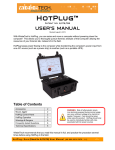
HotPlug LT is contained inside a sturdy, waterproof carrying case. There is a built-in compartment for
storing the accessories.
1.2 Mouse Jiggler installation
Before using HotPlug to move a computer, plug Mouse Jiggler into
one of the computer’s USB ports. This will prevent the computer
from entering screen saver or sleep modes, which may be protected
by passwords. For more information on the use of Mouse Jiggler,
see the instructions accompanying that product.
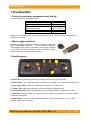
1.3 Identifying parts
A Input Power – power coming from the new power source, such as a portable UPS.
B Power Switch – Turns HotPlug unit on & off. Glows when HotPlug is connected to new power source.
C Power Status LED – Glows when HotPlug power switch is in the ON position.
D “Ready” LED – Glows when HotPlug is armed and ready for the power transfer.
E Power Output LED – Glows when HotPlug is connected to the computer’s original power source.
F Arm Switch – When the cables are properly connected, pushing this switch will arm HotPlug so that it
is ready to transfer power.
G Output Power – power line connected to the computer’s original power source, such as a surge
protector, power strip, or wall plug.
H o t P l u g U s e r M a n u a l ( A9 - 0 0 0 - 0 0 3 4 ) R E V 1 . 0
-2-