1
CRU-WiebeTech
2. HotPlug Operation
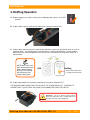
A. Before plugging in any cables, make sure the HotPlug power switch is in the OFF
position.
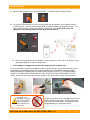
B. Plug the black input line cord into the HotPlug unit (receptacle labeled “IN”).
C. Plug the other end of the input line cord into the new power source that you want to switch to (such as
a portable UPS). The HotPlug power switch will light up, indicating that HotPlug is receiving power.
Make sure that a second receptacle on the same circuit is available on the new power source (i.e. a
duplex outlet).
NOTE: Many UPSs have
both surge-protected and
battery-powered outlets.
Be sure to use HotPlug
with UPS outlets that
supply battery power.
UPS
HotPlug
(Power switch glows when
receiving power from UPS)
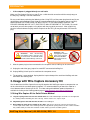
D. Plug the gray output line cord into the HotPlug unit (receptacle labeled “OUT”).
YOU SHOULD NOW ASSUME THAT THE PLUG AT THE OTHER END IS HOT. CONTINUE TO
ASSUME THAT IT IS HOT UNTIL HOTPLUG IS DISCONNECTED FROM THE CIRCUIT.
WARNING: The user should assume that the
plug on the output line cord is energized whenever
the other end of the cord is plugged in.
H o t P l u g U s e r M a n u a l ( A9 - 0 0 0 - 0 0 3 4 ) R E V 1 . 0
-3-