1
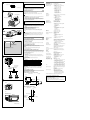
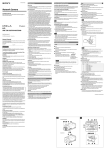
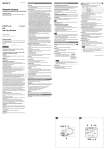
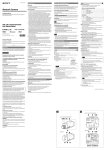
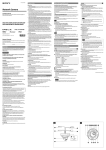
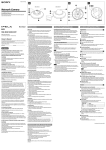
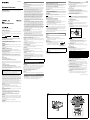
Installation CS-mount lens Specifications Compression Caution To prevent the camera from falling, make sure to attach the supplied wire rope. 5.5 (7/32) or less Unit: mm (inch) Suitable lens The lens must be a CS-mount type and the protrusion behind the mounting surface must be 5.5 mm (7/32 inch) or less. Attaching the wire rope Screw (supplied) When you install the camera on a ceiling or a high position, be sure to attach the supplied wire rope to prevent the camera from falling. Attach the wire rope to the screw hole on the rear of the camera, as in the illustration. Note Take care not to short-circuit the power terminal or the cable with the wire rope when you attach it. 1 Secure the wire rope to the junction box on the ceiling. Use a screw to match the screw hole of your junction box (not supplied). 2 Secure the wire rope to the wire rope mounting screw hole on the rear of the camera using the supplied screw. Wire rope (supplied) Caution Use the supplied screws for installation. If not, the wire rope may not function properly. Adjusting the Camera Coverage and Focus 1 Loosen the zoom ring locking screw to adjust the camera shooting 2 3 4 5 coverage. Tighten the locking screw to fix the zoom. Loosen the focus ring locking screw to adjust the focus. Tighten the locking screw to fix the focus. Press the Easy Focus button on the rear to automatically adjust the focus. You may not achieve satisfactory focus with the Easy Focus button due to the shooting environment. In this condition, press and hold Easy Focus button for more than 4 seconds to return to the default flange back position. Then, adjust the focus following step 3 and 4. Connection Connecting to the Network Connect the LAN cable of the camera to a router or hub in the network using the network cable (straight, not supplied). To connect to a computer Connect the LAN cable of the camera to the network connector of a computer using the network cable (cross, not supplied). The number indicates the focus position. * mark indicates the approximate focus position. Connecting the Power Source There are three ways to supply power to this camera, as follows. 12 V DC 24 V AC Power supply equipment pursuant to IEEE802.3af (PoE* system) *PoE means Power over Ethernet. Connect the power input cable of the camera to a 12 V DC or 24 V AC source. Use a 12 V DC or 24 V AC source isolated from 100 to 240 V AC. The acceptable voltage ranges for each are as follows. 12 V DC: 10.8 V to 13.2 V 24 V AC: 21.6 V to 26.4 V - I n the USA, The product shall be powered by a UL Listed Class 2 Power Supply Only. - I n Canada, The product shall be powered by a CSA certified Class 2 Power Supply Only. Use UL cable (VW-1 style 10368) for these connections. recommended cable DC12 V: #24 #22 #20 8 14 20 CABLE(AWG) #24 #22 #20 Max. length(m) 33 57 83 Max. length(m) Signal system NTSC color system/PAL color system (switchable) Image device SNC-CH140 1/3type CMOS (Exmor) Effective picture elements: Approx. 1,390,000 SNC-CH240 1/2.8type CMOS (Exmor) Effective picture elements: Approx. 3,270,000 Synchronization Internal synchronization Horizontal resolution 600 TV lines (analog video) Video S/N More than 50 dB (AGC 0 dB) Minimum illumination SNC-CH140 F1.2/View-DR Off/VE off/AGC High/XDNR Middle/50 IRE (IP) Color 0.20 lx Black & White 0.10 lx SNC-CH240 F1.3/View-DR Off/VE off/AGC High/XDNR Middle/50 IRE (IP) Color 0.40 lx Black & White 0.25 lx Focal length SNC-CH140: 2.8 mm ~ 8 mm SNC-CH240: 2.8 mm ~ 6 mm Maximum relative aperture SNC-CH140: F1.2 ~ F1.9 SNC-CH240: F1.3 ~ F1.9 View angle SNC-CH140 Vertical: 76.2° ~ 27.2° (1280 × 1024) Horizontal: 96.5° ~ 33.9° SNC-CH240 Vertical: 74.2° ~ 35.2° (1920 × 1440) Horizontal: 101.2° ~ 47.0° Minimum object distance 300 mm Interface LAN port 10BASE-T/100BASE-TX, auto negotiation (RJ-45) I/O port Sensor input: × 1, make contact, break contact Alarm output: × 2, 24 V AC/DC, 1 A (mechanical relay outputs electrically isolated from the camera) CF card slot CF Type I/II Video output VIDEO OUT: BNC, 1.0 Vp-p, 75 ohms, unbalanced, sync negative Microphone input* Minijack (monaural) Plug-in-power supported (rated voltage: 2.5 V DC) Recommended load impedance: 2.2 kΩ Line input* Minijack (monaural) * The microphone input and the line input are switchable with operating menu. Line output Connecting to 12 V DC or 24 V AC source CABLE(AWG) Camera Lens Note When Easy Focus button is pressed Video compression format JPEG/MPEG4/H.264 Audio compression format G.711/G.726 (40, 32, 24, 16 kbps) Maximum frame rate SNC-CH140 JPEG/MPEG4/H.264: 30 fps (1280 × 720) JPEG: 30 fps (1280 × 1024) MPEG4: 25 fps (1280 × 1024) H.264: 20 fps (1280 × 1024) SNC-CH240 JPEG: 16 fps (1920 × 1080)/ 12 fps (1920 × 1440) MPEG4: 20 fps (1920 × 1080)/ 15 fps (1920 × 1440) H.264: 30 fps (1920 × 1080)/ 20 fps (1920 × 1440) Others Power supply Power consumption Operating temperature Storage temperature Operating humidity Storage humidity Dimensions (w/h/d) AC24 V: 10BASE-T/ 100BASE-TX Network cable (straight, not supplied) Connecting to the power supply equipment pursuant to IEEE802.3af Mass Supplied accessories Optional accessories Connect the wires of the I/O cable as follows: Router or hub The power supply equipment pursuant to IEEE802.3af supplies the power through the LAN cable. For details, refer to the Instruction Manual of the equipment. Connecting the I/O Cable Wiring diagram for sensor input Mechanical switch/open collector output device Camera inside Outside Minijack (monaural), Maximum output level: 1 Vrms 12 V DC ± 10% 24 V AC ± 10%, 50/60 Hz IEEE802.3af compliant (PoE system) SNC-CH140: 9.0 W max. SNC-CH240: 11.2 W max. Start temperature: 0°C~50°C (32°F to 122°F) Working temperature: –10°C~+50°C (14°F to 122°F) –20°C to +60°C (–4°F to +140°F) 20% to 80% 20% to 95% 72 mm × 63 mm × 145 mm (2 7/8 inches × 2 5/8 inches × 5 ³/₄ inches) not including the projecting parts SNC-CH140: 72 mm × 63 mm × 197 mm (2 7/8 inches × 2 1/2 inches × 7 7/8 inches) with lens not including the projecting parts SNC-CH240: 72 mm × 63 mm × 197.3 mm (2 7/8 inches × 2 1/2 inches × 7 7/8 inches) with lens not including the projecting parts SNC-CH140: Approx. 600 g (1 lb 5.2 oz) with lens SNC-CH240: Approx. 650 g (1 lb 6.9 oz) with lens CD-ROM (Users Guides, and supplied programs) (1) Wire rope (1) Screw M4 (1) Installation Manual (this document) (1) Wireless card SNCA-CFW5* Wireless LAN antenna SNCA-AN1* * SNCA-CFW5, SNCA-AN1 may not be purchasable in some regions. For details, contact your Sony service representative. Design and specifications are subject to change without notice. 3.3 V Recommendation of Periodic Inspections 10 kΩ 2.2 kΩ 10 kΩ 10 kΩ Front Sensor input + Mechanical switch Sensor input − (GND) 72 (2 7/₈) 63 (2 1/₂) 62 (2 7/₁₆) GND GND Open collector output device GND Wiring diagram for alarm output Camera inside Outside 5V R Side SNC-CH140: 52 (2 1/₈) SNC-CH240: 52.3 (2 1/₈) 43 (1 3/₄) 145 (5 3/₄) 140 (5 5/₈) Alarm Output + Magnet relay AC 24 V DC 24 V 1 A or less Circuit example Alarm Output − 55 (2 1/₄) 152 (6) Unit: mm (inches) or GND In case using this device over an extended period of time, please have it inspected periodically for safe use. It may appear flawless, but the components may have deteriorated over time, which may cause a malfunction or accident. For details, please consult the store of purchase or an authorized Sony dealer.