1
Installation
Connecting Audio Components
Connecting the Headset
SD/MMC/MS
Plug the stereo headphone cable into the Headphone jack (light green) of your All-in-One PC.
Connecting a Microphone
Plug the microphone cable into the Microphone
jack (pink) of your All-in-One PC.
Connecting to a Network
Connect to a local area network (LAN) using the RJ45 LAN jack of your All-in-One PC.
1. Plug one end of the network cable to the RJ-45
LAN jack at the rear of your All-in-One PC.
2. Connect the other end to a network hub or a wall
socket.
To ensure proper connection, check the LAN jack’s
LED indicators.
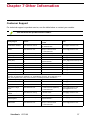
Activity/Link LED
LED
Activity/Link
LED
Speed LED
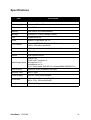
Color
Green
Green
Yellow
ViewSonic VPC190
LED Status
Speed LED
Condition
Off
LAN link is not established.
On (Steady)
LAN link is established.
On (Flashing)
The All-in-One PC is communicating
with other computers on the network.
Off
10 Mbit/sec data rate is selected.
On
100 Mbit/sec data rate is selected.
On
1000 Mbit/sec data rate is selected.
12