1
Register your product and get support at
www.philips.com/welcome
SA2VBE04
SA2VBE08
SA2VBE16
EN User manual
1 Important safety information
General maintenance
Recycling the product and the built-in
battery
2 Your new VIBE
8 Audiobooks
3
3
6
What’s in the box
7
7
3 Getting started
8
Overview of the controls and
connections
Limit the volume
Overview of the main menu
Connect and charge
Software loaded on the VIBE
Files loaded on the VIBE
4 Update VIBE
Manually verify / update the firmware
5 Turn VIBE on and off
Automatic shut-down
Lock the keys
6 Philips Songbird
Build a media library
Browse your media library
Organize and manage your Songbird
library
Playlists
Change the look of the Songbird
library
Format VIBE (erase all music and data)
Repair VIBE (restore factory settings)
7 Music
Listen to music
Navigate inside a music track
Play music from a filtered selection
Find your music
8
8
9
9
10
10
11
11
12
12
12
Add audiobooks to VIBE
Audiobook controls
Select audiobook by book title
Add a bookmark in an audiobook
Find a bookmark in an audiobook
Delete a bookmark in an audiobook
9 Video
22
22
22
22
22
Play videos
Navigate inside a video
Delete the currently playing video
Delete one or more videos
10 Pictures
Add pictures to VIBE
View pictures
Start a slideshow
Delete the currently displayed picture
Delete one or more pictures
11 Radio
14
15
16
16
17
18
18
18
18
18
23
23
23
23
23
23
24
24
24
24
24
Listen to FM radio
Manually tune a radio station
Auto-tune radio station presets
Play a preset radio station
12 Recordings
13
13
14
20
20
20
20
21
21
21
Record audio/voices
Listen to recordings
Upload your recordings to a computer
Delete the currently playing video
Delete one or more recordings
25
25
25
25
25
26
13 Use the VIBE to carry data files
27
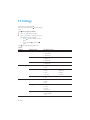
14 Settings
28
15 Technical data
30
30
System requirements
16 Glossary
31
EN
1
English
Contents
Need help?
Please visit
www.philips.com/welcome
where you can access a full set of supporting
materials such as the user manual, the latest
software updates, and answers to frequently
asked questions.
2
EN
Replacement parts/accessories:
Visit www.philips.com/support to order
replacement parts/accessories.
English
1 Important safety
information
Hearing Safety
General maintenance
The translation of this document is for
reference only.
In the event of any inconsistency between the
English version and the translated version, the
English version shall prevail.
Caution
• To avoid damage or malfunction:
• Do not expose the product to excessive heat
caused by heating equipment or direct sunlight.
• Do not drop the product or allow objects to
fall on your player.
• Do not allow the product to be submerged
•
•
•
•
in water. Do not expose headphone socket
or battery compartment to water, as water
entering the set may cause major damage.
Active mobile phones in the vicinity may cause
interference.
Back up your files. Ensure that you retain the
original files you have downloaded to your
device. Philips is not responsible for any loss of
data if the product becomes damaged or not
readable / legible.
Manage (transfer, delete, etc.) your music files
only with the supplied music software to avoid
problems.
Do not use any cleaning agents containing
alcohol, ammonia, benzene, or abrasives as
these may harm the product.
About operating and storage temperatures
• Operate in a place where temperature is
always between 0 and 35ºC (32 to 95ºF)
• Store in a place where temperature is
always between -20 and 45ºC (-4 to
113ºF).
• Battery life may be shortened in low
temperature conditions.
Listen at a moderate volume:
Using headphones at a high volume can impair
your hearing. This product can produce sounds
in decibel ranges that may cause hearing loss for
a normal person, even for exposure less than
a minute. The higher decibel ranges are offered
for those that may have already experienced
some hearing loss.
Sound can be deceiving. Over time your hearing
‘comfort level’ adapts to higher volumes of
sound. So after prolonged listening, what sounds
‘normal’ can actually be loud and harmful to
your hearing. To guard against this, set your
volume to a safe level before your hearing
adapts and leave it there.
To establish a safe volume level:
Set your volume control at a low setting.
Slowly increase the sound until you can hear it
comfortably and clearly, without distortion.
Listen for reasonable periods of time:
Prolonged exposure to sound, even at normally
‘safe’ levels, can also cause hearing loss.
Be sure to use your equipment reasonably and
take appropriate breaks.
Be sure to observe the following guidelines
when using your headphones.
Listen at reasonable volumes for reasonable
periods of time.
Be careful not to adjust the volume as your
hearing adapts.
Do not turn up the volume so high that you
can’t hear what’s around you.
You should use caution or temporarily
discontinue use in potentially hazardous
situations.
Do not use headphones while operating a
motorized vehicle, cycling, skateboarding, etc.; it
EN
3
may create a traffic hazard and is illegal in many
areas.
Modifications
Modifications not authorized by the
manufacturer may void user’s authority to
operate the product.
Copyright information
All other brands and product names are
trademarks of their respective companies or
organizations.
Unauthorized duplication of any recordings
whether downloaded from the Internet or
made from audio CDs is a violation of copyright
laws and international treaties.
The making of unauthorized copies of copyprotected material, including computer
programs, files, broadcasts and sound
recordings, may be an infringement of
copyrights and constitute a criminal offense.
This equipment should not be used for such
purposes.
The Windows Media and the Windows logo are
registered trademarks of Microsoft Corporation
in the United States and/or other countries.
Be responsible! Respect copyrights.
non-commercial use and shall respect eventual
copyright instructions provided by the copyright
owner of the work. Such instruction may
state that no further copies shall be made.
Video streams may include copy protection
technology that prohibits further copying. For
such situations the recording function will not
work and you will be notified with a message.
Data logging
Philips is committed to improving the quality
of your product and enhancing the Philips user
experience. To understand the usage profile of
this device, this device logs some info / data to
the non-volatile memory region of the device.
These data are used to identify and detect
any failures or problems you as a user may
experience while using the device. The data
stored, for example, will be the duration of
playback in music mode, duration of playback
in turner mode, how many times battery low
was encountered, etc. The data stored do not
reveal the content or media used on the device
or the source of downloads. The data stored on
the device are retrieved and used ONLY if the
user returns the device to the Philips service
center and ONLY to simplify error detection
and prevention. The data stored shall be made
available to user on user’s first request.
Monkey’s Audio decoder
Philips respects the intellectual property of
others, and we ask our users to do the same.
Multimedia content on the internet may have
been created and/or distributed without the
original copyright owner’s authorization.
Copying or distributing unauthorized content
may violate copyright laws in various countries
including yours.
Compliance with copyright laws remains your
responsibility.
The recording and transfer to the portable
player of video streams downloaded to your
computer is intended only for use with public
domain or properly licensed content. You
may only use such content for your private,
4
EN
a The Monkey’s Audio SDK and source
code can be freely used to add
APE format playback, encoding, or
tagging support to any product, free
or commercial. Use of the code for
proprietary efforts that don’t support
the official APE format require written
consent of the author.
b Monkey’s Audio source can be included
in GPL and open-source software,
although Monkey’s Audio itself will
not be subjected to external licensing
requirements or other viral source
restrictions.
d Any source code, ideas, or libraries used
must be plainly acknowledged in the
software using the code.
e Although the software has been tested
thoroughly, the author is in no way
responsible for damages due to bugs or
misuse.
If you do not completely agree with all of the
previous stipulations, you must cease using this
source code and remove it from your storage
device.
FLAC decoder
Copyright (C) 2000,2001,2002,2003,2004,2005,
2006,2007,2008,2009 Josh Coalson
Redistribution and use in source and binary
forms, with or without modification, are
permitted provided that the following
conditions are met:
• Redistributions of source code must
retain the above copyright notice, this list
of conditions and the following disclaimer.
• Redistributions in binary form must
reproduce the above copyright notice,
this list of conditions and the following
disclaimer in the documentation and/
or other materials provided with the
distribution.
• Neither the name of the Xiph.org
Foundation nor the names of its
contributors may be used to endorse
or promote products derived from this
software without specific prior written
permission.
THIS SOFTWARE IS PROVIDED BY
THE COPYRIGHT HOLDERS AND
CONTRIBUTORS “AS IS” AND ANY EXPRESS
OR IMPLIED WARRANTIES, INCLUDING,
BUT NOT LIMITED TO, THE IMPLIED
WARRANTIES OF MERCHANTABILITY AND
FITNESS FOR A PARTICULAR PURPOSE
ARE DISCLAIMED. IN NO EVENT SHALL
THE FOUNDATION OR CONTRIBUTORS
BE LIABLE FOR ANY DIRECT, INDIRECT,
INCIDENTAL, SPECIAL, EXEMPLARY, OR
CONSEQUENTIAL DAMAGES (INCLUDING,
BUT NOT LIMITED TO, PROCUREMENT OF
SUBSTITUTE GOODS OR SERVICES; LOSS
OF USE, DATA, OR PROFITS; OR BUSINESS
INTERRUPTION) HOWEVER CAUSED
AND ON ANY THEORY OF LIABILITY,
WHETHER IN CONTRACT, STRICT LIABILITY,
OR TORT (INCLUDING NEGLIGENCE OR
OTHERWISE) ARISING IN ANY WAY OUT
OF THE USE OF THIS SOFTWARE, EVEN IF
ADVISED OF THE POSSIBILITY OF SUCH
DAMAGE.
XPAT XML Parser
Copyright (c) 1998, 1999, 2000 Thai Open
Source Software Center Ltd
Permission is hereby granted, free of charge, to
any person obtaining a copy of this software
and associated documentation files (the
“Software”), to deal in the Software without
restriction, including without limitation the rights
to use, copy, modify, merge, publish, distribute,
sub-license, and/or sell copies of the Software,
and to permit persons to whom the Software
is furnished to do so, subject to the following
conditions:
The above copyright notice and this permission
notice shall be included in all copies or
substantial portions of the Software.
THE SOFTWARE IS PROVIDED “AS IS”,
WITHOUT WARRANTY OF ANY KIND,
EXPRESS OR IMPLIED, INCLUDING BUT
NOT LIMITED TO THE WARRANTIES
OF MERCHANTABILITY, FITNESS FOR
A PARTICULAR PURPOSE AND NONINFRINGEMENT. IN NO EVENT SHALL THE
AUTHORS OR COPYRIGHT HOLDERS
BE LIABLE FOR ANY CLAIM, DAMAGES
OR OTHER LIABILITY, WHETHER IN AN
EN
5
English
c Code changes and improvements must
be contributed back to the Monkey’s
Audio project free from restrictions or
royalties, unless exempted by express
written consent of the author.
ACTION OF CONTRACT, TORT OR
OTHERWISE, ARISING FROM, OUT OF OR
IN CONNECTION WITH THE SOFTWARE
OR THE USE OR OTHER DEALINGS IN THE
SOFTWARE.
Recycling the product and the
built-in battery
Your product is designed and manufactured
with high quality materials and components,
which can be recycled and reused.
Never dispose of your product with other
household waste. Please inform yourself about
the local rules on the separate collection of
electrical and electronic products and batteries.
The correct disposal of these products helps
prevent potentially negative consequences on
the environment and human health.
Please visit www.recycle.philips.com for
additional information on a recycling center in
your area.
Caution
• Removal of the built-in battery invalidates the
warranty and can destroy the product.
Philips
SA2VBE04 SA2VBE08 SA2VBE16
Notice for the USA
This equipment has been tested and found
to comply with the limits for a Class B digital
device, pursuant to part 15 of the FCC Rules.
These limits are designed to provide reasonable
protection against harmful interference in a
residential installation. This equipment generates,
uses, and can radiate radio frequency energy
and, if not installed and used in accordance
with the instruction manual, may cause harmful
interference to radio communications.
However, there is no guarantee that
interference will not occur in a particular
installation. If this equipment does cause harmful
interference to radio or television reception,
6
EN
which can be determined by turning the
equipment off and on, the user is encouraged
to try to correct the interference by one or
more of the following measures:
• Relocate the receiving antenna.
• Increase the separation between
equipment and receiver.
• Connect the equipment into an outlet on
a circuit different from that to which the
receiver is connected.
• Consult the dealer or an experienced
radio/TV technician for help.
Notice for Canada
This Class B digital apparatus complies with
Canadian ICES-003.
The set complies with the FCC-Rules, Part-15
and with 21 CFR 1040.10. Operation is subject
to the following two conditions:
• This device may not cause harmful
interference, and
• This device must accept any interference
received, including interference that may
cause undesired operation.
English
2 Your new VIBE
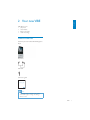
VIBE allows you to
• play music
• watch videos
• listen to FM radio
• make recordings
What’s in the box
Check that you have received the following items:
Player
Earphones
USB cable
Quick start guide
Philips GoGear audio player
Quick start guide
Note
• The images serve as reference only. Philips
reserves the right to change color/design
without notice.
EN
7
3 Getting started
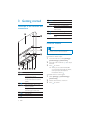
Overview of the controls and
connections
h RESET press: reset VIBE
slide and hold: turn VIBE on/off
i
slide: lock/unlock all buttons
/
in list, press: scroll up/down
j
in list, press and hold: scroll up/
down quickly
USB connector plug
k
press: back one level
l
press and hold: return to root
menu
Limit the volume
Caution
• Listening to loud sounds for longer than a
moment can be harmful to the listener.
You can set the volume level of VIBE to limit
the maximum volume output.
a
b
c
d
/
/
e
f MIC
g
8
EN
display
in play screen, press: increase/
decrease the volume
in play screen, press and hold:
increase/decrease the volume
quickly
show options menu
press and hold: skip to next/
previous quickly
in play screen, press and hold to
scan through current track
press: play/pause/confirm
microphone
headphone jack
1
From the main menu, select [Settings] >
[Sound settings] > [Volume limit].
2
Press the volume controls
the level.
3
Press to confirm.
» When you set a volume limit, VIBE
can no longer exceed the set volume,
even if you press the button to
increase the volume .
/
to adjust
To enable maximum volume again:
1
Select [Settings] > [Sound settings] >
[Volume limit].
2
3
Set the volume limit to maximum.
Press
to confirm.
Menu
Mode
Music
To
play digital audio
tracks
Rhapsody* listen to your
channels
Rhapsody* channels
Video
play videos
Pictures
view pictures
FM radio listen to FM radio
Recordings create or listen to
recordings
Folder
view files in folders
view
Settings
customize the
settings of VIBE
Now
show the current play
playing
screen
Connect VIBE to a computer
1
Connect the USB plug of the supplied
USB cable to a spare USB port on your
computer.
2
Connect the small USB plug of the USB
cable to the small USB jack on VIBE.
3
Turn on your computer.
» VIBE charges.
Install Philips Songbird for the first
time
When you connect VIBE to the PC for the
first time, a pop-up window appears:
1
2
main menu after you connect VIBE to a
computer that has the Rhapsody software
installed. Rhapsody channels services require
an active Rhapsody account and is available in
some regions only.
Connect and charge
VIBE has a built-in battery that can be charged
through the USB port of a computer (USB
cable included).
Note
• When you connect VIBE to a computer, you
are briefly prompted to select:
• [Charge & transfer] or [Charge & play].
• VIBE automatically applies [Charge & transfer],
if no new selection is made.
Select Install Philips Songbird.
Follow the on-screen instructions to
complete the installation.
Note
Note
• * Rhapsody channels becomes part of the
English
Overview of the main menu
• The installation requires you to agree to the
license terms.
If the pop-up window is not displayed
automatically:
1
Select My Computer (Windows XP /
Windows 2000) / Computer (Windows
Vista / Windows 7).
2
Right click on the Philips GoGear VIBE
icon.
3
Select Install Philips Songbird (Setup.
exe).
4
Follow the on-screen instructions to
complete the installation.
Note
• The installation requires you to agree to the
license terms.
EN
9
Install the Philips Songbird software
again (after the first installation)
Important!
The Philips Songbird software installer is
preloaded to VIBE.
To free memory capacity for your media
content on VIBE, the installer file is
automatically deleted during the first
installation process.
If you want to install the software any time
after the first installation, follow these
instructions:
1
2
Connect VIBE to the computer.
3
In Windows Explorer, right click on VIBE,
and then select the option to install
Philips Songbird.
» The computer downloads the installer
file from the Internet.
4
Ensure that the computer is connected
to the Internet, and then open Windows
Explorer.
Follow the on-screen instructions to
complete the installation.
Battery level indication
The display indicates the approximate levels of
the battery status as follows:
100%
75%
50%
25%
0%
» A flashing battery screen indicates
that the battery is low. The player
saves all settings and switches off
within 60 seconds.
Note
• Rechargeable batteries have a limited number
of charge cycles. Battery life and number of
charge cycles vary by use and settings.
• The charging animation stops and the
icon is displayed when the charging process is
completed.
Tip
• You can conserve battery power and increase
the play time of VIBE if you go to > [Display
Settings] > [Screen off timer] and ensure that
the shortest timer setting is selected.
Software loaded on the VIBE
VIBE comes with the following software:
• Philips Songbird (helps you update the
firmware of VIBE and transfer your media
files).
Files loaded on the VIBE
The following files are loaded on VIBE:
• User Manual
• Frequently Asked Questions
• Safety and warranty information
• Worldwide warranty information
10
EN
English
4 Update VIBE
VIBE is controlled by an internal program called
firmware. Newer versions of the firmware may
have been released after you have purchased
VIBE.
The software program called Philips Songbird
can use your computer to check for firmware
updates that are available on the Internet.
Install Philips Songbird on your computer
(see chapter Install software) and follow the
instructions to update (see chapter Manually
verify / update the firmware).
Note
• Your music files are not affected by a firmware
update.
Manually verify / update the
firmware
1
Ensure that your computer is connected
to the Internet.
2
Connect VIBE to the computer (see
section Connect and charge for
instructions).
3
On your computer, click Start >
Programs > Philips > Philips Songbird to
launch the Philips Songbird application.
4
Select Tools > Updates
» Philips Songbird checks for updates
and installs new firmware from the
Internet, if available.
5
Follow the on-screen instructions to
update the firmware of VIBE.
6
Wait until the update is completed, then
disconnect VIBE from the computer.
» VIBE restarts after the firmware is
updated and is ready for use again.
EN
11
5 Turn VIBE on
and off
1
To toggle between modes on and off,
slide and hold for approximately 2
seconds.
Automatic shut-down
VIBE has an automatic shut-down feature that
can save battery power.
After 10 minutes in idle mode (no music plays,
no button is pressed), VIBE turns off.
1
Slide and hold for approximately 2
seconds to turn VIBE on again.
Lock the keys
VIBE has a lock switch to prevent accidental
operation.
1
To lock the buttons when you play, move
the slider to position .
» All buttons except the volume keys
are locked and the display shows a
lock icon.
2
To unlock the buttons again, move the
slider to the center position.
12
EN
VIBE comes with the Philips Songbird software.
The Philips Songbird software helps you to:
• purchase new media (music and videos)
online
• create a media library
• manage your media library
• play music and videos
• sync your media with the VIBE
When Philips Songbird is launched for the
first time, choose from the following options
to import media files into the Songbird media
library:
• Import an existing iTunes library.
• Scan for media files in specific directories.
(You can select to watch a folder, so that
the files that are added or deleted there
are automatically added or deleted in the
Songbird media library.)
Import media files from a directory
The following steps show how you can import
media (music and video) files that are stored
elsewhere on your computer or computer
network:
1
On the computer, launch the Songbird
program.
2
On the Songbird toolbar, click File, then
select Import Media....
3
Select your media (music and video) files,
then click OK.
» The media files that you added are
listed in the media library.
Tip
• If you select a folder that contains music or
video files, the software scans the folder and
adds all the music or video files it contains to
the media library (duplicate titles are ignored).
Import media from iTunes
Build a media library
1
Use one or more of the following options to
build a media library with Songbird:
On the computer, launch the Songbird
program.
2
3
Select Tools > Options....
4
5
Verify your library location and options.
Rip a CD
By default, the Philips Songbird software
installs the following add-ons that are needed
to rip a CD:
• CD Rip Support
• Gracenote Metadata Lookup Provider
On the Songbird toolbar, select the
Media Importer tab, then iTunes Import/
Export.
Select Import Library.
» The software imports the iTunes
library into Songbird.
Set up the CD rip options
1
On the computer, launch the Songbird
program.
2
3
Select Tools > Options....
4
Select the CD Rip tab, and then choose
your CD rip options.
Click on OK to confirm.
EN
13
English
6 Philips Songbird
Export media to iTunes
1
On the computer, launch the Songbird
program.
2
3
Select Tools > Options....
4
5
Verify your library location and options.
Browse your media library
The Songbird media library is structured as
follows:
On the Songbird toolbar, select the
Media Importer tab, then iTunes Import/
Export.
Select Export Library.
» The software exports the library from
Songbird to iTunes.
Get content from online sources
You can purchase content from online sources
such as the following:
• 7-digital
Check the specifications of your VIBE to see
what services are available to you.
Import recordings from VIBE
1
On the computer, launch the Songbird
program.
2
On the Songbird toolbar, click File, then
select Import Media....
3
Select your recordings on VIBE, then click
OK.
» The selected recordings are listed in
the media library.
Tip
• If you select a folder that contains recordings,
the software scans the folder and adds all the
recordings it contains to the library (duplicate
titles are ignored).
14
EN
a Player Pane (this is where the VIBE is
displayed)
b Library Pane (this is where you find the
contents of your library)
c Service Pane (this is where you find
additional information about contents,
such as playlists)
d Information Pane (this is were you find
information about the selected options)
Organize and manage your
Songbird library
Let Songbird manage your media
1
On the computer, launch the Songbird
program.
2
3
Select Tools > Options….
4
Check Allow Songbird to manage my
files.
5
Set the options on how you want to
organize your media.
On the Songbird toolbar, select the
Manage Files tab.
1
In the Songbird library, right click on a
media file, then select Remove.
2
In the prompt window, click Remove to
confirm that you want to remove the file.
» The selected file is removed from
the library and from all playlists. (By
default, the file is only “removed”, not
“deleted”. The media file still exists in
its original location on the computer
or computer network.)
Let Songbird watch a folder
English
Remove media files from the Songbird
media library
You can let Songbird
• monitor the contents of a folder, and
• add or remove the media from your
library to match the folder contents.
1
On the computer, launch the Songbird
program.
2
3
Select Tools > Options....
4
Select the folder that you want Songbird
to watch for changes.
» The selected folder is watched and
Songbird matches the library content
to the content of the folder.
Tip
• To select multiple files on the computer (PC),
press and hold Ctrl.
• To select multiple consecutive files, press and
On the Songbird toolbar, select the
Media Importer tab, and then Watch
Folders.
hold Shift.
Fetch album artwork
Delete media
Choose from these options to fetch the
artwork for your albums:
This is how to delete media files in Windows
Explorer:
1
1
With VIBE connected to the computer,
open Windows explorer.
2
3
Locate the media folder in VIBE.
Delete the media file in the same way as
you would from any other location on the
computer.
On the computer, launch the Songbird
program.
• On the Songbird toolbar, select
Tools > Get Album Artwork.
» If no titles are selected, Songbird
fetches the artwork for all titles in the
library.
• Right-Click on selected titles.
» Songbird fetches the artwork for all
selected titles.
Playlists
By default, the Philips Songbird software installs
the following add-ons that are needed to rip a
CD:
• CD Rip Support
• Gracenote Metadata Lookup Provider
EN
15
Create a playlist
1
On the computer, launch the Songbird
program.
2
Choose from these options to create a
new playlist:
• On the Songbird toolbar, select File
> New Playlist.
• Right-click on the left hand sidebar,
and then choose New Playlist.
• Click the + symbol at the bottom of
the left hand side Service Pane.
» A new playlist appears in the Service
Pane.
3
Change the look of the
Songbird library
You can change the design and color scheme
of the Songbird library. We call this “changing
feathers”. New feathers are installed and
managed like add-ons.
Find new feathers
1
On the computer, launch the Songbird
program.
2
On the Songbird toolbar, select View >
Feathers > Get More Feathers….
» The software searches for new
feathers.
Enter a name for the new playlist.
» Follow the on-line instructions to
install the new feathers.
Add titles to a playlist
1
On the computer, launch the Songbird
program.
2
3
Select one or more titles.
Choose from these options to add the
selected titles to a playlist:
• Drag and drop the selected titles to
the playlist in the Service Pane.
• Right-click on the selection, and then
select Add to Playlist > The_name_
of_your_playlist.
» All selected titles are added to the
playlist.
Format VIBE (erase all music
and data)
Philips Songbird has a Format feature that you
can use to format VIBE and erase all your files
from the internal memory.
Caution
• The following procedure erases all your files
that are stored on VIBE.
Remove titles from a playlist
1
On the computer, launch the Songbird
program.
2
3
Select a playlist.
16
Right-click on the title that you want to
remove, and then Remove.
» The selected title is removed from the
playlist.
EN
1
Install Philips Songbird on your computer
(see chapter Install software), and then
launch the program.
2
In the Philips Songbird player pane, click
on VIBE.
3
In the library pane, click on the tab called
Tools.
4
5
In the tools pane, click on Format device.
Follow the on-screen instructions to
complete the repair procedure.
English
Repair VIBE (restore factory
settings)
Philips Songbird has a repair feature that you
can use to restore VIBE to the factory settings.
Before you proceed, back up your files that are
stored on VIBE if possible.
Caution
• The following procedure erases all your files
that are stored on VIBE, and restores the
factory settings.
1
Install Philips Songbird on your computer
(see chapter Install software), and then
launch the program.
2
In the Philips Songbird menu bar (at the
top), click on the Tools pull-down menu
and then select Repair My VIBE.
3
Follow the on-screen instructions to
complete the repair procedure.
EN
17
7 Music
Find your music
Listen to music
From the main menu, select to enter music
mode.
VIBE offers the following menu options:
1
From the main menu, select
the music mode.
2
Navigate the sub-menus to select the
music track.
3
Press to toggle between play and
pause.
• Press to see more music options.
• Press
to go back one level.
• Press and hold
to return to the
main menu.
to enter
Navigate inside a music track
1
While you listen to a music track, press
/ to quickly navigate forward /
backwards inside the track.
• Press to view more music options.
Play music from a filtered
selection
1
2
18
While you listen to music, press and
then select [Play mode] > [Play music
from…].
Select the selection filter (example:
selection filter[… this album] plays only
music from the currently playing album).
» VIBE plays only music from the filtered
selection.
EN
[All songs]
• Alphabetically listed tracks
[Artists]
• Alphabetically listed artists
• Alphabetically listed albums
• Tracks listed in album order
[Albums]
• Alphanumerically listed albums
• Tracks listed in album order
[Album art]
• Alphanumerically listed album art
[Playlists]
• [Playlist-on-the-go]
• Tracks listed in playlist order
[Audiobooks]*
• Books listed in alphanumerical order
Note
• * You can purchase audiobooks at online
stores such as audible.com.
• VIBE handles the audiobooks like music files.
Delete the currently playing music
track
This is how to delete the currently playing
music track:
1
While you listen to the music track, press
.
2
Select the option to delete the music
track.
3
Select [Yes] to confirm the deletion.
English
Delete one or more music tracks
Use the Philips Songbird software to sync
your media files.
Alternatively, you can delete music in
Windows Explorer:
1
2
Connect VIBE to the computer.
3
Delete the music as you normally would
on the computer.
In Windows Explorer, locate the music
folder in VIBE.
Note
• Alternatively, you can select
from the main
menu and find your files in folder view.
EN
19
8 Audiobooks
VIBE supports books in audio format. The use
of this feature requires that you download the
AudibleManager from audible.com. With the
AudibleManager you can manage the digital
contents of your audiobooks.
Visit audible.com and register. The onscreen
instructions guide you through the
AudibleManager software download process.
Add audiobooks to VIBE
•
Important: VIBE supports audiobook
format or format .
1
On your computer, launch
AudibleManager.
2
Follow the online instructions to
download your audiobooks in format
or format .
3
Follow the AudibleManager on-screen
instructions to activate VIBE for your
audiobooks.
4
Follow the AudibleManager on-screen
instructions to transfer your audiobooks
to VIBE.
Audiobook controls
VIBE offers the following audiobook mode
controls:
Goal
Play / pause
Skip forward to beginning of
new section / chapter
Skip back to beginning of
current section / chapter
Fast skip forwards through
audiobook
Fast skip backwards through
audiobook
Access options menu
Return to browsing menu
Increase / decrease volume
Action
Press
Press
Press
Press and hold
Press and hold
Press
Press
Press
VOL
Tip
• You can resume play after navigating away
from audiobooks (see section Resume play in
this user manual).
Select audiobook by book
title
Note
• VIBE can only play audiobooks for which it is
activated.
20
EN
1
From the main menu, select
music mode.
2
Press or , then
Audiobooks.
3
Press or to select title, then
play.
» To exit, press .
to enter
to select
to
1
2
3
In audiobook play mode, press
Press or , then
[Bookmarks].
English
Add a bookmark in an
audiobook
.
to select
Press or , then to select [Add
bookmark].
» The display shows a confirmation
screen.
•
To exit, press
.
Find a bookmark in an
audiobook
1
2
In audiobook play mode, press
.
Press or , then
[Bookmarks].
to select
3
Press or , then
bookmark].
to select [Go to
4
Press or
the list.
5
Press to go to the selected bookmark.
• To exit, press .
to select the bookmark in
Delete a bookmark in an
audiobook
1
2
In audiobook play mode, press
.
Press or , then
[Bookmark [x]].
to select
3
Press or , then
bookmark].
to select [Delete
4
Press or
the list.
5
Press to delete the selected bookmark.
• To exit, press .
to select the bookmark in
EN
21
9 Video
Delete one or more videos
Play videos
1
From the main menu, select
the video mode.
2
Navigate the sub-menus to select the
video.
3
Press to toggle between play and
pause.
• Press to see more video options.
• Press
to go back one level.
• Press and hold
to return to the
main menu.
to enter
Navigate inside a video
1
While you watch a video, press /
to quickly navigate forward / backwards
inside the video.
• Press to view more video options.
Delete the currently playing
video
This is how to delete the currently playing
video:
1
2
3
While you watch the video, press
22
EN
.
Select the option to delete the video.
Select [Yes] to confirm the deletion.
Use the Philips Songbird software to sync
your media files.
Alternatively, you can delete music in
Windows Explorer:
1
2
Connect VIBE to the computer.
3
Delete the video as you normally would
on the computer.
In Windows Explorer, locate the video
folder in VIBE.
Note
• Alternatively, you can select
from the main
menu and find your files in folder view.
Delete the currently displayed
picture
Add pictures to VIBE
This is how to delete the currently displayed
picture:
1
2
Connect VIBE to the computer.
3
Use drag and drop actions to sort your
pictures into the folders.
In Windows Explorer, create folders in
VIBE.
1
While you view the picture in full-screen
mode, press .
2
3
Select the option to delete the picture.
Select [Yes] to confirm the deletion.
Delete one or more pictures
View pictures
Use a computer to delete pictures in
Windows Explorer:
1
From the main menu, select
the picture mode.
2
Navigate the sub-menus to select the
picture.
1
2
Connect VIBE to the computer.
3
Press to view the picture in full-screen
mode.
3
4
Press / to rotate the picture.
• Press to see more picture options.
• Press
to go back one level.
• Press and hold
to return to the
main menu.
Delete the pictures as you normally
would on the computer.
to enter
In Windows Explorer, locate the picture
folder in VIBE.
Note
• Alternatively, you can select
from the main
menu and find your files in folder view.
Start a slideshow
1
While you view a video in full-screen
mode, press to start a slideshow.
• Press to view more slideshow
options.
EN
23
English
10 Pictures
11 Radio
Play a preset radio station
1
2
While in
Listen to FM radio
1
3
To search for the next stronger signal,
press and hold or for 2 seconds.
• To return to the main menu, press
and hold
for 2 seconds.
From the main menu, select to enter
radio mode.
» The earphones cable acts as FM
antenna.
Tip
• Radio play stops when you switch to another
mode or when you turn off VIBE.
Manually tune a radio station
While in mode, you can manually tune to a
radio station:
1
To search for the next stronger signal,
press and hold / .
2
To fine tune the frequency, briefly press
/ .
Auto-tune radio station
presets
The auto-tune feature of VIBE helps you find
radio stations and save them under the preset
numbers.
1
While in mode with the earphones
connected, select a preset.
2
Press and then select [Auto tune].
• If prompted, select [Yes] to confirm.
» The radio automatically tunes radio
stations and saves the frequencies to
presets. There are 20 presets available.
•
•
24
EN
To stop auto tuning, press .
To return to the main menu, press
and hold
for 2 seconds.
Press or
preset.
mode, select preset.
to change to another
Note
• To play preset radio stations, you first have to
store radio stations under presets.
Record audio/voices
This is how you can record audio/voices with
the built-in microphone (see section Overview
for location of built-in microphone):
1
2
3
From the main menu, select > [Start
voice recording].
• Press to toggle between pause
and record.
Press
to stop.
Press to save the recording or press
to cancel.
» Recordings are saved on the player.
(Filename format: VOICEXXX.MP3,
where XXX is the recording number
that is generated automatically.)
Upload your recordings to a
computer
English
12 Recordings
Use the Philips Songbird software to sync your
media files.
Alternatively, you can transfer recordings in
Windows Explorer:
1
2
3
Connect VIBE to the computer.
4
Copy and paste the recordings to any
location on the computer.
In Windows Explorer, open VIBE.
Select the folder Recordings > Voice or
FM radio*.
Note
• * FM radio recording feature is available with
some versions only. Refer to the on-screen
menu of VIBE to find out which features are
available to you.
Tip
• You can find your recordings under
[Recordings Library] > [Voice].
Listen to recordings
Listen to voice/audio recordings:
1
2
3
4
From the main menu, select .
Press and then select [Recordings
Library] > [Voice].
Delete the currently playing
video
This is how to delete the currently playing
recording:
1
2
3
While you listen to a recording, press
.
Select the option to delete the recording.
Select [Yes] to confirm the deletion.
Select a recording.
Press
to play your recording.
EN
25
Delete one or more
recordings
This is how to delete recordings in Windows
Explorer:
1
2
Connect VIBE to the computer.
3
Delete the recordings as you normally
would on the computer.
In Windows Explorer, locate the folder
Recordings > Voice or FM radio*.
Note
• * FM radio recording feature is available with
some versions only. Refer to the on-screen
menu of VIBE to find out which features are
available to you.
26
EN
English
13 Use the VIBE to
carry data files
This is how you use VIBE to store and carry
data files:
1
Connect VIBE to the computer (for
instructions see section Connect and
charge).
2
On the computer in Windows
Explorer,copy the data files and paste
them to VIBE.
Tip
• Use the computer to transfer your data files
back to the computer, or delete your data files
from VIBE.
EN
27
14 Settings
This is how you customize VIBE:
From the main menu, select to enter settings
mode.
In the menu, navigate as follows:
1
2
Press
/
to select an option.
Press to confirm a selection and go to
the next level (when available).
• Press
to return to the previous
level.
• Press and hold
to exit the
menu.
In the menu, the following options are
available:
Settings
Play mode
Options menu
Play music from...
Repeat
Shuffle
Sound settings
FullSound
Equalizer
Volume limit
Display settings
Theme
Backlight timer
Sleep timer
28
EN
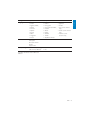
Sub-options menu
• All songs
• ...this album
• ...this artist
• Repeat off (default)
• Repeat 1
• Repeat all
• Shuffle off (default)
• Shuffle all
• Off (default)
• On*
• Off (default)
• Rock
• Funk
• Hip hop
• Off (default)
• Set
• Black (default)
• Blue
• Red
• 15 sec. (default)
• 30 sec.
• 45 sec.
• Always on
• Time left: [x] minutes
• Off (default)
• Set
•
•
•
•
Jazz
Classical
Techno
Custom
Information
Factory settings
Options menu
• Czech
• Greek
• English (default)
• Danish
• German
• Spanish
• French
• Italian
• Hungarian
• Dutch
Capacity
Free space
Firmware version
Model
Support site
Restore factory settings?
(Files are not affected.)
Sub-options menu
• Norwegian
• Polish
• Portuguese
• Portuguese (Brazilian)
• Russian
• Slovak
• Finnish
• Swedish
• Turkish
• Simplified Chinese
•
•
•
•
Traditional Chinese
Japanese
Korean
Thai (some versions
only)
• Arabic (some versions
only)
• Hebrew (some
versions only)
• Yes
• No
*Equalizer deactivates when FullSound is
selected.
EN
29
English
Settings
Language
15 Technical data
Power
Power supply: 250 mAh Li-ion polymer
internal rechargeable battery
Play time¹
- music: 24 hours
- video: 4 hours
Software
Philips Songbird: to update firmware and
transfer music
Connectivity
Headphone 3.5 mm
USB 2.0 High speed
Sound
Channel separation: 45 dB
Frequency Response: 80 - 18,000 Hz
Output power: 2 x 2.4 mW
Signal to noise ratio: > 84 dB
Audio playback
Supported formats:
MP3:
MP3 bit rates: 8 - 320 kps and VBR
MP3 sample rates: 8, 11.025, 16, 22.050, 32,
44.1, 48 kHz
WMA:
WMA bit rates: 5 - 320 kbps
WMA sample rates: 8, 11.025, 16, 22.050, 32,
44.1, 48 kHz
WAV
FLAC
APE
Video playback
Supported formats:
MP4
MJPEG (in .mp4)
Picture display
Supported formats:
JPEG
BMP
30
EN
Storage media
Built-in memory capacity²:
SA2VBE04 4GB NAND Flash
SA2VBE08 8GB NAND Flash
SA2VBE16 16GB NAND Flash
Display
Color LCD 128 x 128 pixels
Note
• ¹ Rechargeable batteries have a limited number
of charge cycles. Battery life and number of
charge cycles vary by use and settings.
• ² 1GB = 1 billion bytes; available storage
capacity is less. Full memory capacity may
not be available as some memory is reserved
for the player. Storage capacity is based on 4
minutes per song and 128 kbps MP3 encoding.
System requirements
•
•
•
•
•
•
•
•
Windows® XP (SP3 or above) / Vista / 7
Pentium III 800 MHz processor or higher
512 MB RAM
500 MB hard disk space
Internet connection
Windows® Internet Explorer 6.0 or later
CD-ROM drive
USB port
B
Bit rate
Bit rate is the number of bits that are
conveyed or processed per unit of time. The
bit rate is usually measured in some multiple
of bits per second (kilobits per second: kbps).
The term bit rate is a synonym for data
transfer rate (or simply data rate).
C
Compression
In audio terms, this is a process of temporarily
or permanently reducing audio data for more
efficient storage or transmission. A temporary
reduction in file size is called ‘non-lossy’
compression, and no information is lost. A
permanent reduction in file size (such as with
MP3 files) is called ‘lossy’ compression, and
involves discarding unnecessary information
which is irretrievably lost.
D
Frequency Response
Is the range of frequencies that a speaker
reproduces, lowest frequency to the highest.
While the optimal normal is 20-20,000 Hz
(Hertz), the range of human hearing for
individuals is often much more restricted.
A good full-range speaker system however,
reproduces as much of this range as possible
to cover all variations. Individual drivers are
limited to reproduce only that part of the
spectrum for which they were made, so their
response is limited, but still a necessary point
to consider when designing a complete sound
system.
FullSound
FullSound™ is an innovative technology
designed by Philips. FullSound™ faithfully
restores sonic details to compressed music,
enhancing it to provide a full sound experience
without any distortion.
L
LCD (Liquid Crystal Display)
Probably the most common way to show
visual information on non-computer electronic
equipment.
Decibel (dB)
A unit of measure used to express relative
difference in power or intensity of sound.
Lossless compression
A system for reducing the number of data bits
(density) in a musical signal without corrupting
the original.
F
M
FM (Frequency Modulation)
In radio broadcasting: a method of modulation
in which the frequency of the carrier voltage
is varied with the frequency of the modulation
voltage.
MP3
A file format with a sound data compression
system. MP3 is the abbreviation of Motion
Picture Experts Group 1 (or MPEG-1) Audio
Layer 3. With the MP3 format, one CD-R or
CD-RW can contain about 10 times more
data than a regular CD.
EN
31
English
16 Glossary
MSC [Mass Storage Class]
The USB mass storage device class (or
USB MSC or UMS) is a set of computing
communications protocols that provide an
interface to storage devices. Devices that
support this standard are referred to as MSC
(Mass Storage Class) devices.
MTP [Media Transfer Protocol]
Media Transfer Protocol supports the transfer
of music and video files to portable audio and
video players.
R
Rip (ripping)
Using a software program that “grabs” digital
audio from a compact disc and transfers it to a
computer hard drive. The integrity of the data
is preserved, because the signal does not pass
through the computer sound card, and need
not be converted to an analog format. The
digital-to-digital transfer creates a WAV file
that can then be converted into an MP3 file.
S
SuperScroll
SuperScroll™ is a navigation feature of the
double-action search keys of the product.
SuperScroll™ allows easy speed control when
scrolling through large libraries to swiftly find
items within large libraries. Longer press of the
button results in faster scroll speed.
32
EN
© 2010 Koninklijke Philips Electronics N.V.
All rights reserved.
SA2VBE_37_UM_V2.0
wk10151