1
APPLICATION NOTE - Configuring and Deploying the AX411 Wireless Access Point
Operational Model
The AX411 access points are managed from branch SRX Series Services Gateways, allowing for a simpler, centralized
provisioning model. In particular, the following operations can be performed directly from the SRX Series gateways.
• Configuration management: The entire configuration is centralized at the branch gateway and pushed to the
different access points. The Junos OS infrastructure is used to provide configuration backup and restore, auditing,
scripting, role-based authentication, etc.
• Monitoring: Access points are monitored from the services gateway, including the ability to obtain device and
wireless network information from the command-line interface (CLI), J-Web Software, or SNMP.
• Device maintenance: Device maintenance support includes firmware upgrades.
When an access point is connected to a branch gateway for the first time, it requests an IP address using the Dynamic
Host Configuration Protocol (DHCP). After obtaining an IP address, a registration protocol is used to exchange
configuration and status information between the devices.
The SRX Series gateway uses the media access control (MAC) address received in the registration messages to identify
each access point. The advantage of using this approach is that access points can be connected to any port or given
any IP address while still being correctly identified since MAC addresses are fixed.
Internet Control Message Protocol (ICMP) is used as a “keepalive” protocol between each access point and the SRX
Series gateway. If an access point detects a failure, it automatically stops broadcasting any service set identifier (SSID)
that it has configured, thus allowing the client stations to associate to a different access point and circumvent the failure.
Access points can be managed in two different modes.
• Layer 2 management mode
• Layer 3 management mode
L2 Management Mode
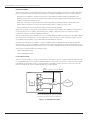
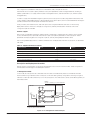
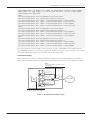
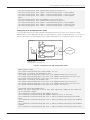
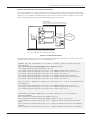
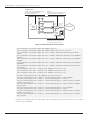
The most common mode is to connect all access points to the same L2 network. A single routed VLAN interface (RVI)
is configured per VLAN, which is used as the default gateway for the VLAN. Access point to access point traffic can be
forwarded at L2. The gateway can do so at line rate, without the need to inspect such traffic. Traffic from an access
point to the Internet (i.e., traffic routed by the gateway) will be inspected.
DHCP
Handles out addresses in the 192.168.1.0/24
OFFICE
SRX
Series
INTERNET
vlan.0
192.168.1.1/24
Client
Ports
All access point facing ports are connected to interfaces
in switching mode and associated to the default vlan
Figure 1: L2 management mode
4
Copyright © 2009, Juniper Networks, Inc.