1
connecting to other devices
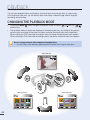
You can view the recorded videos and photos on a large screen by connecting the camcorder to a TV.
CONNECTING TO A TV
• To playback your recordings, the television must be PAL-compatible. ²page 99
• We recommend that you use the AC power adaptor as power source for the camcorder.
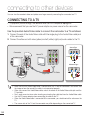
Use the provided Audio/Video cable to connect the camcorder to a TV as follows:
1. Connect the end of the Audio/Video cable with the single plug to the Audio/Video cable jack
of the camcorder.
2. Connect the other end with video (yellow) and left (white)/ right (red) audio cables to the TV.
Stereo Type
VIDEO
Camcorder
AUDIO
L
R
Normal TV
Red
Yellow
White
Yellow White Red
Monaural Type
VIDEO
AUDIO
AV
Signal flow
AV Cable
• Make sure that the Audio/Video cable is connected to the TV and the camcorder. You cannot view
the image or hear the sound if the cable is not connected properly.
• When you connect the Audio/Video cable, match the colour of the Audio/Video cable jack and the
TV terminals.
• Don’t apply excessive force when inserting or extracting the cable into/from the Audio/Video cable.
• Use the AC power adaptor when connecting the cable to the TV.
• When the Audio/Video cable is connected to the camcorder, you should control the volume on the
TV.
• The screen ratio of the TV and the camcorder may differ depending on the connected TV.
94