1
Installation Instructions
PAC730A/B/C
INSTALLATION
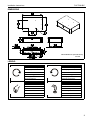
NOTE: The PAC730 may be mounted on the Chief cart or
stand either by being attached mid-column on the cart
or stand column, or to the top of the cart or stand
column.
Mid-Column Attachment
1.
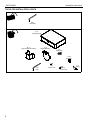
Attach pole attachment plate (B) around the cart or stand
column to the storage shelf (A) using four 1/4-20 x 3/8"
button head cap screws (F). (See Figure 1)
2.
Proceed to Adding Bumpers section.
(A)
Hole
Pattern
1
(F) x 4
1
(H) x 4
(B)
Cart/Stand
Column
Figure 2
Figure 1
2.
Remove display from faceplate following instructions in the
cart or stand installation instructions.
Top of Column Attachment
1.
Attach upper bracket (C) to storage shelf (A) using four
1/4-20 x 3/4" button head cap screws (H). (See Figure 2)
NOTE: The upper bracket (C) may be attached in two different
ways using the two hole patterns on the storage shelf
bottom. (See Figure 2)
5