1
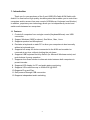
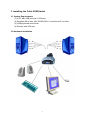
Plug the USB keyboard, USB mouse, and monitor into the corresponding
connectors of your 2-port USB/VGA Cable KVM Switch.
Plug the speakers into the corresponding jacks of your 2-port USB/VGA Cable
KVM Switch.
Connect the KVM cables into the corresponding ports on the computers.
3.3 Hot Swappable
The 2-port USB/VGA Cable KVM Switch supports hot-swap technology. All the
components can be added or removed at any time without shutting the PC down.
3.4 Driver Installation (Windows 98/SE only)
After you connect the 2-port USB/VGA Cable KVM Switch to your PC, Win 98
will automatically detect the device and prompt for the driver installation. Please
install the 2-port USB/VGA Cable KVM Switch by the following instruction from Step
A-E. Please have your Windows 98 CD ready.
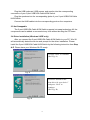
A. Press “Next” to Continue.
(Ref. Fig. A)
Fig. A
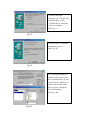
B. Select “Search for the
best driver for your device”
and press “Next” to
continue.
(Ref. Fig. B).
Fig. B
6